-
9 min read
Rightsize now covers AWS S3: Lower your S3 bill with bucket-level recommendations

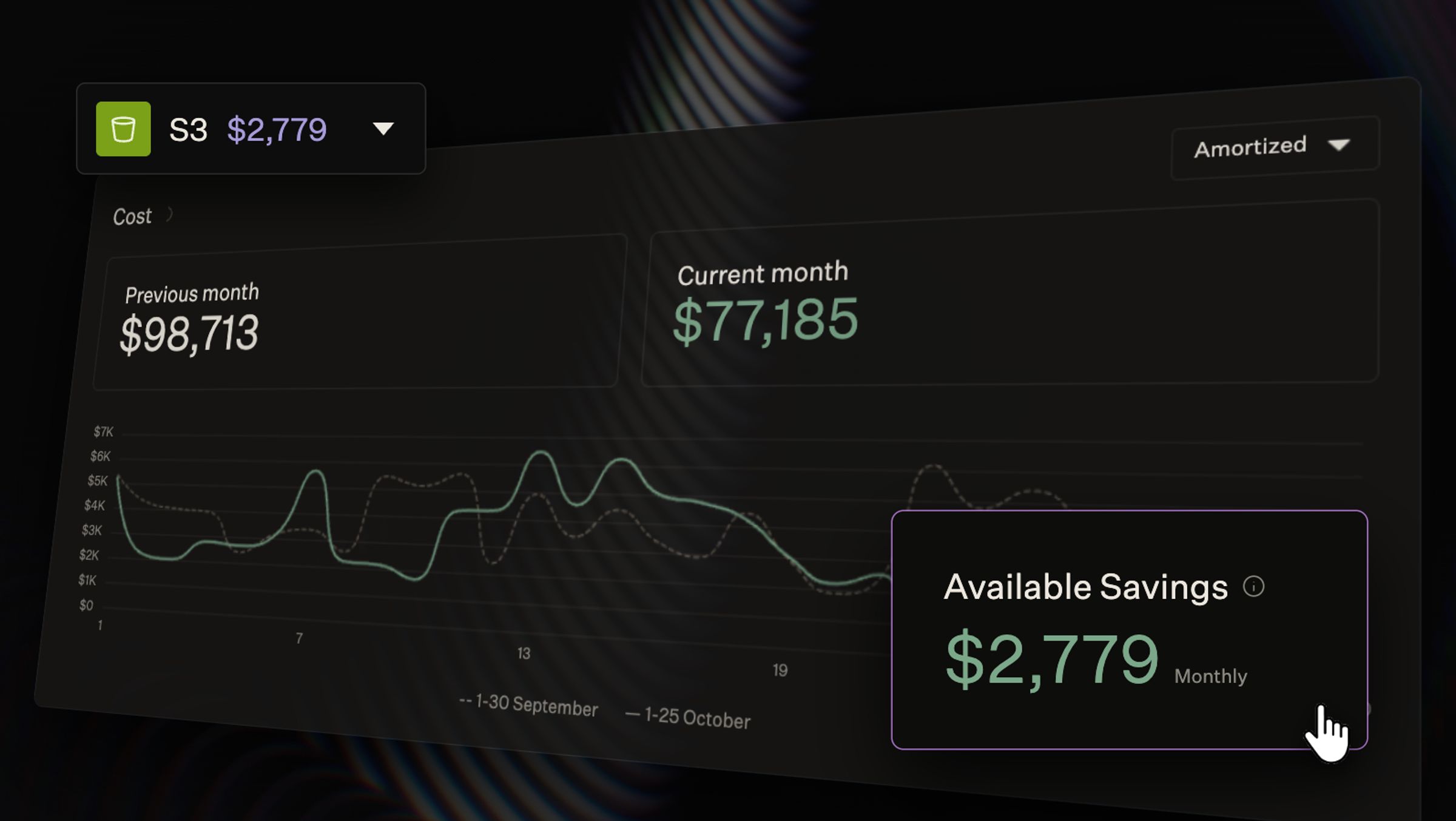
On many Amazon Web Services (AWS) bills, Simple Storage Service (S3) ranks among the largest infrastructure expenses. The bill shows what each bucket cost, but your team has to work out the rest.
That means finding which charges could come down and deciding what to change. AWS offers tools to optimize S3 storage, but storage is only one part of the bill. Requests, data transfer, and retrieval fees also affect what you pay.
North now shows you where to save on S3, across every AWS account. Rightsize checks each bucket and flags the ones that cost more than they should. Each finding explains why and what you can change.
Rightsize asks three questions of every bucket:
- Storage class: Does the class match how often the data is read?
- Region: Could the data cost less elsewhere, or avoid cross-region fees?
- Delivery: Could caching cut request and download charges?
When North can estimate savings, it also shows what the change will cost. Estimates subtract any new fees and include any one-time costs. That way, you know which changes pay off before your team commits.
How AWS S3 storage costs work
An S3 bucket is a container for files, which AWS calls objects. One bucket can hold a few files or billions of them.
Rightsizing usually starts with compute. For an Amazon Elastic Compute Cloud (EC2) instance, it means moving to a smaller size. You pay for capacity, so less capacity costs less.
An S3 bucket works differently, since it has no fixed size. AWS bills each bucket for what it holds and how it’s used:
- Storage: AWS charges each month for the data kept in the bucket.
- Requests: AWS charges for each request to read or write a file.
- Data transfer: AWS charges for data sent out of the bucket.
- Retrieval: Some storage classes charge for each GB of data read back.
The biggest lever is storage class. AWS offers several classes and stores each file in one of them. The cheaper the class, the less it costs to store data. In exchange, it adds a retrieval fee each time that data is read. Some classes also charge a fee if you remove data too soon. The table below shows where each class lands on that trade-off.
| Storage class | Built for | Trade-off |
| S3 Standard | Data that is read often | Highest storage price, with no retrieval fee |
| S3 Intelligent-Tiering | Data with changing or unknown access | AWS moves files to a cheaper tier after 30 days unread, for a monthly fee per file |
| S3 Standard-Infrequent Access (IA) and One Zone-IA | Data read less than once a month | Lower storage price, plus a retrieval fee for each GB read |
| S3 Glacier Instant Retrieval | Data read about once a quarter | Lower storage price again, with a higher retrieval fee |
| S3 Glacier Flexible Retrieval and Deep Archive | Archive data | Lowest storage prices, but files must be restored before reading, which can take hours |
The right class depends on how often each file is read. On some buckets, though, requests or data transfer are the largest charge. A cheaper class won’t lower either one, so finding S3 savings means looking past storage class.
Find the S3 savings worth acting on
Rightsize starts from your S3 bill and works down to individual buckets. You see the total first, then the buckets behind it, then why each bucket costs what it does.
Start with the buckets worth your time
The S3 tab gives you the big picture before you open a single bucket:
- Cost chart: Spot whether S3 spend is rising compared with last month.
- Available Savings: See the monthly total you could save across your buckets.
- Bucket status: Know how many buckets are in scope and how many need attention.
A note on the tab shows how much of your S3 bill the bucket table covers. Every total ties back to what AWS charged.
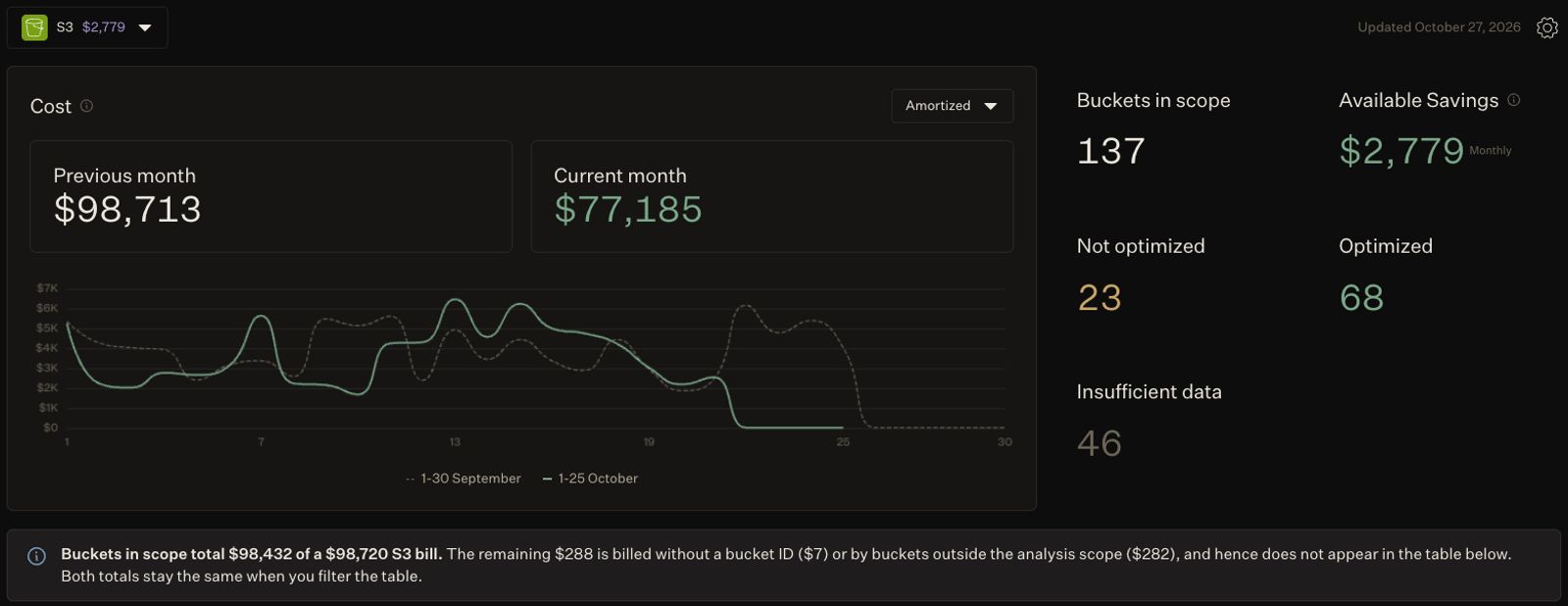
The S3 tab in North’s Rightsize shows monthly S3 cost, buckets in scope, and Available Savings, with a note tying the totals back to the S3 bill.
Below that, the bucket table puts each bucket’s billed cost next to its estimated savings. A bar for each bucket shows how its data splits across storage classes. That makes a bucket sitting almost entirely in S3 Standard easy to spot. Filter by region or account to see only the buckets your team owns.
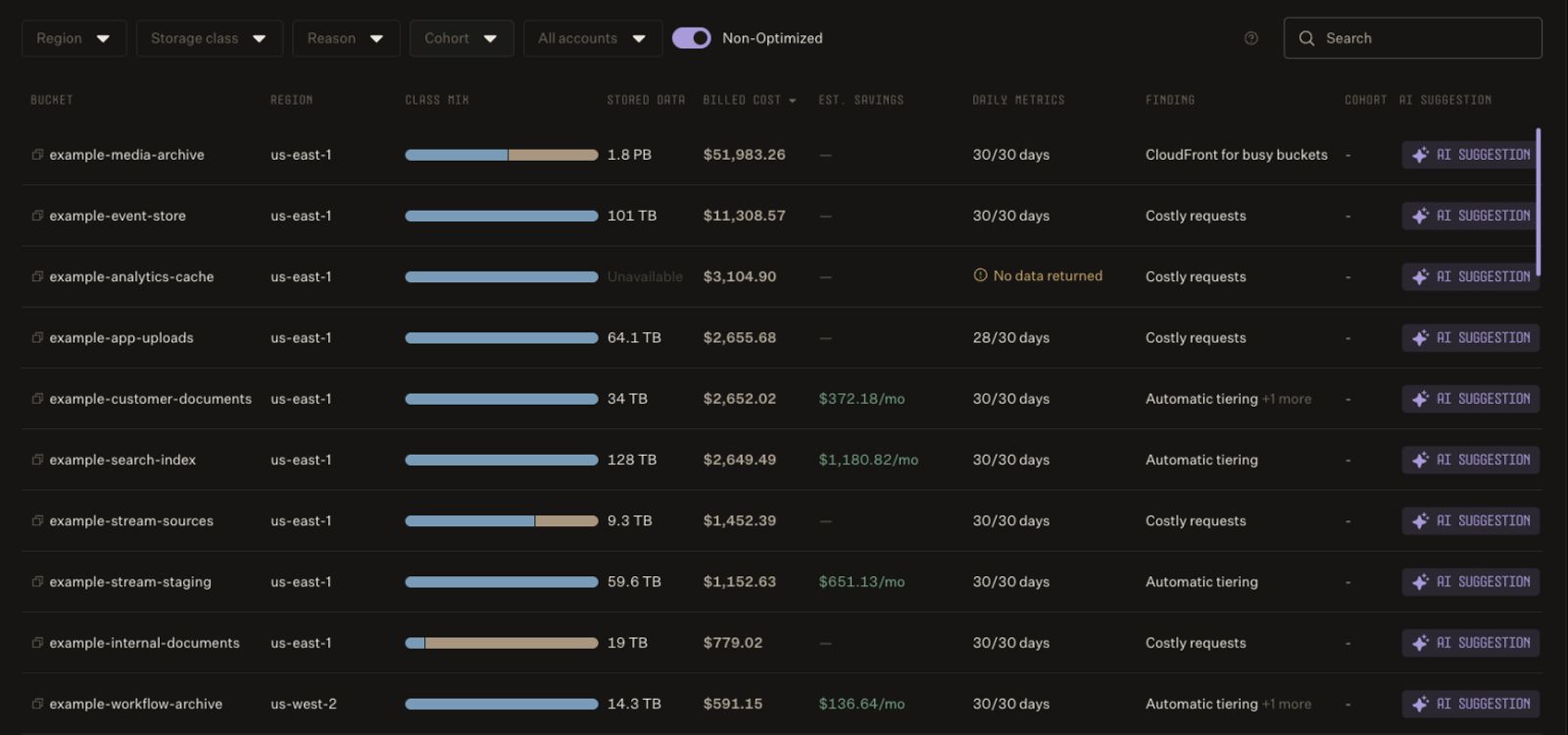
In North’s Rightsize, the bucket table lines up each S3 bucket’s billed cost, estimated savings, and top finding, with storage class mix shown at a glance.
Open a bucket to see its findings. Each one tells you three things:
- Why the bucket costs more than it should
- What you can change
- The charges and assumptions behind any savings figure
North doesn’t read the files inside your buckets, so it can’t tell which files go unread. Your team often can. Each recommendation explains when a change would help, so you can check it against how you use the bucket.
Match storage class to how data is read
Most S3 findings come down to one trade-off. A cheaper storage class lowers the price of keeping data, but it raises the price of reading it. If you get the match wrong in either direction, you pay for it.
The common case is data that stays in S3 Standard long after anyone stops reading it. For these buckets, North checks whether a move to S3 Intelligent-Tiering pays off. Intelligent-Tiering moves each file to a cheaper tier after 30 days without a read. It moves the file back when someone reads it.
It isn’t free, though. AWS charges a monthly fee for each file it monitors, plus a one-time fee to move files in. That fee is why the estimate matters. Take a bucket in us-east-1 with 10 TB in S3 Standard, spread across 20 million files. At AWS list prices, here’s how North calculates the move:
| Step | Amount |
| Storage saving, assuming 80% of data goes unread | $142.42 a month |
| Intelligent-Tiering monitoring fee | −$50.00 a month |
| Monthly saving | $92.42 a month |
| One-time transition cost | $200.00 |
| Payback period | About 2.2 months |
Without the monitoring fee, the saving looks more than 50% larger than it is. A tool that shows only the storage saving would promise $142 a month for a change that saves $92.
Small files are a second trap. Intelligent-Tiering never moves files under 128 KB to a cheaper tier, so a bucket full of them saves nothing. North does not suggest tiering for those buckets.
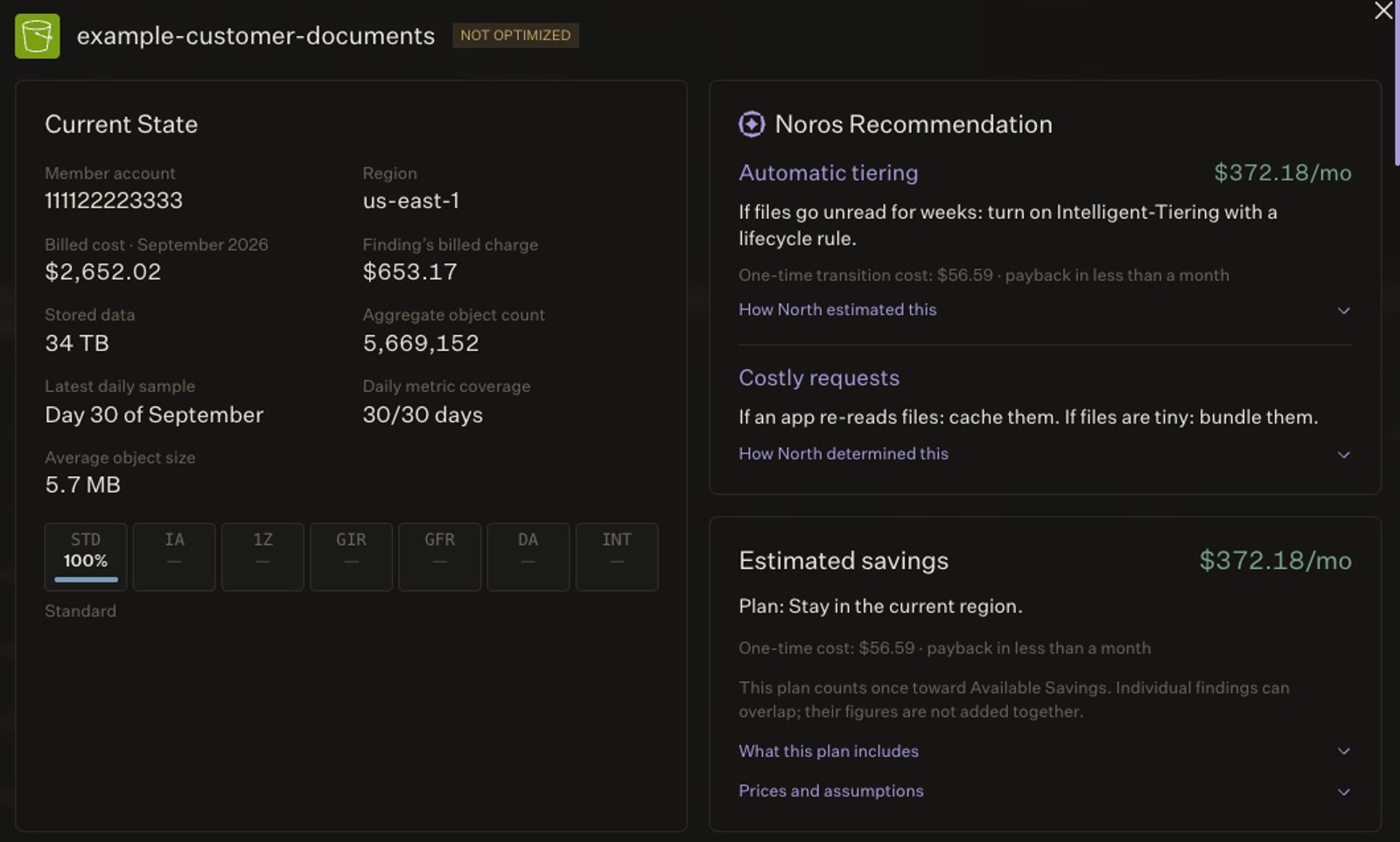
A bucket detail in North shows an automatic tiering recommendation from Noros, with the estimated monthly savings, one-time cost, and payback period.
The opposite mistake happens too. Data moved to S3 Standard-IA to save on storage can cost more if your apps keep reading it, because Standard-IA charges for every GB read. For example, take 10 TB in Standard-IA in us-east-1 that your apps read in full twice a month:
| Step | Amount |
| Storage saving compared with S3 Standard | $107.52 a month |
| Read fees, 20 TB at $0.01 per GB | $204.80 a month |
| Extra cost of Standard-IA | $97.28 a month |
Here, the cheaper class costs about $97 a month more than S3 Standard would. That’s before request charges, which are also higher in Standard-IA. North flags buckets like this with a read fees finding and estimates what you’d save by copying the data back to S3 Standard.
Two more findings cover lifecycle rules:
- Early-delete fees: If a rule moves data out of a cheaper class before its minimum stay, AWS charges a fee. North shows what that fee cost you that month.
- No lifecycle rule: If a bucket has no rule, North points it out. Your team can then decide whether to move or delete old data on a schedule.
Store data where it costs less
Storage prices differ across AWS regions, even inside one geography. North compares each bucket with other regions in the same geography, such as US with US. It then estimates what you’d save by copying the data. The estimate includes the one-time cost of the copy, so you can see how many months the move takes to pay back.
The move only makes sense under two conditions, and the finding states both:
- The apps that read the bucket can move with it.
- Your rules allow the data to live in the new region.
Data that crosses regions costs money too. When a bucket pays to send data to another region, North shows that month’s transfer charge. The finding offers two options: move the app to the bucket’s region, or move the data to the app’s region if it can live there.
Cut request and download charges
On some buckets, storage is a small part of the bill. Most of the cost comes from how often files are read, written, and downloaded. A cheaper storage class won’t reduce it.
When people download the same files often, Amazon CloudFront can cache them closer to those users, so files load faster. North flags buckets where internet downloads make up a large share of the cost. That shows you where CloudFront is worth a look.
When reads and writes drive a bucket’s cost, two changes can help. Apps that re-read the same files can cache them. Your team can also bundle tiny files into fewer, larger ones, so the same data takes fewer requests.
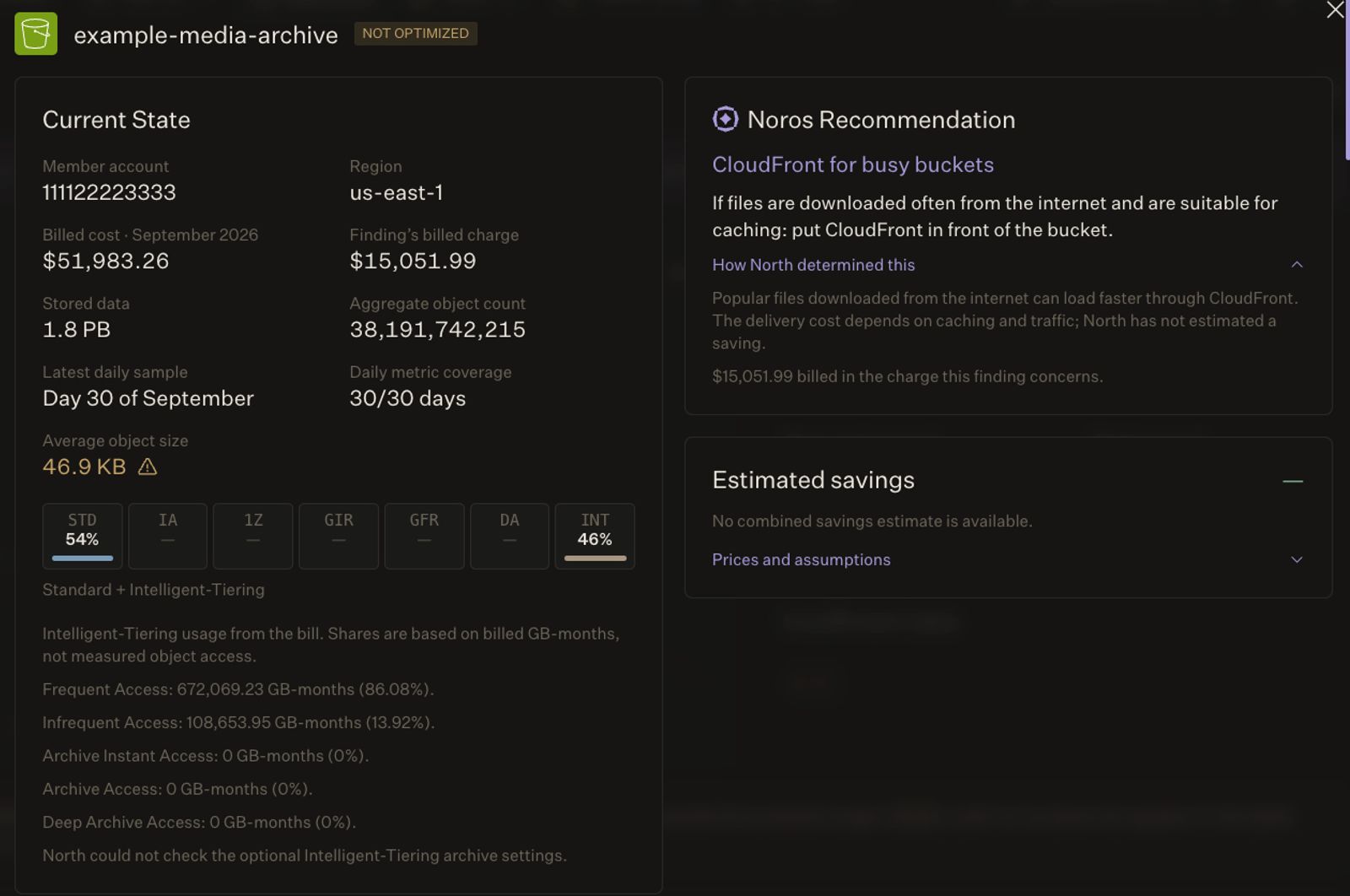
For a busy bucket, North’s Rightsize flags CloudFront as an option and explains why it doesn’t estimate a saving.
For every finding, its conditions, and how North calculates each figure, see S3 in Rightsize in the North docs.
Ask Noros when you need a quick answer
Noros, North’s FinOps Agent, answers questions about S3 findings in plain language. Your team can get answers without opening Rightsize, with questions like:
- “Which S3 buckets have the largest estimated savings this month?”
- “Why was this bucket flagged for automatic tiering?”
- “Which buckets are paying fees to send data between regions?”
From a quick question to a full bucket review, your team works from one set of findings.
Lower your S3 bill with North today
S3 in Rightsize is live now, at no extra cost and on every plan. You decide which buckets it reviews and which savings are worth surfacing. Rightsize only recommends, so nothing changes in your AWS account until your team acts.
More is on the way. Rightsize will soon flag data that lingers after it stops being useful, starting with unfinished uploads and old file versions. Tiering estimates will also get sharper for buckets full of small files.
Already a North customer? Select S3 in Rightsize to see your buckets today.
New to North? Book a demo to see what savings Rightsize finds in your S3 buckets.
FAQs
Common questions about how Rightsize analyzes S3 and where the numbers come from.
Does North read the files in my S3 buckets?
No. Rightsize uses three sources: your AWS bill, daily CloudWatch metrics for each bucket, and five bucket settings, such as lifecycle rules and versioning. The permissions for those settings give access to bucket configuration only, not to your files.
How does North know which data goes unread?
It does not, because it does not read your files. For the Intelligent-Tiering estimate, North assumes that 80% of a bucket's data goes unread for 30 days or more. North chose a conservative value, so the saving you get is likely higher than the estimate. Each option also comes with a condition, so your team can check it against what it knows about the bucket, alongside the usage detail you already see in North.
Why not move every bucket to Intelligent-Tiering?
Because it does not pay off for every bucket. AWS charges a monthly monitoring fee for each file, plus a one-time fee to move files in. Files under 128 KB never move to a cheaper tier. Data that is read often stays in the frequent tier, which costs the same as S3 Standard. North suggests Intelligent-Tiering only when the saving, after the monitoring fee, pays back the one-time cost quickly. The same principle applies across rightsizing without the risk.
Why do some findings have no savings figure?
North shows a figure only when your bill and bucket metrics are enough to calculate one. CloudFront savings depend on caching and traffic. Request savings depend on how many reads a cache would serve. Lifecycle rule savings depend on what the rule does and how old the data is. Where a figure is missing, you can still dig into the underlying spend in Analyze.
What if a bucket has more than one saving?
Some changes act on the same data. If a bucket moves to a cheaper region, its tiering saving uses that region's prices. For these buckets, North calculates two plans: one that stays in the current region and one that moves. Available Savings counts the larger plan, once for each bucket, so the total stays comparable to your effective savings rate.
Does my AWS discount change the estimate?
Yes. North starts from AWS list prices, then applies each bucket's own discount. The discount is your billed charges divided by the same charges at list prices. It applies to the current cost and to the cost after the change, the same way it does across automated rate optimization.
Will North change anything in my AWS account?
No. Rightsize only recommends. Storage classes, lifecycle rules, and regions stay as they are until your team changes them.
Do I need to set anything up?
Not for the findings that come from your bill and daily metrics. A few findings, such as the lifecycle rule finding, need permission to view bucket settings. If your North stack for AWS does not have it yet, the S3 tab tells you and shows how to update the stack.
Does S3 in Rightsize cost extra?
No. It is included on every plan at no extra cost.
Can I keep some buckets out of the results?
Yes. Add buckets by name to Never touch in Rightsize settings. You can also set a minimum monthly saving and a minimum share of bucket cost, so small findings stay hidden. If you want to see how this works on your own buckets, book a demo.