-
20 min read
Overprovisioned? How to rightsize without the risk

TL;DR
- Overprovisioning happens when allocated capacity exceeds what a workload actually uses, sustained over time rather than a one-off spike.
- Some overprovisioning is intentional: new workloads, variable traffic, high-stakes production systems, and deliberate redundancy all justify extra headroom.
- Other patterns are worth fixing: orphaned resources, mismatched instance families, post-sprint sprawl, idle non-production environments, and gradual drift.
- Rightsizing takes three forms, downsizing, right-typing, and removing, and works best as a continuous practice rather than a periodic audit.
- North.cloud's Rightsize monitors infrastructure continuously across AWS, Azure, and GCP, previews the impact of every change, and routes recommendations to the right owner.
The word "overprovisioned" gets treated like a diagnosis. Yet more often than not, it is just a number without enough context.
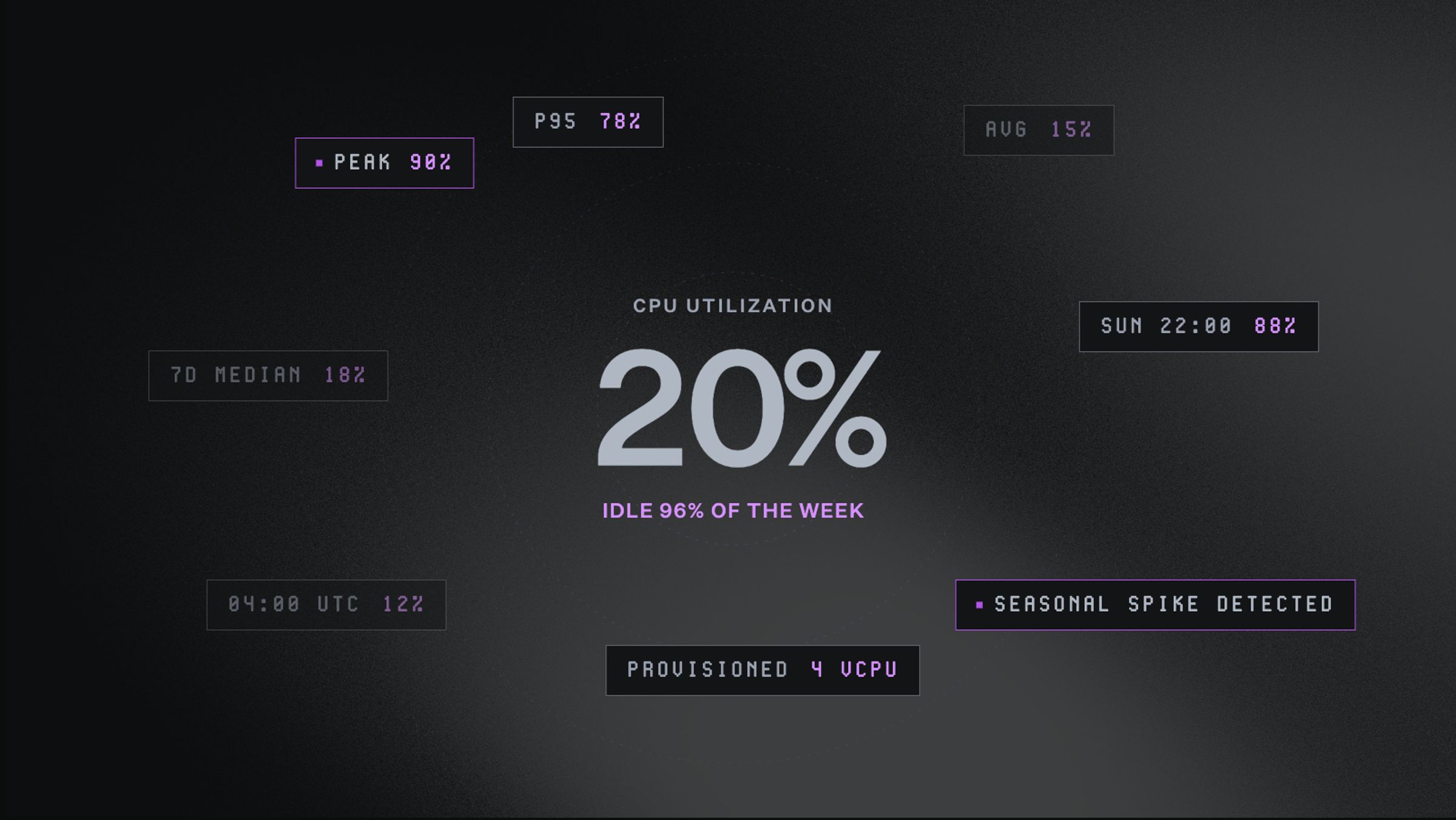
A resource running at 20% Central Processing Unit (CPU) utilization might be worth addressing. Or it might be exactly where it should be.
The label alone does not tell you what to do next. Acting without that context is where rightsizing efforts go sideways, whether you run Amazon Web Services (AWS), Microsoft Azure, or Google Cloud Platform (GCP).
This guide is built around one distinction. Overprovisioning can be intentional, or it can be quietly compounding.
It covers what being overprovisioned means and when it is worth addressing. Then it shows how to rightsize so the approach holds up over time, no matter which cloud you run.
What does being overprovisioned mean?
Overprovisioning happens when allocated capacity exceeds what a workload demands.
It is not a one-time event. It is a pattern that holds over time.
In practice, that looks like:
- CPU cores sitting idle most of the day
- Memory headroom that never gets used
- Storage provisioned for growth that has not arrived yet
It is a snapshot, not a fixed state
Think of it like checking the weather at noon and dressing for the whole week.
A resource that looks right on a monthly average might be underprovisioned at peak, but overprovisioned the rest of the time.
This is why two things matter as much as the utilization number itself:
- How far back you look
- Whether you are looking at average behavior or peak behavior
The observation window changes the picture
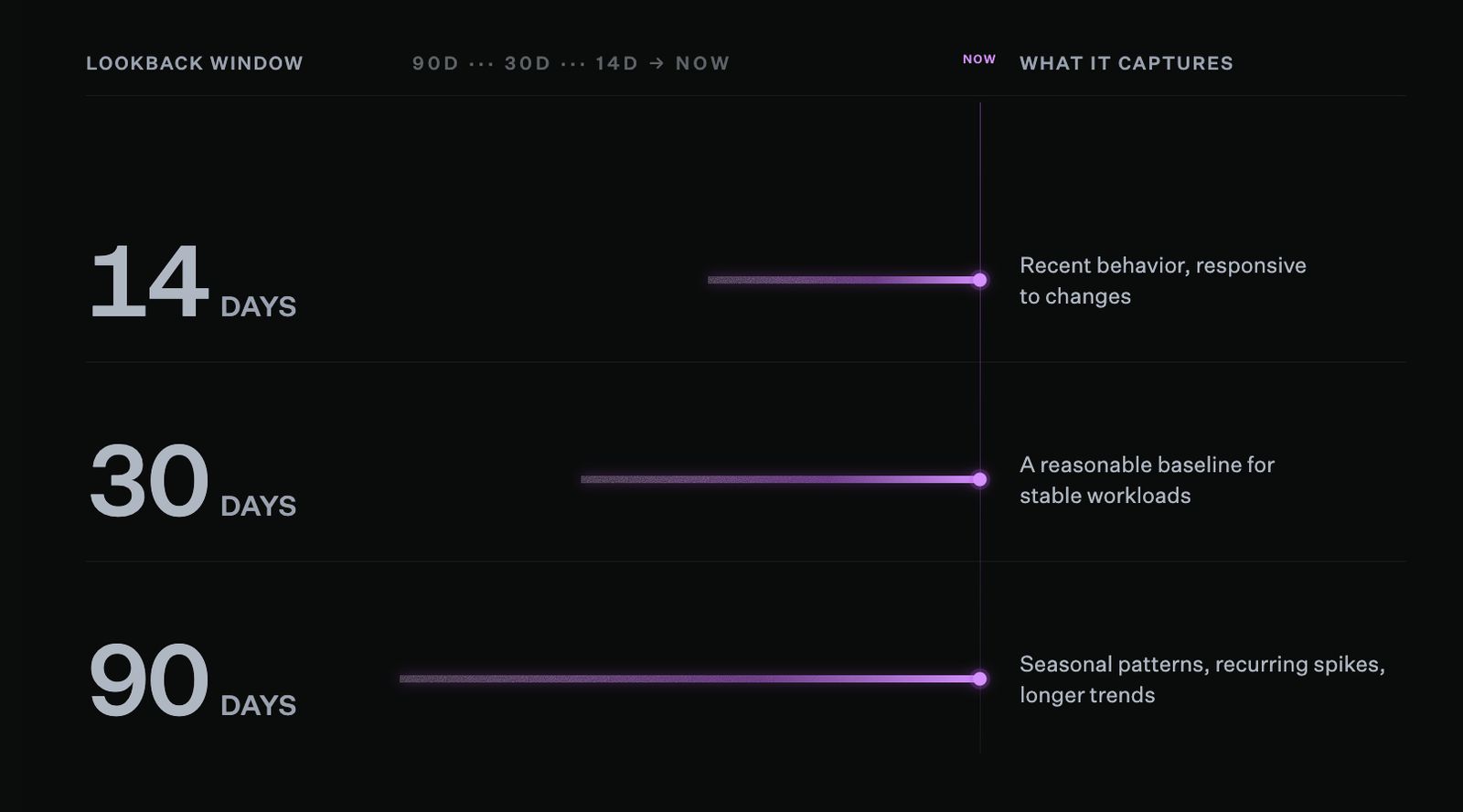
The right lookback window depends on how variable your workload is.
How long you look back shapes what you see:
- A 30-day average tells you what a resource looks like under normal conditions.
- A 90-day view that accounts for seasonal patterns, anomalies, and traffic spikes tells you what it needs to handle the full range of demand.
There is no universal right answer. The more variable the workload, the longer the lookback window you need.
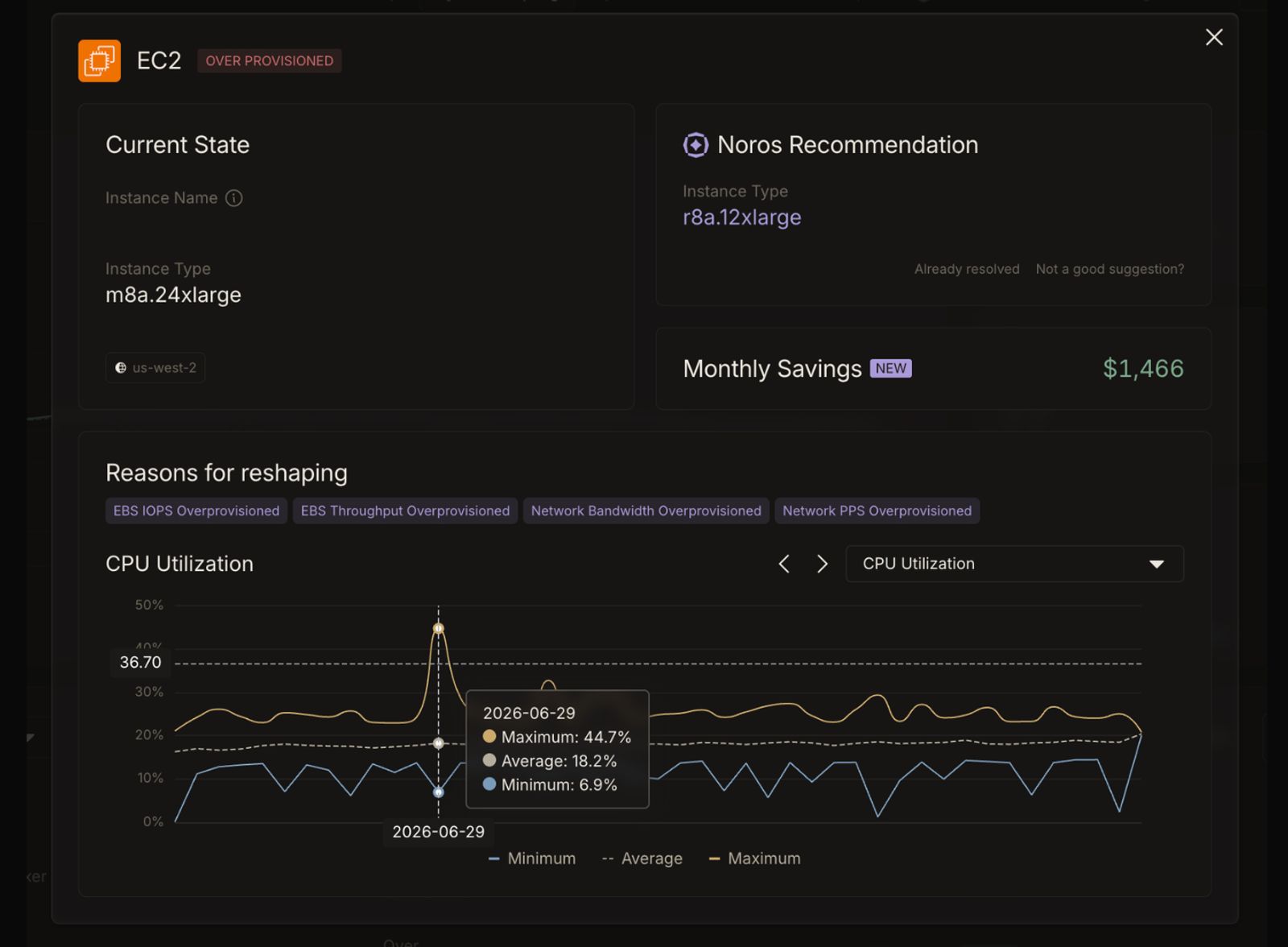
The same EC2 instance tells two different stories: an average CPU of 18.2% suggests waste, but a maximum of 6.9% reveals a workload that needs every bit of that capacity when demand peaks.
Average vs. peak utilization
Window length is one part of the picture. Which metric you look at is the other.
Average utilization can be misleading in two common scenarios:
- Steady-state workloads at moderate utilization. A resource averaging 60 to 70% CPU in production is not necessarily overprovisioned. That headroom gives autoscaling time to respond. It also absorbs spikes that fall outside any planned schedule.
- Workloads with irregular peaks. A resource averaging 15% CPU on a normal day but climbing sharply during a launch or seasonal event tells a similar story. The average does not reflect what the workload needs when demand is highest.
The right approach depends on how predictable the traffic is. Such as:
- Scheduled scaling works for anticipated peaks, without permanent overprovisioning.
- Built-in headroom is more reliable for spikes that are irregular or hard to forecast.
The more useful question is what a resource needs to handle the full range of demand placed on it, not what a resource uses on a typical day.
That distinction holds true across AWS, Azure, and GCP, and it matters every time a rightsizing recommendation gets made.
Two types of overprovisioning worth knowing
Overprovisioning shows up at two different levels, and each needs a different approach:
- Resource-level overprovisioning is about instance size, memory allocation, and storage configuration. The resource exists and is running, but it is larger than the workload needs.
- Commitment-level overprovisioning is about reserved capacity you are paying for but not using. You committed to a certain level of usage, and your usage came in below it.
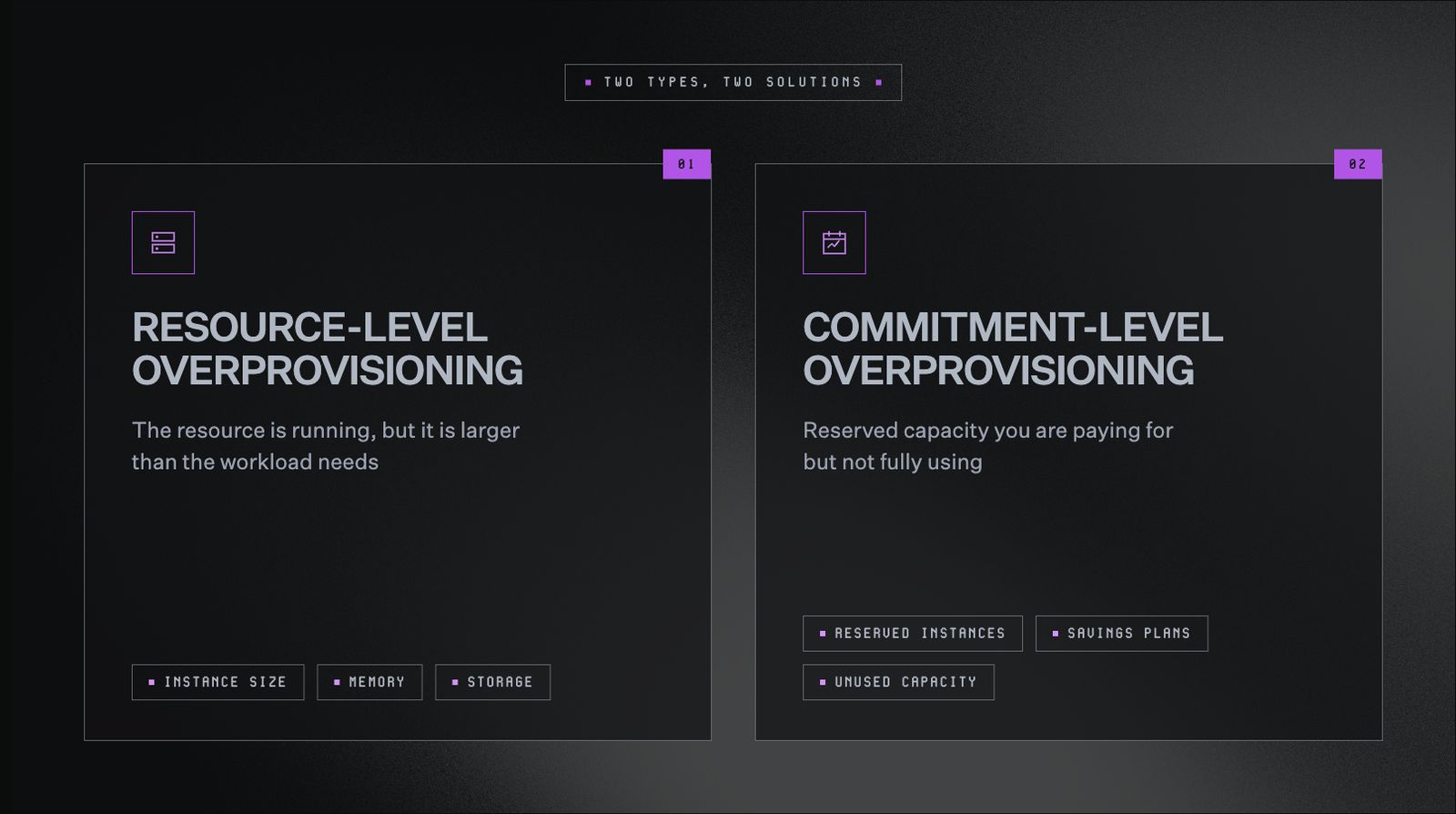
Resource-level and commitment-level overprovisioning look similar on a bill but require completely different fixes.
This guide focuses on resource-level rightsizing. For the commitment side, our cloud resource management guide breaks down how rate optimization works across AWS, Azure, and GCP.
When being overprovisioned is the right decision
Not all overprovisioning signals a problem.
Some of it is deliberate engineering judgment. Understanding this difference is what turns rightsizing into a practice that compounds over time.
Here are the cases where overprovisioning is the right call.
New workloads with no utilization baseline
You cannot rightsize what you have not observed.
When launching something new, there is no historical data, traffic patterns, or peak behavior to account for. So, the responsible move is usually provisioning generously at the start and watching what unfolds.
Once a few weeks of data have accumulated, starting with a longer lookback window is a low-risk way to build a reliable baseline.
Workloads with meaningful traffic variability
Average utilization does not capture the full picture. A service with meaningful variability needs its buffer sized to its peak, not its average.
Rightsizing to the average leaves that workload exposed exactly when it matters most.
High-stakes production systems
The risk calculus is different in production.
A dev environment can tolerate running lean. While a payment processor or healthcare data pipeline cannot.
Applying the same rightsizing thresholds across every environment does not simplify the problem. Rather, it moves it somewhere more expensive to fix.
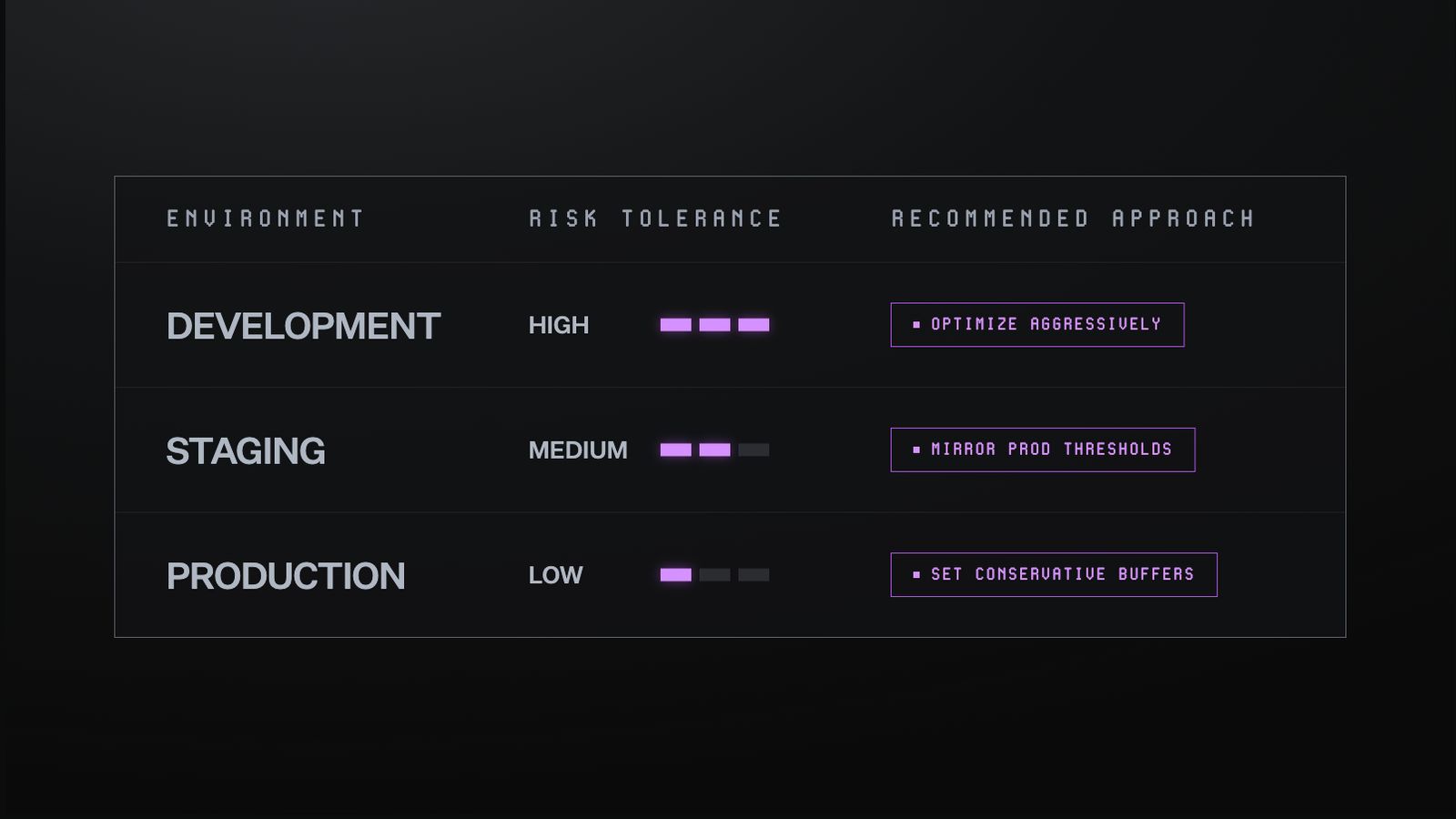
The same rightsizing threshold that makes sense in development can create reliability risks in production. Segment by environment before you optimize.
Deliberate redundancy built into the architecture
Some overprovisioning is architecture, not accident.
Standby capacity, warm failover configurations, and buffers designed to absorb failover load are all intentional choices. They exist because the cost of being wrong in the other direction is too high.
Think of it like a hospital keeping backup generators on standby. Nobody calls that waste.
The same logic applies to infrastructure across AWS, Azure, and GCP, wherever availability is non-negotiable.
Putting it together
Rather than asking "are we overprovisioned," the better question is this: is this overprovisioning intentional, and is the rationale still valid?
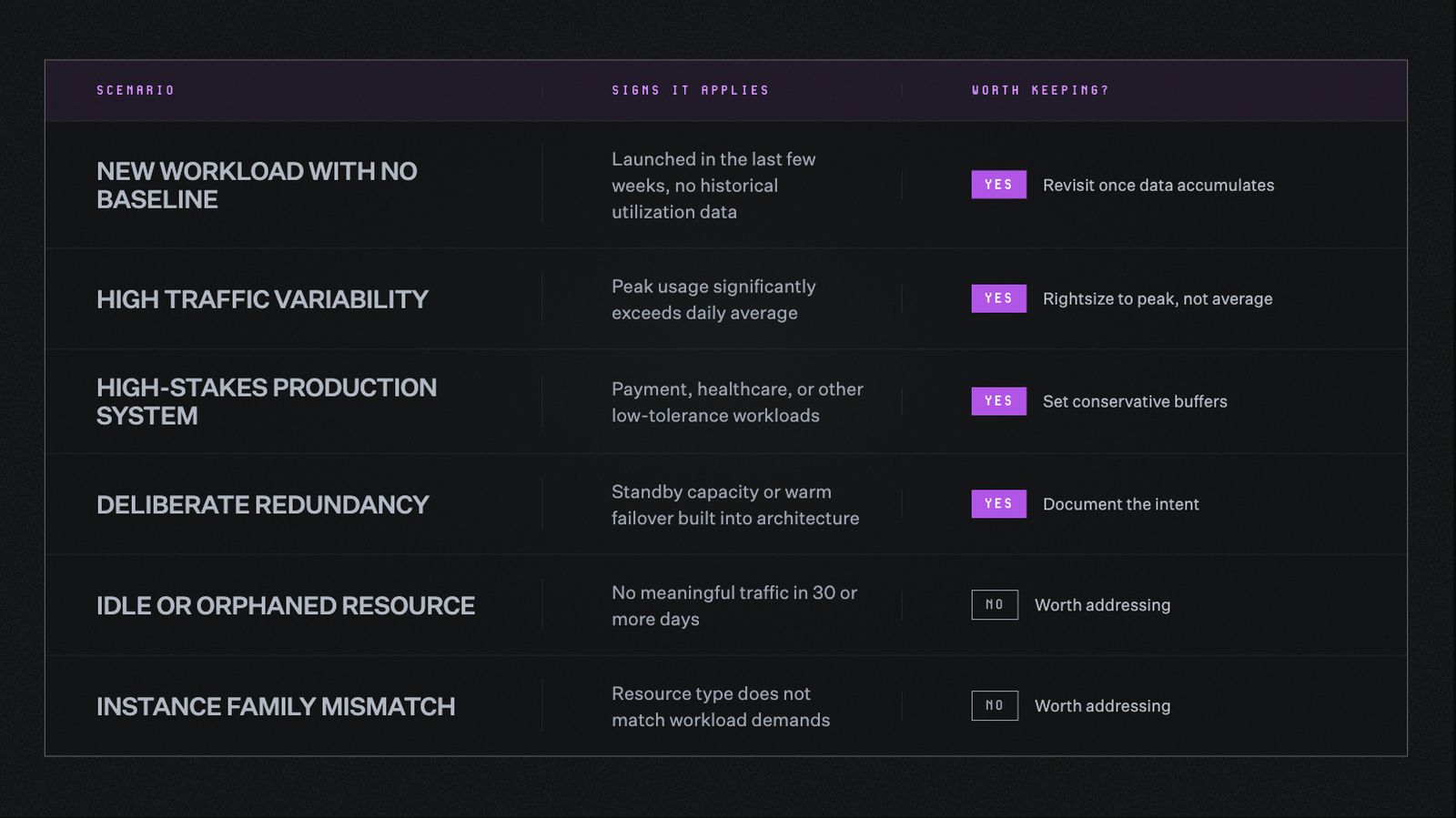
Before making any changes, the question worth asking is: is this overprovisioning intentional, and is the rationale still valid?
When overprovisioning deserves a closer look
Some patterns tend to surface meaningful savings when examined. Here is what to look for.
Orphaned resources
These are cloud assets that no longer serve an active purpose but continue running and billing.
Infrastructure from finished projects, deprecated services, and completed migrations all fall into this category.
This tends to persist not from negligence, but from uncertainty. Nobody was quite sure whether something else depended on it.
A quick visibility check is usually all it takes to find out. Once confirmed, removing them is the most straightforward rightsizing action available, on AWS, Azure, or GCP.
The wrong instance family
Cloud providers offer different instance families for different types of work.
- Compute-optimized instances handle CPU-heavy processing.
- Memory-optimized instances handle data-intensive workloads.
- General-purpose instances sit somewhere in between.
When a workload and its instance family are mismatched, you end up paying for resources the workload cannot use.
A memory-optimized instance running a compute-heavy job has memory sitting idle while the CPU strains. The inefficiency runs in both directions. It often goes unnoticed, since utilization numbers alone do not show whether the right kind of capacity is in use.
Think of it like buying a truck to commute to work alone every day. The truck can haul cargo and tow trailers, but none of that capability gets used.
You are not just paying for more than you need. You are paying for an entirely different set of capabilities than the job requires.
When this pattern shows up, right-typing the instance to a better-matched family often delivers more value than downsizing within the same family.
Post-sprint sprawl
Engineering teams spin up resources fast under deadline pressure, deliver the sprint, and move on.
What gets left behind was meant to be temporary but has no clear expiration date.
A startup that went through an intensive AI development sprint burned through $50,000 to $60,000 in a single week. Not because anyone made a bad decision, but because the infrastructure outlasted the urgency and nobody had visibility into what was still running.
By the time the bill arrived, the sprint was long over.
Non-production environments running continuously
Nights and weekends make up more than 65% of the week.
If dev and test environments run through all of it, that is worth a closer look.
These environments exist to support engineering work. When no engineering work is happening, the case for running them around the clock gets harder to defend.
Gradual drift across a growing fleet
A handful of slightly oversized instances is a rounding error.
The same pattern across hundreds of instances, across AWS, Azure, or GCP, adds up to material spend. It gets there gradually enough that no single moment triggers a review.
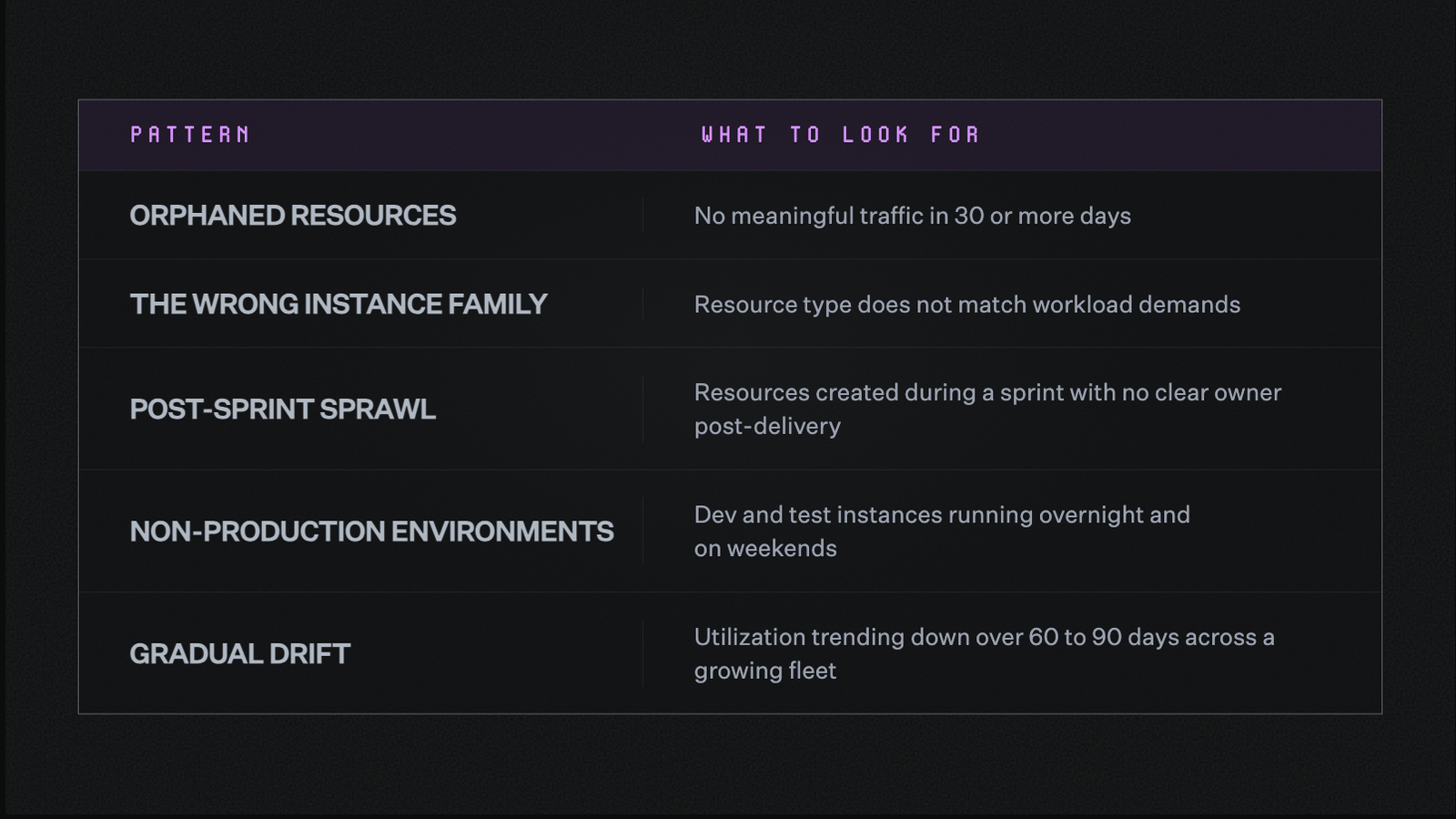
Five patterns worth examining when overprovisioning deserves a closer look.
From understanding what is overprovisioned to rightsizing It
Knowing when overprovisioning is intentional and when it deserves attention is half the work.
The other half is knowing what to do about it.
The sections that follow cover what rightsizing involves, where it tends to get complicated, and how to build an approach that holds up as your infrastructure grows, on AWS, Azure, and GCP alike.
What is rightsizing in cloud cost optimization?
Rightsizing is the practice of matching cloud resource specifications to what a workload demands.
That means instance type, instance size, storage configuration, and memory allocation should reflect real usage patterns, not the estimates made when the resource was first created.
One thing worth clarifying: rightsizing is not a cost-cutting exercise in itself.
Downsizing a resource that cannot handle the reduction creates incidents. Those incidents tend to cost more to resolve than the savings were worth.
The goal is to match the resource to the workload, not to make it as small as possible.
The three forms rightsizing takes in practice
- Downsizing is moving an overprovisioned resource to a smaller type or lower-tier configuration. It is the most common form and the one most conversations focus on.
- Right-typing is switching instance families to better match the nature of the workload. A workload running on the wrong instance family pays for capabilities it cannot use, so moving to a better-matched family often delivers more value than simply moving to a smaller instance in the same one.
- Removing is decommissioning idle or orphaned resources entirely. No resizing required, just identifying what no longer serves a purpose and turning it off. This is typically the highest-impact form and the most straightforward to act on.
This applies the same way across AWS, Azure, and GCP. The mechanics of each provider differ, but the logic doesn’t.
Rightsizing works best as a continuous practice rather than a periodic audit.
Workloads change, teams reorganize, and traffic patterns shift. What is right-sized today reflects the environment as it exists now, not as it existed six months ago.
Why rightsizing is harder to sustain than it looks
Most engineering teams have run a rightsizing audit at some point.
The challenge is rarely awareness. It is the structural dynamics that make rightsizing hard to act on consistently, and even harder to sustain over time.
Recommendations go stale quickly
Cloud environments change constantly.
The infrastructure you are running today may look very different from what any report captured last month. The longer a recommendation sits unactioned, the less reliable it becomes.
Acting requires context that is often distributed
Knowing a resource is oversized is not enough to act on it.
To make a confident decision, you need to know who owns the resource, what workload it runs, what the risk of changing it is, and what it will save.
That context rarely lives in one place. It is spread across teams, tools, and institutional knowledge that can be hard to surface quickly.
Single-metric analysis misses the full picture
Average CPU utilization is a useful starting point, but it does not capture spike behavior.
A resource that averages 15% CPU but regularly spikes to 85% under peak load looks overprovisioned on paper. In practice, it is doing exactly what it needs to do.
Recommendations built on averages alone carry more risk than they appear to, regardless of whether the resource sits in AWS, Azure, or GCP.
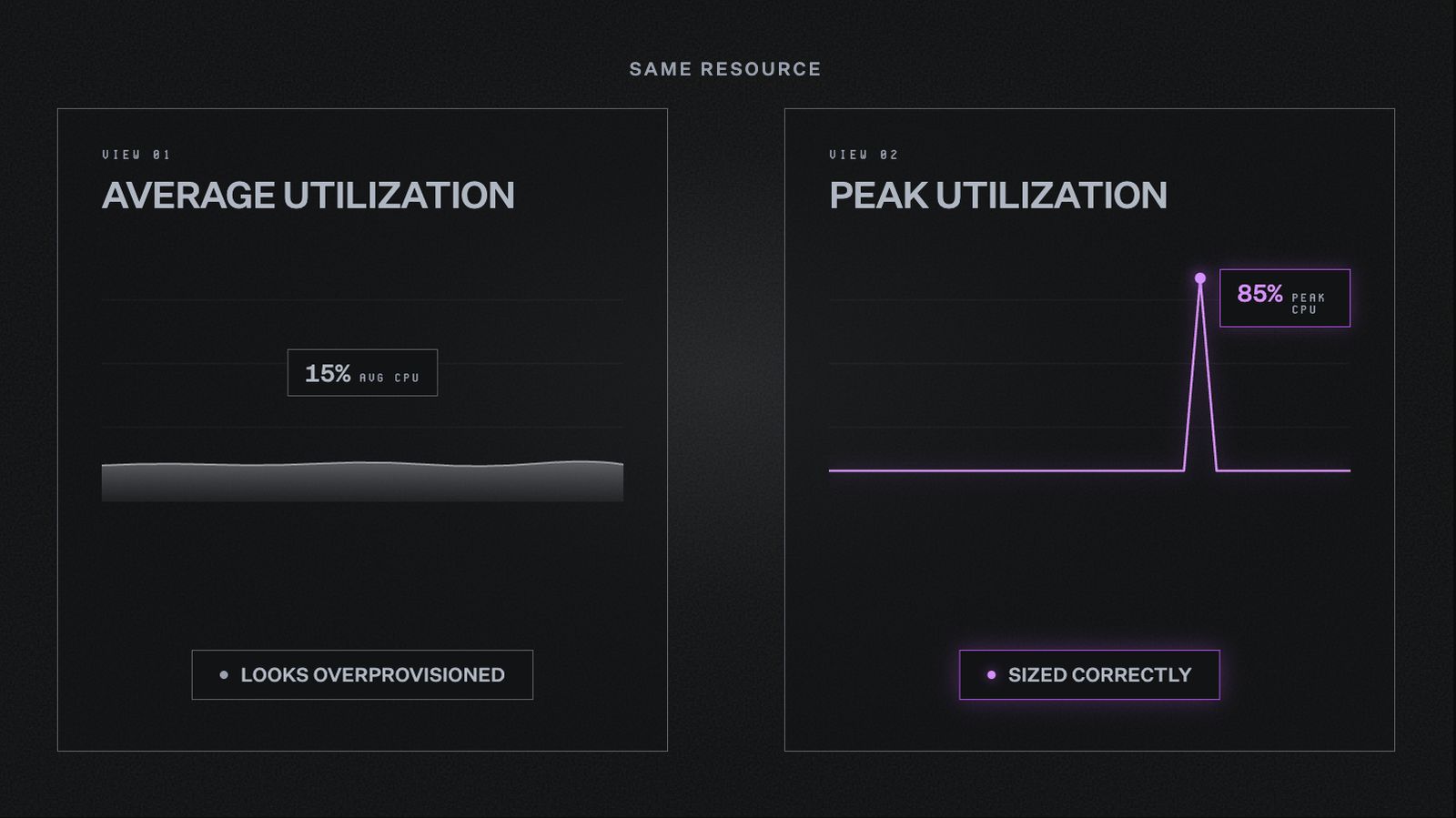
The same resource tells two different stories depending on which metric you look at. Average utilization alone is not enough to make a confident rightsizing decision.
Without a feedback loop it is hard to know what worked
Rightsizing a resource and moving on is only half the practice.
Without a way to track whether performance held, whether downstream services were affected, and whether the expected savings materialized, each action is essentially a one-time experiment.
The feedback loop is what turns individual actions into institutional knowledge that improves over time.
Ownership ambiguity slows everything down
When a recommendation has no clear owner, it falls through the cracks.
Everyone sees it. Nobody is sure it is theirs to act on.
Routing recommendations directly to the team responsible for a resource is what closes that gap.
Six best practices for rightsizing that hold up over time
Before getting into tooling, it helps to have a clear lens for where to focus.
Two questions cut through most of the noise:
- Was this provisioning intentional? Did someone make a deliberate choice to provision at this level, or did it happen by default as the environment grew?
- Has it been reviewed recently? Is the reasoning that justified this provisioning still valid, or has the workload, team, or business context shifted since then?
Together, these two questions sort any resource into one of four categories.
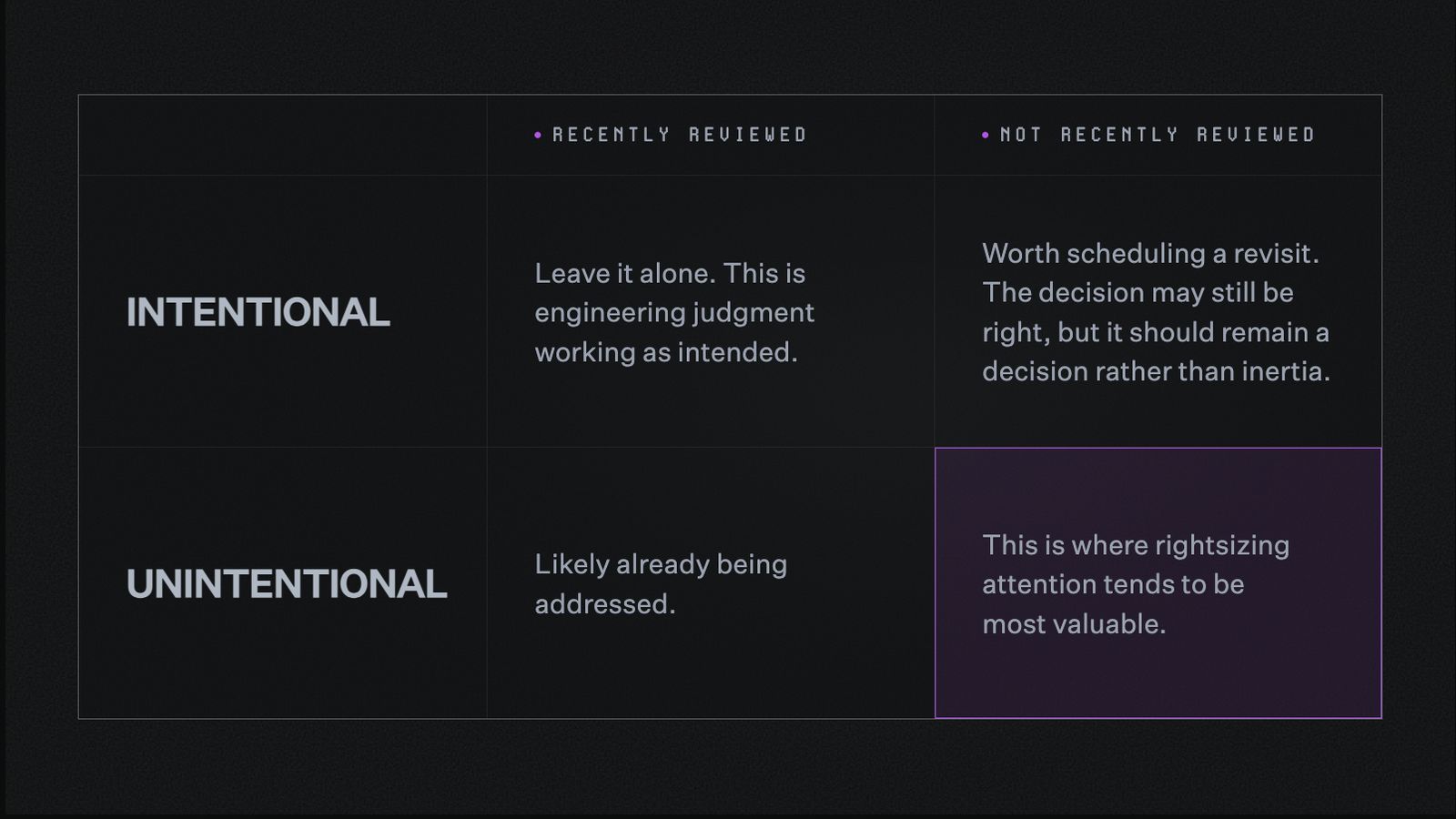
Two questions sort any resource into one of four categories.
The bottom right quadrant is where most recoverable spend tends to live. The best practices below are built around getting there efficiently.
01: Segment by environment first
Production, staging, development, and test environments have different risk tolerances and different definitions of appropriate headroom.
As covered in the environment table earlier, what is an acceptable buffer in production is often unnecessary overhead in development.
Establishing the right threshold per environment, before applying any utilization criteria, keeps rightsizing focused on the right things in the right places.
02: Look at peak behavior, not just averages
Average utilization is a starting point.
Building on the observation window section, what a resource needs when demand is highest is what determines whether it is sized correctly.
03: Sort by spend impact, not by number of resources
A long list of slightly oversized small instances can look like a large opportunity.
In practice, a handful of significantly oversized large instances often represents more recoverable spend with far less effort.
Sorting by spend impact before diving in keeps attention where it is most likely to move the needle.
04: Start with idle and orphaned resources
Among the patterns worth examining, idle and orphaned resources are the most straightforward place to begin.
There is no utilization threshold to debate and no performance risk to weigh. If a resource has seen no meaningful traffic in 30 or more days, it is a natural first candidate.
05: Consider instance types before downsizing
Before reducing the size of an instance, ask whether it sits in the right instance family for the workload it runs.
As the wrong instance family section showed, moving to a better-matched family often delivers more value than moving to a smaller instance in the same one.
06: Build in a review cycle after every change
Every rightsizing action is worth a utilization check two to four weeks later.
- Did the workload perform as expected?
- Did anything downstream shift?
- Did the savings materialize?
This review cycle is what turns individual actions into a reliable practice rather than a one-time cleanup.
This same sequence applies whether the resource lives in AWS, Azure, or GCP. The thresholds and instance names differ by provider, but the logic does not.
Why configurable thresholds matter
The two diagnostic questions at the start of this section only work if intent is understood from the beginning.
That can be a configured threshold in a tool, or it can be a note in a runbook. Either way, someone needs to record what is deliberate.
If a production environment is intentionally running at 50% headroom, that reasoning needs to be visible. Otherwise, the same environment gets flagged as waste every time someone reviews it.
Without that record, intentional buffers and accidental waste look identical. Every review starts from zero, and recommendations get too noisy to act on reliably.
Teams using tooling that supports configurable thresholds can encode this once and let it persist. Teams working manually need to document it just as deliberately, since the risk of losing that context is the same either way.
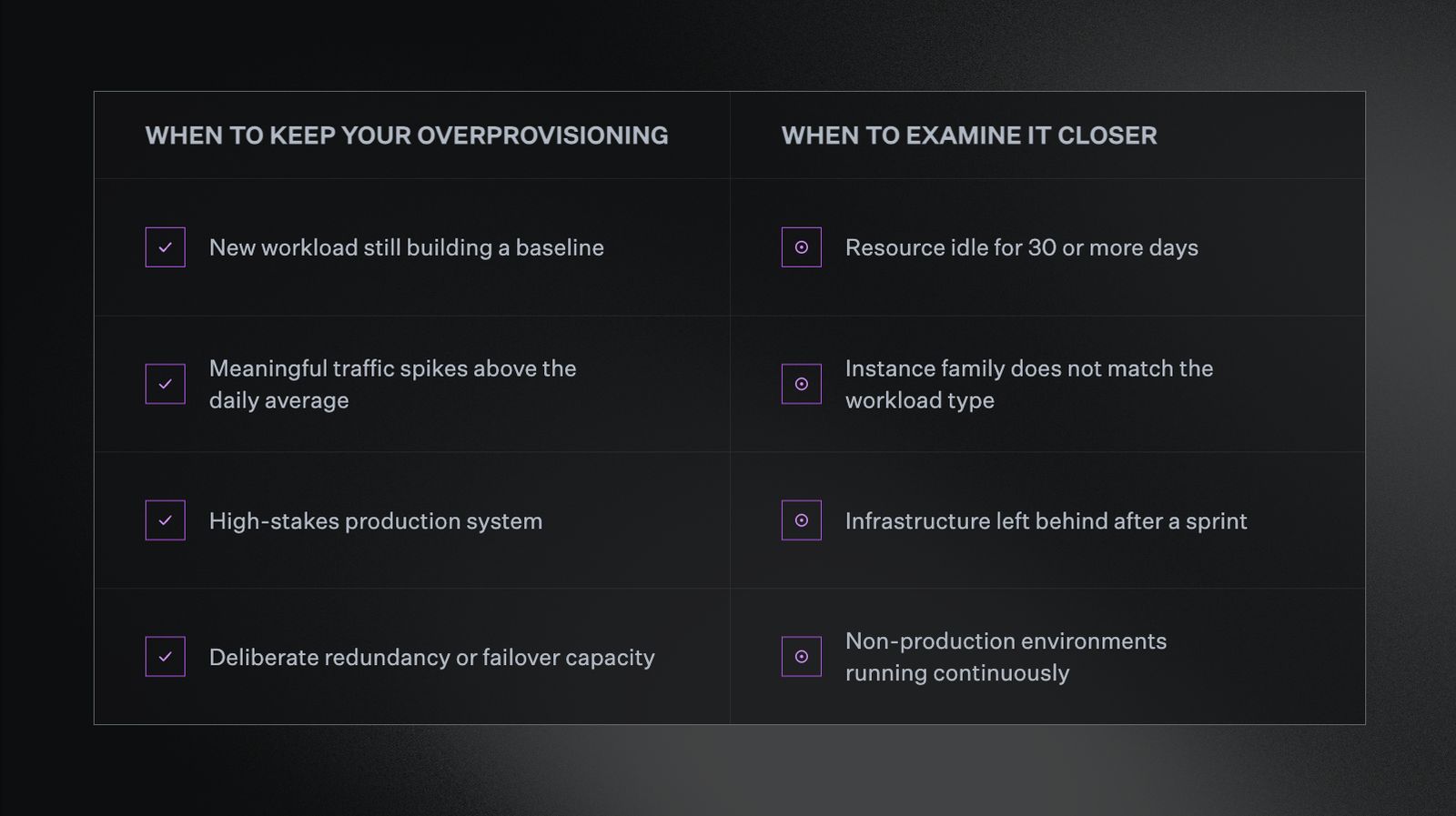
Not all overprovisioning is worth fixing. Knowing which category a resource falls into is where rightsizing starts.
How to approach rightsizing with North
The best practices above describe what good rightsizing looks like.
Rightsize, North's continuous infrastructure optimization tool, is how those practices get put into action.
It watches your cloud infrastructure in real time across AWS, Azure, and GCP, and recommends the optimal size for every resource, compute, storage, serverless, and auto-scaling alike.
Here is what that looks like, step by step.
Step 1: Connect your account
North connects to your cloud account in minutes, with no infrastructure to deploy and no lengthy onboarding.
Within 24 hours, Rightsize has analyzed your environment and surfaced its first set of recommendations, giving your team something concrete to work from on day one.
Rightsize is included on North's free tier, so teams can start rightsizing at no cost before deciding whether to expand into commitment automation or the rest of the platform.
Step 2: Configure your analysis preferences
Before Rightsize surfaces recommendations, tailor the analysis to your environment.
- Lookback period: choose 14, 32, or 93 days. Longer lookbacks yield deeper insights for variable or seasonal workloads. The default is 32 days.
- Risk tolerance: tune how aggressive recommendations are by team, account, or environment, so production gets treated differently than development.
- CPU utilization percentile: choose P90, P95, or P99.5 depending on how much spike behavior you want to account for.
- Scope: configure organization-wide, by specific account, or down to individual resources.
This configuration is how you communicate intent to the system. When Rightsize understands which headroom is deliberate, it stops surfacing intentional buffers as opportunities and focuses on what is worth addressing.
Step 3: Review recommendations by impact
The dashboard displays a curated list of AI-driven suggestions, each rated as overprovisioned, underprovisioned, or optimized, ranked by dollar impact so you know where to focus first.
Every recommendation includes:
- Current vs. recommended configuration
- Monthly savings or performance gains
- Migration complexity
- Underlying analytics, including utilization history, risk headroom, and anomaly notes
Most customers save 10 to 15% on compute by acting on these recommendations, without disrupting workloads or slowing teams down.
Step 4: Preview the impact, in both directions
Before anything moves, Rightsize shows exactly what is changing, how much effort it takes, and what the savings will be.
That includes downsizing where possible and upsizing where a workload is straining against an undersized instance. Rightsizing is about fit, not just reduction, and fit works both ways.
Every case for change is defensible before it reaches an engineer's queue, since nothing gets applied blind.
Step 5: Route to the right owner
Share any recommendation directly with your team via Slack, by creating a Jira ticket, or by email, all from within North's platform.
The recommendation reaches the right person with the reasoning, the estimated savings, and the migration complexity already attached, streamlining decision-making and speeding up implementation.
Step 6: Let the system learn
When you apply a suggestion, results are measured and fed back into the machine learning system.
Models retrain continually, growing more accurate as your infrastructure and requirements evolve. All recommendations are stored, versioned, and tracked with account and resource granularity, and historical effectiveness metrics are available for review.
Get started with rightsizing today with North
Overprovisioned is a description, not a diagnosis.
A resource running below its allocated capacity might be wasteful, or it might be exactly where it needs to be. The difference comes down to context, and building a practice around that context is what makes rightsizing sustainable.
The teams that get this right are not the ones who cut the most aggressively.
They’re the ones who know which overprovisioning is intentional, have a clear lens for spotting what is not, and have a system in place that surfaces the rest continuously, across AWS, Azure, and GCP.
Ready to see what that looks like in your own environment? Start with the best practices in this guide:
- Segment by environment
- Look at peak behavior
- Sort by spend impact
- Build in a review cycle
From there, the work compounds quickly.
When those practices need a system to run on top of, North's Rightsize handles the continuous monitoring, machine learning recommendations, and ownership routing that make rightsizing a practice rather than a project. Most customers save 10 to 15% on compute without disrupting workloads or slowing teams down.
Explore North’s free tier and see what Rightsize finds in your environment.
FAQs
Answers to common questions about the product or feature covered in this post.
How do I rightsize cloud resources without breaking something?
Segment by environment first, since production needs more conservative buffers than development.
Look at peak utilization, not just average, so you do not undersize a resource that spikes under load. Review the change two to four weeks after applying it, to confirm performance held and savings materialized.
What's the fastest way to find hidden or wasted cloud costs?
Start with idle and orphaned resources.
There is no utilization threshold to debate and no performance risk to weigh, since these resources are not serving any active purpose. Confirming they are safe to remove is usually the highest-impact, lowest-effort place to begin.
What utilization percentage means a resource is overprovisioned?
There is no single utilization number that applies across the board.
The right threshold depends on the lookback window, whether you are viewing average or peak behavior, and how variable the workload is. A resource averaging 15% CPU could be overprovisioned, or it could be sized correctly for a workload that spikes to 85% under load.
What's the difference between overprovisioned and intentionally overprovisioned?
Overprovisioned describes a resource with more capacity than its workload uses. That alone is not a problem.
Intentional overprovisioning is a deliberate choice, made for a new workload with no baseline yet, a variable traffic pattern, a high-stakes production system, or planned redundancy. The difference is whether someone chose that buffer on purpose and the reasoning still holds.
What's the difference between downsizing, right-typing, and removing resources?
These are the three forms rightsizing takes in practice.
- Downsizing moves a resource to a smaller size within the same instance family.
- Right-typing switches to a different family better matched to the workload.
- Removing decommissions a resource that no longer serves an active purpose.
Each addresses a different kind of inefficiency, so the right fix depends on which one applies.
Is it safe to rightsize production workloads?
Yes, with more conservative thresholds than non-production environments.
Production carries a different risk calculus than development or staging, since the cost of an incident is higher than the cost of some unused headroom. Setting tighter, more conservative buffers for production, and reviewing after every change, keeps the risk low.
How often should I review rightsizing recommendations?
Continuously, rather than on a quarterly audit cycle.
Cloud environments change fast enough that a recommendation from last month may no longer reflect current usage. A two-to-four-week check after every applied change is what keeps the practice reliable over time.
How does machine learning improve rightsizing recommendations?
Machine learning lets recommendations adapt continuously, instead of relying on a periodic manual audit.
North's Rightsize monitors usage patterns in real time across AWS, Azure, and GCP, then retrains on the outcomes of changes teams actually make. That means recommendations get more accurate the more a team acts on them, rather than staying static between reviews.
Can I control how aggressive North’s Rightsize recommendations are?
Yes. Risk tolerance is configurable by team, account, or environment.
That means production can run on conservative thresholds while development runs more aggressively, without one setting forcing a tradeoff on the other.
Is Rightsize available on North's free tier?
Yes. Rightsize is included on North's free tier, alongside Analyze, Coststreams, Anomalies, GreenOps, and visibility within Coverage.
Teams can start rightsizing and monitoring spend for free, then expand as needs grow. See the pricing page for full plan details.