-
13 min read
Cloud resource management: A three-layer guide

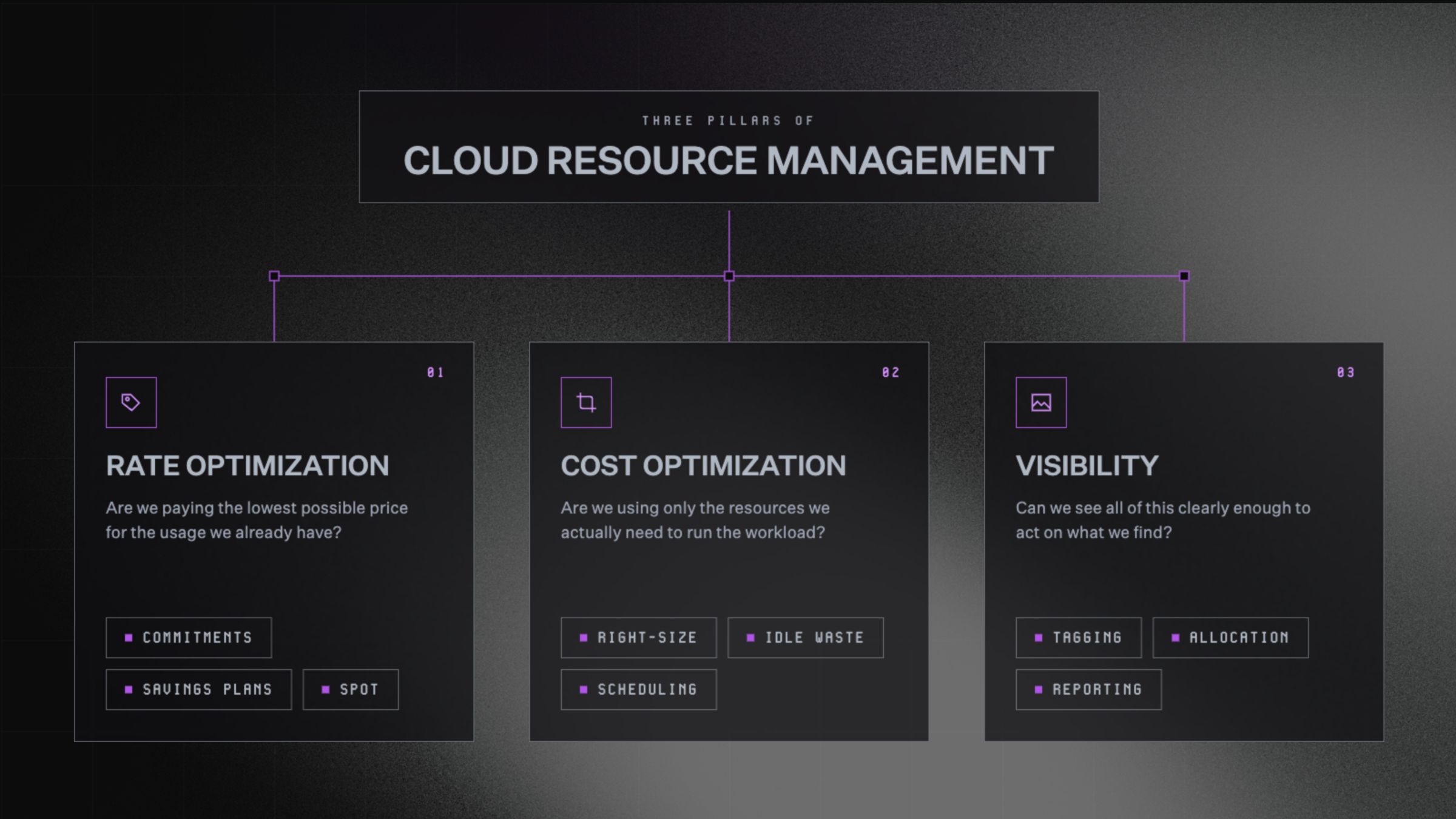
TL;DR
- Cloud resource management covers three distinct layers: rate optimization, cost optimization, and visibility. Most teams only work on one or two at a time.
- Rate optimization is about price. Cost optimization is about fit. Confusing the two leads to fixing the wrong problem.
- Good tagging, continuous monitoring, and forward-looking forecasts are the foundations that make optimization possible in the first place.
- North.cloud brings all three layers together across AWS, Azure, and GCP.
- North’s Coverage handles rate optimization, Rightsize handles cost optimization, and Noros handles visibility.
Imagine inheriting a massive mansion from owners you never met.
The lights have been on for years. The heat runs in empty wings. The water bill keeps arriving for pipes you can't even locate.
The house is costing you money you didn't budget for, and you have no idea where to start.
That's what managing cloud resources feels like for most teams. Resources pile up and bills balloon. Eventually nobody can answer the most basic question:
What are we paying for, and why?
Cloud resource management is how you get that answer. More importantly, it's how you act on it. This guide breaks down what it looks like in practice, and how to get it under control at any stage of the journey.
What is cloud resource management?
Cloud resource management is the process of overseeing, allocating, and optimizing your cloud infrastructure. It covers everything your organization runs in the cloud, including:
- Compute: the machines running your workloads
- Storage: where your data lives
- Networking: how it all connects
- Third-party services plugged into your environment
The goal is simple. Everything should run efficiently, get used appropriately, and cost only what it should.
It’s not just about cutting costs
When people hear "cloud resource management," the instinct is to think about cost reduction. Cost is a big part of it, but the picture is broader than that.
When you manage your cloud resources well, you also get:
- Stability: you know where your spend is going and how it flows
- Early warning: you can spot spikes before they snowball
- Predictability: you can plan ahead instead of reacting at month-end
- Confident decisions: you understand the infrastructure behind every choice
It's the difference between knowing your house has a leak, and knowing exactly which pipe, in which room, and how much water you're losing every day.
Who owns it: engineering, finance, or both?
Cloud resource management sits at the intersection of engineering and finance. That's what makes ownership tricky.
Engineers understand the infrastructure but aren't always focused on the financial side. Finance understands the budget but can't always interpret the bill.
The teams that do this well treat cloud resource management as a shared language, not a siloed responsibility. One control tower. One source of truth. Both sides working from the same data.
Once ownership is settled, the work itself splits into three categories.
The three layers of cloud resource management
Most cloud cost conversations get tangled. That's because people use "optimization" to mean three very different things.
Pulling them apart makes the work much clearer.
The three layers are rate optimization, cost optimization, and visibility. Each one asks a fundamentally different question.
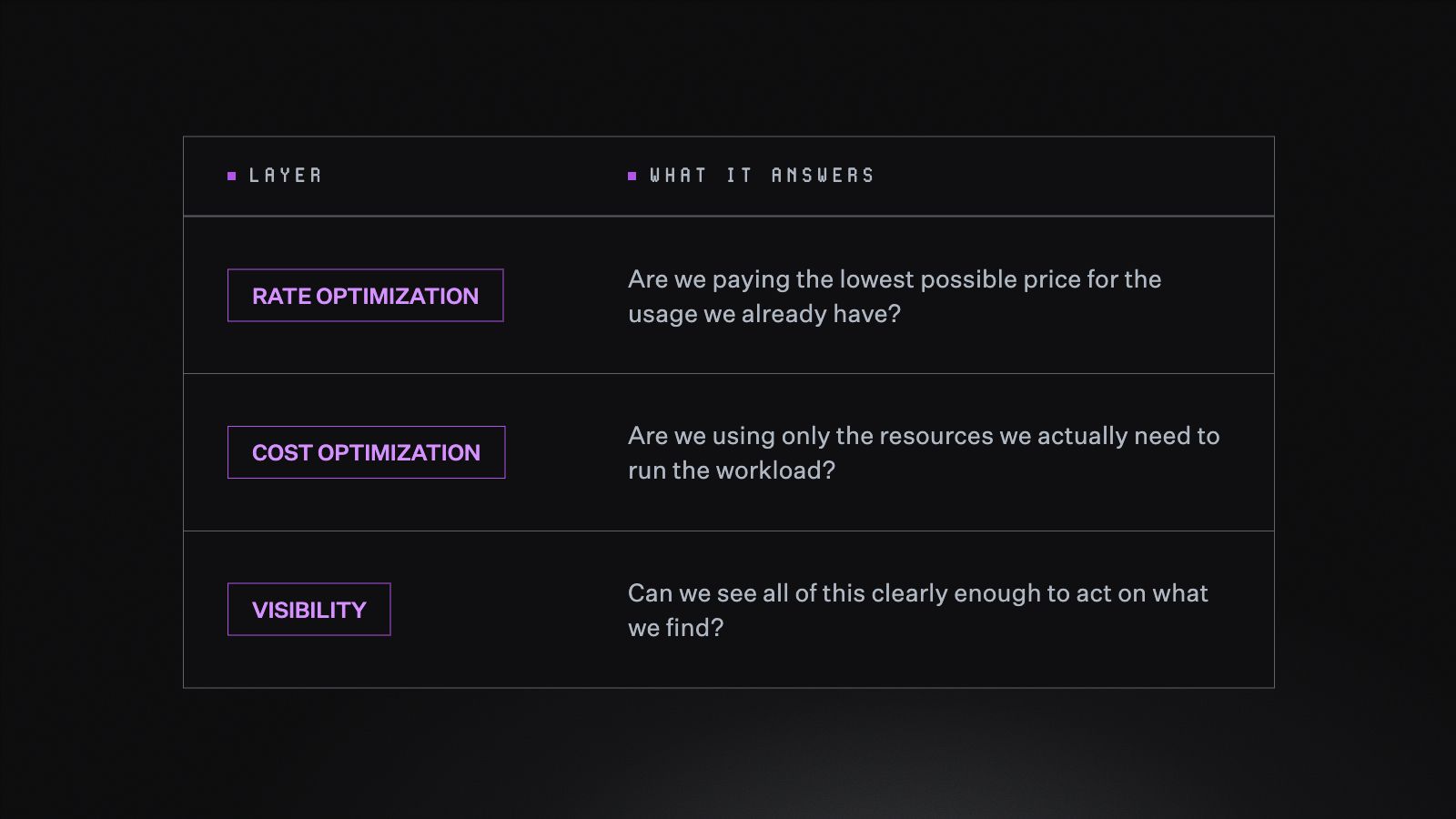
The three layers of cloud resource management, and the question each one is built to answer.
Layer 1: Rate optimization
Every major cloud provider charges different prices for the same resource. There's a flexible on-demand rate, and a discounted rate for teams willing to commit to usage over time.
The gap between the two is significant. Capturing it is the single fastest cost lever available in most environments.
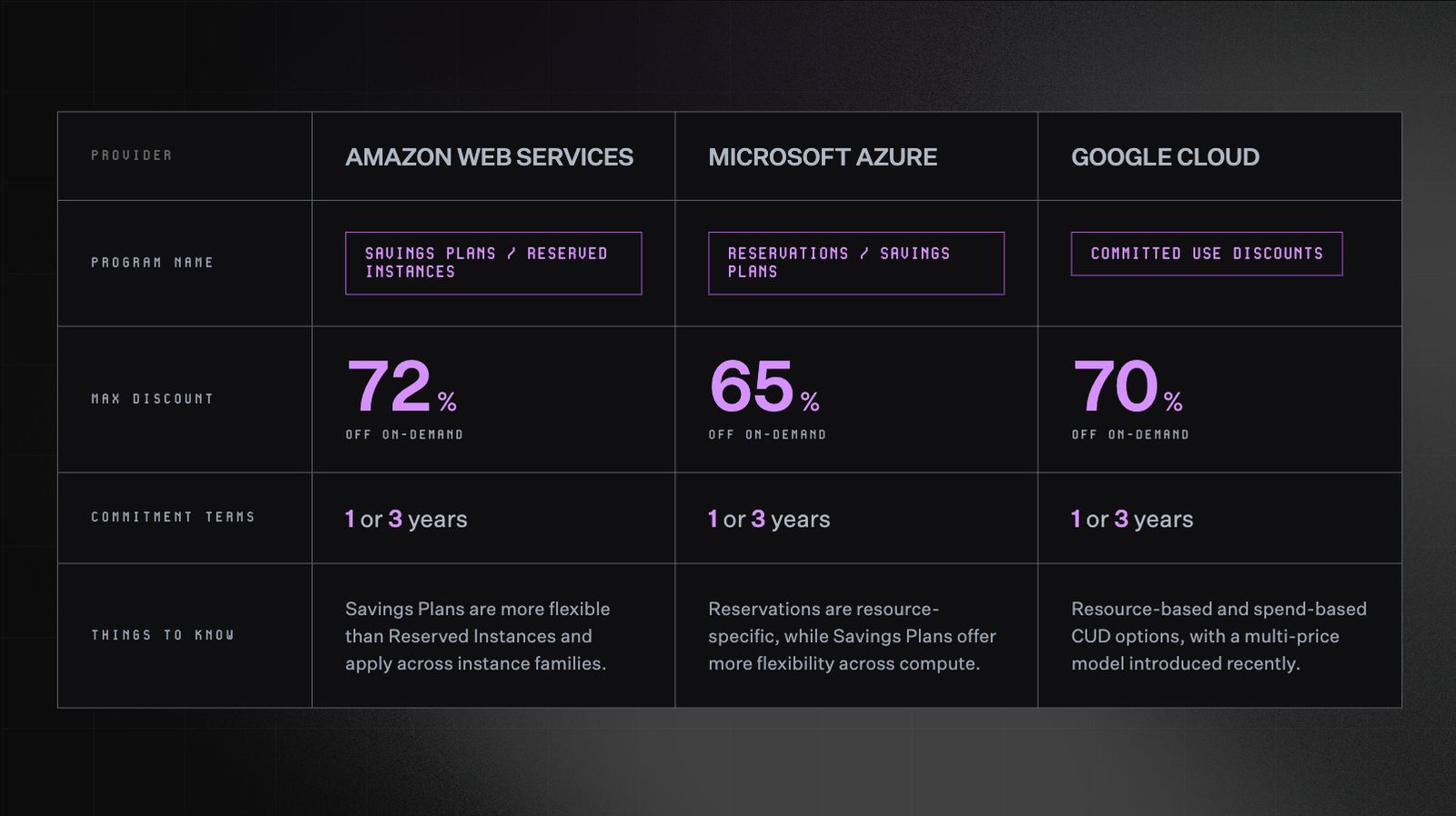
Commitment-based discount programs by cloud provider, including program names, maximum savings, and key differences to know.
Each provider has its own version of this:
- Amazon Web Services (AWS) offers Savings Plans and Reserved Instances, with discounts up to 72% off on-demand pricing for one- or three-year commitments
- Google Cloud Platform (GCP) offers Committed Use Discounts (CUDs), with discounts up to 70% for three-year commitments on resource-based or spend-based terms
- Microsoft Azure offers Reservations and Savings Plans, with discounts up to 65% for one- or three-year commitments across compute, databases, and storage
Most teams know these discounts exist. Most teams still default to on-demand pricing anyway.
The reason is lock-in. You sign up for three years of a specific instance type. Your infrastructure shifts, or your business priorities move. Suddenly you're paying for capacity you no longer need.
The math works on paper, but the risk doesn't. So teams pay full price because at least it stays flexible.
The risk isn't really the commitments themselves. It's the manual, all-or-nothing way they've traditionally been managed.
Tools that continuously monitor usage and rebalance commitments in real time, such as North's Flexbot, make it possible to capture the discount without locking into a contract that may not fit a year from now.
Layer 2: Cost optimization
Every cloud environment starts with provisioning, the process of allocating resources to support a workload. The challenge is that those decisions compound over time.
Coming back to the mansion analogy, after a few years of growth, here's what most cloud infrastructure looks like:
- Lights on, nobody home: resources still running for projects that have long since ended
- A twin bed in the master suite: small workloads occupying oversized instances
- A king-size bed in the broom closet: undersized resources causing performance issues
- Locked rooms nobody opens: services running in the background that nobody remembers turning on
The person managing the environment today probably didn't build it. They have no easy way to know what's necessary and what's just left over.
Cost optimization is the work of going room by room. Rightsize what's oversized. Scale up what's strained. Turn off what nobody's using.
Done well, it's not a one-time cleanup. It's an ongoing read on which resources match the workloads they're attached to.
Layer 3: Visibility
A single cloud bill from a single provider is already difficult to understand:
- Resources have dependencies, so one service's cost directly affects another
- Discounts and adjustments are applied mid-month or end-of-month, making real-time tracking hard
- Line items often have no clear identifier and require deep platform knowledge to interpret
Now multiply that across AWS, GCP, Azure, Snowflake, and any other providers your team is running.
Each has its own billing logic, its own data format, and its own quirks. Even tagging works differently across providers:
- Naming conventions vary from one platform to the next
- Enforcement mechanisms that exist on AWS may not exist on GCP or Azure
- A tagging strategy built for one provider rarely translates cleanly to another
Without a way to normalize all of that data, comparing costs across providers is like reading the same book in four different languages at once.
Normalization means bringing everything into a single framework. The same field means the same thing, no matter where it came from. That gives engineering and finance a shared view they can work from.
Best practices for cloud resource management
The framework above describes what cloud resource management involves. The practices below are how teams keep it running in a real environment.
Cloud resource management advice tends to follow a familiar pattern: tag everything, rightsize your instances, set up alerts.
That guidance isn't wrong, it just doesn't go far enough on its own.
Getting it right is less about following a checklist. It's about building habits that scale with your infrastructure.
These are the practices that consistently move the needle, regardless of where your team is starting from
1. Get your tagging foundation right
Picture this: your AWS bill comes in 30% higher than last month. The instinct is to start cutting.
But cutting what, exactly? Without knowing where that increase came from, any action is a guess.
Tags are labels applied to cloud resources. They tell you what belongs to which team, product, environment, or customer.
Tags are the backbone of any cost allocation strategy. Without a consistent approach, everything built on top of them becomes unreliable.
The basics matter more than most teams realize:
- Agree on a naming convention before resources get created, not after
- Apply tags at the account and resource level across every provider
- Build enforcement into your deployment process so untagged resources cannot slip through
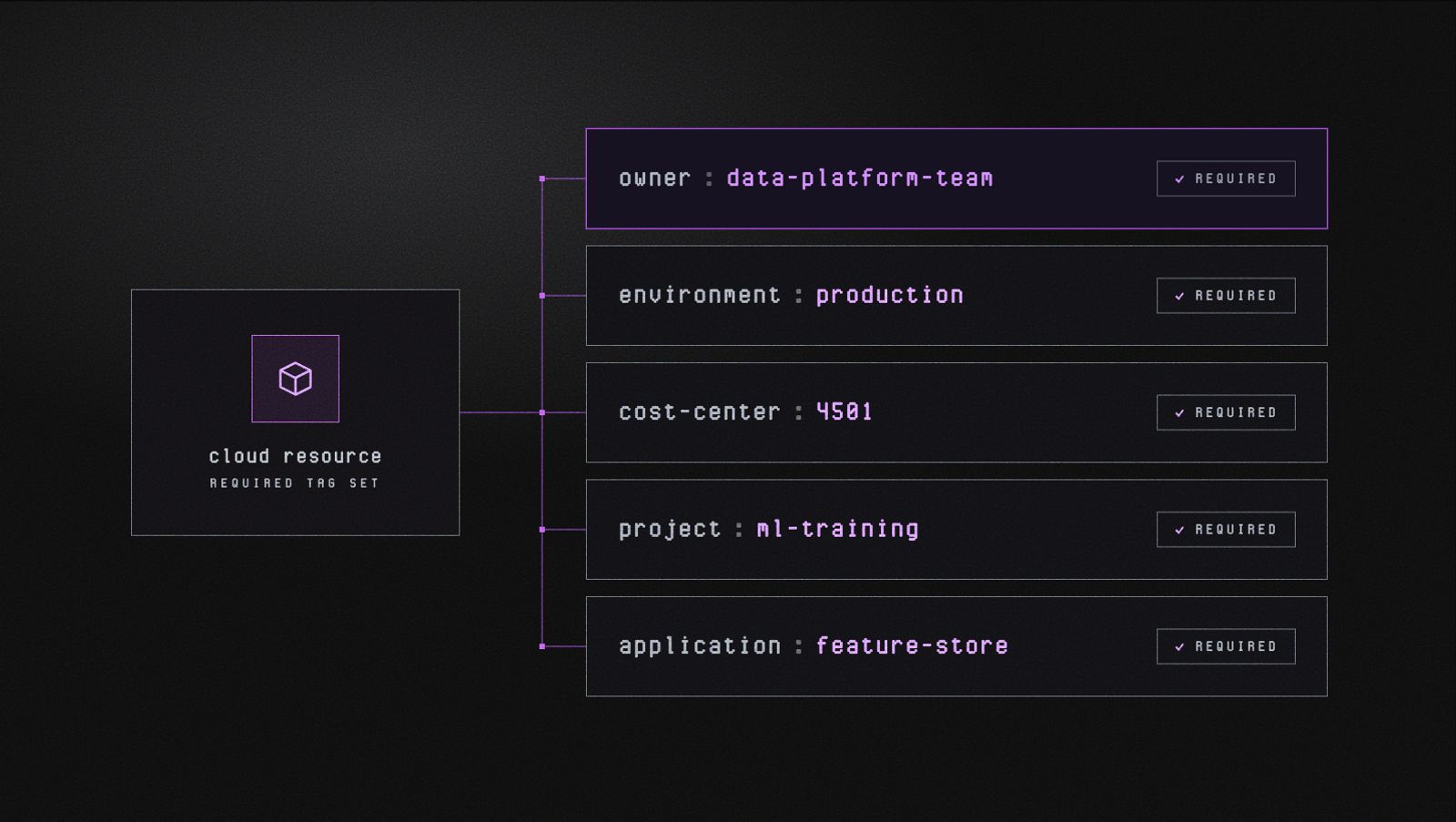
A required minimum tag set defines the baseline metadata every resource must carry before it can be deployed. Owner, environment, cost-center, project, and application together answer the most common questions teams ask about any resource: who owns it, where it runs, who pays for it, what it supports, and what it is.
Once that foundation is in place, you can start asking the questions that matter. Good tagging is what lets you trace a spike back to its source:
- Is it one team, or spread across several?
- A specific service, or a pattern across your whole environment?
- A product launch, or something that quietly crept up?
The goal isn't just to see your total spend. It's to understand the story behind it.
That context is what turns a cost conversation from reactive to strategic.
For a full breakdown of how to build a tagging strategy that holds up across AWS, GCP, and Azure, read our guide: Cloud Tagging Done Right: A Guide for Modern Teams.
2. Track your spikes and dips, not just your monthly total
Reviewing cloud costs monthly is a reasonable starting point. Active monitoring is what keeps teams ahead of surprises.
A spike in week two can look very different by the time the bill arrives. Continuous monitoring gives your team the lead time to respond before costs compound.
Here's what that difference looks like in practice:
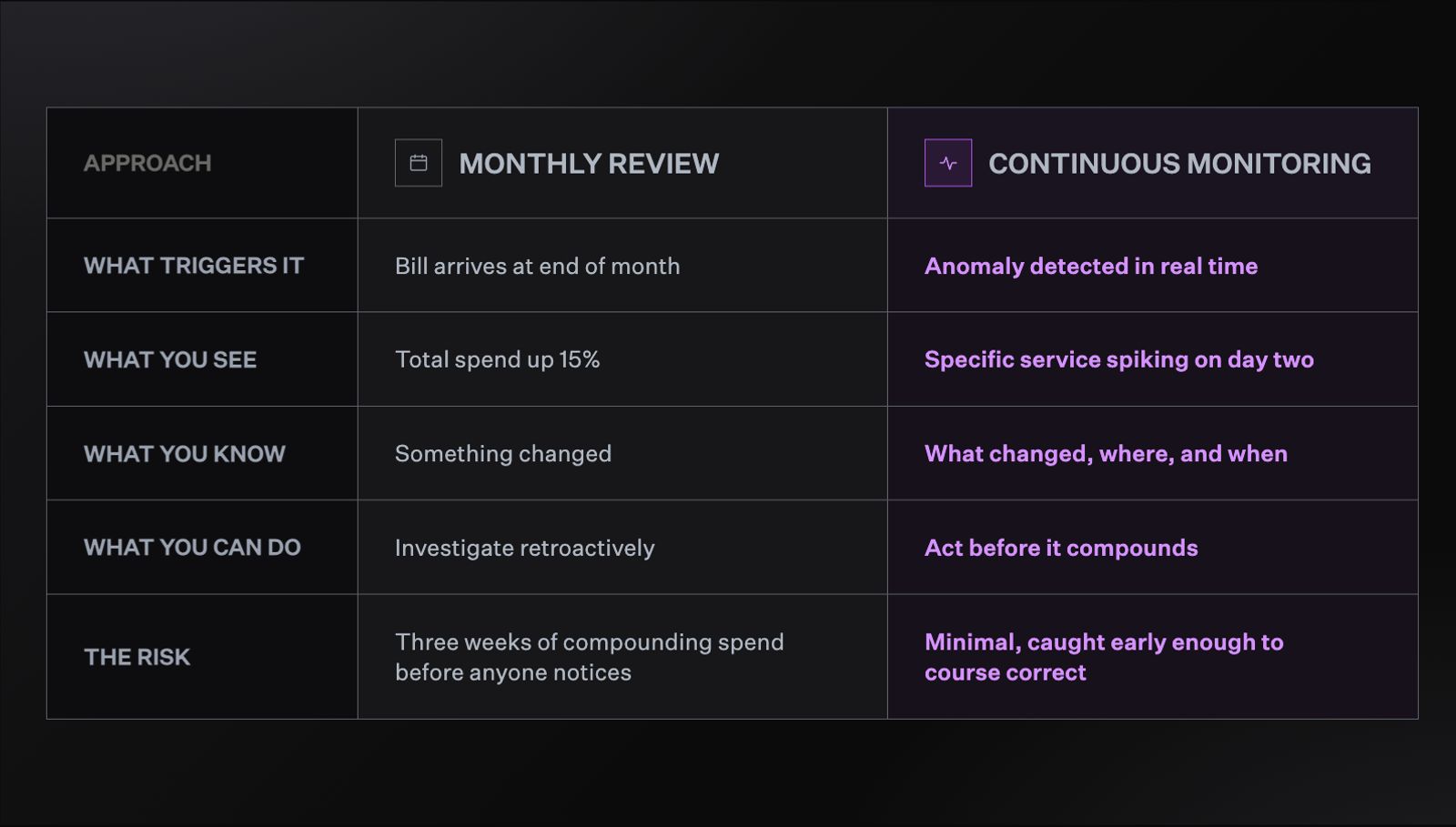
Continuous monitoring catches spend anomalies in real time, while monthly review leaves weeks of compounding cost before anyone notices.
Teams that catch cost anomalies early have time to investigate, understand the cause, and make adjustments. The same anomaly surfaced at month-end becomes a much harder conversation.
3. Know when overprovisioning is intentional
Overprovisioning is usually the first thing flagged when teams start thinking seriously about cloud costs. Unused capacity costs money, so most optimization frameworks treat it as something to eliminate.
But cloud environments aren't static. Extra capacity isn't always wasteful. Sometimes it's a deliberate choice:
- Unpredictable workloads: stability matters more than savings
- High-stakes services: the cost of underperformance outweighs the cost of excess
- Production environments: higher buffers are required compared to dev or test
The work isn't to eliminate overprovisioning across the board. It's to tell the difference between intentional buffer and accidental waste.
Good tooling lets you set your own thresholds by account, region, or service. That way the system understands the difference too, and stops flagging deliberate choices as problems to fix.
This is part of what North's Coststreams was built to do. It makes the breakdown between intentional and accidental waste visible, without requiring exhaustive tagging coverage first.
4. Plan for where you're going, not just where you are
Even teams with good visibility often struggle with the next step: understanding how costs are changing and where they're headed.
The default approach is manual. Pull a report for this month, pull one for last month, put them in a spreadsheet.
It works, but it's slow and error-prone. It tells you what happened, not why or what comes next.
Effective forecasting doesn't require sophisticated tooling to get started. At its most basic, it means:
- Tracking your month-over-month growth rate and projecting it forward
- Identifying which services are growing fastest and applying that trajectory
- Flagging planned initiatives, like product launches or migrations, that will change your cost profile
This is getting harder as AI adoption grows. GPU-intensive workloads can consume enormous resources fast, and unlike traditional compute, the usage patterns are rarely steady.
For teams without real-time forecasting in place, the month-end bill can look very different from what anyone expected.
How North handles each layer
The practices above are the foundation of good cloud resource management. Tagging that holds up. Monitoring that catches what matters. Forecasting that looks forward. Knowing when overprovisioning is intentional.
The hard part isn't knowing what they are. It's running all of them at once, across every provider, without losing the thread.
That's what North was built to do.
It brings those practices together in one place, mapped to the three layers of cloud resource management. AWS, Azure, and GCP run in a single system. Engineering and finance work from the same data, instead of stitching together separate tooling for each provider.
Three capabilities line up directly with the three layers:
North’s Coverage handles rate optimization, with two engines depending on who holds the contract:
- Flexbot gives teams the savings of a long-term commitment with month-to-month flexibility, adjusting coverage continuously instead of locking into a fixed term.
- Autobot, a machine learning-powered engine, ladders in commitments incrementally and adjusts them as usage shifts.
Rightsize handles cost optimization. It uses machine learning to surface specific resizing, removal, and scaling actions across EC2, ECS, EBS, Lambda, Compute Engine and Auto Scaling Groups, with the reasoning and impact attached to each one.
Noros, North’s FinOps Agent, handles visibility. It's an AI cloud finance companion that answers cost questions in plain English, builds dashboards from a single prompt, and routes complex queries to specialist agents trained on cloud cost data.
What this looks like on a normal Tuesday
Morning: Flexbot adjusts commitment coverage as workloads shift, capturing rate savings on usage that would have otherwise defaulted to on-demand pricing. On the customer-owned side, Autobot ladders in a new monthly increment rather than betting on a multi-year term.
Noon: Rightsize flags twelve resources for review. The highest-impact recommendation is an over-provisioned RDS instance running at 14% CPU utilization, already pushed to Jira for the team that owns it.
Evening: The CFO opens Noros and asks why platform costs are pacing 8% higher than last month. Noros builds a dashboard on the spot, showing a specific Glue ETL job tied to the AI/ML cohort, along with the cost impact and three recommended next steps.
None of those moments required anyone to pull a report, reconcile a bill, or schedule a meeting between engineering and finance. Each layer of the work is handled by the system built for that layer, and the team's attention is freed up for the decisions that need a human in the loop.
Get your control tower set up today
Cloud resource management gets harder the longer it goes unmanaged.
Bills grow. Environments drift. The gap between what your cloud is doing and what your team can see widens with every quarter.
The point of a control tower isn't more dashboards to check. It's making sure the work gets handled, the right questions get answered, and the decisions worth your attention are the only ones in front of you.
Ready to bring that to your own environment? Start with the foundations:
- A tagging strategy that holds up
- Monitoring that catches what matters
- Forecasting that looks forward
From there, the work compounds quickly.
And when those foundations need a system to run on top of, North brings rate optimization, cost optimization, and visibility together in one place. Coverage, Rightsize, and Noros run across all three layers, continuously and across AWS, Azure, and GCP.
Explore North to see what your cloud resource management looks like with all three layers handled from day one.
FAQs
Answers to common questions about the product or feature covered in this post.
Who should own cloud resource management: engineering or finance?
Neither owns it alone. Cloud resource management sits at the intersection of engineering and finance.
Engineers understand the infrastructure. Finance understands the budget. The teams that do this well treat it as a shared language, with both sides working from the same data instead of separate reports.
What's the difference between rate optimization and cost optimization?
Rate optimization is about price: are you paying the lowest rate available for the resources you're using.
Cost optimization is about fit: are you using only the resources your workload actually needs.
A resource can be rightsized and still overpriced, or correctly priced and still oversized. The two problems require different fixes.
Is overprovisioning always a problem?
No. Overprovisioning is sometimes a deliberate choice, not a mistake.
Unpredictable workloads, high-stakes services, and production environments often need extra headroom on purpose. The goal isn't eliminating overprovisioning everywhere. It's telling intentional buffer apart from accidental waste, and setting thresholds so your tooling understands the difference too.
How often should I review cloud spend?
Monthly review is a reasonable baseline, but it isn't enough on its own.
Continuous monitoring catches a spike in week two before it becomes a much larger number by the time the bill arrives. The more your infrastructure changes, the more that lead time matters.
Do I need perfect tagging before I can start optimizing?
No. Tagging helps, but waiting for full coverage before you start optimizing means waiting indefinitely.
Tools built to attribute spend without depending on exhaustive tagging, such as North's Coststreams, let you see intentional versus accidental waste even while tag coverage is still catching up.
How do commitment discounts work, and what's the risk?
Cloud providers offer discounted rates, sometimes up to 72% off, in exchange for committing to a set level of usage for one or three years.
The risk is lock-in. Infrastructure shifts, priorities change, and a commitment that made sense a year ago can leave you paying for capacity you no longer need.
North's Coverage feature removes that tradeoff. Flexbot gives teams the savings of a long-term commitment with month-to-month flexibility, adjusting coverage continuously instead of locking into a fixed term. Autobot brings that same flexibility to customer-owned accounts, laddering in commitments incrementally as usage shifts.
Does cloud resource management cover AI and LLM spend?
Increasingly, yes. AI workloads bring GPU-intensive usage patterns that are harder to forecast than traditional compute, and they're becoming a real line item on most cloud bills.
North's TokenFlow, with early access coming soon, is built to bring that spend into the same view as cloud cost. Native integrations with AI and data platforms like OpenAI, Anthropic, and Snowflake bring that spend alongside cloud infrastructure in one place.
What tools do I need to manage cloud resources across AWS, GCP, and Azure?
At minimum, you need something that normalizes data across providers, since each cloud has its own billing logic and tagging rules.
Beyond that, look for coverage across all three layers: rate optimization, cost optimization, and visibility. North brings Coverage, Rightsize, and Noros together in one system across AWS, Azure, and GCP, so you're not stitching together provider-specific tools.