-
18 min read
Cloud tagging done right: A guide for modern teams

TL;DR
- Cloud tagging is key-value metadata attached to resources, used to attribute cost, ownership, and context to an otherwise opaque bill.
- Tagging done well unlocks cost allocation, chargeback and showback, resource governance, security policy, and operational visibility.
- Tagging done poorly drifts fast: inconsistent naming, untagged resources, and orphaned infrastructure are the most common failure points.
- A deliberate taxonomy, provisioning-time enforcement, and scheduled audits are what keep tagging reliable as a company scales.
- North.cloud attributes cloud spend using metadata that's already there, so cost visibility doesn't depend on complete or consistent tag coverage.
Good cloud tagging turns your cloud bill from a monthly mystery into a clear picture of how your business runs.
With good tagging, finance stops guessing at allocation, engineering can see where spend is going, and leadership gets numbers it can act on.
That's the goal. As companies grow, keeping tagging consistent gets harder.
Common challenges include:
- Tags applied inconsistently across teams
- Resources provisioned without any tags
- Naming conventions drifting, creating duplicate labels that take effort to reconcile
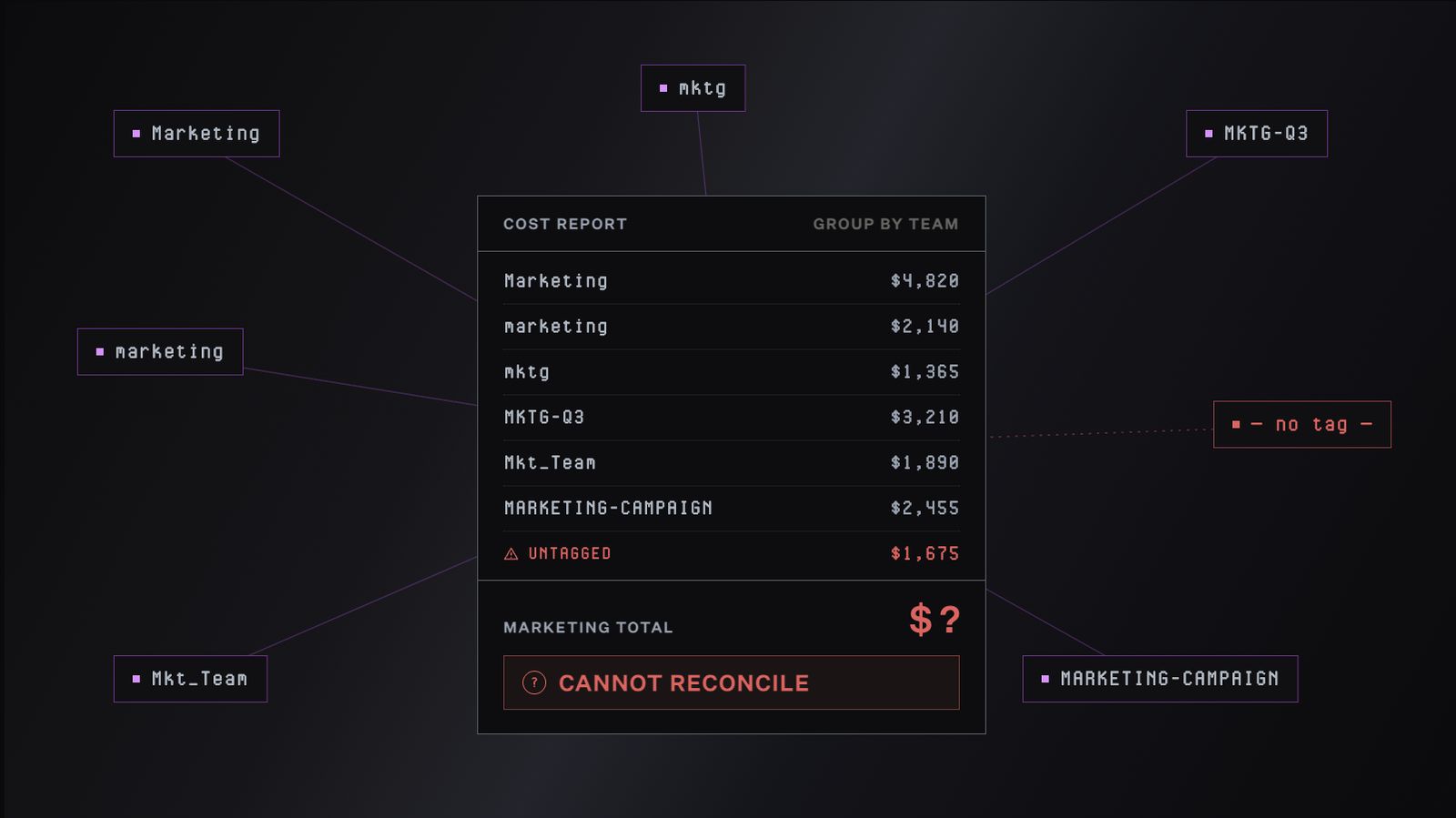
Marketing, marketing, mktg, MKTG-Q3, Mkt_Team, MARKETING-CAMPAIGN: six labels, one team, no reliable total.
This guide covers what cloud tagging is, the best practices for doing it well, and why teams increasingly pair tagging with AI-driven cost allocation.
What is cloud tagging?
Imagine a credit card shared by everyone in a household. The monthly statement shows categories: groceries, gas, streaming, etc.
Within each category, the detail stops there. The grocery line is $400. You can't tell if that's a backyard party or a champagne splurge. This is because the category alone isn't enough to act on.
A cloud bill works the same way. You can see what you spent on compute, storage, or networking. What's underneath stays opaque.
Was a compute spike a long-running training job? A misconfigured staging environment? One team's workload? Without more context, the bill doesn't explain itself.
Tags add that context. They're key-value metadata labels attached to cloud resources (compute instances, storage buckets, databases, managed services). They let you group, filter, and attribute costs along dimensions that reflect how your business runs.
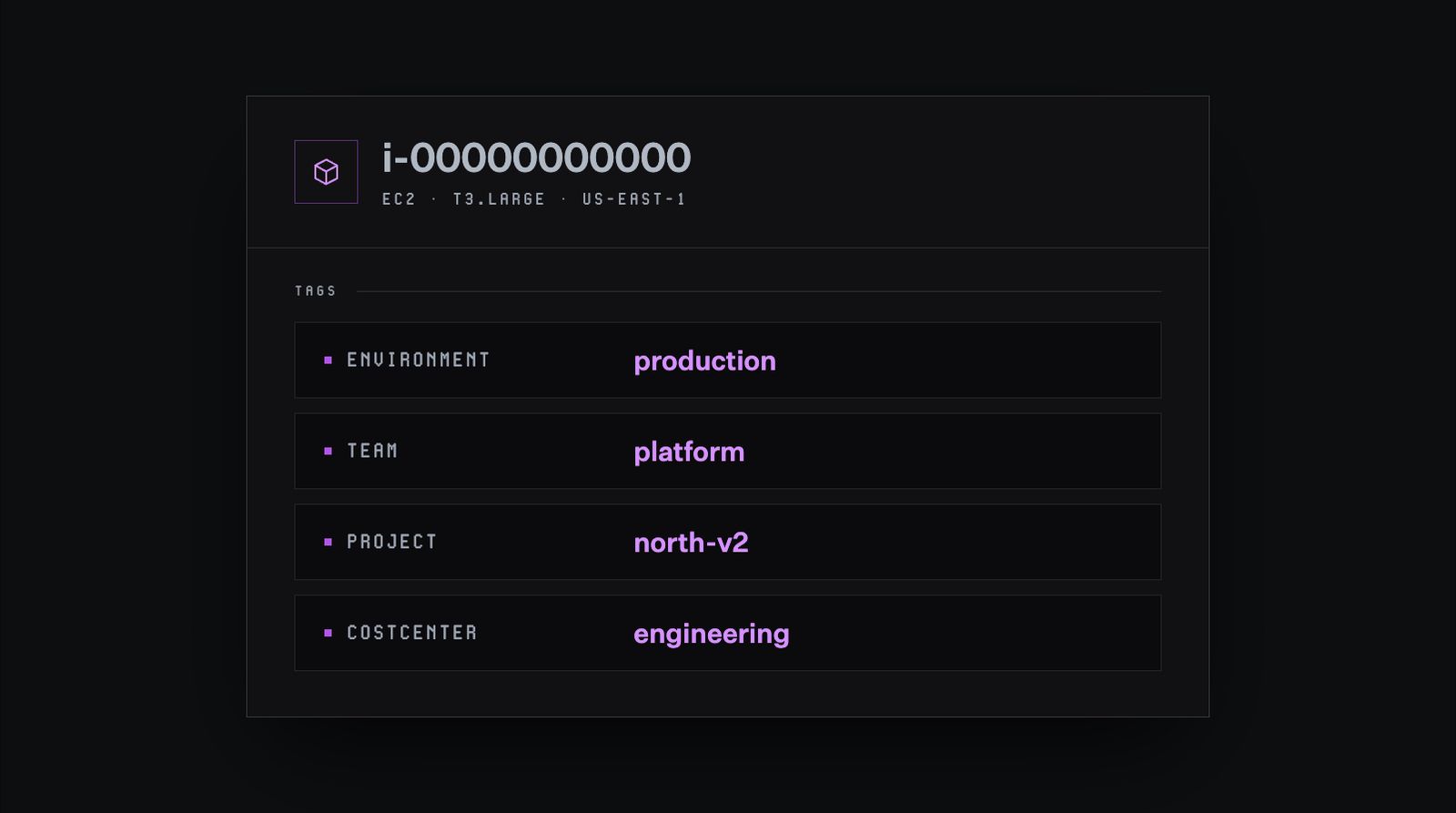
A typical set of tags on a single cloud resource. Each key (Environment, Team, Project, CostCenter) describes a dimension, and each value answers it for this specific resource.
With tags in place, you can answer questions a raw bill can't:
- How much is the platform team spending this quarter?
- What does Project North-v3 cost in production versus staging?
- Which cost center should be charged for this database?
Cloud providers like Amazon Web Services (AWS), Google Cloud Platform (GCP), and Microsoft Azure include some metadata out of the box: region, service type, operation type. That's useful for engineering analysis, but it describes the infrastructure, not your organization.
Tags are how you add the business layer: who owns the resource, which product it supports, which cost center pays for it.
How AWS, Azure, and GCP handle tagging differently
All three providers support tagging, but each approaches it a little differently.
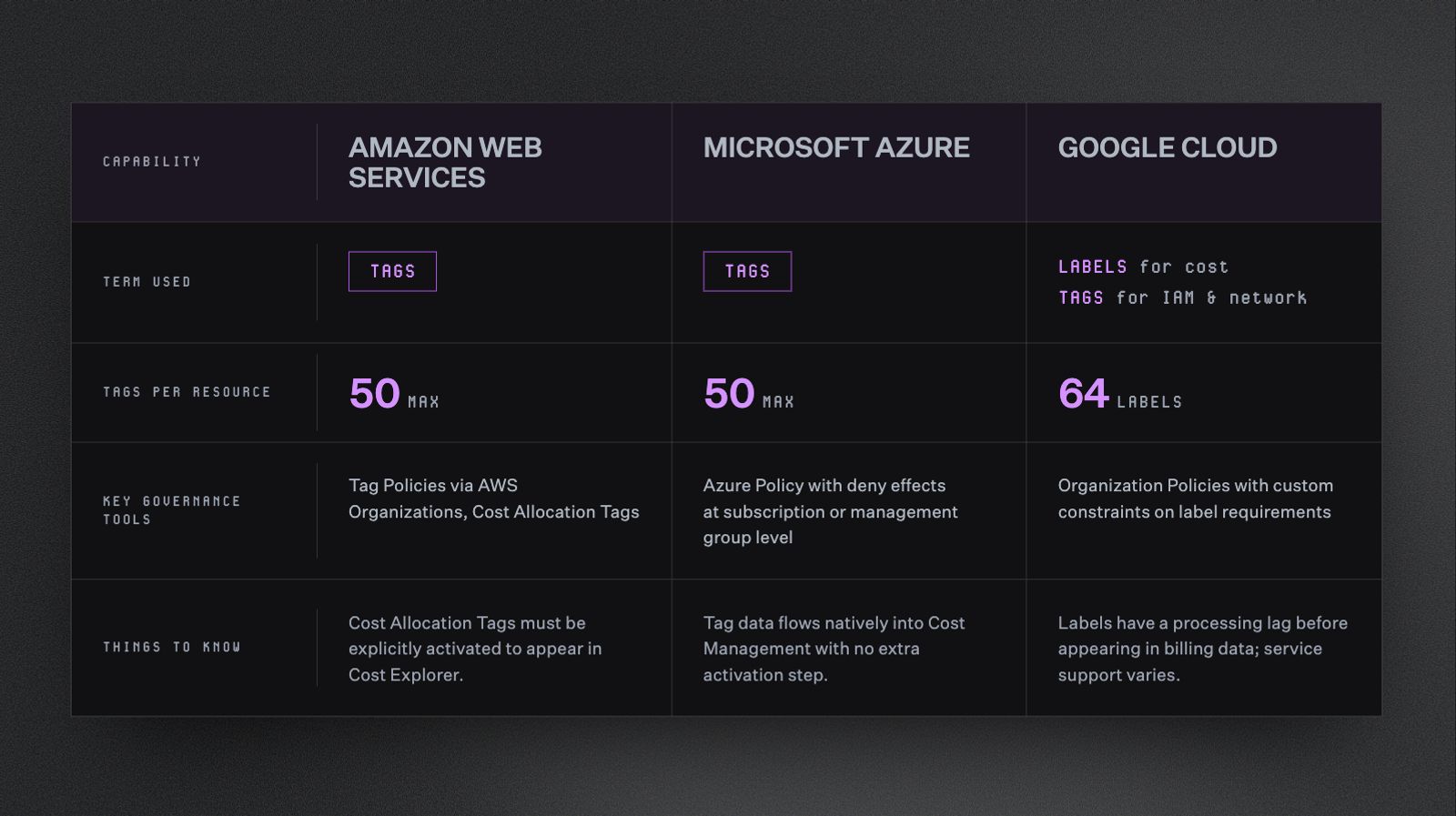
A side-by-side look at how AWS, Azure, and GCP each handle tagging. The terminology, limits, and governance tools differ enough that a strategy built for one cloud usually needs to be adapted for the others.
A few things worth knowing:
- AWS Cost Allocation Tags need explicit activation before they show up in Cost Explorer. This surprises teams reviewing past spend.
- Azure ties tagging directly into Azure Policy, making enforcement at provisioning straightforward.
- GCP splits the concept in two. Labels handle cost reporting. Tags handle network and IAM decisions. If your team is coming from AWS or Azure, this split takes some adjusting to.
In a multi-cloud environment, tagging isn't one practice. It's three related ones. A strategy built for one cloud usually needs adapting for the others.
Why cloud tagging matters, and why it's harder than it looks
Without tagging, your cloud bill is a black box. Finance, engineering, and leadership all see the same number. So, nobody can tell who owns what, what caused a spike, or whether a product line is trending the wrong direction.
Done well, tagging can unlock four capabilities that shape how you understand and manage cloud spend.
Cost allocation
Cost allocation maps cloud spend back to the teams, products, or business units responsible for it.
On its own, a $400,000 monthly compute bill is just a number. With tags, it becomes something actionable:
- $180,000 to the platform team
- $90,000 to the data team
- $130,000 to the customer-facing product team
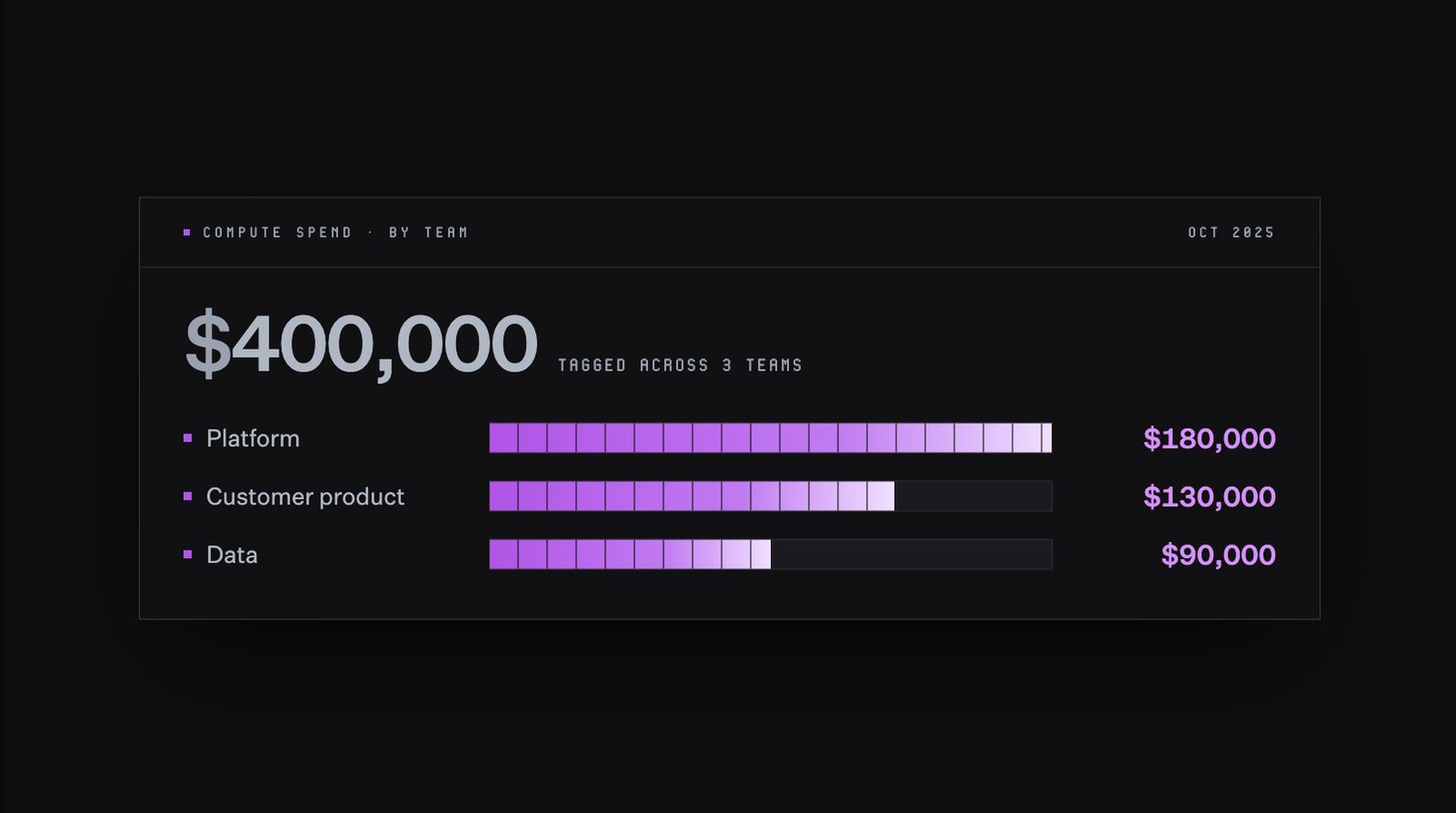
With tags in place, a single $400,000 compute bill becomes a clear breakdown by team. Each team can see what they're spending, and finance can allocate accordingly.
Chargeback and showback
This breakdown is what makes chargeback and showback models possible:
- Chargeback: The platform team's $180,000 shows up as a charge against their budget
- Showback: The team sees the number but isn't formally billed for it
Both approaches create accountability. Chargeback tends to drive faster behavior change, since there's a real budget consequence.
Take the $400,000 compute bill again. With environment tags in place, a team can see their staging environment alone costs $12,000 a month. That visibility makes inefficiencies, like test instances running overnight, easy to spot and fix. Without tags, that cost stays hidden in the broader total.
Resource governance
Resource governance means knowing what exists in your cloud environment, who owns it, and whether it still needs to be there.
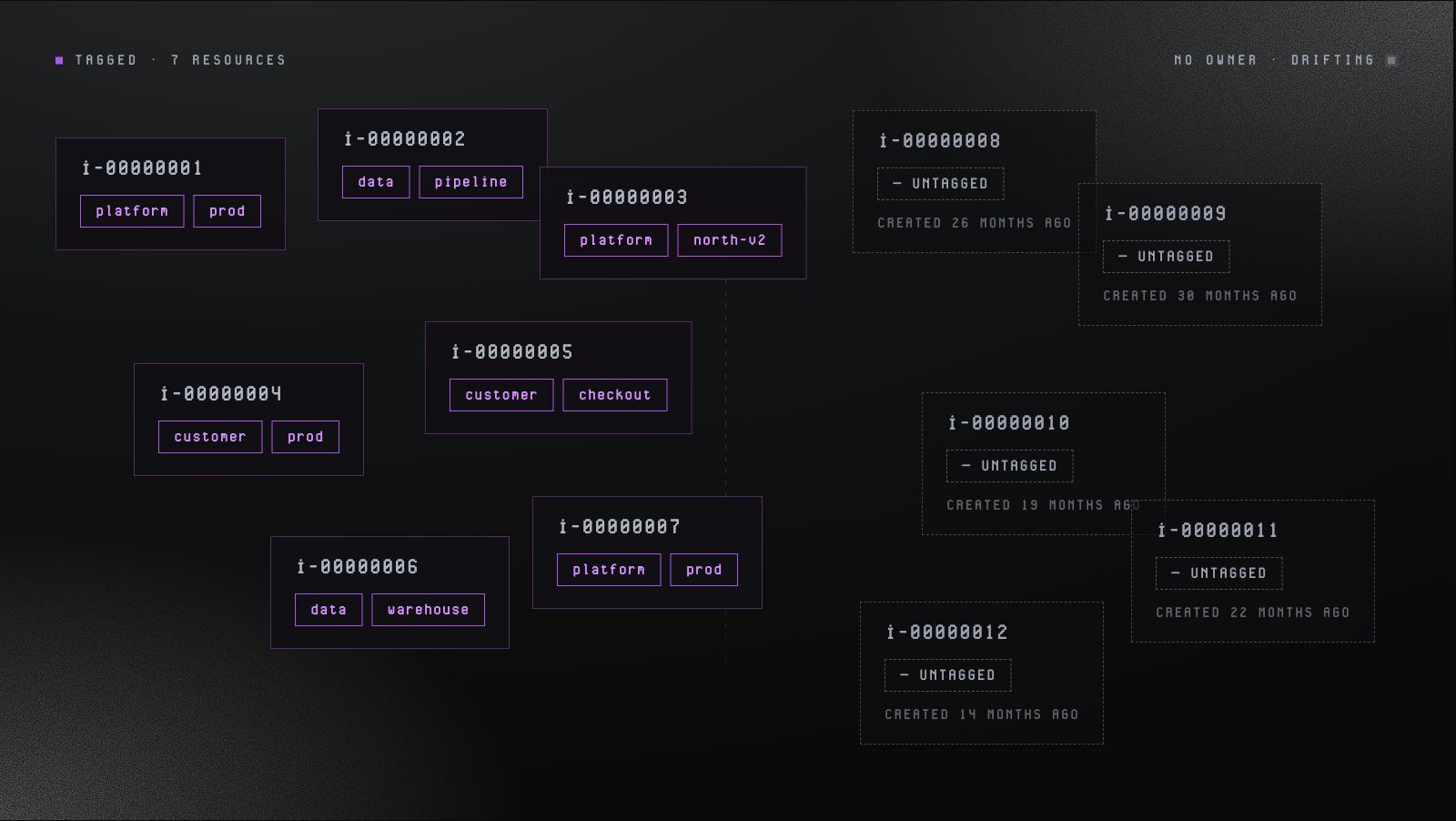
A visual representation of how orphaned resources accumulate over time. The seven tagged resources on the left have clear ownership and purpose, while the five untagged resources on the right have been running for over a year without anyone to claim them.
This sounds straightforward. It's actually one of the most common places cloud spend quietly grows.
Here's a pattern that plays out at almost every growing organization:
- An engineer spins up a database for a short-term experiment
- The experiment ends, but the database keeps running
- The engineer moves to a different team
- A year later, no one remembers the database exists
The database keeps accruing storage and backup costs, even though no one is using it. These are sometimes called orphaned or ghost resources. They can quietly add up to a meaningful share of total spend.
Tags help prevent this. When every resource carries an owner tag and a project tag, you can:
- Run regular audits to flag resources whose owner has left the team
- Identify resources tied to projects that have wrapped up
- Automate cleanup policies, like flagging any resource tagged Environment:dev that hasn't been touched in 30 days
Otherwise, this kind of governance means manual archaeology: checking creation dates, tracing IAM roles, asking around in Slack to see if anyone remembers who built what. With consistent tags, it becomes a routine report.
Security policy and compliance
Tags can carry classifications that drive access controls, compliance rules, and network policies.
For example:
- A resource tagged “DataClassification: PII” might be restricted to specific IAM roles, encrypted with a designated key, and excluded from certain network paths
- A resource tagged “Compliance: HIPAA” might require additional logging and retention
This matters because security policy works best when it's automated and applied consistently. Manually checking every new resource against a checklist doesn't scale. Tag-based policies do.
They apply the moment a resource is provisioned and stay in effect for as long as the tag does.
A practical example: a fintech company might require any resource tagged “Environment: production” and “DataClassification: customer-financial” to live in a specific VPC, use approved encryption keys, and stay off public networks. The policy engine handles enforcement. Tags tell it which resources are in scope.
Operational visibility
When something breaks or a cost spike appears, tags are how you trace it back to something actionable.
It’s helpful to compare two versions of the same alert:
- Without tags: “EC2 spend is up 40% this week”
- With tags: "EC2 spend in “Team: data, Project: ml-training” is up 40% this week"
The second version tells you exactly where to look and who to talk to.
This is sometimes called blast radius analysis: understanding the scope of a problem and which parts of the org are affected.
Say an engineer accidentally deploys a database to the wrong region, one with higher costs. If that database is tagged, you can see immediately which project it belongs to, which team owns it, and who to talk to.
Without that context, the same investigation looks different:
- Digging through deployment logs
- Checking with multiple teams
- Piecing together a timeline from scratch
The pattern holds across all four capabilities. Tags turn ambiguous data into something a person can act on.
Cloud tagging best practices, if you're doing it manually
If you're building or fixing a tagging practice, here's what works.
1. Define your taxonomy before you touch a resource
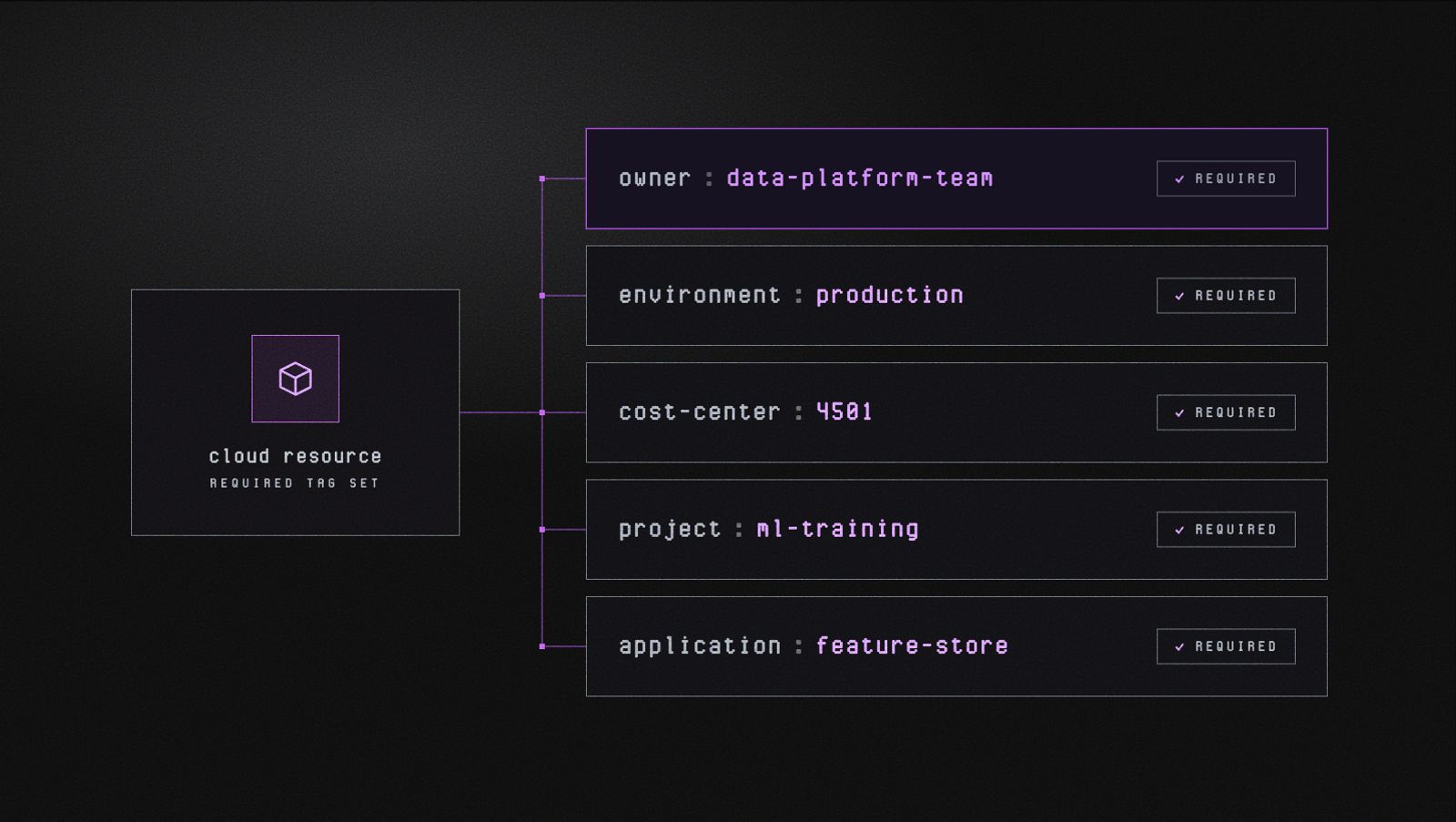
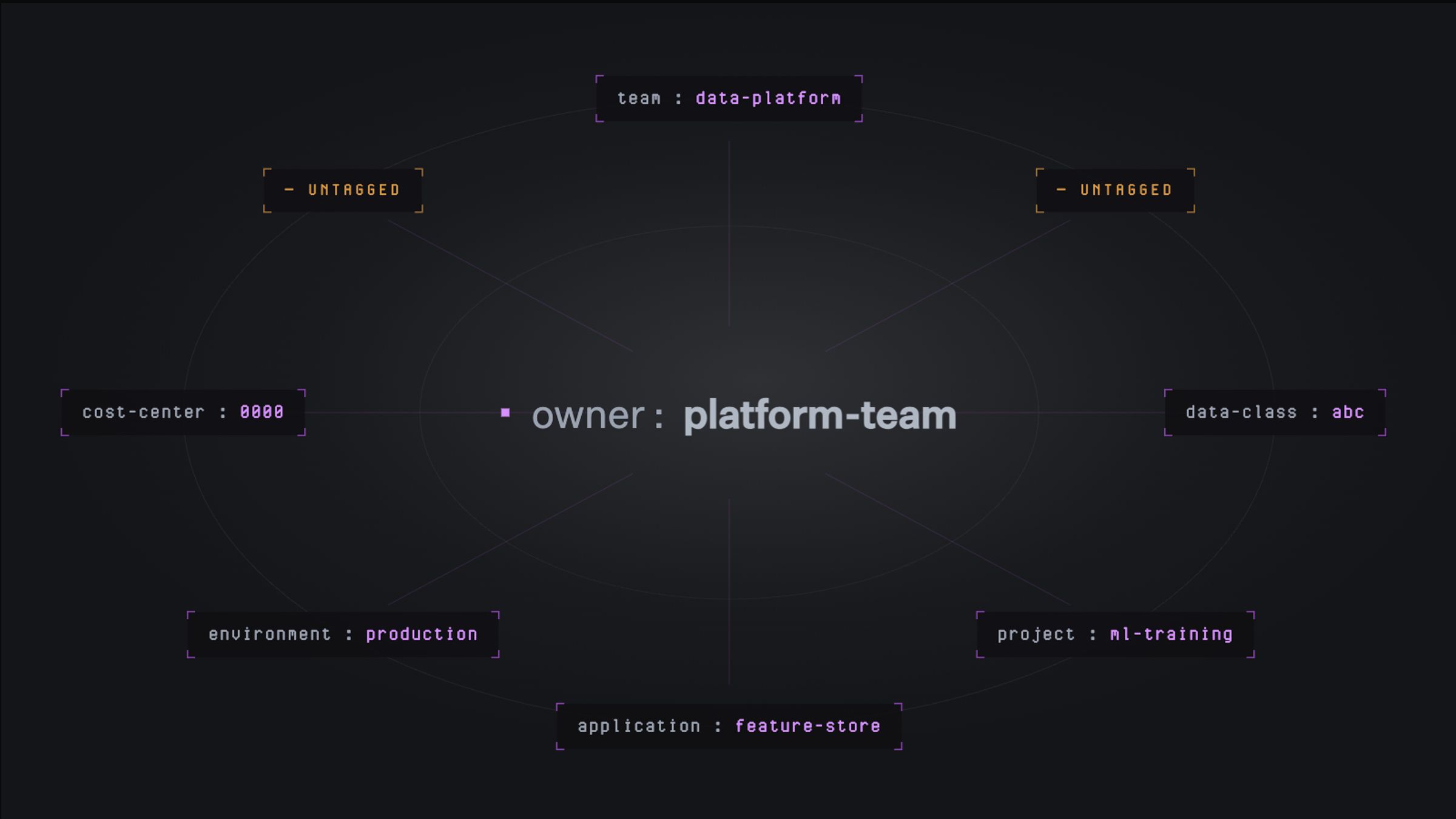
A required minimum tag set defines the baseline metadata every resource must carry before it can be deployed. Owner, environment, cost-center, project, and application together answer the most common questions teams ask about any resource: who owns it, where it runs, who pays for it, what it supports, and what it is.
The most resilient tagging systems start with a deliberate taxonomy rather than evolving reactively. When tags get added ad hoc, teams end up with overlapping labels and inconsistent meanings that take real effort to reconcile later.
A reasonable baseline:
- Owner: the team or individual responsible for the resource
- Environment: production, staging, development, test
- CostCenter: maps to your finance chart of accounts
- Project: the initiative or product this resource supports
- Application: the specific service or app within a project
Involve finance, engineering, and operations in this decision. A taxonomy that works for all three is far more useful than one shaped by a single team's needs.
2. Standardize naming conventions and document them
Pick a casing convention (lowercase with hyphens, capitalized words run together, etc.) and enforce it everywhere. The specific choice matters less than the consistency.
north-cloud, NorthCloud, and northcloud are three different tags that won't aggregate correctly.
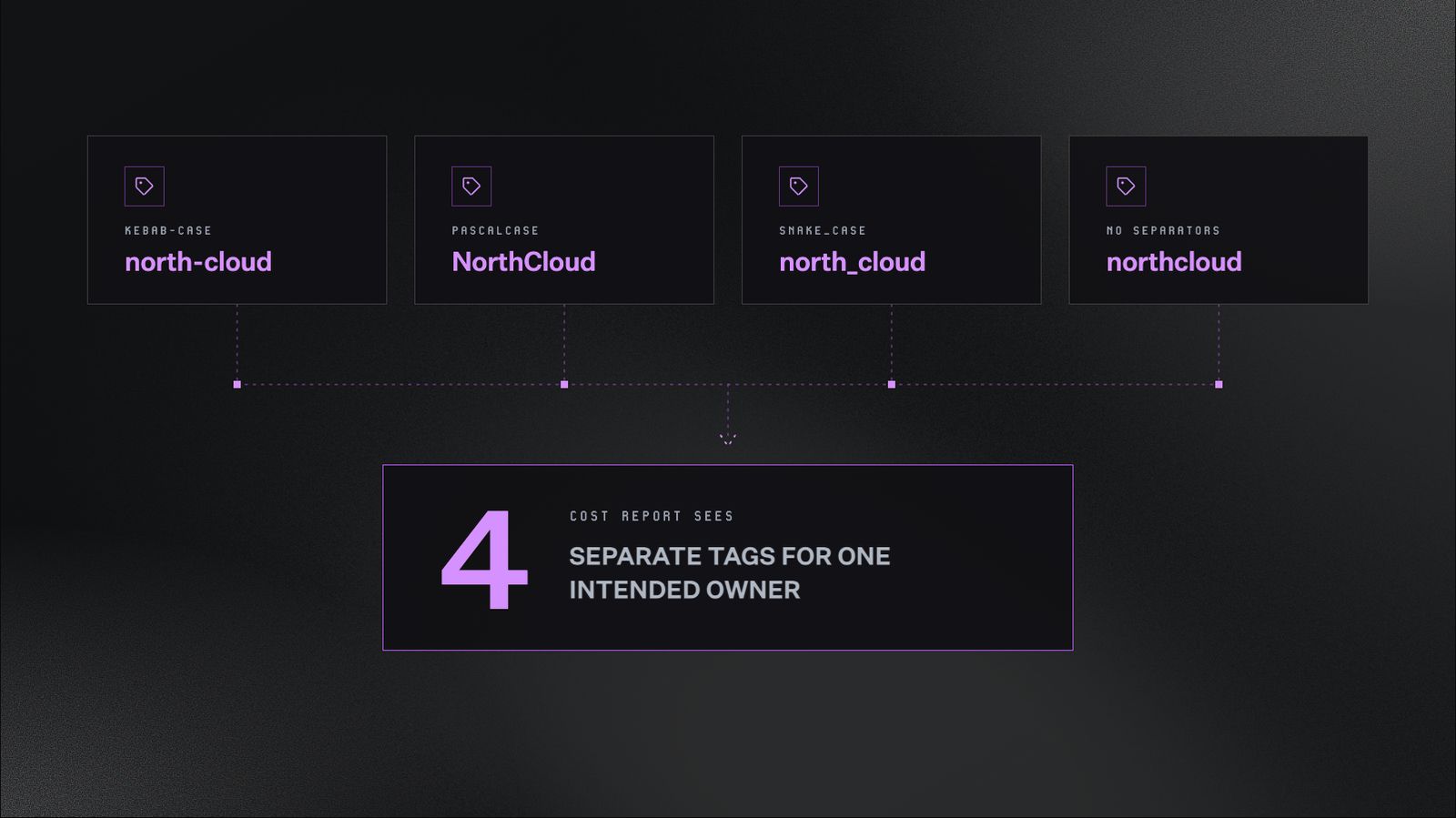
The same value, four different casings, four different tags. Cloud providers treat each variation as a distinct entity, so a report grouped by tag splits the spend across all four instead of aggregating it together.
Avoid abbreviations that only one team understands. mktg-q3-prj makes sense to whoever created it, but anyone else looking at a cost report has to guess.
Write the schema down somewhere discoverable, like a pinned Slack message or a GitHub README. That way, a newly hired engineer has a stylebook to follow instead of guessing.
3. Enforce tags at provisioning, not after
Enforcement works best at provisioning time. Making untagged resources impossible to deploy is what keeps tagging consistent as the organization grows.
Two complementary layers work well together:
- Infrastructure-as-code: Tools like Terraform, Pulumi, and AWS CloudFormation read configuration files and provision resources accordingly. You can require certain tags before a resource will deploy. If an engineer writes a Terraform file for a new database without an Owner tag, the deployment fails before anything is created.
- Cloud-native policy enforcement: Built-in policy tools from each provider act as guardrails on top of whatever provisioning method is being used. They block resources that are missing required tags, even if someone bypasses infrastructure-as-code and provisions through the console or CLI directly.
Each major provider offers its own version:
- AWS: Tag Policies via AWS Organizations, combined Service Control Policies
- Azure: Azure Policy with deny effects at subscription or management group level
- GCP: Organization Policies with custom constraints on label requirements
"Tag or it won't deploy" sounds strict, but it's one of the few approaches that holds up at scale. By the time a missing tag shows up in a report, the resource is often already part of weeks of cost data that's hard to reconstruct.
4. Audit and remediate on a schedule
Tag drift is inevitable without active maintenance. A regular review cycle helps prevent drift from accumulating:
- Schedule monthly tag coverage reports to flag untagged and mistagged resources before they accumulate
- Assign specific ownership for fixing them, since work without a clear owner often slips through the cracks
- Aim for 95%+ coverage on required tags as your baseline
Below that threshold, reports tend to show meaningful gaps. Above it, you're usually catching exceptions rather than systemic issues.
5. Tag for business outcomes, not just for accounting
A tagging taxonomy built around the finance org chart closes the books neatly. It often falls short when teams ask product-level questions, like:
- How much does this feature cost to run?
- What's our infrastructure cost per customer?
- Which product line has the best unit economics?
- Is this customer segment more expensive to serve than others?
Adding tags that map to products, features, or customer segments makes those questions answerable. A few examples:
- Product: checkout alongside CostCenter: engineering
- Feature: ml-recommendations alongside Team: data
- CustomerTier: enterprise alongside Environment: production
These outcome-oriented tags often surface insights pure cost-center reporting can't. A single feature might quietly consume more resources than its owning team realizes. A customer segment might run at a thinner margin than the high-level numbers suggest.
Most mature organizations use both kinds of tags together: standard accounting tags as a baseline, with outcome-oriented tags layered on top where product-level visibility matters most.
The takeaway: accounting tags (Owner, Environment, CostCenter, Project, Application) tell you who spent what. Outcome-oriented tags tell you what that spending is producing.
A different approach: cost attribution without tagging
Tagging is still the most common foundation for cloud cost attribution, but it's not the only one.
A growing number of teams use cloud cost management platforms that attribute spend without depending on complete or consistent tag coverage.
This approach is worth understanding whether you're actively considering it, evaluating whether your current tagging practice is enough, or just trying to make sense of where the space is heading.
How it works
Cloud providers already expose a lot of metadata about every resource, including region, service type, operation type, and account.
Tags add more metadata on top when they're applied. But they're one input among many, not the foundation.
North is a cloud cost management platform built specifically to turn that metadata into actionable cost attribution. It can:
- Pull billing data from all your cloud providers automatically
- Normalize that data into a single, queryable view
- Group spend by any available dimension, including account, region, service, project, environment, team, or tag if it exists
- Drill down to the individual resource or job level, not just the aggregate billing line
Within North, Coststreams ingests cost data across all your cloud providers. Teams can define top-level groupings, called business units, that allocate spend based on whatever combination of attributes makes sense.
Each business unit can have its own budget, its own owners, and its own dashboard view. Tags become one dimension among many, not the foundation the system depends on.
Coststreams also includes lighter-weight features for analytical work:
- CostLabels for visual grouping across business units
- Cost Units for connecting cloud spend to business metrics, like cost per customer or cost per click
Two related features round out the picture:
Together, these tools handle the kind of investigation tagging alone would struggle with.
A practical example: Tracking down a cost spike
Let’s say your team notices unusual cost activity in a development environment. Month-to-date spend is sitting close to production, which shouldn't happen.
Production runs customer-facing workloads at full throttle. Dev environments are where engineers build and iterate, so they should cost a small fraction of production.
Some of that dev cost might be expected. AI training workloads often run in dev, and a team might know they're spending several thousand dollars a month on training. But one service stands out beyond that: an unusually large cost in something like Glue, a managed data integration service.
To investigate, you open North and navigate to Coststreams. Here's how it plays out.
Step 1: Flag the anomaly
In the Coststreams dashboard, dev environment costs sit alongside production and test, broken down by service. When dev starts tracking close to production, that's the signal to investigate.
You switch to Anomalies to pinpoint exactly when and where it started. This view surfaces every cost spike with timestamps, severity ratings, and the affected service.
Here, you see the largest spike: a $401.72 jump, a 1,324% deviation, on April 9, 2026, tied to a Glue ETL job in the AI/ML cohort. That's the thread to pull on.
Step 2: Drill down to the resource
Inside Anomalies, you click into the specific anomaly to see the full pattern at the resource level. The panel reveals:
- The exact job driving the cost
- The severity rating
- The number of spikes detected over time
- The largest single change
This is a level of detail tag-based attribution typically can't reach. Not just "this service is expensive this month," but the specific job, the specific time window, and how the pattern has played out over weeks or months.
Step 3: Ask Noros to explain the spike
Once you've identified the anomaly, the next step is understanding why it happened. Open Noros and paste in the resource identifier. A simple prompt is enough:
"Can you tell me why this anomaly happened and how to resolve it?"
Noros pulls in the relevant anomaly data, analyzes the cost pattern, and surfaces what's driving the spike. In this case, it identifies that the Glue job is part of a broader pattern, related anomalies across other resources, each with its own cost impact and severity rating.
Step 4: Get a resolution plan you can act on
Noros lays out the most likely root causes, ranked by probability:
- A sudden data volume surge
- A misconfigured DPU allocation
- A backfill or reprocessing run
- Inefficient job logic
Alongside these, it provides immediate actions:
- Review job metrics for the affected date
- Verify the input data size
- Check whether the job configuration is over-provisioned
And longer-term optimization steps, like enabling job bookmarking to avoid reprocessing, partitioning data to limit scan scope, or switching to a more cost-efficient runtime configuration.
What would otherwise take an engineer hours to piece together, tracing relationships between resources, reviewing historical patterns, figuring out what to do, is condensed into a single conversation. Ready to send directly to the team responsible.
What made this possible
The investigation inside Coststreams takes roughly two minutes from spotting the anomaly to having a resolution plan.
Without it, the same analysis might take an engineer two to four hours, assuming they already have access to all the underlying data. For someone less involved in the architecture, like an executive, surfacing the issue at all might not be possible without significant help.
This is what cost attribution looks like when it's grounded in resource-level metadata rather than tag coverage. The dev environment didn't need a comprehensive tagging policy. Provider-level metadata, account structure, and resource naming were enough to reach the right answer in minutes.
Where this approach fits
This kind of tooling is most valuable for:
- Fast-scaling engineering orgs that don't have the bandwidth to build and maintain a tagging discipline from scratch
- Companies with significant legacy infrastructure, where retroactive tag remediation would take years
- Multi-cloud environments, where maintaining three separate tagging systems is genuinely hard to justify
- Teams that have invested in tagging and found the discipline required to sustain it is closer to a full-time job than a background process
It's worth being clear about what this approach isn't. It doesn't make tagging useless. Tags remain a valid dimension to split by, and teams with strong tagging practices can use them alongside other attributes.
What changes is that tagging is no longer load-bearing. Cost attribution becomes meaningful before tag coverage is complete, and stays meaningful even when tag coverage drifts.
Get started with cloud tagging today
Cloud tagging is foundational to understanding where your cloud spend goes, and why.
Done well, it gives finance, engineering, and leadership a shared view of how the business runs.
Ready to bring that clarity to your own cloud bill? Start with the basics:
- Define a minimum tag set
- Agree on a naming convention
- Enforce it at provisioning
From there, regular audits and outcome-oriented tags will sharpen the picture over time.
And when tagging alone hits its limits, North's Coststreams can attribute spend across your cloud providers without depending on perfect coverage.
Explore North’s free tier to see what your cost data looks like with resource-level visibility from day one.
FAQs
Answers to common questions about the product or feature covered in this post.
What is cloud tagging?
Cloud tagging is the practice of attaching key-value metadata labels to cloud resources. This lets you group, filter, and attribute costs along dimensions that reflect how your business operates.
A tag like Team: platform or Environment: production adds business context that raw billing data lacks. It makes it possible to answer who owns a resource, what project it supports, and which budget should cover it.
Why is cloud tagging important?
Tagging turns an opaque cloud bill into something actionable.
Without it, you can see total spend by service. You can't tell which team drove a cost spike, which project is over budget, or which resources have sat idle for months.
Tagging enables:
- Cost allocation
- Chargeback and showback models
- Resource governance
- Compliance enforcement
- Operational troubleshooting
What is the difference between mandatory and optional tags?
Mandatory tags are enforced at provisioning time. A resource can't be deployed without them. These typically cover owner, environment, cost center, and project.
Optional tags add useful context that isn't required for every resource, like feature name, customer tier, or data classification.
The distinction matters: mandatory tags ensure a baseline of visibility across the entire environment. Optional tags let teams layer on detail where it's most valuable.
How should you handle tagging across multiple cloud providers?
Each provider uses different terminology, limits, and governance tools:
- AWS calls them tags; GCP separates labels from tags
- AWS and Azure allow 50 tags per resource; GCP allows 64 labels
- Governance enforcement is configured separately in each provider's policy engine
The practical approach is to define a single tagging taxonomy at the organizational level, then map it to each provider's conventions. Expect some adaptation rather than one unified system.
Can North attribute spend across AWS, Azure, and GCP?
Yes. North normalizes billing data from all three major cloud providers into a single, queryable view.
That means you can group and compare spend across providers using the same dimensions, rather than reconciling separate bills manually.
Can you track cloud costs without tagging?
Yes. Cloud providers expose metadata like region, account, service type, and operation type for every resource, regardless of whether tags exist.
Platforms like North's Coststreams use this full range of metadata to attribute spend without depending on complete tag coverage.
Tags become one input among many, not the sole foundation. Cost visibility doesn't break when tagging is inconsistent or incomplete.
How does Noros help with cost anomalies?
Noros is North's AI FinOps agent. When a cost spike appears, you can ask Noros to explain what's driving it in plain language.
Noros analyzes the anomaly, ranks likely root causes by probability, and lays out immediate and longer-term actions you can act on right away.