-
11 min read
Cloud commitment strategy: How to ladder savings without the lock-in

TL;DR
- A cloud commitment strategy defines how much usage to cover and when to adjust it.
- Commit against stable baseline usage, then add coverage in smaller monthly increments.
- Match flexible commitments to changing workloads and narrower options to stable usage.
- North.cloud’s Flexbot provides three-year commitment rates with month-to-month flexibility as usage changes.
- North’s Autobot builds an adaptive commitment ladder through automated monthly purchasing, keeping coverage aligned as infrastructure and spend evolve.
The major hyperscalers offer cloud commitments that can reduce compute costs by 65% or more. Still, many teams leave those savings untouched because the purchase requires a forecast that may not hold.
Infrastructure rarely follows a fixed plan for three years. Workloads grow, migrate, or shut down. A commitment that fits today can become unused commitments later.
A cloud commitment strategy creates a repeatable way to manage that trade-off. It defines how much coverage to buy, which terms to use, and when to adjust the portfolio.
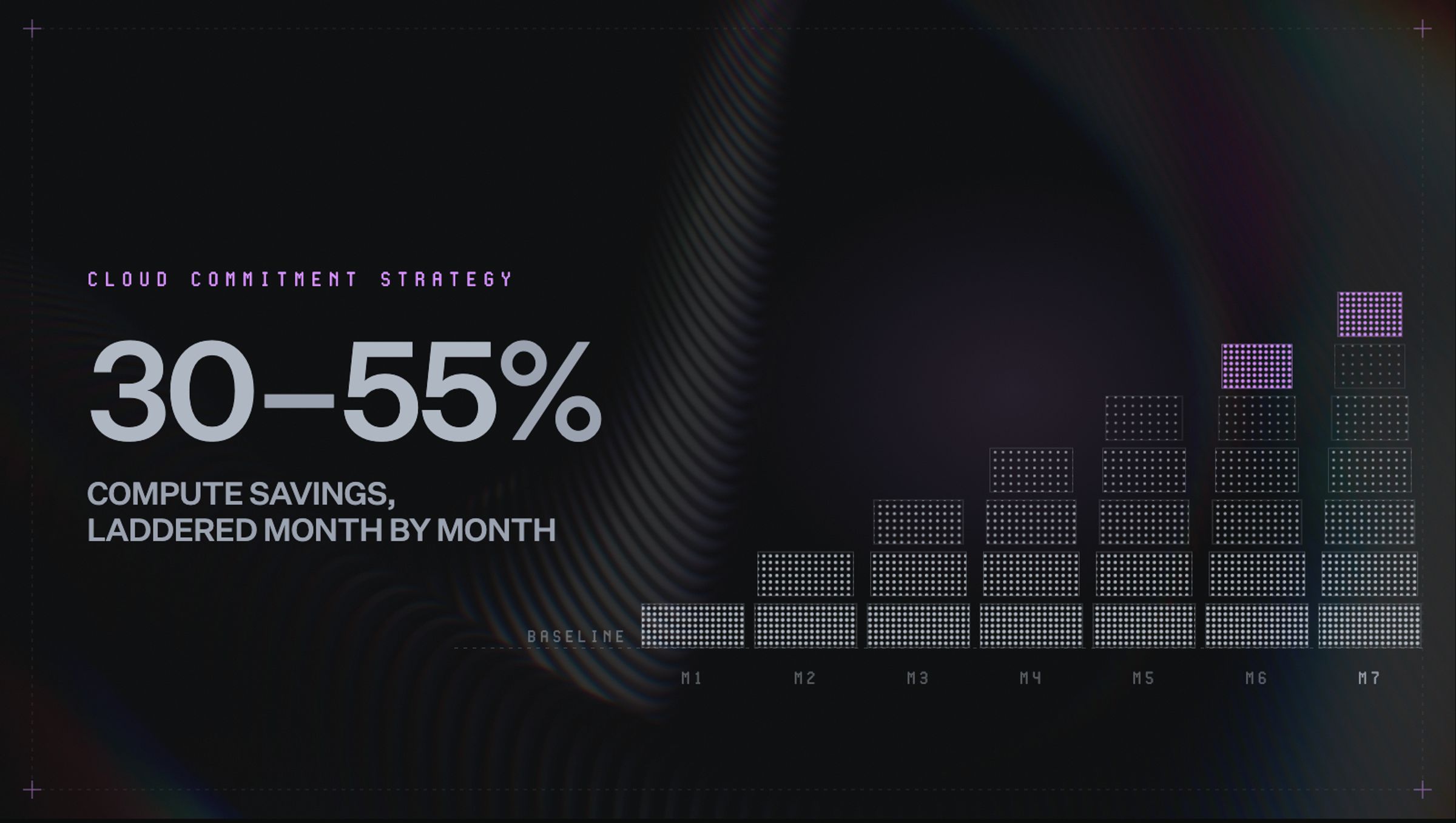
Commitment laddering makes that strategy more flexible. Instead of making one large purchase, teams add smaller increments over time. Each new layer reflects more recent usage and creates another opportunity to change course.
This guide explains how to model baseline demand, choose commitment types, and build a commitment ladder. It also covers how automation keeps that strategy aligned as infrastructure changes.
What is a cloud commitment strategy?
A cloud commitment strategy is a structured plan for buying discounted cloud capacity. It answers four practical questions:
- How much eligible usage should be covered?
- Which term lengths fit each workload?
- Which services should be included?
- How often should coverage be reviewed and adjusted?
The goal is not to commit as much spend as possible. Rather, it’s to capture meaningful savings while preserving enough flexibility for the environment to change.
Cloud providers reward predictable usage with lower rates. Deeper discounts usually come with longer terms or tighter service constraints, which can raise the cost of a bad forecast.
That is the central challenge. Teams need enough coverage to reduce on-demand spend, but not so much that migrations, shutdowns, or changing demand leave commitments unused.
A sound strategy treats commitments as an active portfolio rather than a one-time purchase. On top of that, consistent adjustments help keep coverage aligned as infrastructure changes.
Commitment options across AWS, GCP, and Azure
Each cloud provider offers discounts for predictable usage, but the commitment structure differs.
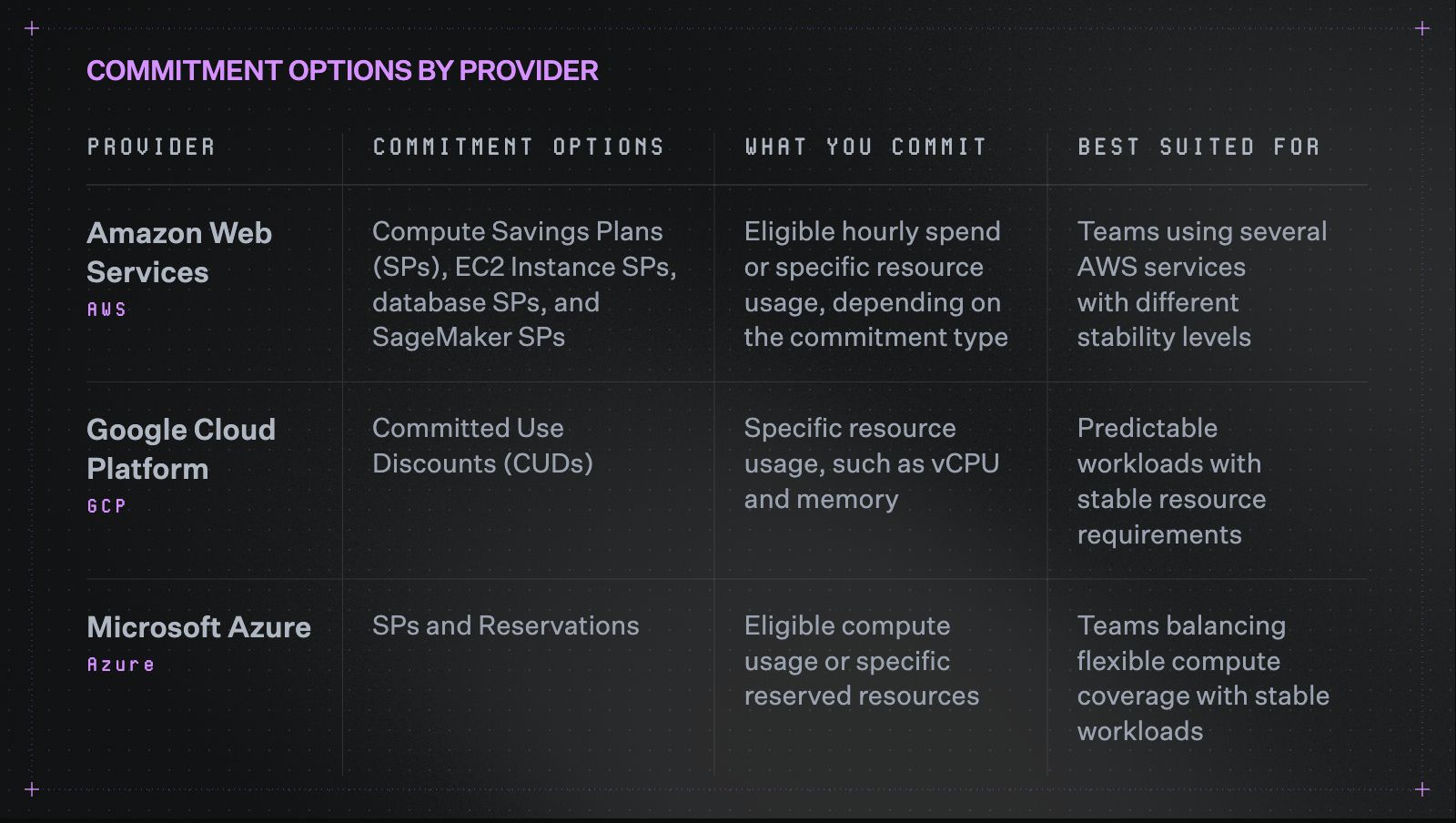
Each provider structures commitments differently, even when the discount looks similar.
These distinctions matter most when choosing between providers:
- AWS: Offers the broadest range of commitment types. Flexible SPs support changing compute usage, while narrower options suit stable workloads.
- GCP: Structures many commitments around resource quantities, such as vCPU and memory, rather than hourly spend.
- Azure: Offers flexible compute SPs alongside more specific Reservations for stable resources.
The right option depends less on the highest advertised discount and more on how stable the workload remains.
Where most commitment strategies leave gaps
Most teams understand how commitment discounts work. However, building a strategy that keeps pace with changing infrastructure is harder.
These four patterns explain where even well-intentioned approaches lose ground.
Why teams hesitate
Teams default to on-demand pricing for a straightforward reason. Overcommitting feels riskier than paying a higher rate. This is because when infrastructure shifts, a commitment that fit last quarter can quickly become dead weight. That preference for flexibility is understandable.
Yet the cost of staying fully on-demand accumulates over time. Eligible usage continues running at standard rates each month the coverage gap remains open.
Infrequent reviews leave workloads uncovered
Usage shifts faster than a 90-day cycle can track, which leaves coverage gaps open for full billing cycles.
Take a workload that reaches steady state in March, well ahead of any scheduled check. It still runs at on-demand rates through April and May, since the next review isn't scheduled until June.
The delay is a matter of timing, and it grows harder to manage as environments scale.
Large one-time purchases create uneven coverage
Some teams buy one large commitment each year, usually triggered by a budget cycle rather than a usage review. That purchase matches whatever usage looked like on that one day, which is why coverage looks strong right afterward.
Cloud environments do not hold still, though. Six months later, workloads have shifted while the commitment has not, so utilization drops and effective savings erode with it.
Non-compute services get overlooked
Compute usually gets the most attention in a commitment strategy since it tends to carry the largest share of spend. That focus makes sense on the surface, but it leaves a blind spot.
Database and machine learning services often qualify for their own commitment discounts, yet they rarely make it into the plan. Skipping them means part of the environment keeps paying standard rates for no real reason.
The building blocks of a sound cloud commitment strategy
A sound cloud commitment strategy starts with stable usage, then builds coverage around how that usage may change.
These five steps will guide you through what to commit, when to buy, and where to preserve flexibility.
Step 1: Start with baseline modeling
Your baseline is the lowest level of demand that stays consistent over 60 to 90 days. Measure it hourly, since daily averages can hide large swings between peak and off-peak usage.
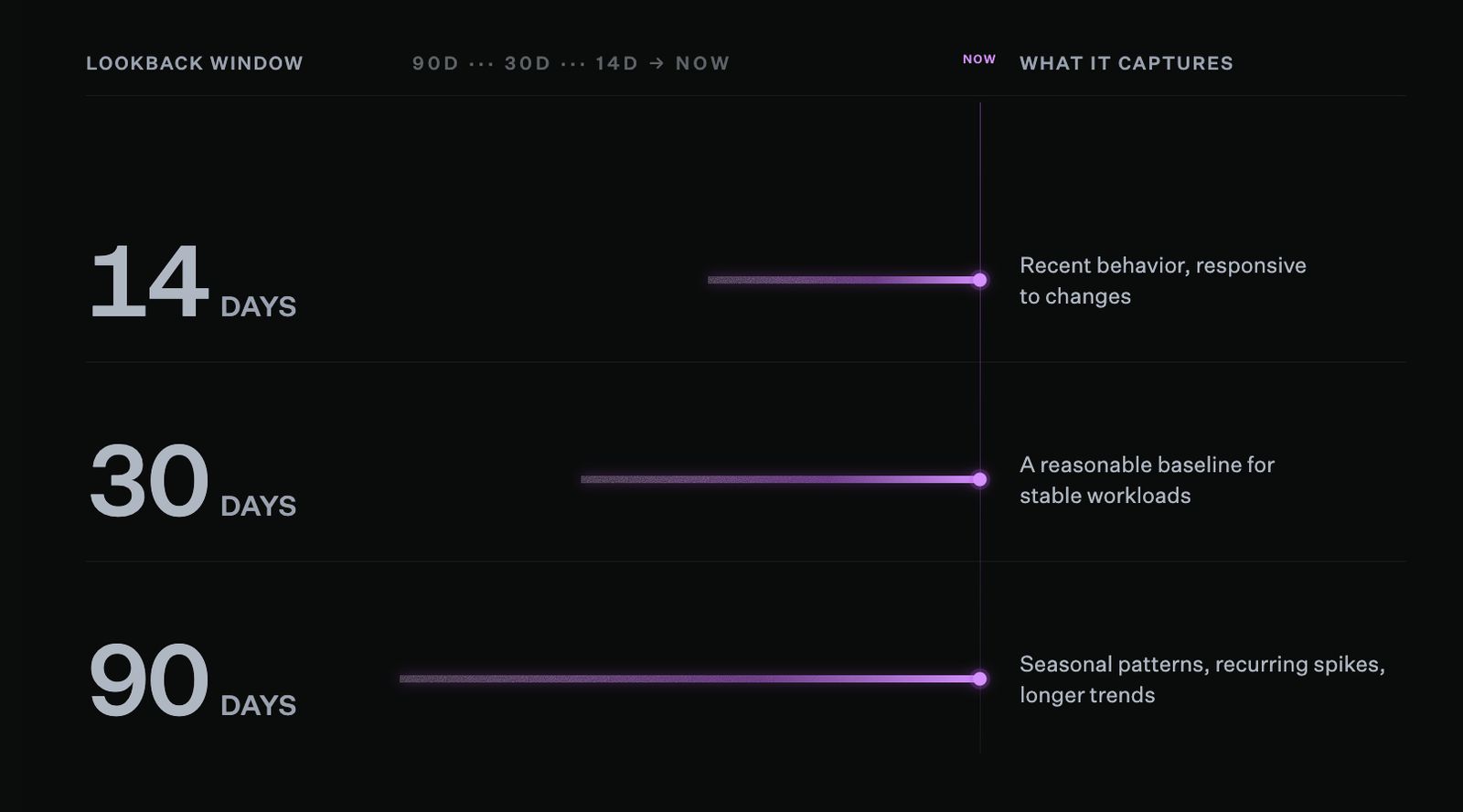
Shorter lookback windows react faster to recent changes, while longer windows reveal seasonal patterns and recurring spikes that shorter windows would miss.
To model the baseline:
- Pull hourly usage data for your top five services by spend
- Identify the lowest level of consistent usage
- Set the initial commitment at or just below that level
- Keep usage above the baseline on-demand until the next review
Think of it like staffing a store: you need a core team all day, then extra staff during busy hours. In this case, the core team is the baseline, while extra coverage (or extra staff) changes with demand.
Cloud commitments work the same way. This is why you should commit against the usage that stays consistent, and then keep variable usage at standard rates.
Keep in mind that baselines should also be revisited when workloads shut down or migrate. Otherwise, coverage tied to retired usage may remain in place longer than needed.
Step 2: Choose commitment types based on workload stability
The right commitment depends on how likely a workload is to change. Flexible options are best suited for evolving infrastructure, while narrower commitments can offer deeper savings for stable usage.
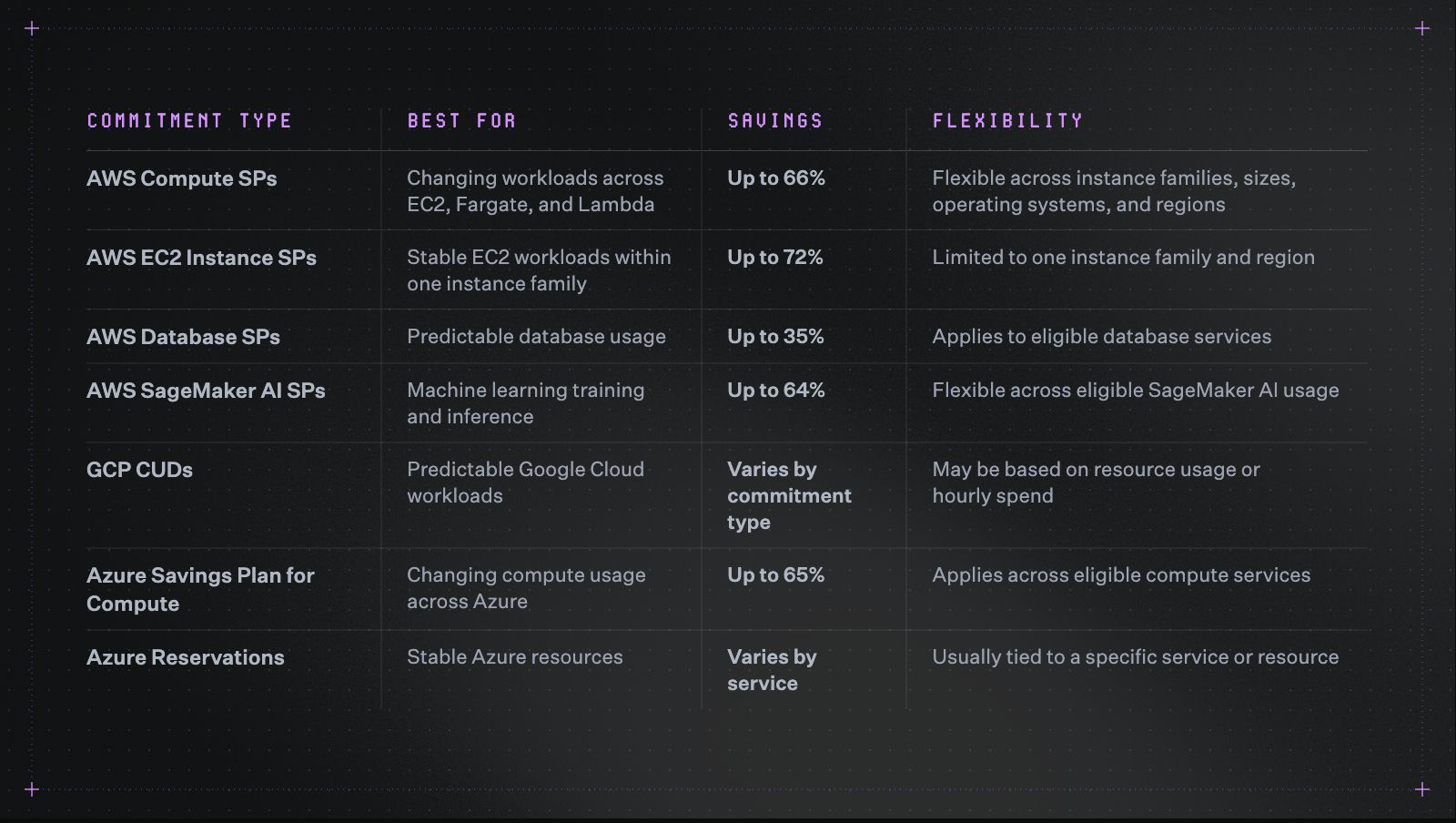
The right commitment type depends more on workload stability than the highest advertised discount.
Teams can also combine term lengths, weighing flexibility against depth of savings rather than picking one horizon for the whole portfolio. One-year commitments suit usage that may shift, while three-year terms fit workloads stable enough to hold.
The FinOps Foundation describes a 60/40 approach as one possible starting point:
- 60% of stable baseline usage in three-year commitments
- 40% in one-year commitments
That split will not fit every environment. Teams expecting migrations, product changes, or uneven growth may favor one-year coverage. The right balance depends on how predictable future usage is.
Step 3: Build commitments through monthly laddering
Buying commitments in smaller monthly increments lowers the risk of overcommitting. It also creates a rolling renewal schedule that can adjust as usage changes.
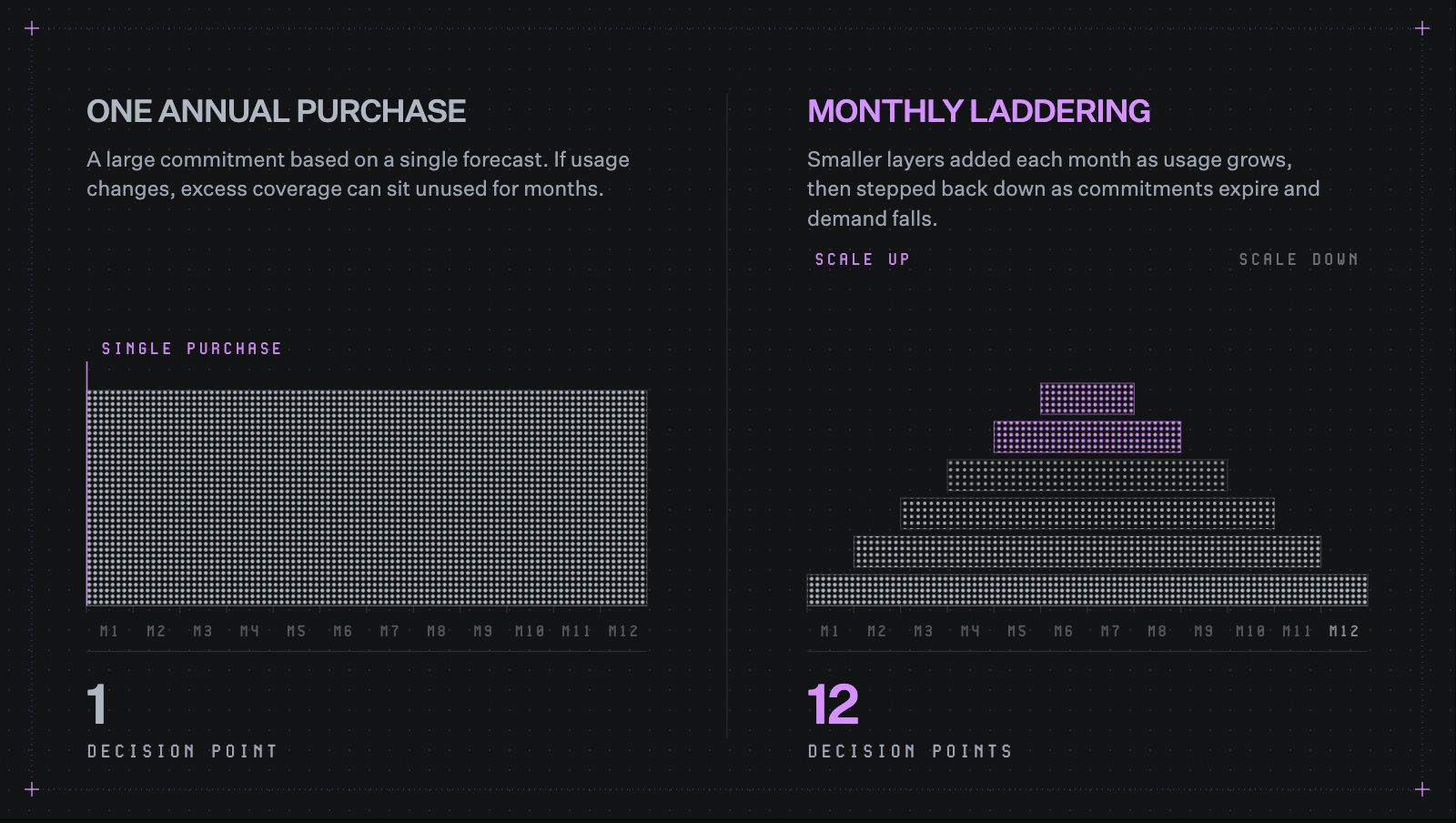
One large purchase locks in a single forecast. Laddering creates twelve chances to adjust it.
Compare the two approaches:
- One annual purchase: The team commits a large amount based on one forecast. If usage changes, excess coverage may remain for months.
- Monthly purchases: The team adds smaller amounts throughout the year. Future purchases can adjust as newer usage data becomes available.
Monthly purchasing creates 12 decision points instead of one. This makes each decision smaller and based on more recent usage.
A monthly cadence can also bring new workloads under coverage sooner. Once usage stabilizes, the next purchase can reflect that change instead of waiting for a quarterly review.
This is the logic behind commitment laddering. Instead of relying on one large purchase, teams build coverage in layers with different start and renewal dates.
Automate the ladder as it grows
North's Autobot is an autonomous commitment management engine built around monthly laddering, using machine learning to read usage patterns, renewal windows, and projected demand.
Teams set savings and flexibility goals, while Autobot purchases, renews, scales, and reduces customer-owned commitments as needs change.
As conditions change, Autobot can:
- Purchase new commitments
- Renew existing coverage
- Increase coverage as usage grows
- Reduce future purchases as demand falls
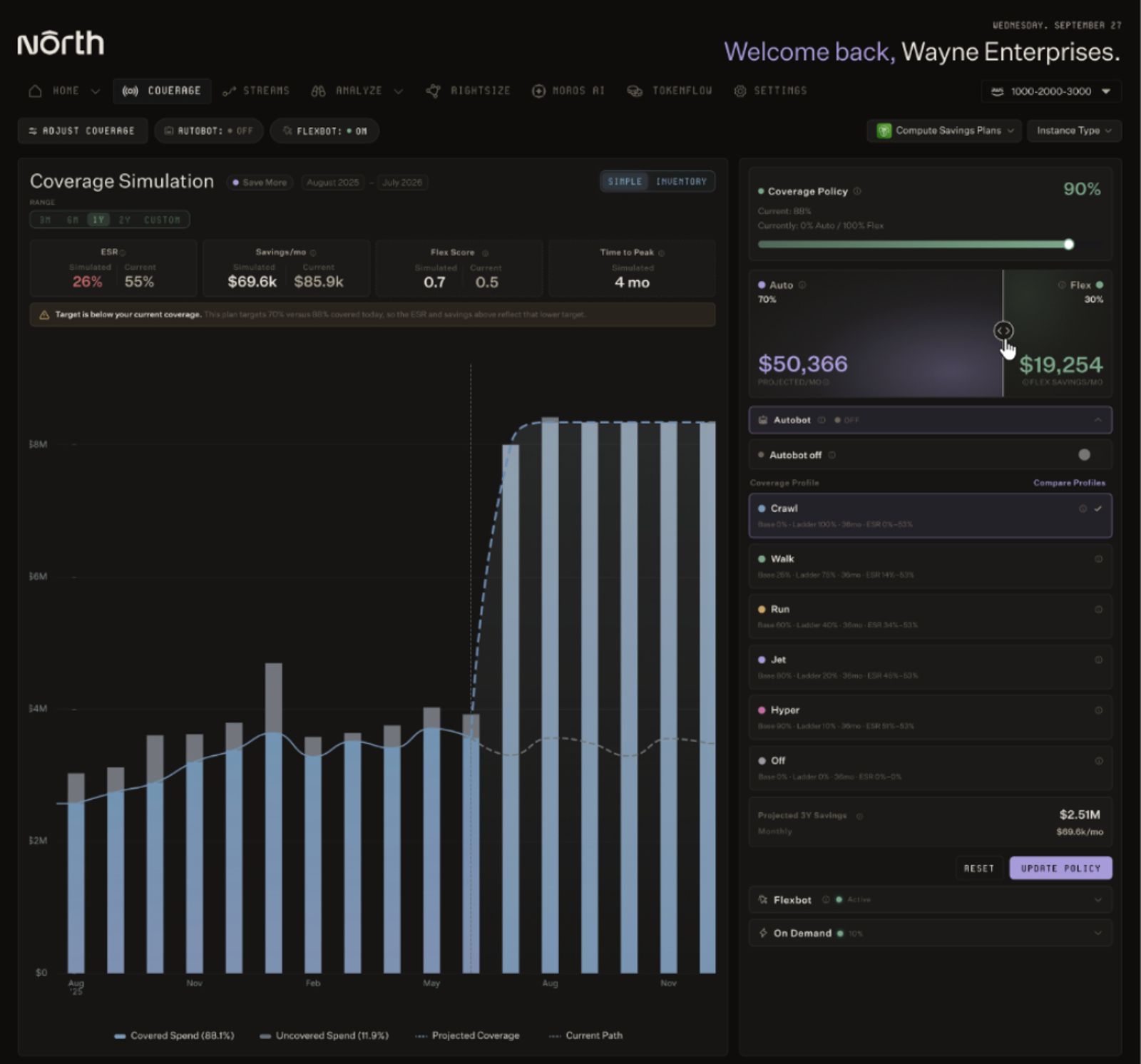
North's coverage simulation compares projected savings and time to peak savings across different commitment strategies before any changes go live.
Before anything executes, teams can run a simulation in North. It compares projected savings, time to peak savings, and available flexibility windows across different commitment strategies.
Step 4: Extend beyond compute
Commitment options can extend beyond traditional compute, since eligible database and machine learning services often support their own discount programs depending on the provider.
To expand the strategy:
- List your top five services by monthly spend
- Check which services offer commitment-based discounts
- Model the baseline for each service separately
- Start with one-year terms on stable non-compute usage
Each service may require its own baseline, term, and level of flexibility. As the portfolio expands, those differences make manual coordination harder.
Step 5: Consider adding on flexible commitments
On-demand pricing gives teams room to adjust, though eligible usage still runs at standard rates the whole time. Traditional commitments push discounts deeper, at the cost of longer terms and more exposure if usage shifts.
Some commitment models combine discounted rates with shorter adjustment windows. This creates another way to reduce on-demand spend without relying entirely on fixed, customer-held commitments.
Managing those adjustments still requires ongoing review. For engineering and DevOps teams, that work competes with maintaining infrastructure and building product.
North's Flexbot provides three-year discount rates with month-to-month flexibility and no lock-in risk, since North holds the underlying commitments.
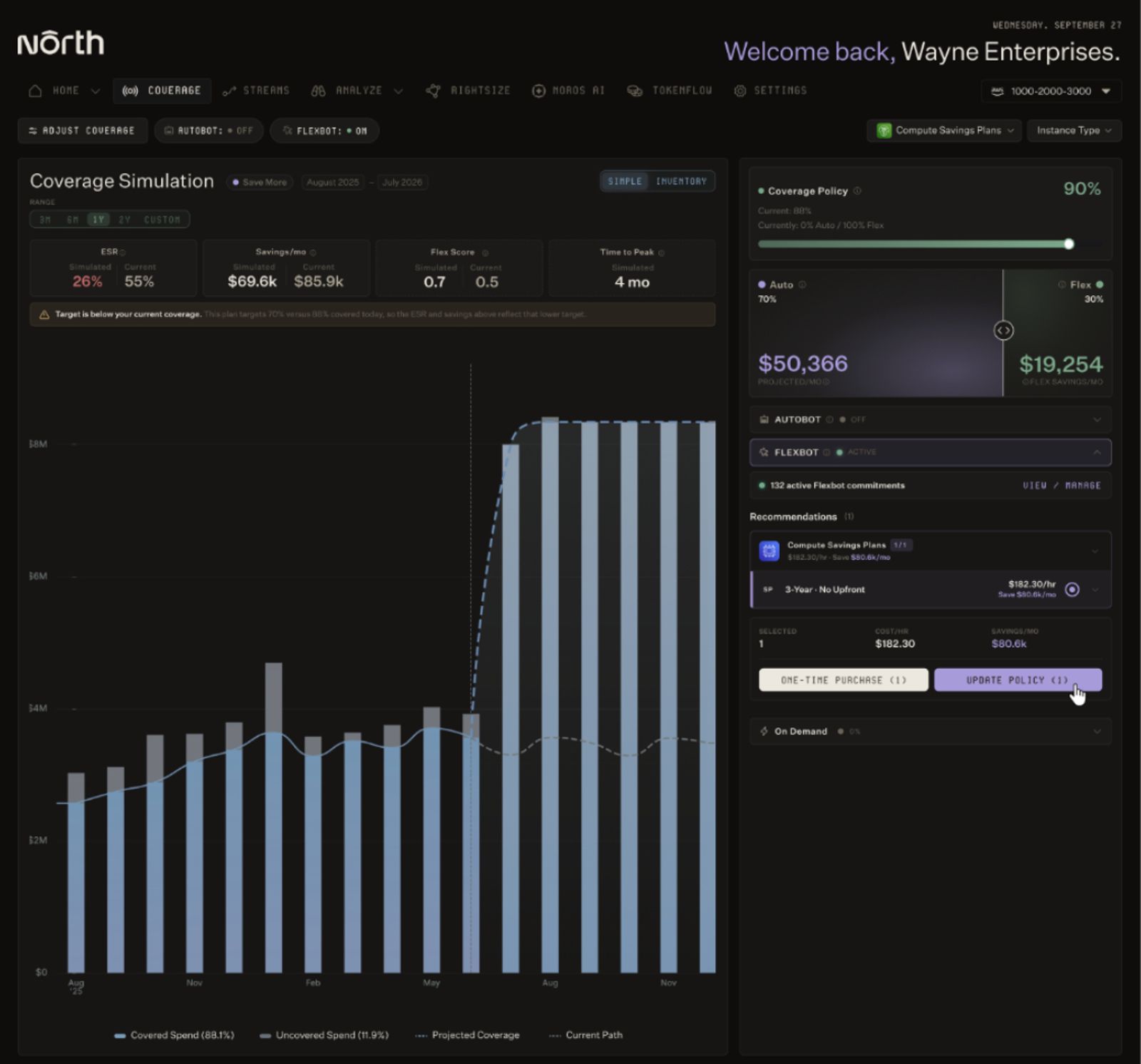
With Flexbot active, North surfaces specific commitment recommendations, like this 3-year plan projected to save $80.6k per month, without requiring the team to hold the underlying risk.
Coverage adjusts as usage changes. Flexbot can:
- Add coverage as demand grows
- Shift coverage where it is needed
- Reduce coverage as demand contracts
- Release coverage entirely, since North holds the risk instead of you
This model suits workloads that benefit from commitment pricing but still need month-to-month flexibility. Flexbot delivers average compute savings of 55% on AWS and 35% on GCP.
Match the approach to your commitment strategy
Autobot and Flexbot support different commitment needs. The right mix depends on each workload’s stability, flexibility needs, and ownership preferences.
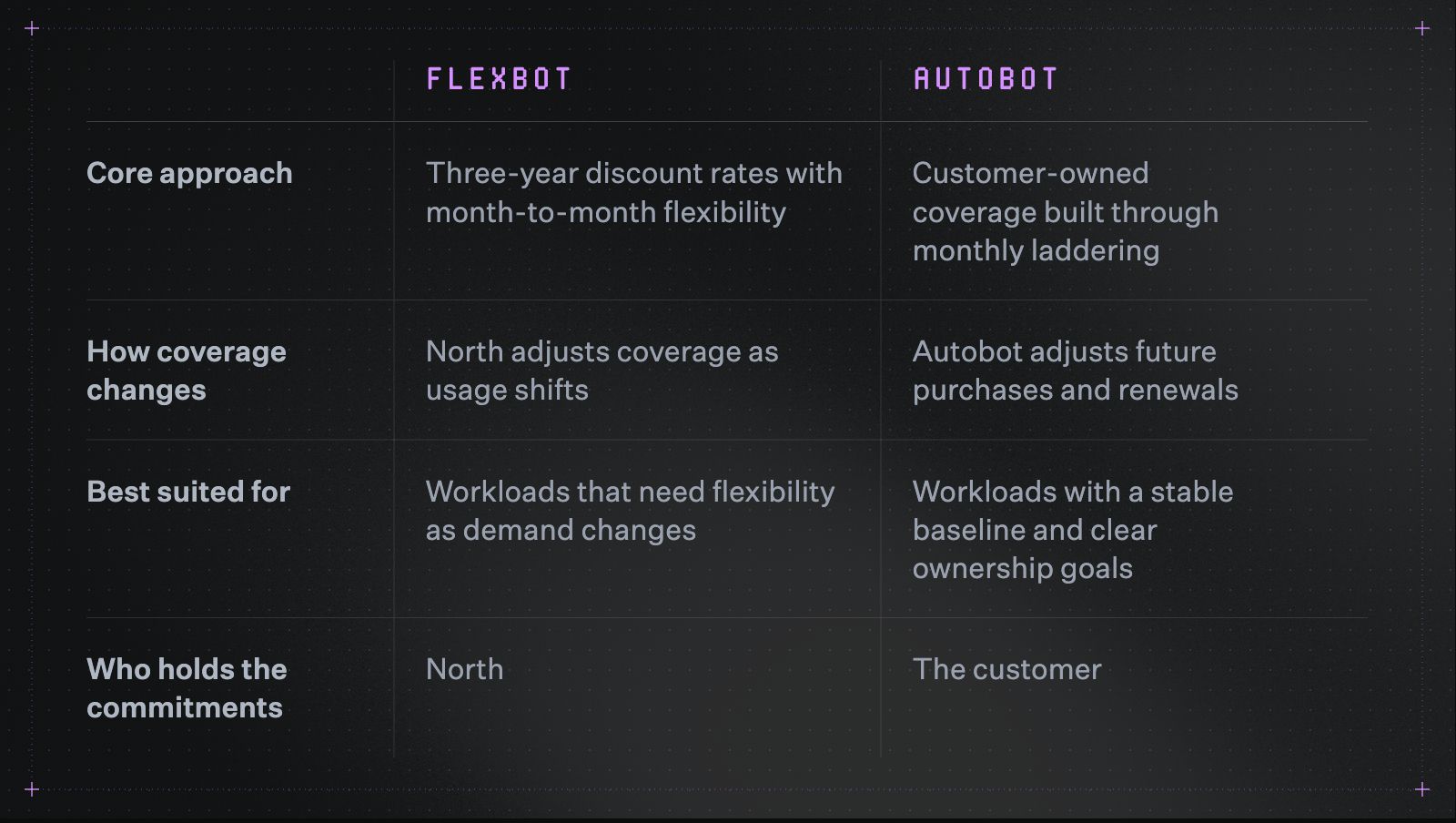
Autobot and Flexbot solve different problems. The table shows which one fits where.
Teams can use either approach or run both together. For example, Autobot can build customer-owned coverage for stable workloads, while Flexbot covers usage that needs more room to change.
North's analytics view tracks both in one place. The dashboard below shows Flex Savings and Auto Savings side by side, alongside coverage, utilization, and on-demand spend.
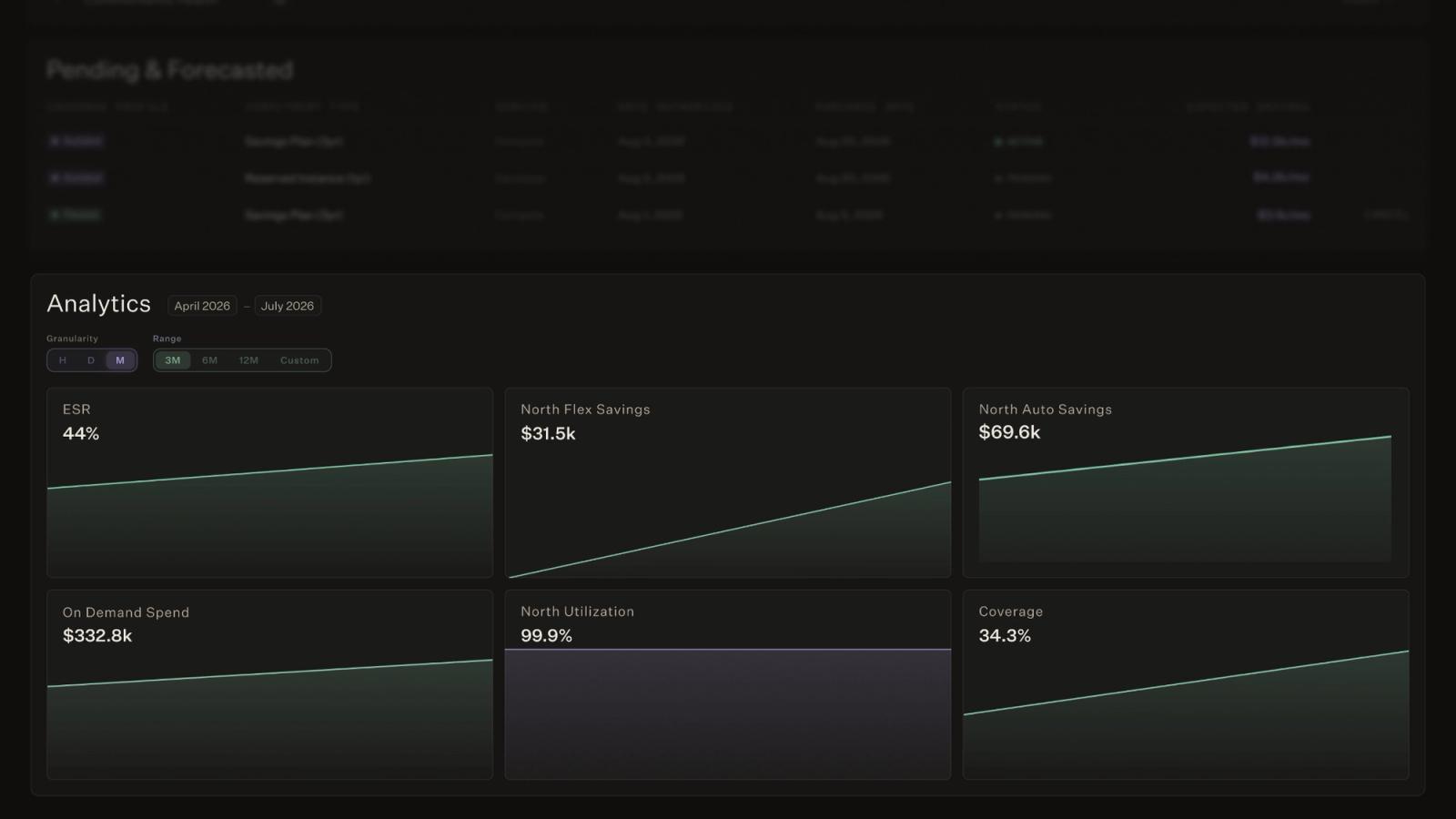
In practice, teams can track Flexbot and Autobot performance together, alongside coverage, utilization, and on-demand spend.
Build a commitment strategy that can adjust
A commitment strategy starts with a stable baseline. Its long-term value depends on how well coverage adapts as usage changes.
Monthly laddering, mixed term lengths, and service-level planning create more opportunities to adjust without relying on one large forecast.
Book a demo to see what your commitment strategy could look like with clearer coverage, lower risk, and more flexibility from day one.
FAQs
Answers to common questions about the product or feature covered in this post.
What is the difference between AWS Savings Plans and Reserved Instances?
AWS Savings Plans (SPs) apply discounts to a set level of eligible hourly spend. Compute SPs can cover EC2, Fargate, and Lambda while allowing changes across instance families, sizes, operating systems, and regions.
Reserved Instances (RIs) are more specific. They usually apply to a defined instance configuration, region, and term.
The main difference is flexibility:
- SPs are easier to adapt as infrastructure changes
- RIs suit stable workloads with predictable requirements.
What is a good cloud commitment coverage rate?
A good coverage rate is one that protects stable baseline usage without creating unused commitments.
Coverage rate measures how much eligible usage is covered by active commitments. Utilization measures how much of that purchased coverage is being used.
Teams should review both metrics together, since high coverage is not helpful when utilization is low. Effective savings rate can provide a clearer view because it reflects the savings achieved after accounting for unused coverage.
How often should cloud commitments be reviewed and purchased?
Cloud commitments should be reviewed regularly, with monthly purchasing offering more flexibility than annual buying cycles.
A monthly cadence creates smaller decision points based on recent usage. It also builds a rolling renewal schedule, making it easier to adjust future purchases as demand changes.
Quarterly or annual reviews can still work for stable environments. However, longer gaps between decisions may leave new workloads uncovered or existing commitments misaligned.
Can cloud commitments cover database and machine learning services?
Yes. Cloud commitments can cover services beyond traditional compute, depending on the provider and product.
Examples include:
- AWS database services and Amazon SageMaker AI
- Google Cloud services covered by eligible CUDs
- Azure database, storage, and compute services covered by reservations or savings plans
Each service should have its own baseline model. A stable database workload may support a different commitment strategy than a variable compute workload.
What happens if cloud usage drops after a commitment is purchased?
With standard customer-owned commitments, the contracted amount is still owed when usage drops.
Teams can reduce that exposure by:
- Committing only against stable baseline usage
- Buying coverage in smaller increments
- Using shorter terms for less predictable workloads
- Reviewing usage before each purchase or renewal
North's Autobot builds this discipline into customer-owned commitments directly, laddering purchases monthly so any single decision carries less risk.
Flexbot offers another model. North holds the commitments and absorbs the risk if usage drops, so customers get flexibility without holding the underlying contracts.
What is the difference between Flexbot and Autobot?
Flexbot and Autobot are the two commitment management approaches within North’s Coverage.
- Flexbot provides three-year discount rates with month-to-month flexibility. North holds the underlying commitments and adjusts coverage as usage changes.
- Autobot builds customer-owned coverage through automated monthly laddering. It uses machine learning to model usage daily and manage purchasing and renewals around the team's goals.
Teams can run either approach or combine both across workloads with different stability and flexibility needs.