-
23 min read
The best GCP cloud cost optimization tools in 2026

On most Google Cloud Platform (GCP) bills, one service is quietly running the show. For some teams it's Compute Engine sitting outside any committed use discount. For others it's BigQuery scanning far more data than a query actually needs. Either way, the fix rarely shows up on its own.
Native GCP tools catch a real share of this for free. FinOps Hub, Recommender, and billing exports cover visibility, budgets, and basic optimization well. The harder question is what to add once that stops being enough, and which tool actually fits the gap.
This guide walks you through what the native stack handles, where GCP-specific costs tend to hide, and how 11 tools compare on closing that gap in 2026.
Where GCP costs actually come from
Most GCP cost advice is a few years out of date. Editions replaced flat-rate slots, GKE Autopilot changed how Kubernetes bills, and the CUD migration in January 2026 changed how discounts show up in the data.
Here's what's driving spend today.
A query that still runs, and still costs too much
If you manage GCP spend, you've probably felt something shift in your billing data this year, even if nobody flagged what it was.
On January 21, 2026, GCP moved spend-based committed use discounts (CUDs) from a credit-based model to a direct-discount model.
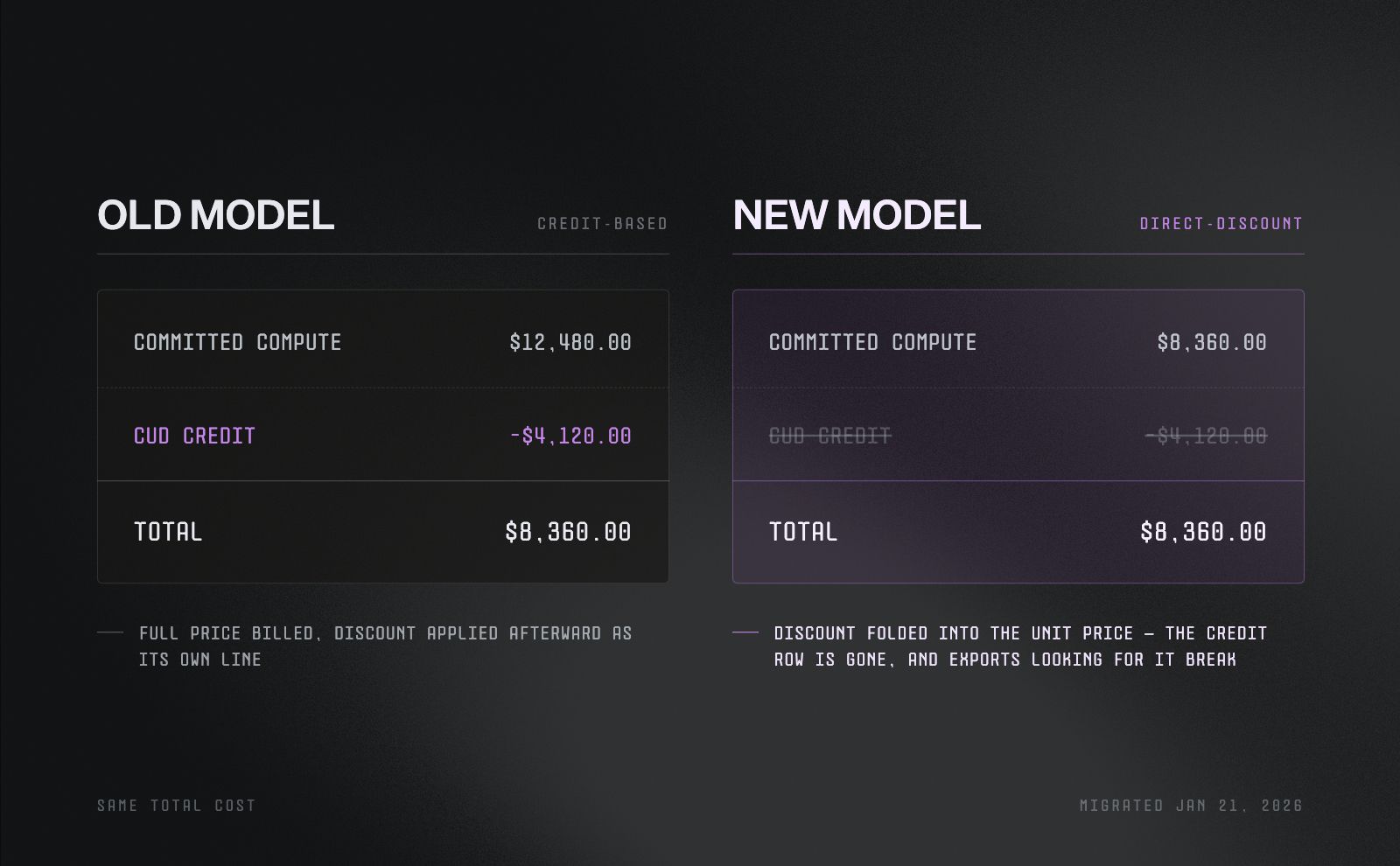
How GCP's January 2026 CUD migration changed the bill. The total cost stays the same, but the discount now shows up in the unit price instead of a separate credit line.
The total a team pays under a given commitment hasn't changed. What changed is the shape of the data describing that spend.
What's affected:
- Compute Engine, GKE, and Cloud Run (under Compute Flexible CUDs)
- BigQuery
- Cloud SQL and Spanner
What's not affected, which stay on the legacy credit model:
- VMware Engine commitments
- NetApp Volumes commitments
For a team with a BigQuery billing export built before that date, this is not a cosmetic change. The export was built to find a discount as a discrete credit row. After the migration, that row is gone.
Reports can show savings dropping to zero, or shifting into a different cost category, when nothing about real spend changed at all. GCP documented the migration, but nothing in the console reconciles an old dashboard automatically. That's on whoever owns the export.
That same blind spot, a change nothing in the console surfaces on its own, shows up in a few other places on a GCP bill.
BigQuery: the cost of a query nobody checked
BigQuery charges $6.25 per tebibyte (TiB) scanned, with the first TiB each month free. The charge is based on how much data a query reads, not how complex it looks or how long it takes to run.
Large tables are usually split into partitions, often by date, so a query can scan just the relevant slice instead of the whole table. A partition filter is what tells BigQuery which slice to look at.
What a missing filter does to the same query:
- With a filter: scans one week of data → costs around $2
- Without a filter: scans a full year of data → costs well over $200
That gap repeats every time the query runs. If it's on a daily schedule, it's not a one-time $200 charge, it's $200 a day.
And nothing about this looks broken. The query returns the correct answer. BigQuery has no way to flag "technically correct, but scanning far more than it needs to."
GKE: the mode decides who pays for a bad estimate
Google Kubernetes Engine (GKE) offers two billing modes, and each one absorbs waste differently.
- Standard mode: bills for node virtual machines (VMs) whether pods use that capacity or not. An idle node becomes a fixed cost, hiding quietly until someone checks utilization.
- Autopilot mode: bills per pod resource request instead. An oversized request shows up in the bill immediately, since there's no idle node to absorb it.
Neither mode is inherently better. What matters is that the number driving cost, the initial sizing decision, is usually set once, at deployment, and rarely revisited as usage changes.
One lever that helps regardless of mode: Spot VMs can cut compute cost by 60% to 91%, in exchange for a 30-second preemption notice. That works well for interruption-tolerant workloads, but it's a discount on the waste, not a fix for a stale sizing decision.
Vertex AI: billing that outlives the work
A model deployed to a Vertex AI endpoint bills by the hour for as long as it stays deployed, whether or not it serves a single prediction.
- There's no automatic scale-to-zero
- Stopping the charge requires someone to actively deactivate the model
- The console gives no indication that an idle endpoint is a cost problem, since GCP considers it to be doing exactly what it was deployed to do
This is the newest of the three patterns, and the one most teams haven't built habits around yet. The discipline that GKE and BigQuery have slowly earned over the years hasn't caught up to AI infrastructure spend, mostly because that spend is still new enough that the instinct hasn't formed.
The 11 best GCP cost optimization tools in 2026
The tools below cover the ground the sections above pointed to: native GCP options that come with every account, and platforms built to unify GCP cloud, AI, and data spend into a single view.
They're ranked by how well each one fits a GCP-heavy team managing cloud, AI, and data together, weighing pricing, real capabilities, and where each falls short.
1. North.cloud: cloud, AI, and data cost management on GCP
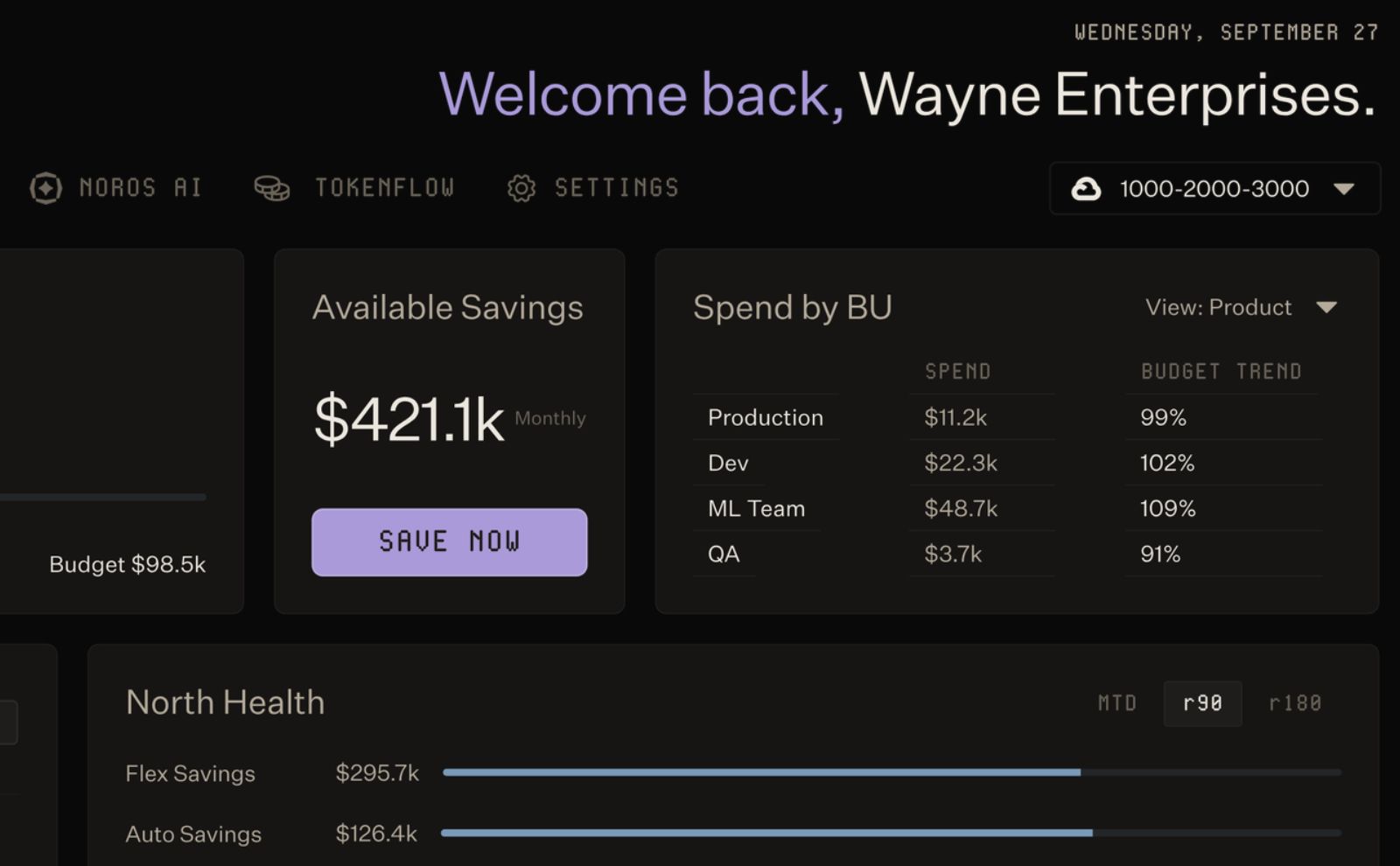
North's dashboard surfacing $421.1k in available monthly savings, with spend broken out by business unit and savings tracked separately across Flexbot and Autobot over a 90-day window.
North is the financial operating system built for cloud, AI, and data spend. On GCP, that means cost visibility, committed use discount (CUD) management, and anomaly detection running in one platform, instead of stitching together the native console with a separate FinOps tool.
Best for: teams that want one source of truth for their GCP bill, plus automated commitment management, without replacing or renegotiating an existing GCP contract.
Key capabilities:
- Cost visibility and analysis, including spend trends, breakdowns by service, region, and usage type, and period-over-period comparisons for a GCP project
- Autonomous CUD management, with North detecting and insuring existing commitments, then proactively buying new ones
- Real-time anomaly detection across GCP spend
- Plain-language answers to GCP spend questions through Noros, North's AI agent
- Read-only, scoped access, so North sees billing data without touching workloads, networking, or resources directly
Pricing:
- Free tier: $0/month. A complete view of GCP costs, showing where spend goes, what's changing, and where to optimize.
- Starter: $199/month,for teams managing up to $75K/month in cloud spend. Adds automated commitment management, with a 3.5% fee on commitment cost and a 25% fee on savings from North-held commitments.
- Premier: $1,399/month,for teams managing $75K/month or more in cloud spend. Lowers those fees to 1.5% and 20%, with unlimited visibility views and business units.
- Premier Plus: Custom annual plan, suggested for teams managing $1M/month or more in cloud spend.
For more information, read North.cloud's pricing page here.
A CUD strategy that adapts instead of locking in a guess
A committed use discount locks in a lower rate, but it also locks in a bet on usage a year or three years out. Get that forecast wrong, and a team ends up overcommitted, paying for capacity it doesn't use.
North removes that guesswork by managing CUDs continuously instead of as a one-time purchase, through Autobot, its ML-powered laddering engine.
- Detects and adjusts commitments a team already holds
- Proactively ladders in new commitments as usage shifts, rather than waiting for a scheduled review
- Runs on the customer's own account, so North never holds the contract itself
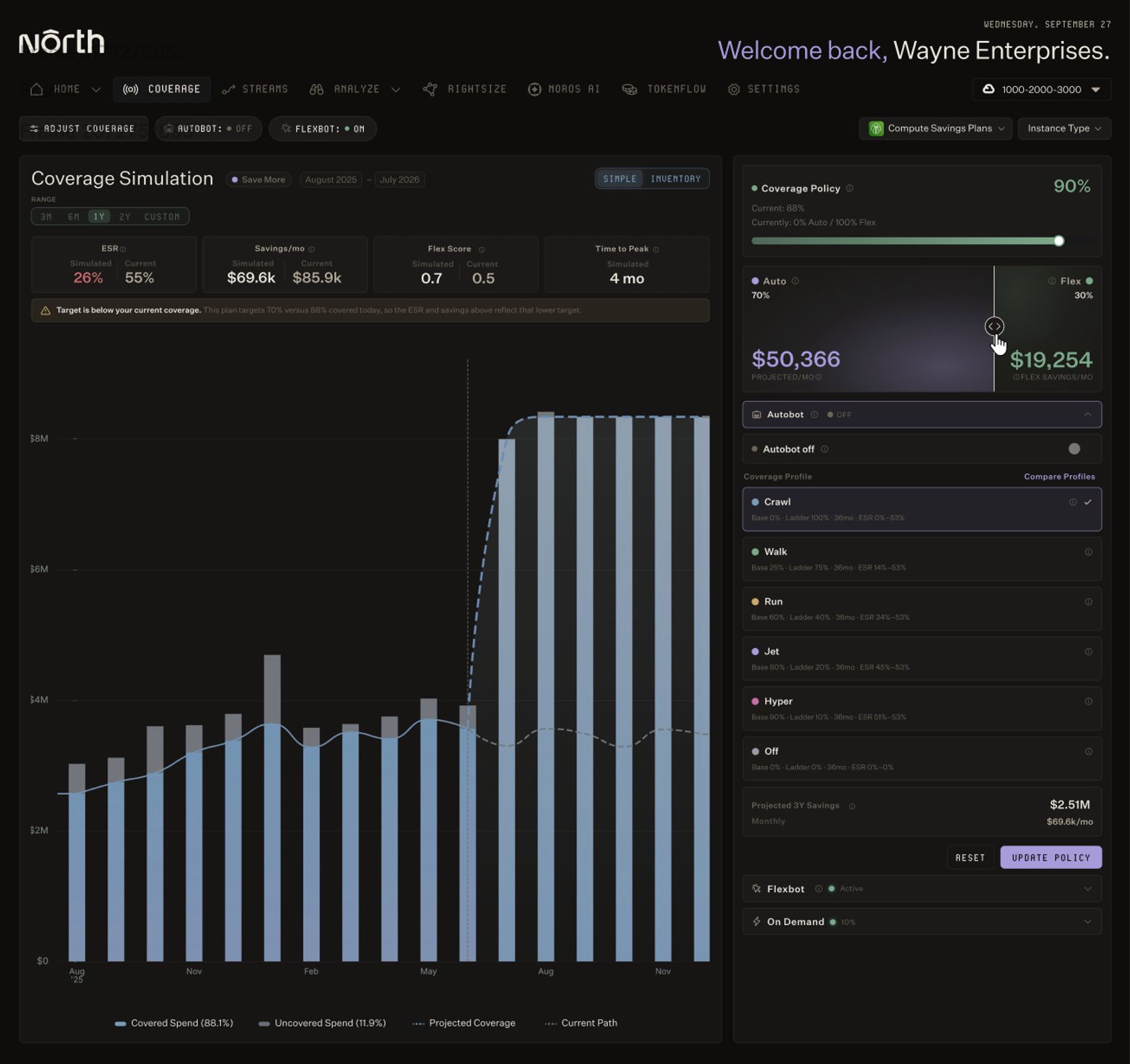
North's Coverage simulation tool, modeling how shifting the Autobot and Flexbot split affects projected savings and coverage over time.
Autobot's goal is to capture the savings of a long-term commitment without betting on a single forecast for the life of the term.
Working alongside what you already have
North doesn't require a team to unwind its existing setup to get value. It's compatible with GCP Private Pricing Agreements, optimizing within a negotiated enterprise contract rather than replacing it. It also works alongside CUDs a team purchased on its own before adopting North, respecting those commitments and layering additional optimization on top rather than starting over.
Beyond GCP
Most teams' cloud footprint doesn't stop at one provider. North extends to:
- AWS and Microsoft Azure, for one multi-cloud view instead of separate ones per provider
- AI and data spend from providers like OpenAI, Anthropic, and Snowflake
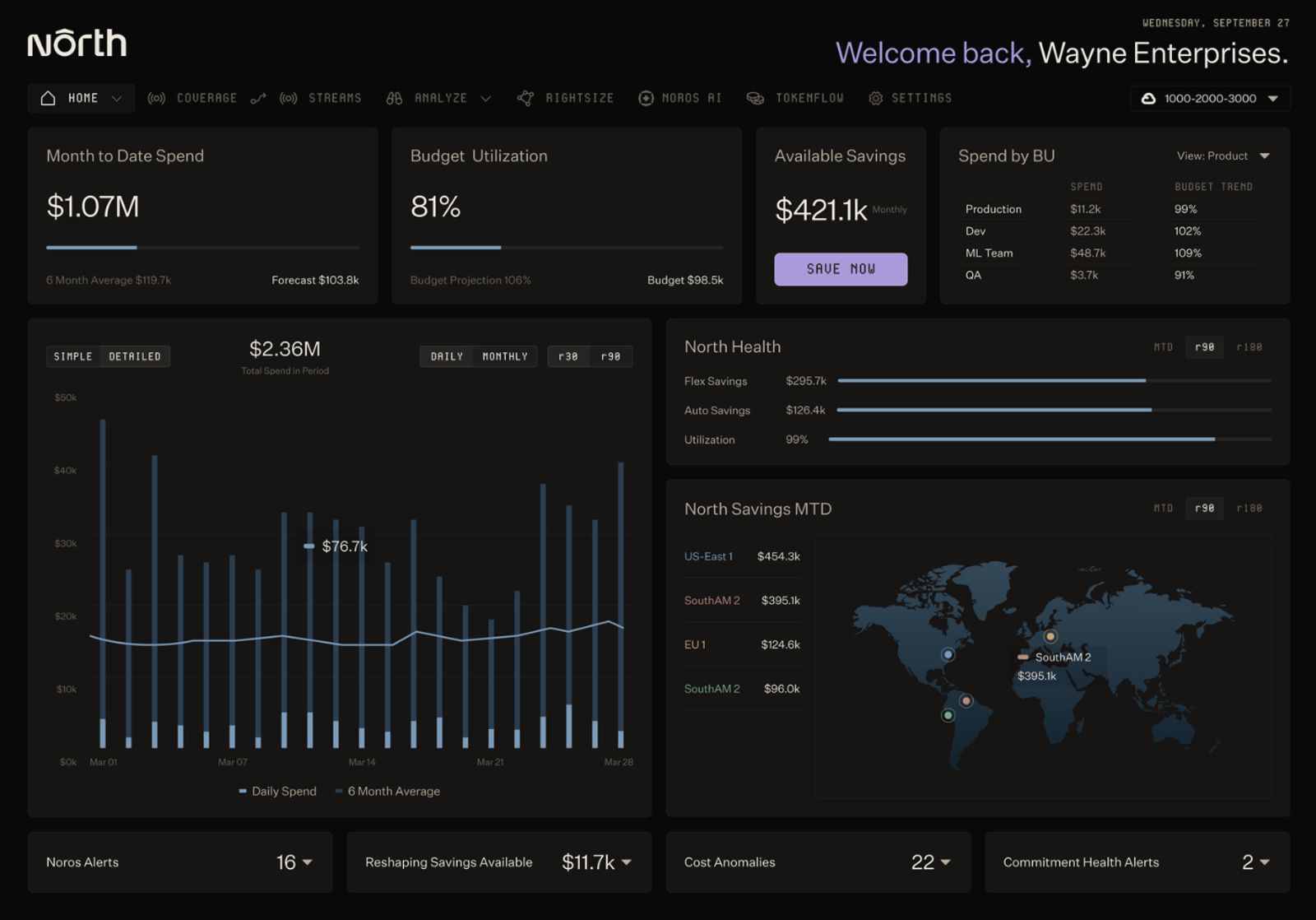
North's home dashboard, giving a single view of spend, savings, and alerts across every region and business unit.
North's CUD automation on GCP currently covers Compute Engine and Cloud SQL, with additional CUD types like BigQuery and Cloud Spanner planned for the future. On average, customers see a 47% Effective Savings Rate (ESR) on Compute Engine and 28% on Cloud SQL, and North's account analysis, which is free, shows specific opportunities before committing to anything.
Explore North's free tier to see GCP cost management and optimization in your own environment.
2. GCP’s FinOps Hub: Native cost visibility and recommendations
FinOps Hub is Google Cloud's built-in dashboard for managing GCP spend, bringing billing insights, commitment coverage, and cost-saving recommendations into one console view without adding a third-party tool.
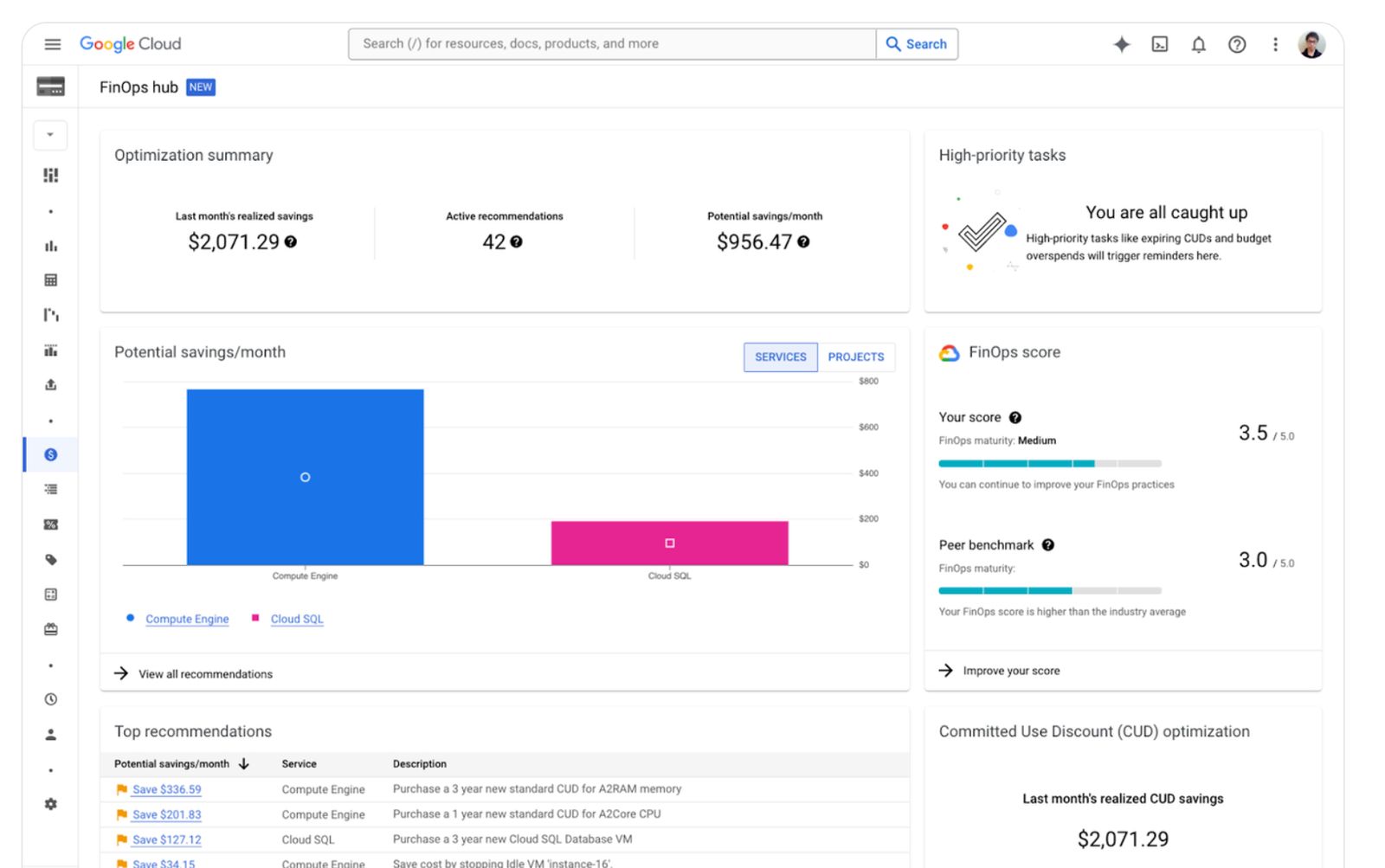
Google Cloud's FinOps hub, showing native recommendations and CUD savings tracking.
Best for: teams that want a strong, free starting point for GCP visibility and recommendations, before deciding whether they need more than the console provides.
Key capabilities:
- Unified billing insights, surfacing savings opportunities and spend trends in one place instead of across separate reports
- Commitment coverage monitoring, tracking how much of current spend is covered by CUDs versus running at on-demand rates
- A FinOps score, giving a rough, at-a-glance sense of how optimized an account is
- CUD purchase simulation, letting a team model different commitment scenarios before buying
- Recommendations pulled from Recommender, surfacing rightsizing and idle-resource opportunities alongside billing data
Pricing: Free. FinOps Hub is included with every GCP account at no additional cost, though standard charges still apply to the underlying GCP resources it analyzes.
What to consider: FinOps Hub surfaces opportunities and lets a team simulate a CUD purchase, but it doesn't execute anything. Buying the commitment, applying a rightsizing recommendation, or resolving a flagged anomaly all require a person to act manually. It's also GCP-only, so a multi-cloud team ends up checking a separate tool for AWS or Azure spend, with no shared view across providers.
3. Noros.ai: AI FinOps agent for GCP cost questions
Noros answers GCP cost questions directly, in plain language, without a report or dashboard to build first. It's North's AI agent, also available as a standalone product at noros.ai.
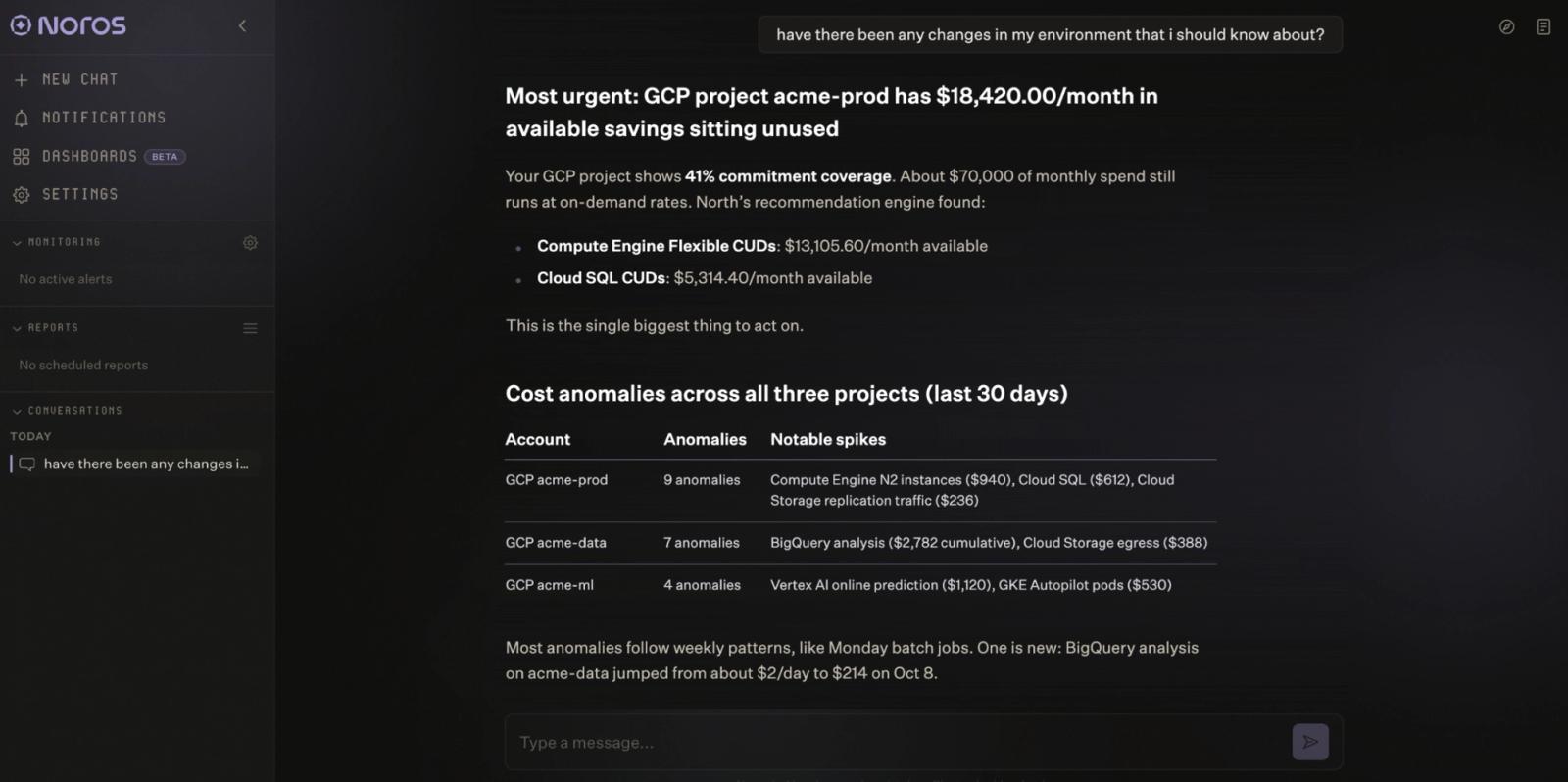
Noros flags unused CUD savings and recent GCP cost anomalies in one answer.
Best for: teams that want fast answers to specific GCP cost questions, without a dedicated analyst or a report-building process.
Key capabilities:
- Plain-language answers to any GCP cost question, grounded in real billing data instead of generic advice
- Automatic cost breakdowns by service, region, or project, plus anomaly detection at the resource level
- Savings opportunities, including CUD coverage gaps and ongoing commitment health tracking
- Generative dashboards and charts, built automatically from a single question instead of a manual report
- Scheduled reports and alerts, delivered to Slack or in-app, on whatever cadence a team sets
- Read-only account connection, so Noros can analyze GCP data without ever writing to the account
Pricing:
- Starter: $99/month per workspace. 100 queries per month, 1 user, 14-day free trial.
- Enterprise: $399/month per workspace. 1,000 queries per month, up to 5 users, advanced monitoring, scheduled insights, priority support.
Learn more at Noros’ pricing page here.
A team without a dedicated FinOps analyst still runs into cost questions constantly, and Noros answers those directly instead of pointing to a dashboard someone has to interpret themselves. It works from the raw cost and usage data behind the bill, across services, resources, usage types, pricing models, and time, which is what lets it explain how a specific cost came about rather than just report the number.
The same grounding carries across providers. Noros connects to AWS, Azure and GCP, so a team running either can ask the same kind of question without switching tools.
Noros is built by North.cloud, drawing on the same FinOps experience North applies across cloud, AI, and data spend for hundreds of engineering and finance teams. Start a free trial at noros.ai to see it against your own GCP data.
4. Vantage: Self-serve GCP cost visibility
Vantage covers GCP cost reporting and optimization with a self-serve, developer-friendly setup, and it's one of the few tools on this list with fully transparent, published pricing.
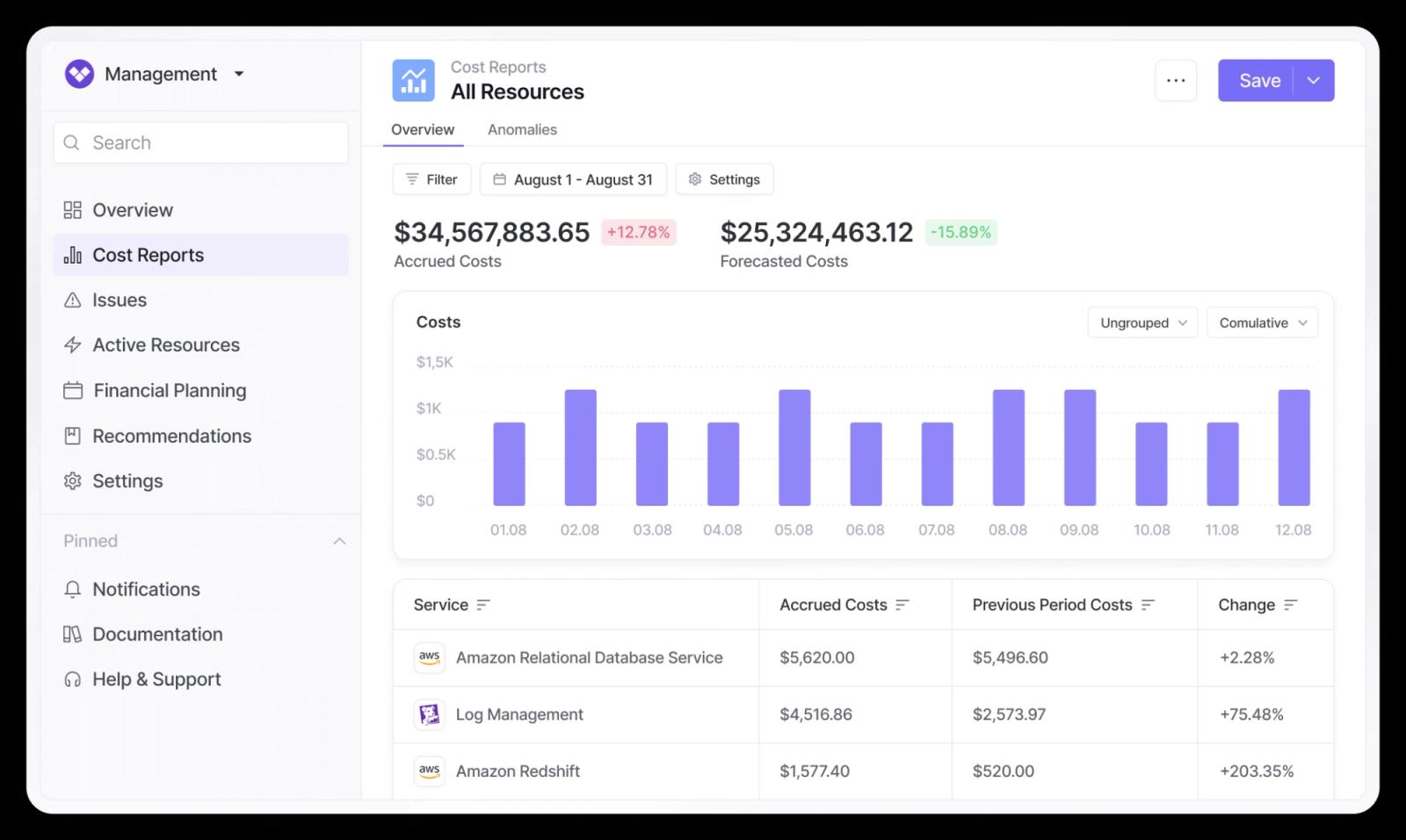
Vantage's cost reporting view, tracking accrued and forecasted spend alongside service-level cost changes. (Source: Vantage)
Best for: teams that want fast, self-serve GCP visibility without a sales call to get started, and value pricing they can check themselves before committing.
Key capabilities:
- Cost reports across GCP, alongside AWS, Azure, and Kubernetes, in one unified view
- Budgeting and forecasting, tracked against actual spend trends
- Unit cost tracking, built around custom business metrics rather than raw service totals
- Autopilot, for automated commitment purchasing on paid tiers
Pricing:
- Starter: free. $2,500 of tracked cloud spend, 30+ supported providers, email support, SAML single sign-on, 3 users.
- Pro: $30/month, with a 14-day free trial. $7,500 of tracked cloud spend, Autopilot, email support, virtual tagging, max 5 users.
- Business: $200/month, with a 14-day free trial. $20,000 of tracked cloud spend, Autopilot, email support, virtual tagging, max 10 users.
- Enterprise: custom. Unlimited tracked cloud spend, an automated FinOps agent, Autopilot, a dedicated account rep, virtual tagging, unlimited users.
What to consider: the self-serve tiers are capped by tracked spend, not just feature access, so a team growing past $20,000 in monthly spend needs Enterprise regardless of which features it actually uses. Autopilot's automated commitment purchasing also currently covers AWS Savings Plans only, not GCP CUDs, so GCP-heavy teams get strong visibility from Vantage but still need another tool or manual work for commitment purchasing.
5. CloudZero: Engineering-led unit cost and cost-per-customer analysis
CloudZero centers on unit economics: cost per customer, per feature, and per transaction. It builds these views across GCP, AWS, and Azure, which makes it a good option for engineering teams that want to tie spend directly to product decisions.
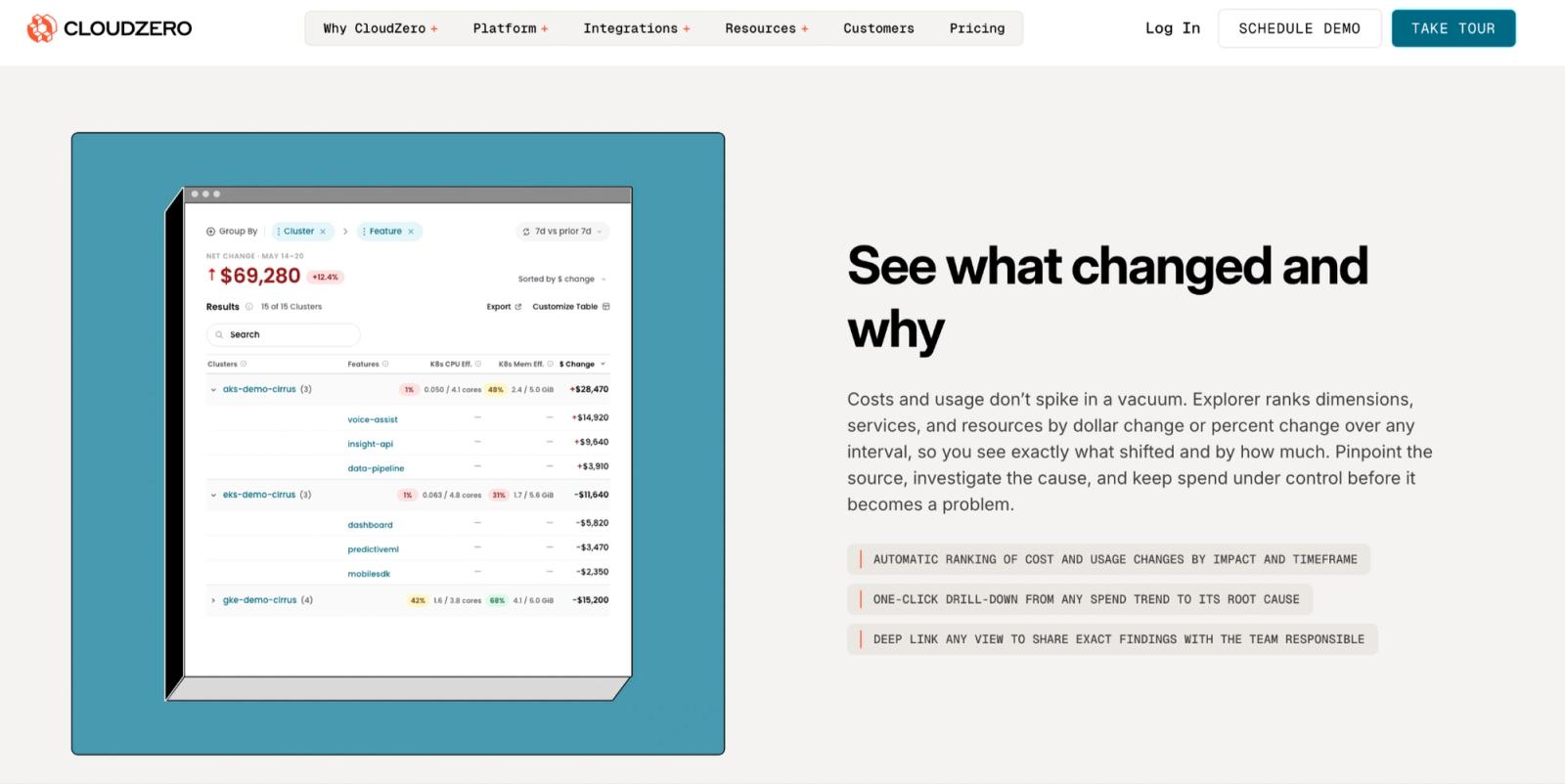
CloudZero's Explorer tool, ranking cost and usage changes by cluster and feature to pinpoint what drove a spend shift. (Source: CloudZero)
Best for: teams that need to understand what's driving spend and connect it to unit economics, like cost per customer or per transaction, rather than just cost per service.
Key capabilities:
- Multi-dimensional cost allocation without requiring a clean tagging structure to already be in place
- Cost per customer, product, or transaction, so a pricing or margin conversation can be grounded in real numbers
- Budgeting and forecasting, tracked against actual usage trends
- Anomaly detection, flagging spend spikes as they happen
Pricing: quote-based, with no per-seat fees. Rates are tiered annually, and CloudZero states its billing doesn't vary month to month even if spend spikes, but there's no free tier, and getting a specific number requires a sales conversation.
What to consider: on G2, some reviewers describe dashboard limitations, noting they've had to rely on separate analytics tools for reporting needs CloudZero's dashboards don't cover. Others point to a desire for more customization, specifically around editing and managing roles and usage reports. A few mention a learning curve, particularly for teams less familiar with cloud architecture or FinOps concepts. Setup also comes up as a challenge for some, requiring more time, coordination, and communication than expected during implementation.
6. Finout: Unified cost visibility with a fixed platform fee
Finout unifies cloud, Kubernetes, and AI spend through a layer it calls MegaBill, which ingests billing data from AWS, GCP, Azure, and OCI alongside AI providers like OpenAI and Anthropic.
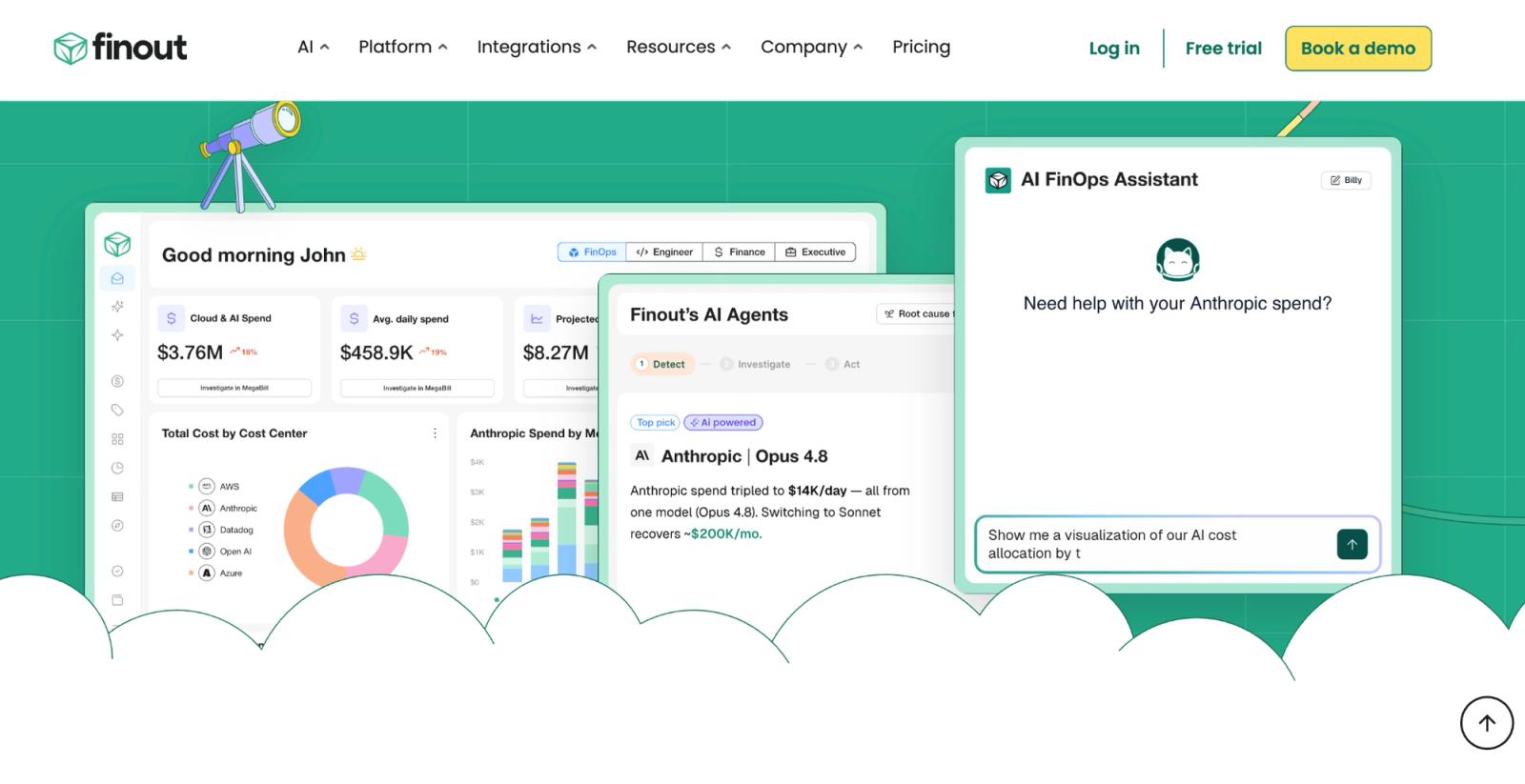
Finout's homepage dashboard, showing cloud and AI spend broken down by cost center alongside its chatbot. (Source: Finout)
Best for: teams that want one consolidated view across multiple clouds and AI spend, and prefer a fixed platform fee over pricing that scales with usage.
Key capabilities:
- A single unified cost view across GCP, AWS, Azure, and OCI, so a bill doesn't have to be reconciled across separate consoles
- Allocation without complete tagging, through a feature called Virtual Tags, letting cost get mapped to team, product, or environment even with imperfect labels
- Shared cost splitting, for infrastructure that serves more than one team at once
- Waste detection, surfacing unused resources and misconfigurations with dollar-impact estimates attached
- Anomaly detection and financial planning, tracked across every connected provider in one place
Pricing: a flat platform fee tied to a tier of committed spend under management, not a percentage and not per seat. If a team adds a new cloud provider or grows usage, that added activity doesn't trigger an extra charge on top of the fee, though the fee itself isn't published and requires a quote. Kubernetes support carries an added cost on lower tiers, but it’s included at no extra charge on Enterprise.
What to consider: Finout draws mixed feedback on complexity, with some reviewers on G2 describing the platform as daunting to work with, particularly around advanced features and integrations for newer users. Customization is a recurring ask, especially in reporting, and a few reviewers mention missing capabilities around visualization and on-premise deployment, along with slower performance loading reports and dashboards on larger datasets. A learning curve also comes up for teams getting through initial setup and mastering the platform's features.
7. PointFive: Agentless waste detection across GCP, GKE, and Vertex AI
PointFive detects waste across the GCP stack and the AI layer running on top of it, from Compute Engine and GKE down to Vertex AI and BigQuery, without deploying any agent into a customer's environment.
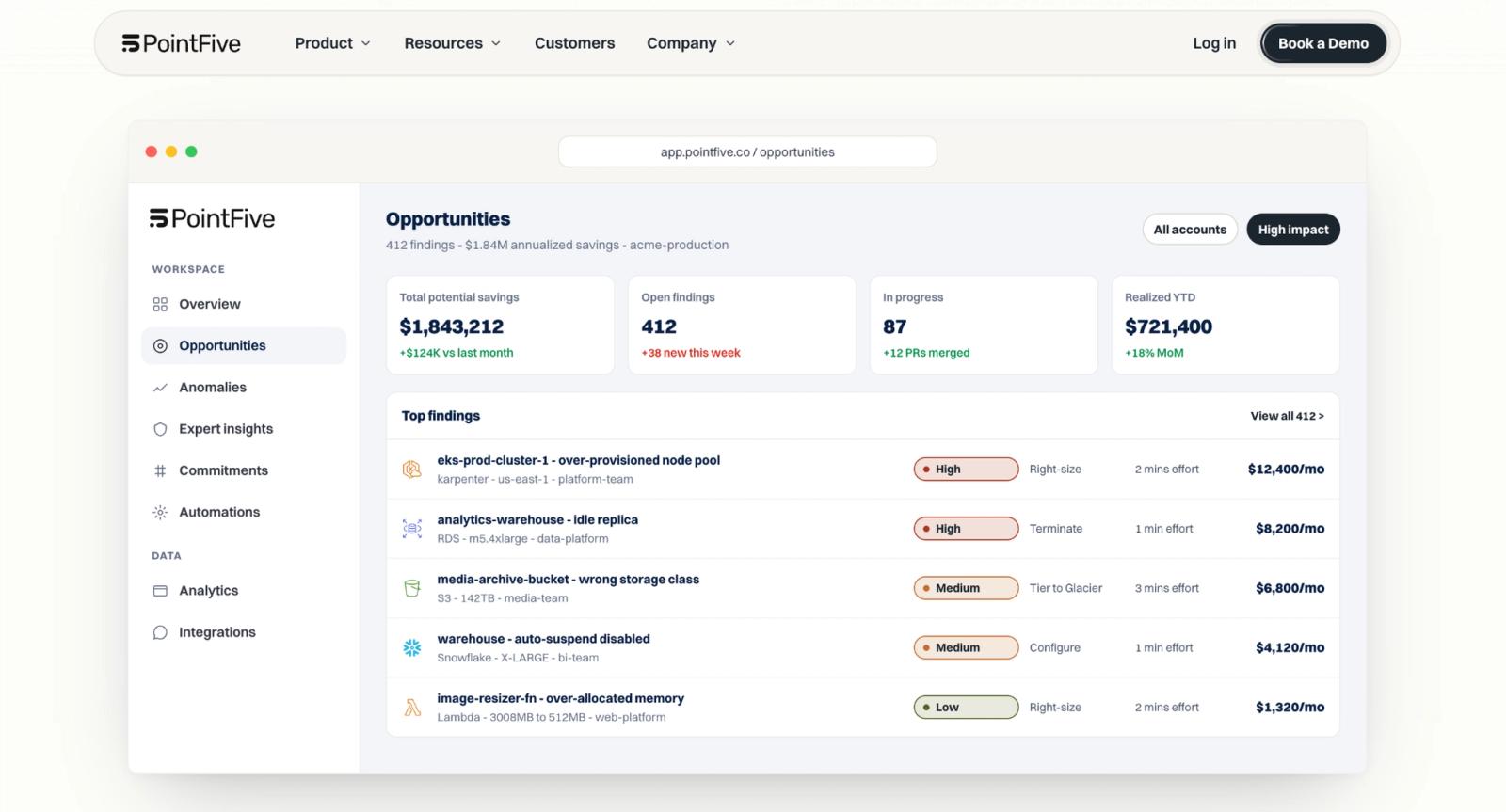
PointFive's Opportunities view, ranking specific waste findings by savings impact and the effort needed to fix each one. (Source: PointFive)
Best for: teams that want detection spanning cloud infrastructure and AI workloads together, without installing anything inside their Kubernetes clusters or cloud accounts.
Key capabilities:
- Agentless GKE optimization, analyzing deployments, DaemonSets, and StatefulSets through read-only API access, with no sidecar or agent running on the cluster
- Coverage across Compute Engine, Cloud SQL, BigQuery, and Cloud Run, alongside GKE, so waste detection isn't limited to compute
- Vertex AI support, covering both Gemini and custom model deployments
- GPU infrastructure coverage, identifying underutilized or idle GPUs and instance-type mismatches
- A detection engine covering 500-plus optimization types, updated on an ongoing basis rather than as a static rule set
Pricing: not published. PointFive requires a conversation with sales to get a quote scoped to a specific environment.
What to consider: the interface is PointFive's biggest friction point according to G2 reviews, with users describing it as confusing to navigate, particularly when working with its power-user query language for filtering and report building. Reporting itself draws similar criticism, with some noting that datasets they'd expect for managing FinOps aren't there. Pricing isn't published anywhere either, so getting a number still means a call with sales before any of this can be weighed against cost.
8. Recommender: Free, machine-learning rightsizing recommendations
Recommender applies Google's own machine learning to a GCP account's usage data, surfacing recommendations across VM rightsizing, idle disk cleanup, unused IP addresses, and committed use discount purchases.
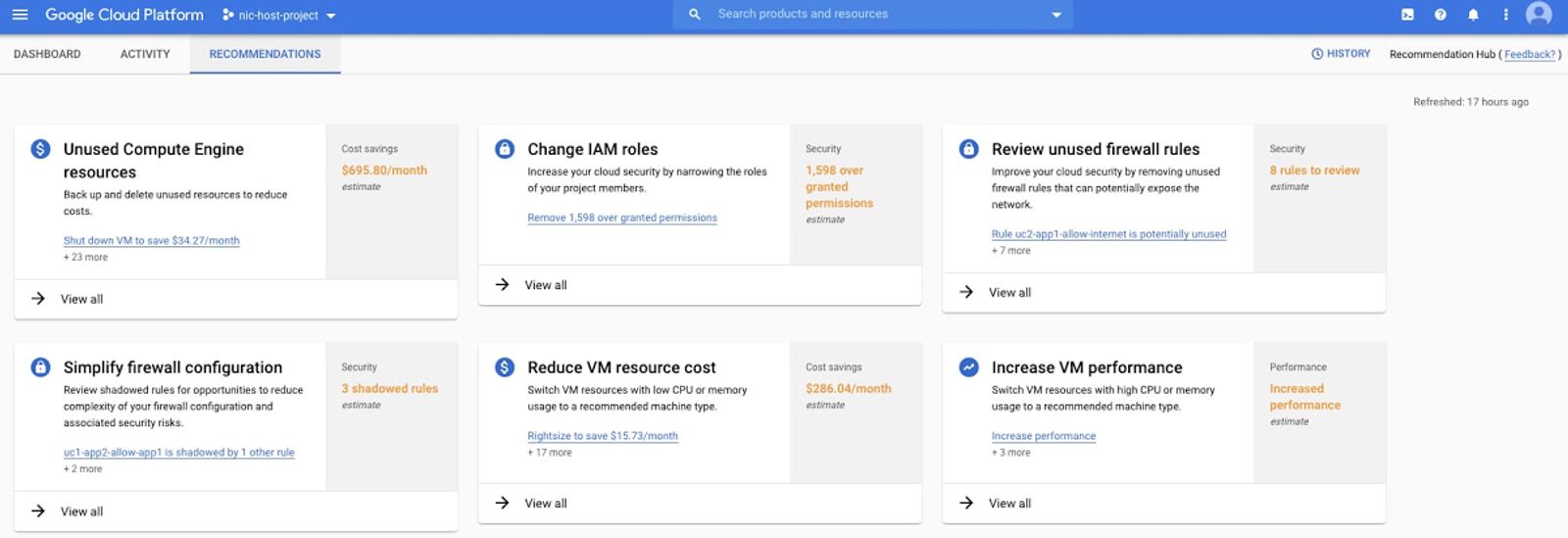
GCP’s native Recommendation Hub, surfacing cost, security, and performance recommendations directly in the console. (Source: Google Cloud documentation)
Best for: teams that want a free, native starting point for catching obvious waste, like an underutilized VM or an idle disk nobody's looked at in months.
Key capabilities:
- VM rightsizing recommendations, flagging instances running well under capacity, based on actual usage patterns rather than initial provisioning guesses
- Idle resource cleanup, identifying unattached disks, unused static IP addresses, and unattended projects with no recent activity
- CUD purchase recommendations, suggesting commitment coverage based on recent usage
- Cost impact estimates, attached to each recommendation so teams can prioritize by savings size
- API and BigQuery export access, for teams that want to build their own tracking on top of the raw recommendation data
Pricing: free for UI and API access to recommendations. Exporting recommendations to BigQuery, along with higher API quotas, requires a Standard, Enhanced, or Premium Google Cloud support package. CUD purchase recommendations are available through BigQuery export regardless of support tier.
What to consider: Recommender flags opportunities but doesn't execute anything. Someone still has to read each recommendation, evaluate it, and apply the change manually. It also analyzes a relatively short usage window by default, which can miss seasonal or quarterly patterns, and it doesn't account for growth uncertainty when suggesting CUD coverage, so a recommendation based on recent usage can turn into an overcommitment if that usage doesn't hold.
9. Budgets: Free spend alerts, by project or label
Budgets is Google Cloud's built-in threshold alerting tool, letting a team set a spend limit on a project, service, or billing account and get notified as actual or forecasted costs approach it.
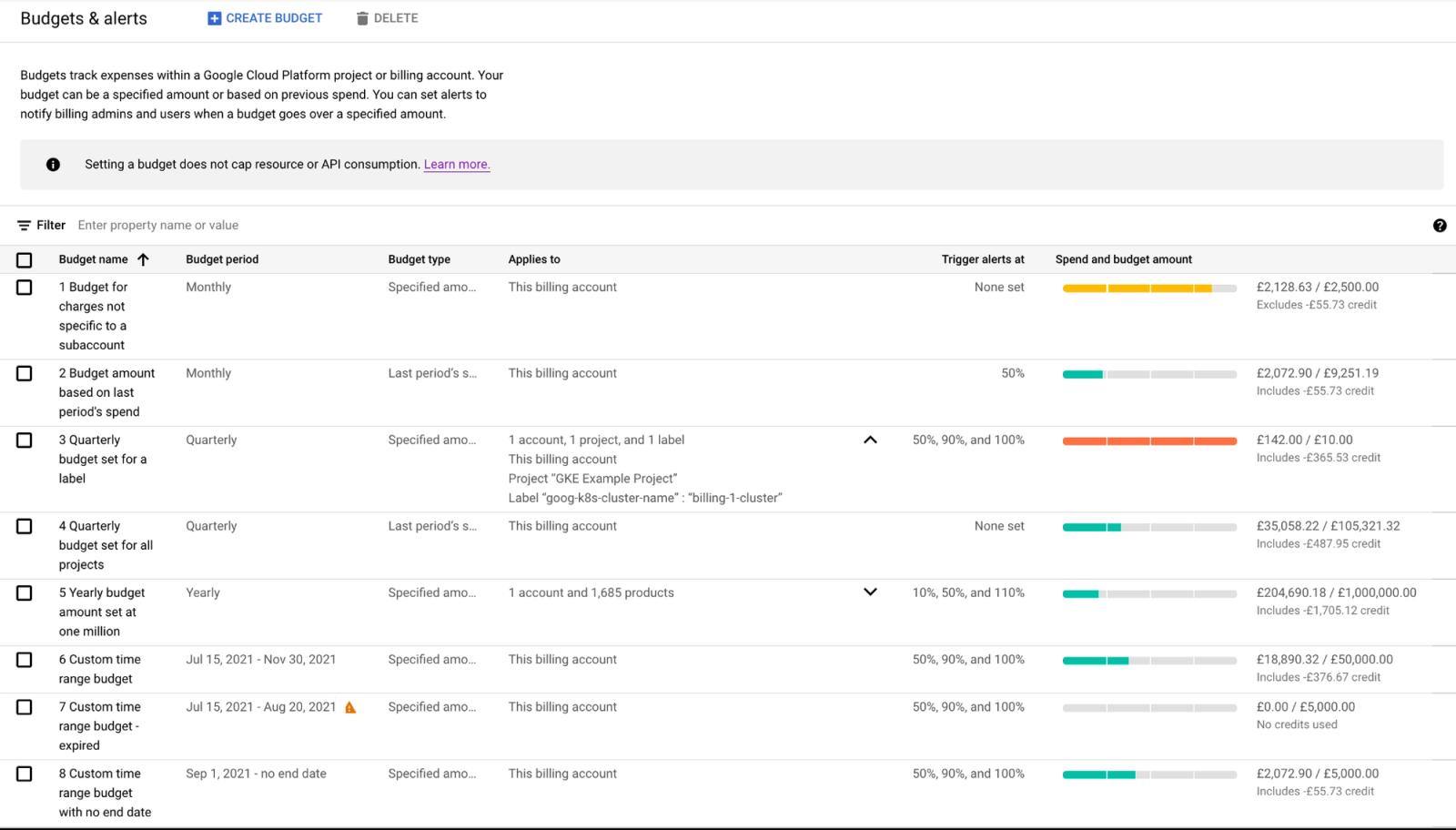
GCP’s reference architecture for budget alerts, showing how a default email notification can be extended into an automated spending cap. (Source: Google Cloud documentation)
Best for: teams that want a simple, free early-warning system for spend, without needing a separate tool just to know when a threshold is crossed.
Key capabilities:
- Alert thresholds by project, service, or billing account, so different teams or environments can have their own limits
- Email notifications, sent automatically when a threshold rule is triggered
- Pub/Sub integration, for programmatic responses, letting a team wire an alert into Slack, PagerDuty, or a custom automation
- Forecasted and actual thresholds, so an alert can fire based on projected spend, not just spend already incurred
Pricing: free. Budgets carries no additional charge beyond the underlying GCP resources being tracked.
What to consider: a Budgets alert only notifies an end user. It doesn't cap spend, slow down usage, or disable a project on its own. Turning a notification into an automatic response, like shutting down a project that's gone over its limit, requires building a Pub/Sub-triggered function separately, which is its own small engineering project rather than something Budgets does out of the box.
10. Apptio Cloudability: Enterprise FinOps governance across clouds
Cloudability connects technology spend to business outcomes for enterprises running GCP alongside AWS and Azure.
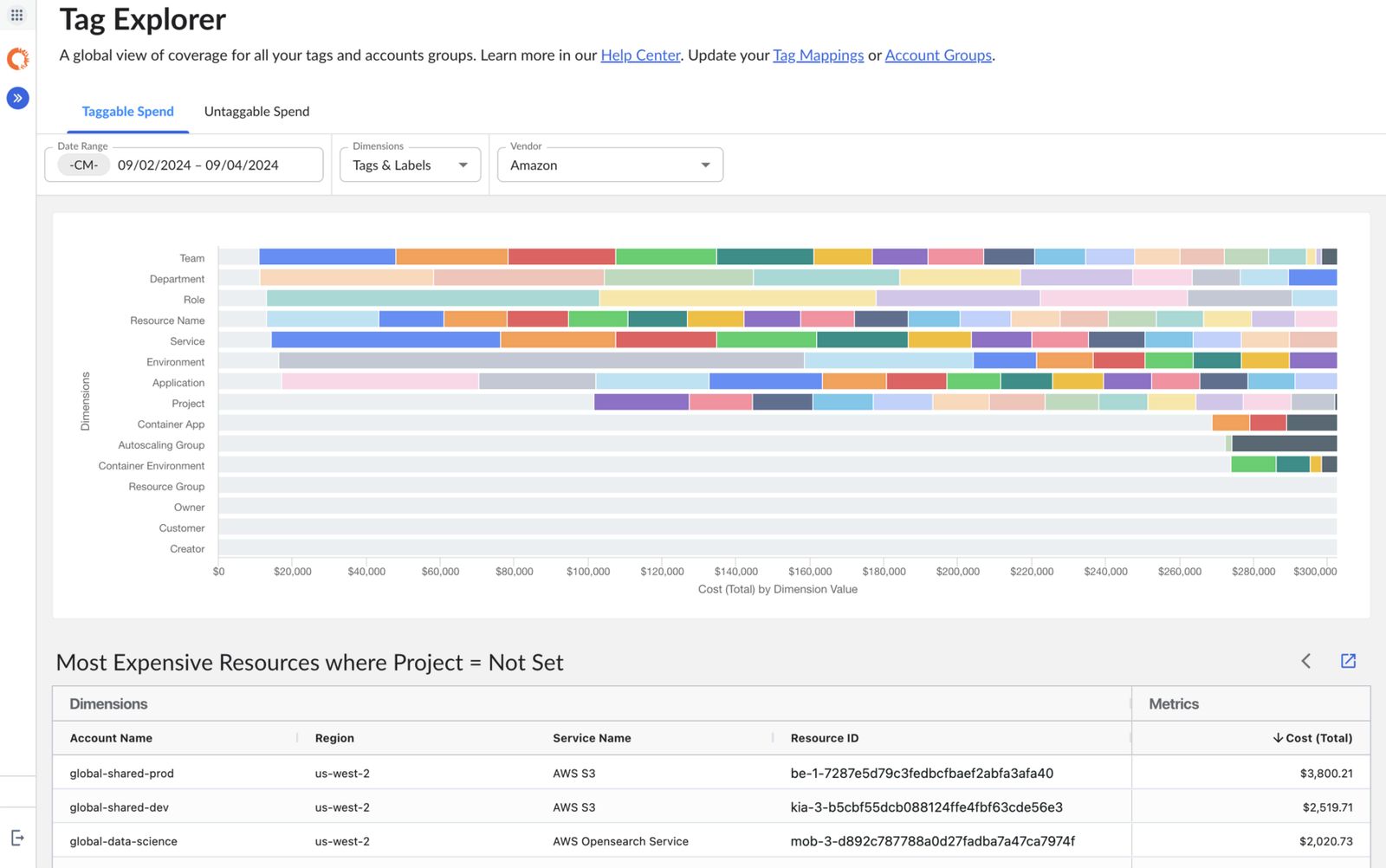
Apptio Cloudability's Tag Explorer, breaking down taggable spend across dimensions and surfacing untagged resources by cost. (Source: Apptio Cloudability)
Best for: large enterprises that need governance and reporting at scale, across multiple clouds and business units, rather than a lighter self-serve tool.
Key capabilities:
- GCP cost allocation, budgeting, and forecasting, alongside the same for AWS and Azure, in one platform
- Spend-to-business-outcome mapping, connecting technology costs to organizational reporting structures
- Full FOCUS specification support, the FinOps Foundation's standard format for normalizing cost data across providers
- Governance built into engineering workflows, flagging the expected cost impact of infrastructure-as-code changes before they're deployed
- Native integration with IBM Turbonomic, for closed-loop resource optimization alongside cost governance
Pricing: quote-based, with no published rates, no free tier, and no trial. Pricing is typically structured as a percentage of managed cloud spend, and third-party estimates generally place Cloudability's best return above $5M in annual cloud spend, with lighter tools often fitting smaller environments better.
What to consider: rightsizing recommendations draw the most criticism on G2, with reviewers pointing to missing memory data and limited options. Integration is worth flagging for a GCP-focused evaluation too, since several reviewers describe the platform as built primarily around AWS, with weaker effectiveness elsewhere. Cloudability also doesn't automate commitment purchasing on its own, and since pricing isn't published, budgeting requires a sales conversation first.
Where native GCP tooling stops, and what to add
The right tool depends less on rankings and more on what's actually driving a bill. A team running mostly Compute Engine can often stick with FinOps Hub, Recommender, and Budgets for a while. A team split across GKE, BigQuery, and Vertex AI is dealing with three different cost mechanics at once, and no native tool reconciles all three.
That split shows up across this whole list. Some tools mainly report on where spend is going, while others act on it directly, through commitment automation, rightsizing, or waste remediation. A few, like North, do both, across cloud, AI, and data together.
Start with what's actually driving the bill, then pick the tool built for that.
Explore North's free tier to see which of these patterns is driving your own GCP bill.
FAQs
Answers to common questions about the product or feature covered in this post.
What is the best GCP cost optimization tool?
There's no single best tool. Native Google Cloud Platform (GCP) tools work well at low to mid spend. Past roughly $100,000 a month, most teams need attribution across projects, cross-vendor normalization if AI and data spend are in the mix, and commitment automation that native tooling doesn't provide on its own.
For teams managing cloud, AI, and data spend together, North is built to cover all three in one platform.
Are native GCP tools like FinOps Hub and Recommender enough on their own?
They handle visibility and recommendations well, and they're free. What they don't do is execute anything. Buying a committed use discount (CUD), applying a rightsizing suggestion, or reconciling a billing schema change all require a person to act manually.
North's Coverage and Rightsize are built to close that gap, buying and adjusting commitments automatically and applying rightsizing recommendations rather than just flagging them.
What changed with GCP committed use discounts (CUDs) in 2026?
On January 21, 2026, GCP moved spend-based CUDs from a credit-based model to a direct-discount model. Total costs didn't change. Savings now appear as a lower per-service price instead of a separate credit line, so teams with BigQuery billing exports built against the old schema need to update those dashboards themselves.
What should a team spending $100K or more a month on GCP look for in a tool?
Look for allocation that doesn't depend on perfect tagging, coverage that spans AI and data spend alongside cloud infrastructure, and commitment automation that adjusts as usage shifts rather than locking in a one-time forecast.
North is built around exactly that combination, giving teams one place to see where spend goes, get commitments managed automatically, and catch waste before it compounds. Explore North's free tier to see your own GCP savings before committing to anything.
How does North.cloud optimize GCP cost management?
North combines visibility, allocation, and commitment automation into one platform for GCP spend, rather than requiring a team to stitch those together with separate tools.
- Cost visibility: spend trends, breakdowns by service, region, and usage type, with anomaly detection catching spikes in real time
- Allocation: cost mapped to team, project, or customer without requiring clean tagging first
- Commitment automation: committed use discounts (CUDs) detected, insured, and proactively purchased as usage shifts, rather than left to a one-time forecast
On average, North customers see:
- Compute Engine: 47% average Effective Savings Rate (ESR)
- Cloud SQL: 28% average Effective Savings Rate (ESR)
Explore North's free tier to see what these savings could look like against your own GCP bill.