-
13 min read
AI spend management with North: Allocate costs, explain usage, and set limits

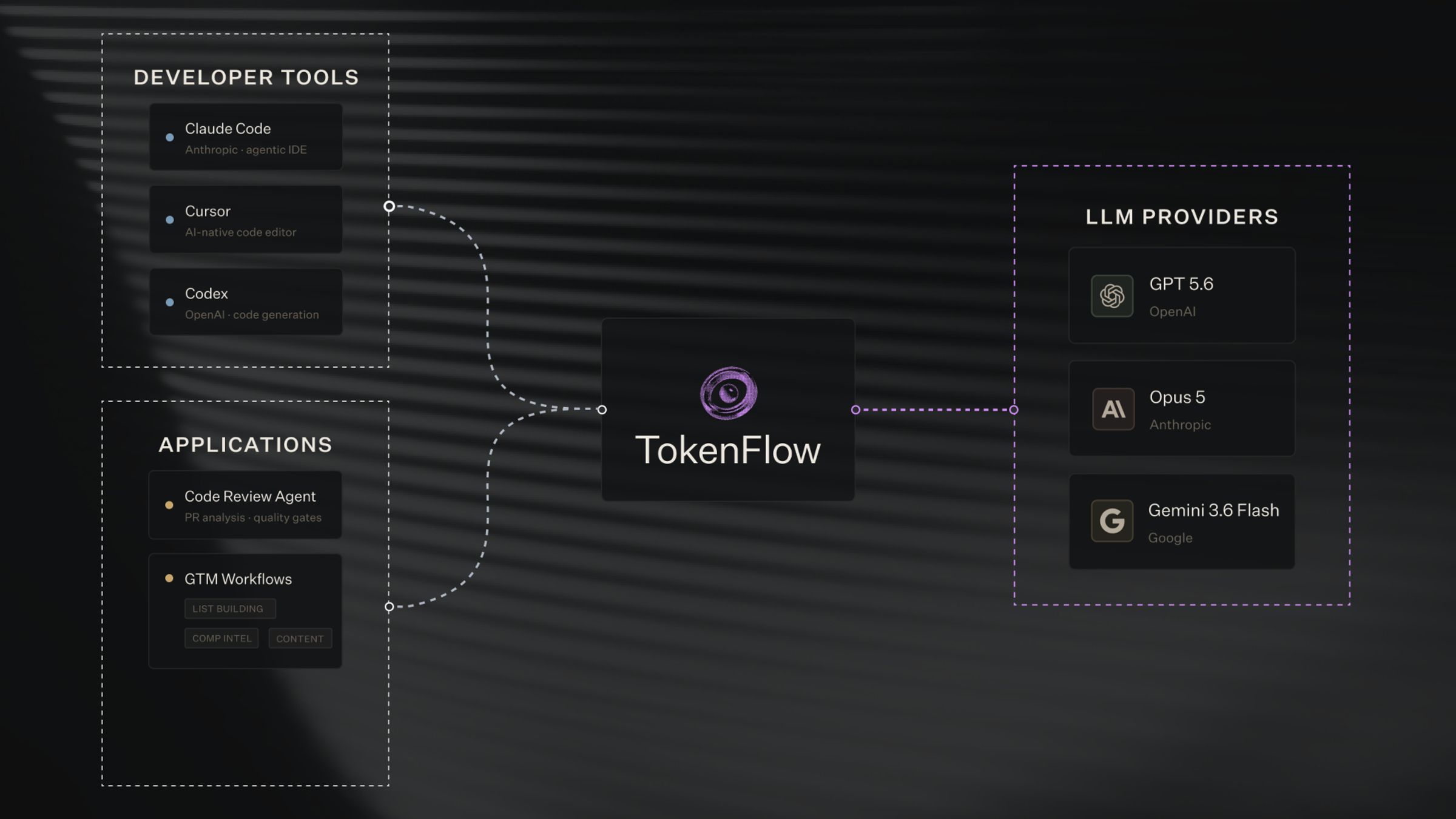
Table of contents:
TL;DR
- AI spend management connects consumption, tokens, cached and uncached, subscription allowances, and usage charges, to the people, budgets, and decisions behind it. Billing is by consumption, not completed tasks.
- A bill can rise without more work getting done. Model mix, response length, and cache reuse can each move the total on their own.
- Allocating AI spend needs an agreed method, since provider account structures rarely match how a company assigns ownership.
- Spending limits should set who can spend, on which models, and what happens at the limit, including an approved fallback, before a budget runs out.
- North.cloud already gives cloud spend an owner, a budget, and a place in chargeback through Coststreams. TokenFlow extends that to AI consumption, checked against the real invoice.
Teams are already choosing AI models, optimizing caching, and setting usage limits. What finance and engineering don't have yet is a shared view of what those choices cost, who owns the spend, and when to change course.
Without that view, a bill just shows up unexplained. Someone has to reconstruct after the fact whether it was expected and who's responsible for it.
North's TokenFlow is built to close that gap by bringing AI consumption into the same cost-management work organizations already do in North for cloud spend, for AI coding assistants and the agents embedded in internal and customer-facing products.
This guide walks through why AI bills move the way they do, how to allocate that spend to the teams responsible, and how to set limits before a budget becomes a surprise.
What is AI spend management?
AI spend management means connecting AI consumption to the people, budgets, and decisions behind it. That includes:
- Token consumption across input, cached input, and output, each billed at a different rate
- Subscription allowances and the usage-based charges that apply beyond them
- The spending policies that decide who can spend, on which models, and what happens at a limit
It's different from token tracking, which measures usage alone. AI spend management explains what that usage costs, who owns it, and whether it's working.
AI models are billed by consumption, not by completed tasks. A request that gets retried after failing a quality check still bills for every token it used, whether or not the final result was useful. That distinction matters for anyone trying to explain a bill: the number reflects what the model processed, not what it accomplished.
Why did my AI bill go up?
Think about how a company reviews a travel bill. A higher company travel bill doesn't mean something went wrong. It could mean more trips, higher fares, or an expensive dinner with a prospect that closed the deal. None of that shows up as a single number on the statement. Finance has to look past the total and ask what actually drove it before deciding whether it's a problem.
An AI bill asks for the same kind of look, and for the same reason: a total by itself can't explain what caused it.
AI spending asks for the same look. A more capable model can justify its cost on demanding work, while a routine task might suit something cheaper. Spotting that spend moved is easy. But tracing it back to an owner, a budget, and a decision takes more work.
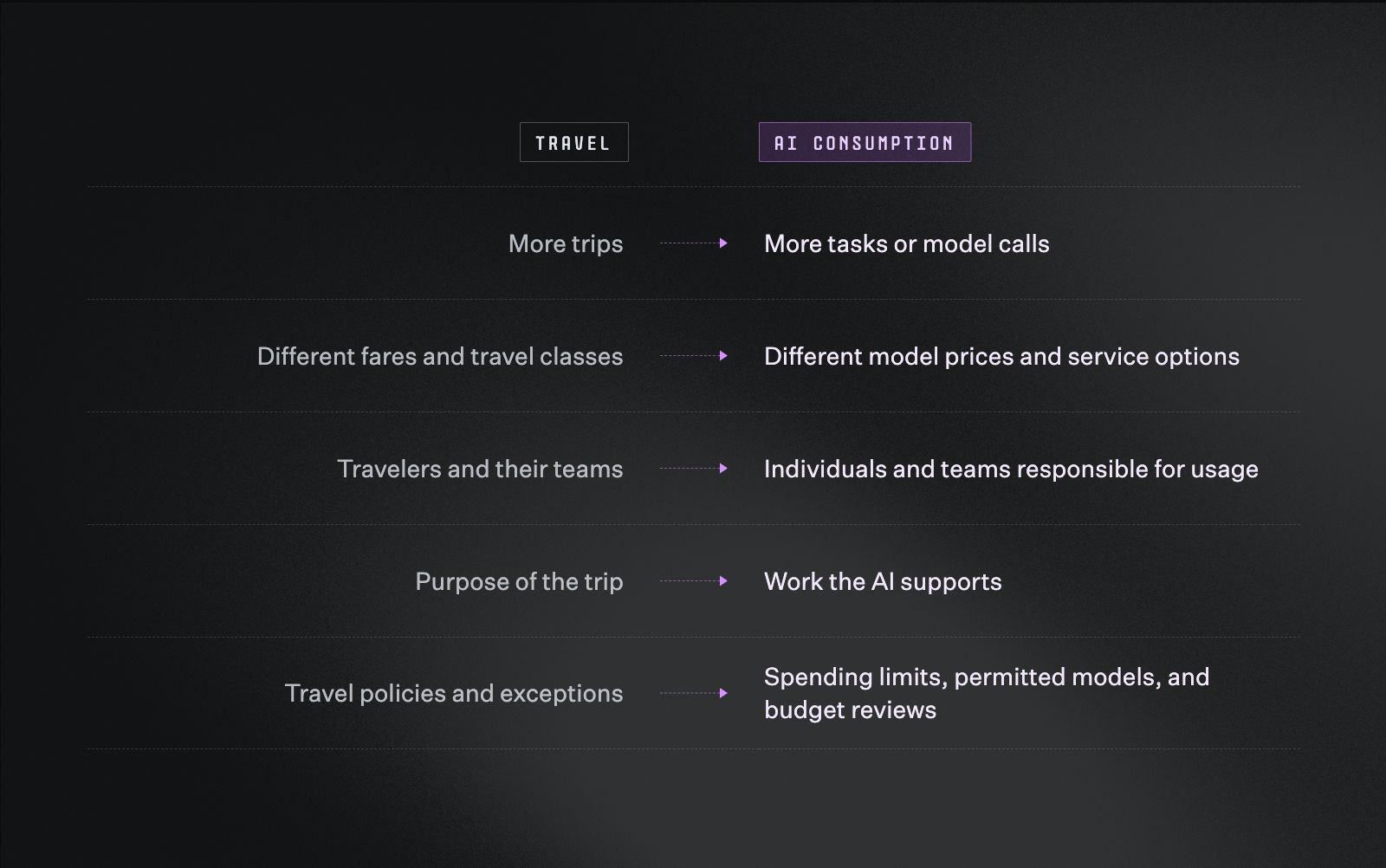
A travel bill and an AI bill raise the same kind of questions, just about different things.
A finance team reviewing a travel bill doesn't stop at the total either. They ask what changed and why before deciding if it's a problem. Reviewing an AI bill takes the same approach, worked through in order.
Step 1: Separate the plan from the bill
A bill can rise even when nothing about usage changed, if the underlying plan or its rates did. Before investigating an increase, separate three things:
- The plan a team bought
- The consumption that plan includes
- Any additional usage charges beyond it
A token-usage estimate and an invoice answer different questions. Reading them as the same thing is where most confusion starts.
Step 2: Check what actually moved
Usage isn't the only thing that changes a bill. A handful of factors can move the total independently:
- More usage
- A different model mix
- Longer responses
- Less reuse of cached context
Subscription allowances and usage-based charges layer on top of all four, which is why the same increase can have entirely different causes month to month.
Step 3: Remember that one request can mean several billed calls
"More usage" isn't always what it looks like from the outside. A single request to an AI agent can trigger several model calls behind it. A support agent handling one customer question might, for example:
- Classify the question
- Review retrieved information
- Draft a response
- Retry if the result fails a check
Each of those calls adds consumption, so a count of customer requests can understate the work actually being billed.
Step 4: Check caching before blaming adoption
Just as one trip to London can cover several client meetings, cached context can serve several model requests. Each request still gets billed, but reusing context that's eligible for caching costs less than processing it fresh every time.
Caching is particularly important here. OpenAI explains that reused input is charged at a reduced cached-input rate. Anthropic documents separate rates for ordinary input, cache writes, cache reads, and output. The applicable rates depend on the model and caching configuration.
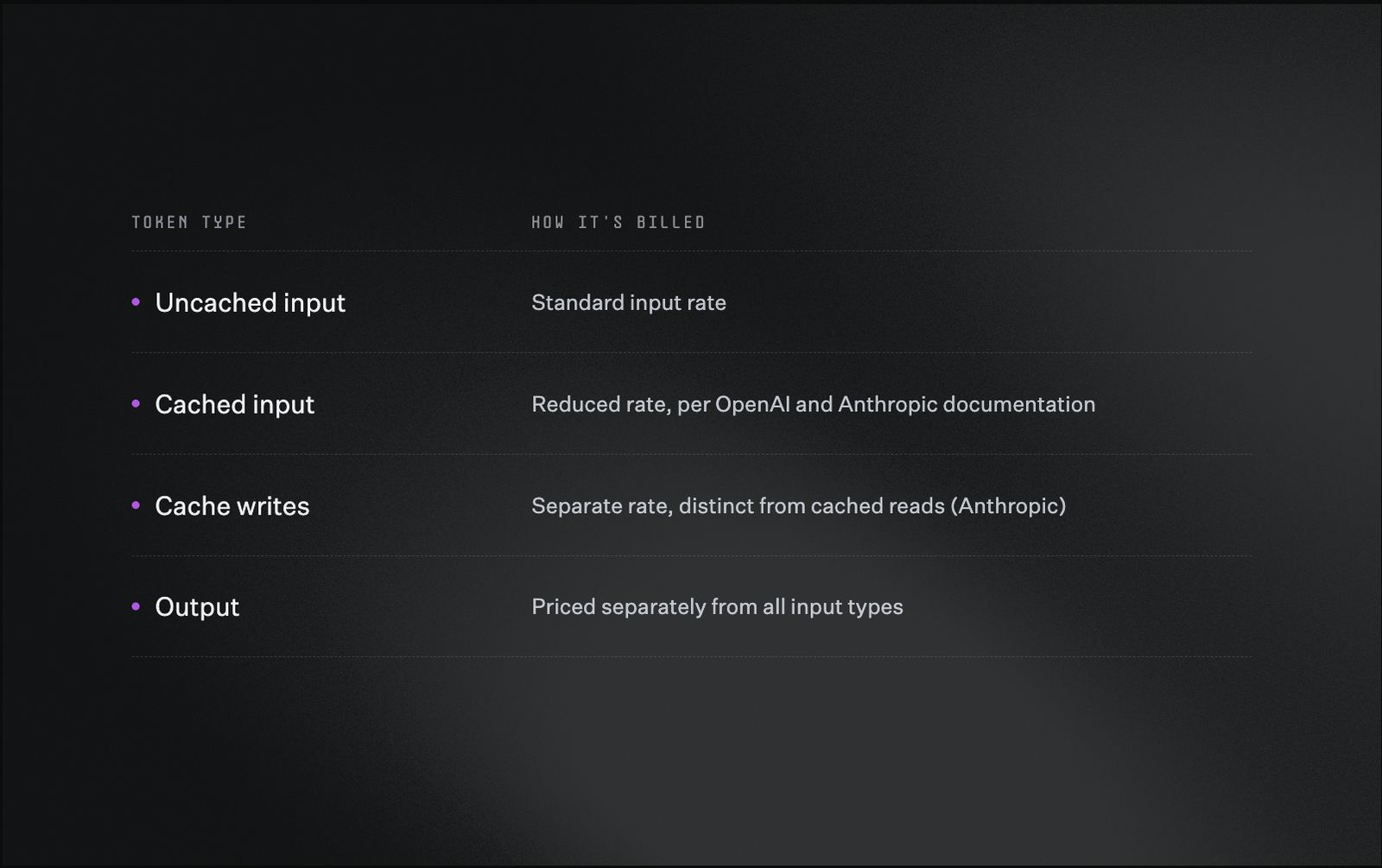
Four token types, four different rates, all inside the same request.
The applicable rates depend on the model and how caching is configured, so the same workload can bill differently depending on setup alone.
Consider an assistant that repeatedly reads the same project context. It may reuse a cached prompt prefix across requests. If that prefix changes, more input may need processing again. Request volume can stay similar while cost increases.
Before attributing a budget variance to higher adoption, check model mix and token type first. Where reporting supports it, check cache hit rate too. A change in cache reuse calls for a different response than a team taking on more work.
Allocate AI costs to the teams responsible
AI cost allocation connects consumption to the person, team, or business unit responsible for it. That mapping supports two different needs:
- Showback, which makes costs visible to the teams driving them
- Chargeback, which assigns those costs to a team's budget
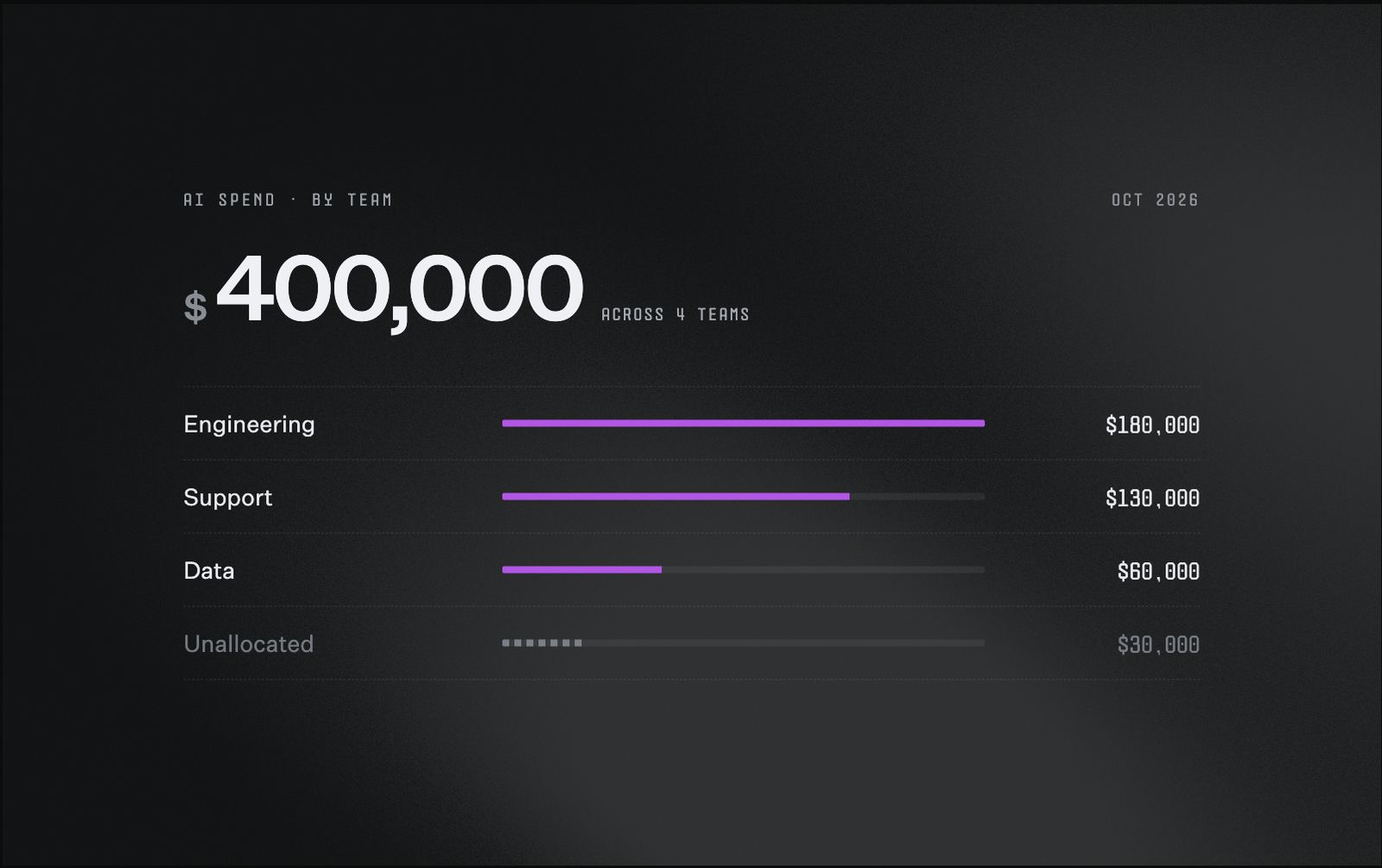
Here’s $30,000 in AI spend with no owner yet, a gap worth closing before the next budget review.
Provider reporting gives useful detail, but its account structure may differ from a company's ownership structure. Anthropic's Usage and Cost API, for example, supports breakdowns by API key, workspace, and model, with daily granularity that can group charges by workspace or description.
A shared workspace needs an agreed allocation method before finance can assign its full bill to individual teams. Invoice reconciliation should compare records at the level the provider actually supports, with any estimated allocations flagged separately rather than presented as exact.
Track what's still unallocated
Some AI spend won't have a clear owner yet. Shared accounts, missing ownership information, or new workflows can all leave costs outside a clean breakdown.
Keep that unallocated share visible during budget reviews, alongside team totals. That way finance can tell the difference between a team's allocated costs and spending that still needs one.
Allocation sets up the real decision
Knowing who spent what only helps if it connects to a budget someone already owns. For a budget owner, an AI spending increase belongs in the same conversation as the rest of a team's technology costs, judged against whether to fund more of the work, change how it gets done, or cut what's avoidable.
Knowing which developer used a tool identifies who to ask, but understanding whether the work justified its cost takes more than ownership. It needs task and outcome context alongside the spend itself.
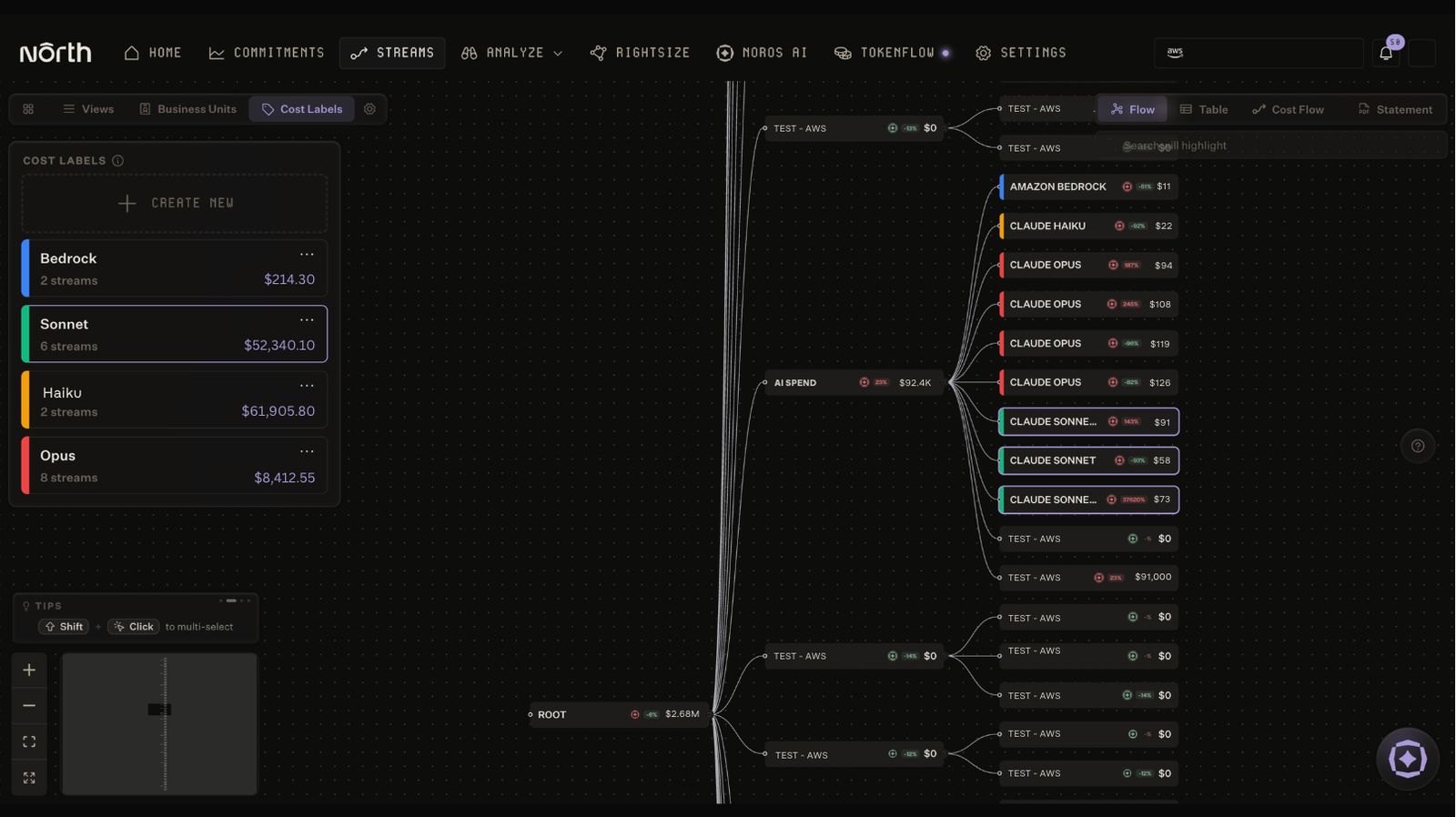
North’s Cost Labels can group AI streams by model, giving a fast read on spend without setting up a business unit.
North's Coststreams already organizes cloud spend across business units, teams, and projects, with budget tracking built in. TokenFlow is built to add that same AI consumption visibility, by individual, team, model, and token type, into that existing structure.
Cost Labels add a lighter layer on top of that structure. A team can group AI streams by model, say, everything running on Claude Sonnet versus Claude Opus, for a fast visual read on where spend concentrates, without the budget enforcement or ownership rules that come with a business unit.
Set AI spending limits and approved fallbacks
An AI spending policy defines who can spend, which models they can use, and what happens when a limit is reached.
Native tool controls are part of that policy already. Cursor, for example, distinguishes on-demand spending limits from included usage, and its Enterprise pooled-usage limits apply to total usage across the plan. That distinction matters for a team deciding how much extra spend to authorize:
- Review the plan's included allowance first
- Set the on-demand limit against that allowance, not on its own
- Remember that enforcement isn't instantaneous, so a limit is a guardrail, not a hard stop
TokenFlow is built to support spending limits and approved fallback models for when those limits are reached, so a team can plan its response before a budget runs out rather than after.
A lower-cost fallback works when a team has confirmed it can still meet the required standard on routine work. Higher-priority work may call for a budget review instead of a fallback. A lower token rate doesn't guarantee a lower total, either, since retries, quality, and cache reuse all factor into the real cost.
Whatever the policy sets, it should make the next action clear to the person doing the work and to the budget owner who has to answer for it.
What should finance measure beyond token spend?
A rising token count only says usage went up. It says nothing about whether that usage produced anything worth the cost. Closing that distance takes a second measure, the cost of useful work, tracked alongside consumption itself.
The FinOps Foundation's unit-economics guidance connects technology costs to business outcomes. Applied to AI, that might mean tracking cost per resolved support case or cost per completed analysis, paired with a quality measure so a cheaper result doesn't get mistaken for a better one.
A team with rising consumption may simply be completing more valuable work. Allocation identifies the owner. Usage detail explains the increase. Outcome measures are what tell a budget owner whether the spend is worth it.
How North brings AI spend into the same system as cloud
Engineering teams already have usage data for tools like Claude Code, Cursor, and Codex. Anthropic and OpenAI can each show that usage by individual developer, but only inside their own dashboard.
That data doesn't move on its own:
- A Claude Code dashboard can't see a Cursor bill
- Neither one sits next to the cloud spend a team already manages elsewhere
- Three tools means three consoles, and a finance team stitching them together by hand, if anyone stitches them together at all
Why reporting tools alone don't close the gap
A few tools already try to solve part of this. Proxies that sit between an app and a model provider can report what passed through them. Most compute cost by multiplying tokens against a rate card, which is an estimate, not the number on the actual bill.
Even the ones that report cleanly leave a team with a number and nowhere to put it: a total by developer or team, sitting outside the place that team's other technology costs already live.
How North already helps manage AI spend
North starts from a different position on two things:
- The actual invoice. North already ingests the real, provider-billed cost for the AI spend it tracks, so a reported number can be checked against what a team actually gets charged, not just estimated ahead of it.
- A place for that number to land. Coststreams and Business Units already give cloud spend an owner, a budget, and a place in a chargeback model.
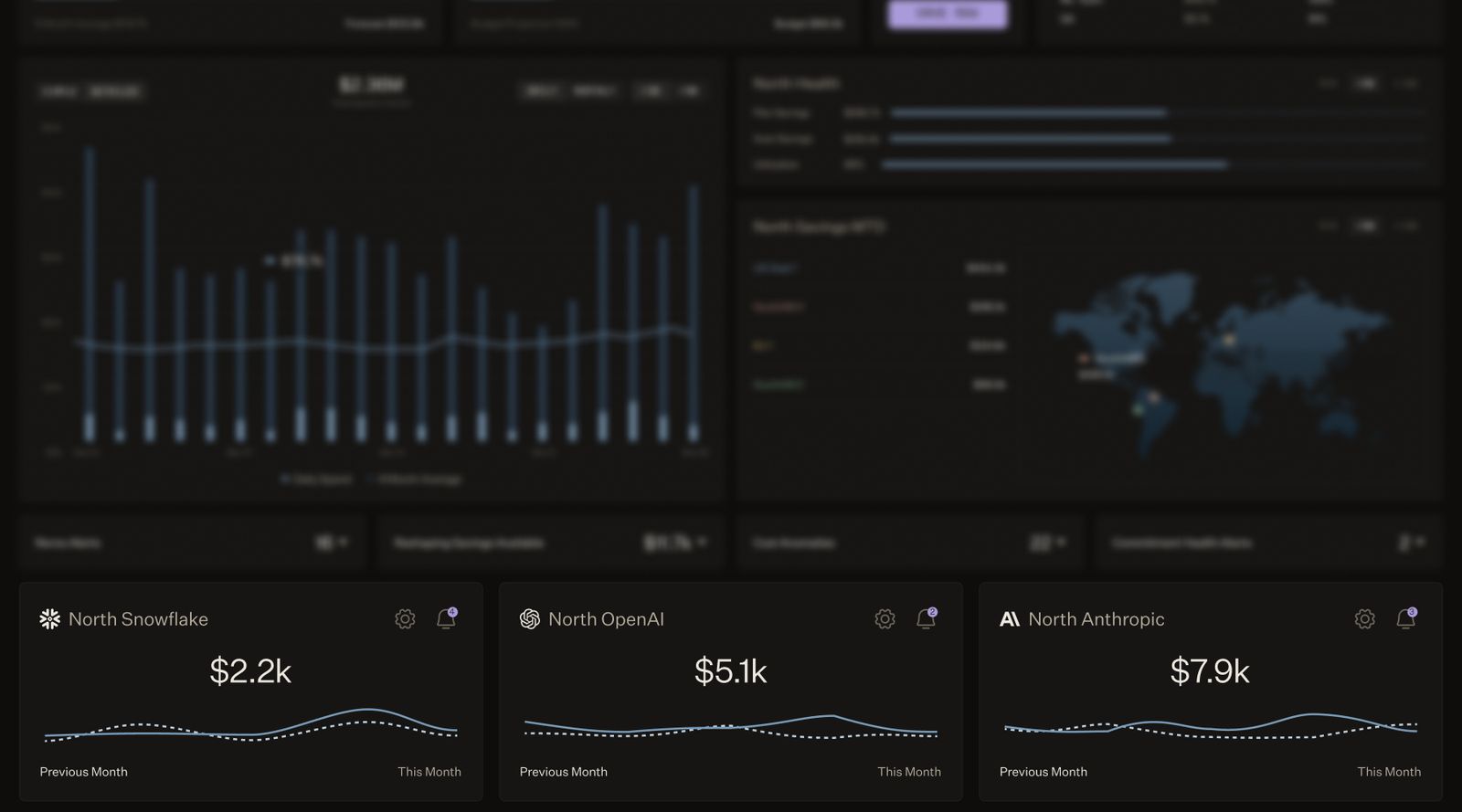
Snowflake, OpenAI, and Anthropic spend, sitting on the same homepage as everything else North tracks.
North connects directly to Anthropic and OpenAI through Cost Loops, bringing AI model costs into the same view as AWS, GCP, and Azure, with the same charts, allocation model, and filters. Snowflake works the same way for data spend, and more integrations will be added soon.
Reporting AI usage by developer or model is a start. What matters more is whether that number joins the financial conversation a team is already having about everything else it runs. That's where most tools stop.
Bringing AI spend into that same structure
TokenFlow extends that same structure to AI consumption for coding assistants like Claude Code, Codex, and Cursor, and the models behind them: Anthropic, OpenAI, and Amazon Bedrock. Once it's live, a team will be able to:
- See AI spend broken down by developer, team, tool, and model, sitting next to the cloud spend it already tracks
- Check that spend against the actual provider invoice, instead of an estimate based on a rate card
- Fold AI consumption into the same Business Unit budgets and chargeback model used for cloud costs today
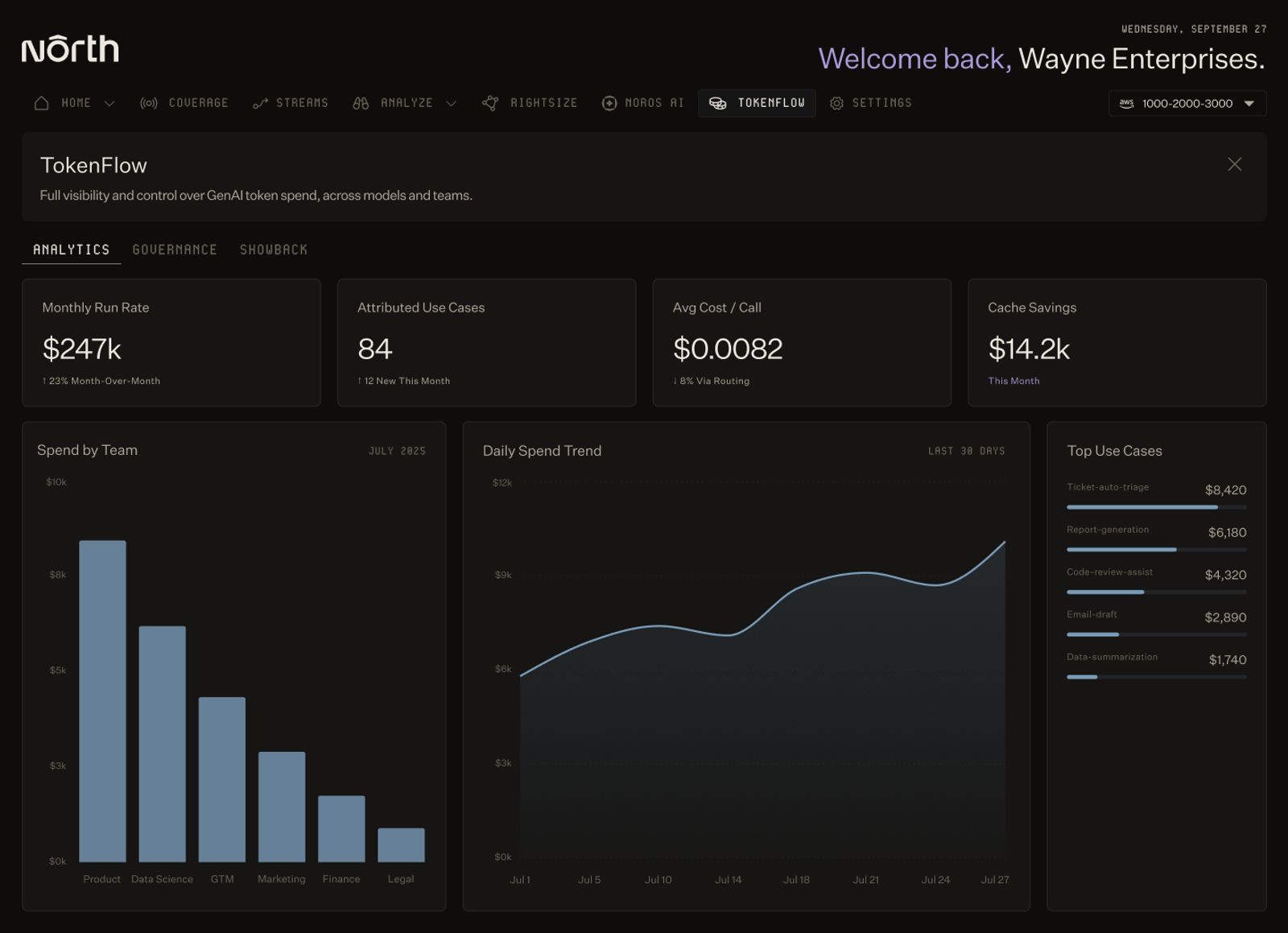
Spend by team, by use case, and by call, once TokenFlow is live.
The early access waitlist for TokenFlow is open now, sign up here.
Bring AI spend into the same view as your cloud and data spend
AI spend builds on the FinOps discipline teams already know, but it doesn't behave the same way. It moves faster, crosses more providers, and hides inside product features rather than discrete accounts.
None of that makes it ungovernable. It means the view needs to catch up:
- A number checked against the real invoice, not a rate-card estimate
- Visibility into which developer, team, and tool is actually driving the spend
- AI cost sitting next to the cloud and data spend it depends on, not off in its own dashboard
Most finance teams can tell you their AWS bill to the dollar. Very few can say the same about their AI bill, and that gap tends to widen before anyone notices.
Join the TokenFlow waitlist, and be among the first to bring AI spend into the same view as your cloud and data cost.
FAQs
Answers to common questions about the product or feature covered in this post.
What is AI spend management?
AI spend management means connecting AI consumption to the people, budgets, and decisions behind it. That includes token consumption across input, cached input, and output, each billed at a different rate; subscription allowances and the usage-based charges that apply beyond them; and the spending policies that decide who can spend, on which models, and what happens at a limit.
Are AI models billed by completed tasks or by consumption?
By consumption. A request that gets retried after failing a quality check still bills for every token it used, whether or not the result was useful.
How does AI spend management differ from tracking tokens?
Token tracking measures usage. AI spend management connects that usage to charges, owners, budgets, and spending policies, accounting for model pricing, cached tokens, subscription allowances, and additional usage charges so teams can explain costs and decide what to change.
How do showback and chargeback apply to AI costs?
Showback reports AI costs to the teams responsible for them. Chargeback assigns those costs to the teams' budgets. Both need an agreed allocation method, especially when multiple teams share a provider account or subscription.
Does choosing a cheaper model always reduce spending?
No. A lower token rate can be offset by additional retries, longer responses, or reduced cache reuse. Compare total consumption alongside output quality and human effort.
What makes North's approach to AI spend different from other tools?
Most tools that report AI usage compute cost by multiplying tokens against a rate card, which is an estimate. North already ingests the actual provider invoice for the AI spend it tracks, so a reported number can be checked against what a team is actually billed. North also already has an allocation engine, Coststreams’ Business Units, that gives cloud spend an owner and a budget. TokenFlow extends that same structure to AI consumption instead of adding another isolated dashboard.
What is TokenFlow?
TokenFlow is North's AI spend management product for AI coding assistants and the agents embedded in internal and customer-facing products. The early access waitlist is open now, ahead of general availability.