-
11 min read
FinOps best practices: 5 strategies every DevOps team should adopt

TL;DR
- FinOps best practices help DevOps teams connect cloud spend to business value and act earlier.
- Build commitments around stable usage, then adapt coverage as infrastructure changes.
- Automate recurring work such as anomaly detection, rightsizing, allocation, reporting, and commitment management.
- Give each team cost views, budgets, and permissions aligned with its responsibilities.
- Use showback and chargeback to make ownership clear across finance and engineering.
- North.cloud gives DevOps and finance one shared system, with multi-cloud coverage across AWS, GCP, and Azure, to reduce manual work and improve visibility.
- North automates commitment purchasing decisions and tracks your Effective Savings Rate, so teams can see whether their coverage is actually paying off.
Cloud spend can climb for weeks before anyone sees the full picture. By the time it reaches a budget review, teams are tracing services, accounts, and workload changes after the fact.
FinOps gives finance and DevOps a shared view of what changed, why it changed, and whether the increase reflects growth or waste.
North brings that context into one system, with allocation, anomaly detection, optimization, and commitment management across Amazon Web Services (AWS), Google Cloud Platform (GCP), and Microsoft Azure.
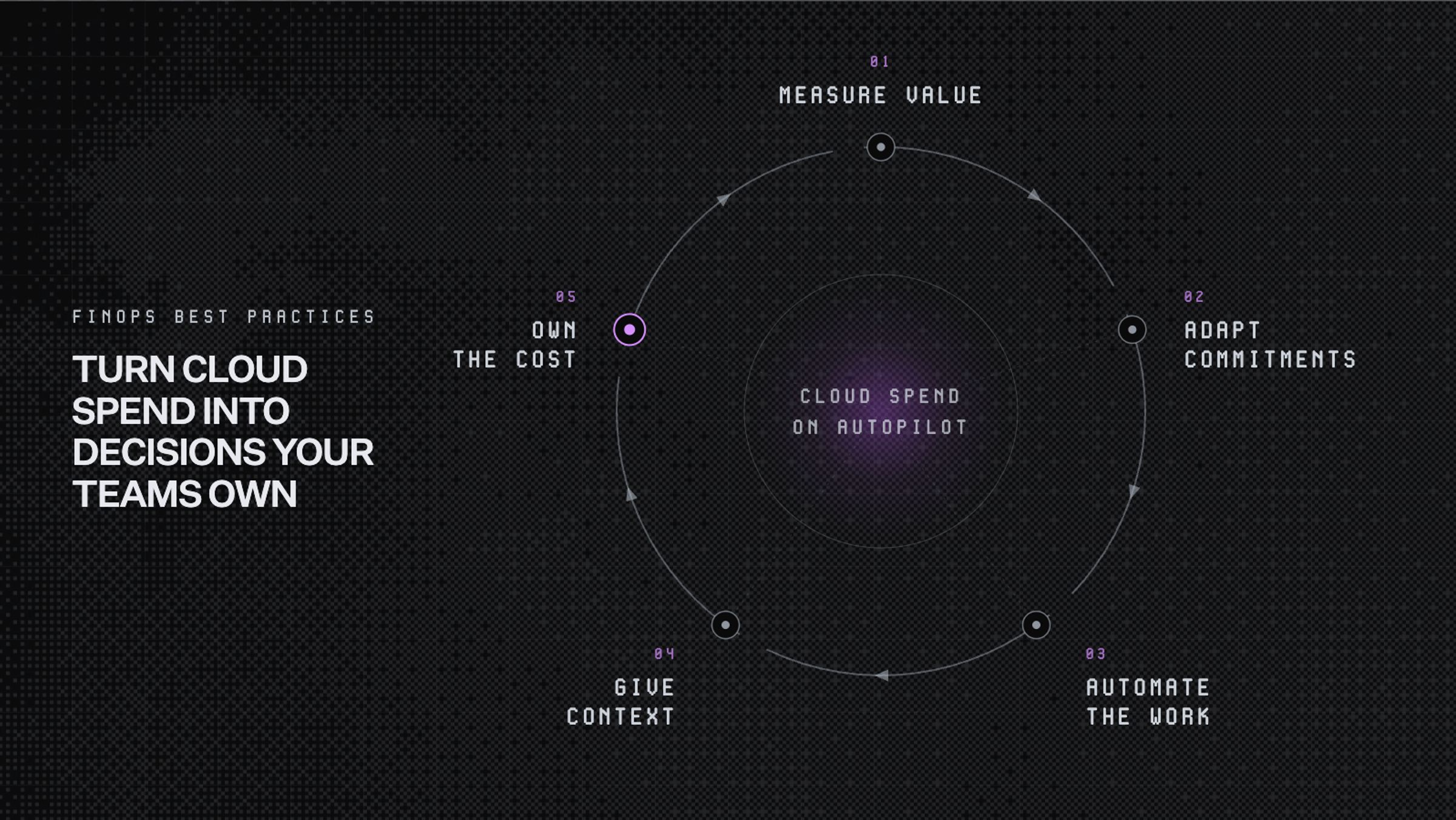
These five FinOps best practices show how DevOps teams can connect spend to business outcomes, automate recurring work, and build cost awareness into daily operations.
1. Measure cloud spend against business value
Higher cloud spend is not always a sign of inefficiency. It may reflect more customers, heavier product usage, or stronger demand.
The challenge is understanding whether that growth is becoming more efficient over time.
Total spend alone rarely answers that question. DevOps teams need to compare cloud costs with the business activity those costs support.
Useful measures may include:
- Cost per customer
- Cost per transaction
- Cost per environment
- Cost per product or feature
- Infrastructure spend compared with usage growth
These measures help teams separate productive growth from avoidable waste.
For example, cloud spend may rise alongside customer demand while cost per customer remains stable. That suggests infrastructure is scaling with the business. If spend rises while usage stays flat, the increase may require closer investigation.
This is why FinOps should focus on value, not cost reduction alone. The goal is to understand whether each additional cloud dollar supports a meaningful outcome.
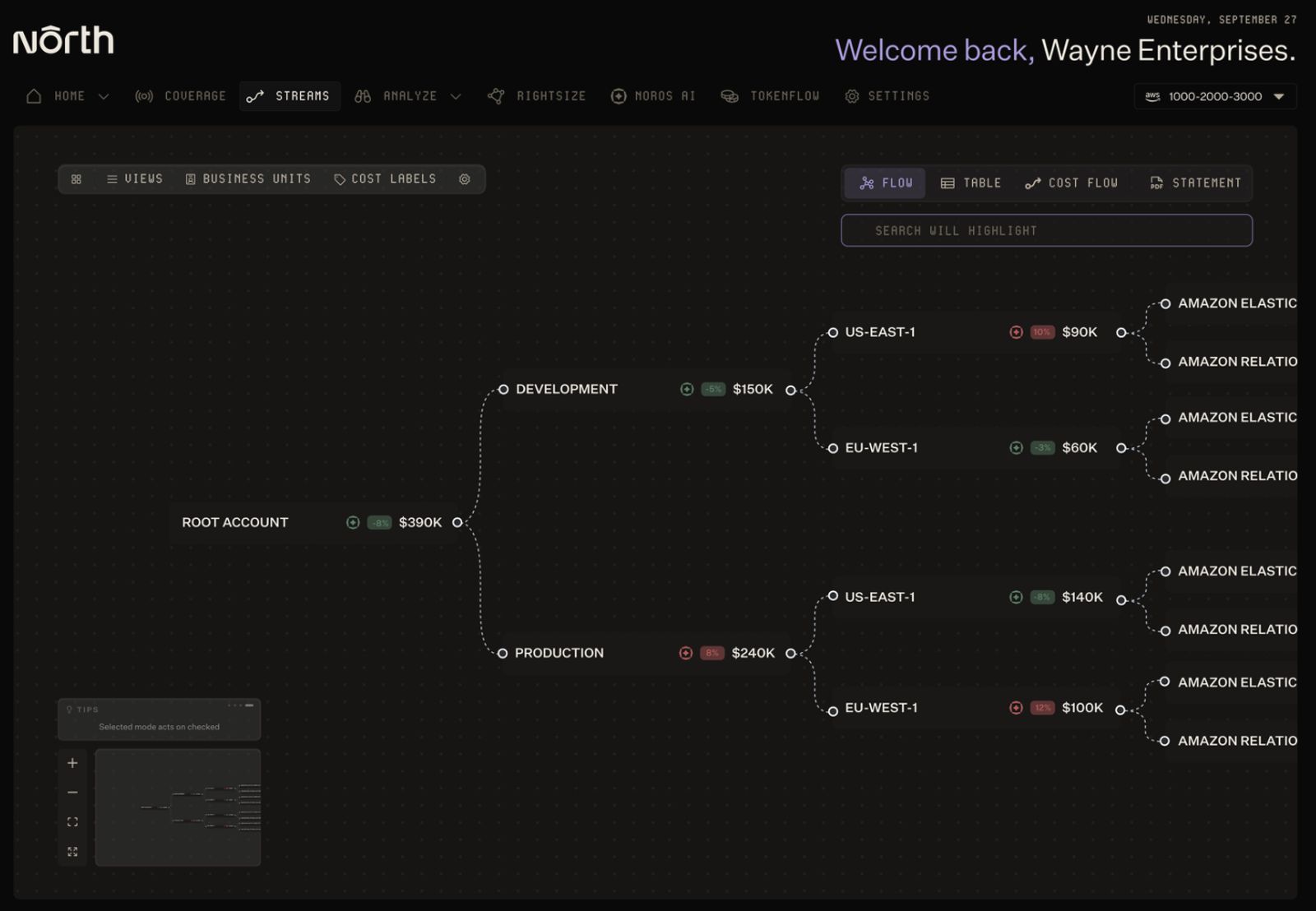
Image: North's Coststreams breaks down a $390K root account into development and production, then by region and service, so teams can trace spend to its source instead of working from one flat total.
Pro tip: Most allocation tools break down when tagging is inconsistent. North's Coststreams allocates spend across teams, projects, customers, and environments using account structure and resource metadata alongside tags, so you get the numerator for unit economics even when tag coverage isn't perfect.
2. Build an adaptable commitment strategy
Cloud providers offer discounted rates when teams commit to predictable usage. These options can generate meaningful savings across steady workloads.
The trade-off is flexibility. Most commitments last one or three years, while infrastructure can change much faster. Teams may hesitate to commit when growth, architecture, or product demand remains uncertain.
An adaptable strategy does not avoid commitments. It matches each workload with the right level of flexibility.
Start with the most dependable usage baseline. Stable workloads can support committed pricing. Newer or variable workloads can remain on demand until their patterns become clearer.
How cloud commitments compare
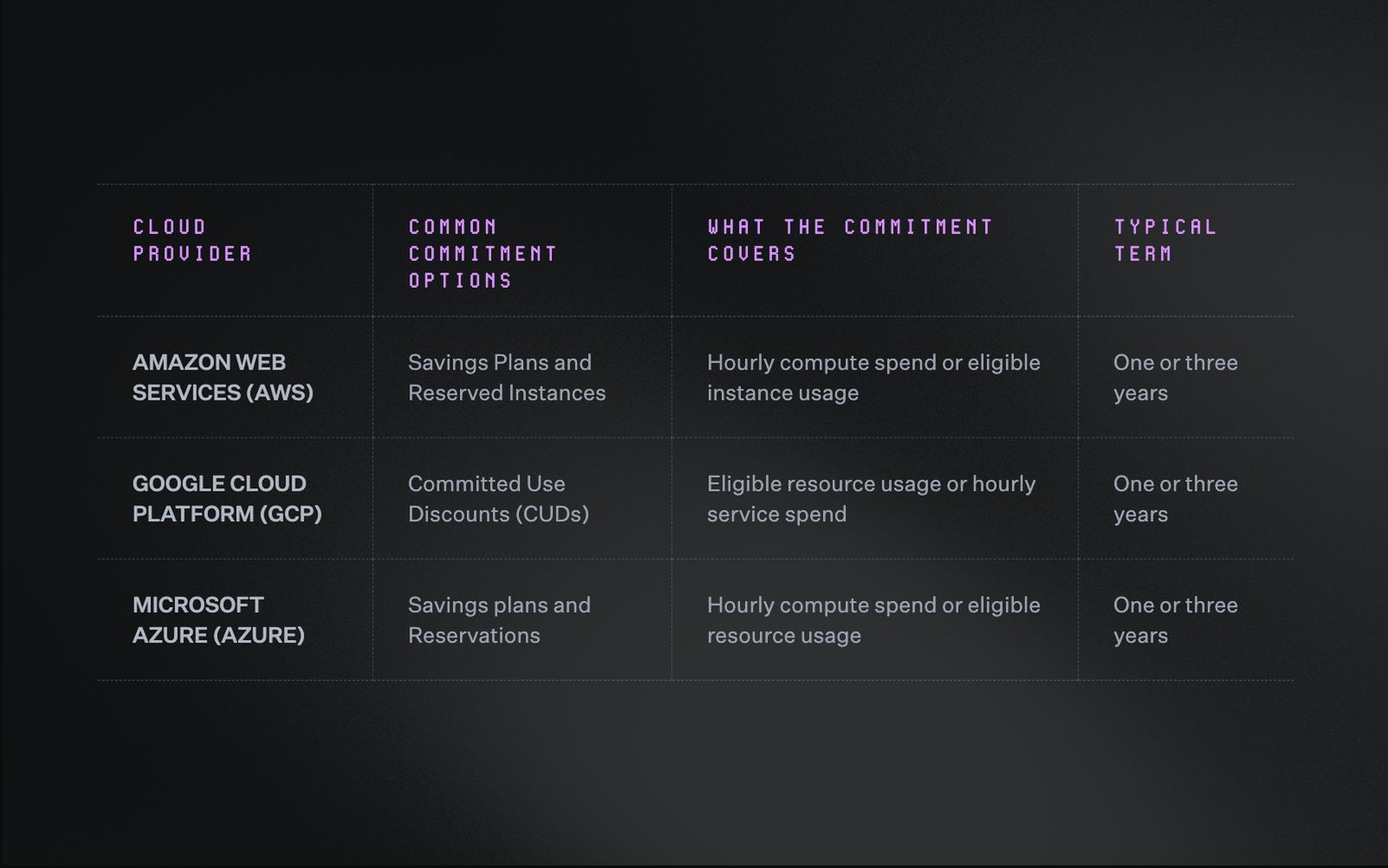
Commitment options vary by provider, but most share the same one or three year term system, which is why flexibility within that term matters more than the discount rate alone.
Savings plans and spend-based commitments generally offer broader flexibility. Resource-specific reservations may suit workloads with stable configurations. Exact coverage varies across providers, services, and commitment types.
Before purchasing coverage, teams should review:
- Which workloads run consistently
- How much usage forms a dependable baseline
- Where demand changes across seasons or environments
- How much unused commitment risk the business can accept
- How often coverage will be reviewed and adjusted
Coverage rate alone does not show whether a strategy is working. Effective Savings Rate (ESR) measures the savings achieved after unused commitments are considered.
High coverage can still produce weak returns when commitments go unused. A well-matched baseline can deliver stronger savings with less exposure. This is why North's commitment engine optimizes for ESR rather than coverage percentage, since a technically high coverage rate can still hide weak returns.
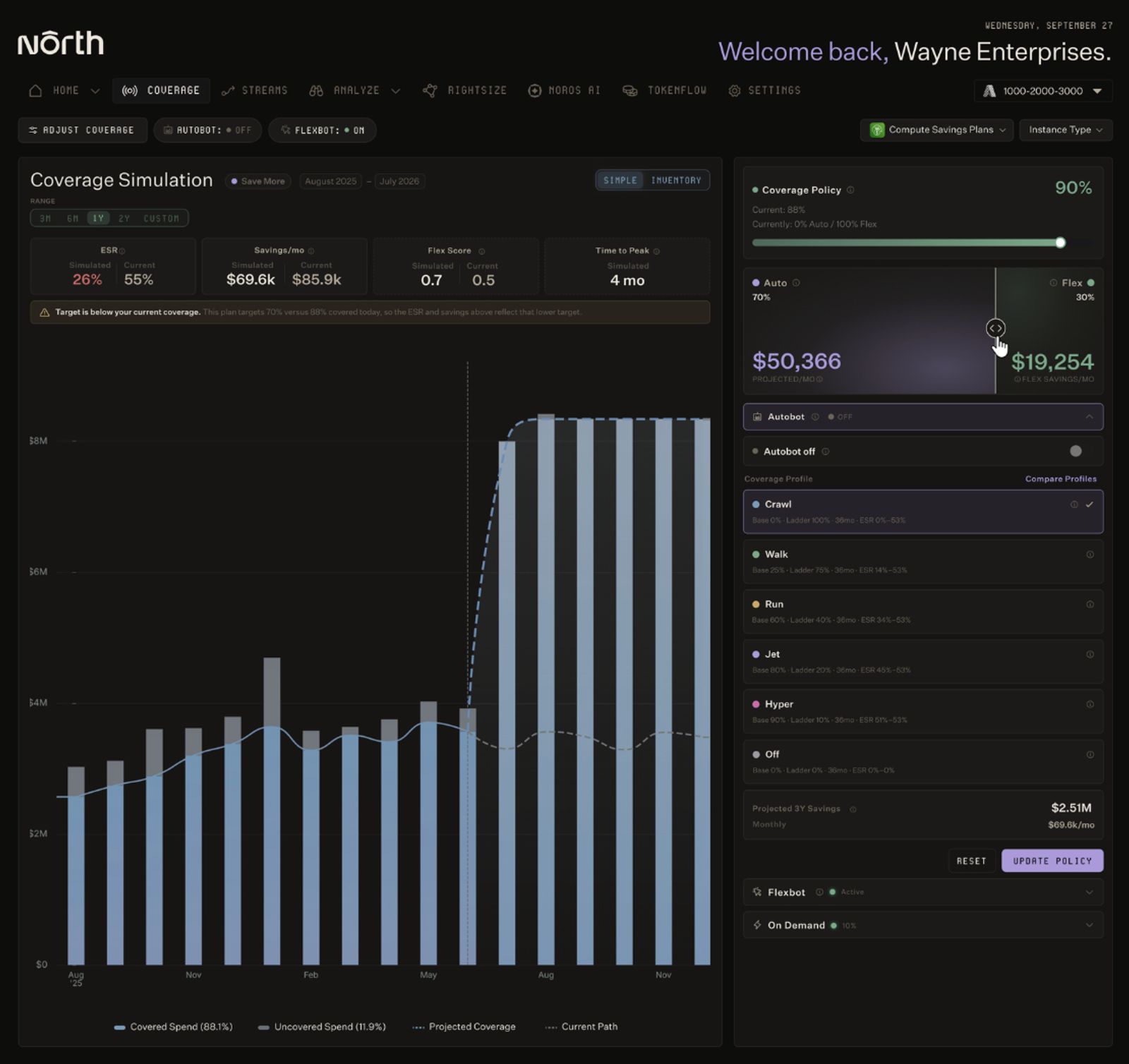
North's Coverage Simulation projects savings under different coverage policies, letting teams test how shifting the mix between automated commitments and flexible coverage affects the savings rate before committing.
Pro tip: North supports two ways to raise ESR as usage changes. Autobot builds an adaptive commitment ladder through smaller monthly purchases, so coverage adjusts as usage shifts instead of locking a full year of assumptions into a single upfront buy. Flexbot delivers commitment-level savings without the one or three year lock-in, so teams can cover volatile workloads without carrying long-term risk.
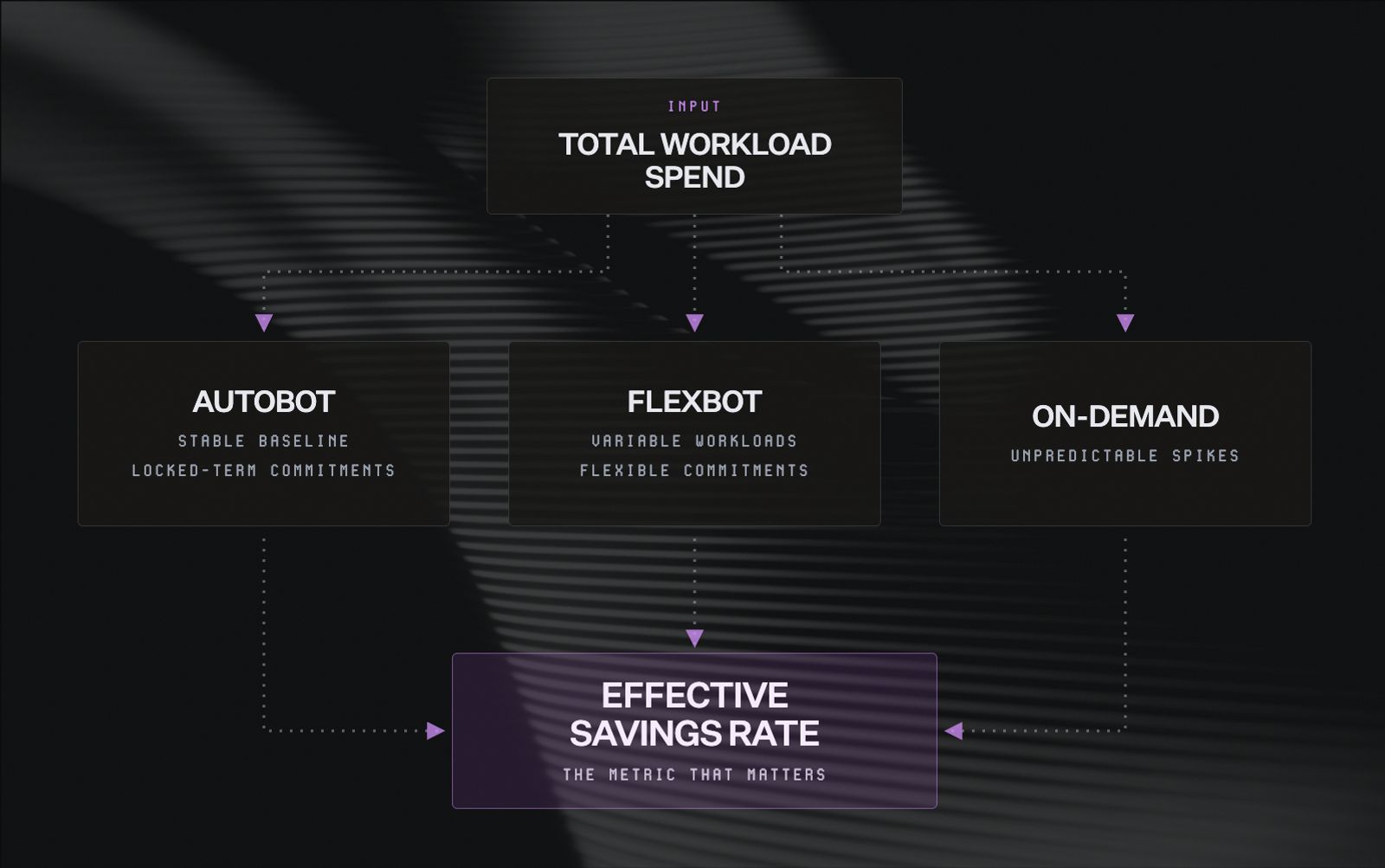
North splits workload spend into three coverage bands, Autobot, Flexbot, and on-demand, and measures all three against Effective Savings Rate rather than coverage percentage alone.
3. Automate recurring FinOps work
FinOps becomes difficult to sustain when every task depends on manual review.
Engineers may spend hours comparing billing exports, checking dashboards, or updating commitment spreadsheets. These tasks matter, but they compete with work that only engineering can do.
Automation helps teams move from periodic cost reviews to a continuous FinOps practice. It keeps routine analysis running in the background while surfacing decisions that need human judgment.
Recurring work that benefits from automation includes:
- Detecting unexpected cost changes
- Identifying idle or oversized resources
- Adjusting commitment coverage as usage shifts
- Allocating shared costs across teams and environments
- Updating forecasts and scheduled reports
- Investigating changes in plain language
The goal is not to remove people from the process. Automation handles repetitive analysis so finance and DevOps can focus on trade-offs, priorities, and implementation.
For example, a development environment may begin approaching production-level spend. Manual investigation requires teams to trace the affected account, service, and workload. Automated anomaly detection surfaces the change earlier, delivering it to the people who subscribed to those notifications through email or Slack, so DevOps has the context needed to investigate without opening a dashboard or exporting a CSV.
That speed matters. Cost issues are easier to correct while the workload change is still recent.
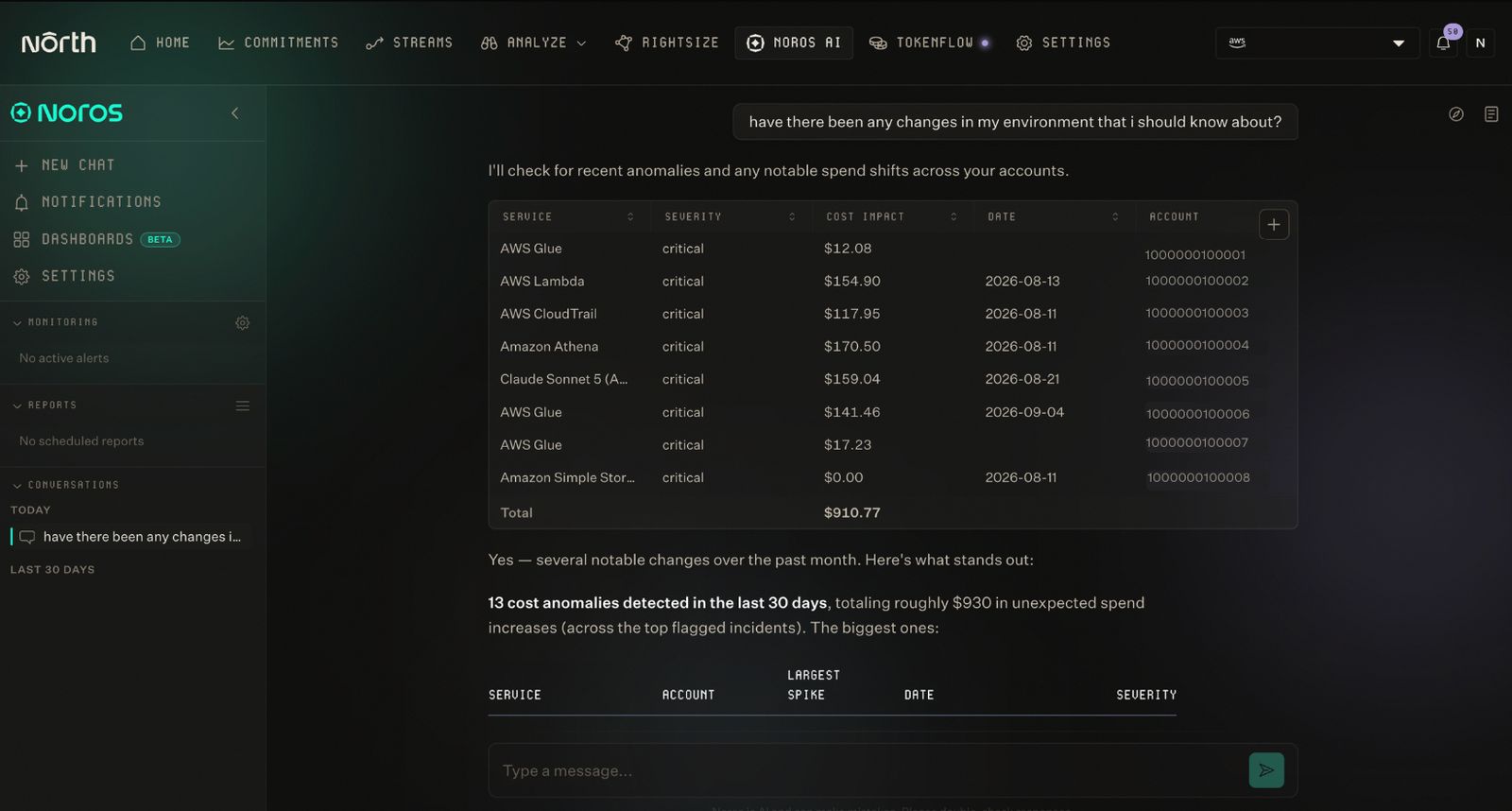
Noros answers plain-language questions about spend changes, surfacing 13 flagged anomalies from the past month with the affected service, account, and dollar impact for each.
Pro tip: North delivers anomaly notifications through email or Slack as they're detected, while Rightsize surfaces optimization opportunities for teams to review directly in the platform. Noros, North's FinOps LLM, lets teams investigate any change in plain language, cutting down on manual exports and dashboard reviews.
4. Give each team relevant cost context
Cloud cost data only helps when teams can connect it to their work.
Finance, DevOps, product, and leadership may use the same cost data differently. Giving every stakeholder the same dashboard often creates more noise than clarity.
Each team needs a view built around the decisions it owns:
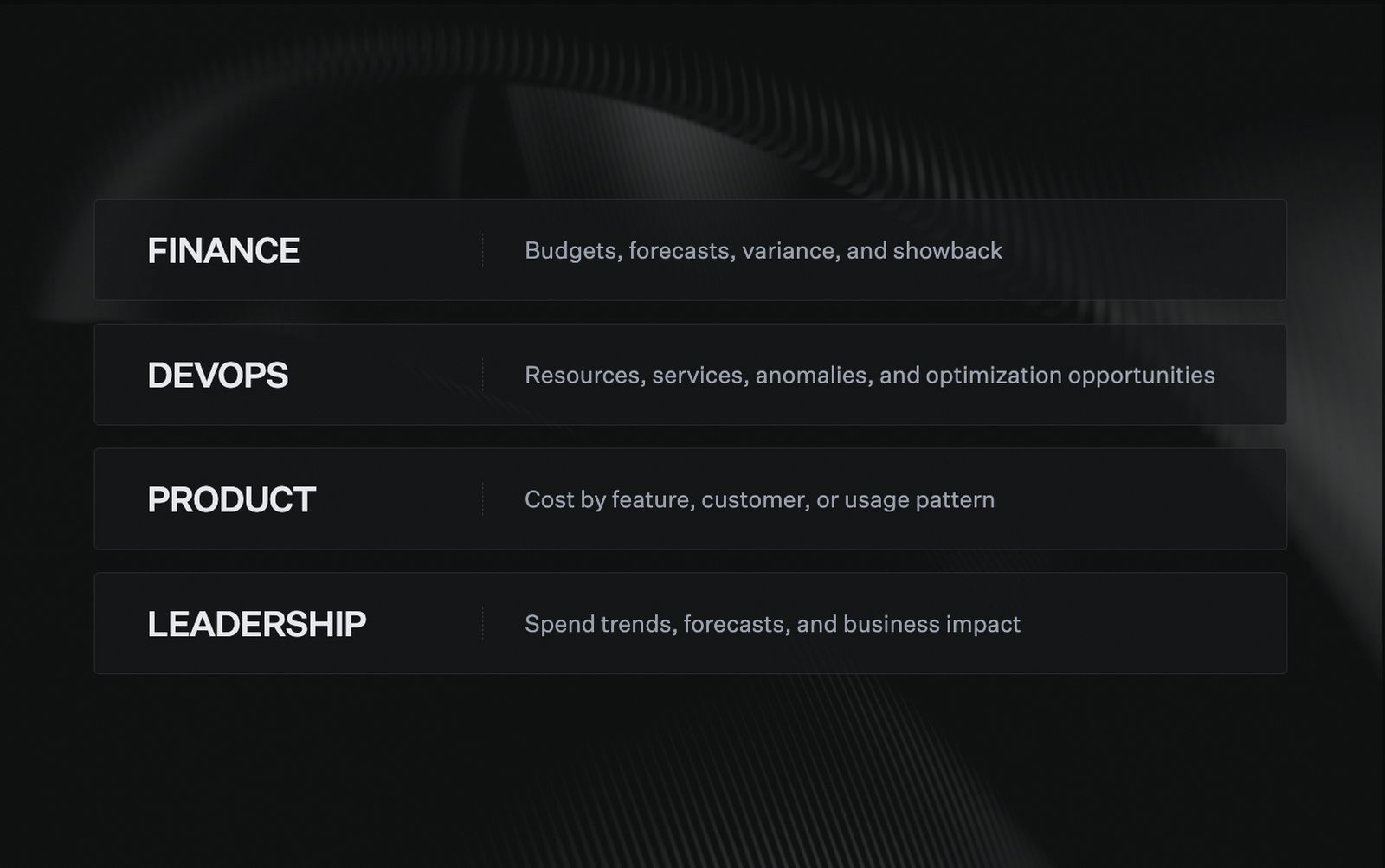
Each team needs a different lens on the same cost data, from finance's budget variance to DevOps's anomaly detection, rather than one dashboard trying to serve everyone at once.
This does not require separate data sources for every team. It requires one reliable cost model with views tailored to each audience.
Engineering teams may organize their views by:
- Team or service owner
- Production, staging, and development
- Product or application
- Cloud service and resource type
- Project, customer, or cost center
Tagging can support this structure, but it should not carry the full burden. Tags often become inconsistent as infrastructure and organizations evolve, and shared resources make simple ownership rules difficult to maintain.
A stronger allocation model solves that by combining tags with other business and infrastructure dimensions. Shared resources like data platforms, observability tools, or networking can then be split by consumption rather than left in an unallocated bucket, so teams see the costs they influence without sorting through the entire cloud bill.
Access controls matter just as much as allocation. Each team should see only the views tied to its role, without needing a separate tool or a separate export to get there. With North, role-based access scopes what each user can see and do, so finance, engineering, and leadership share one cost model without everyone landing on the same view.
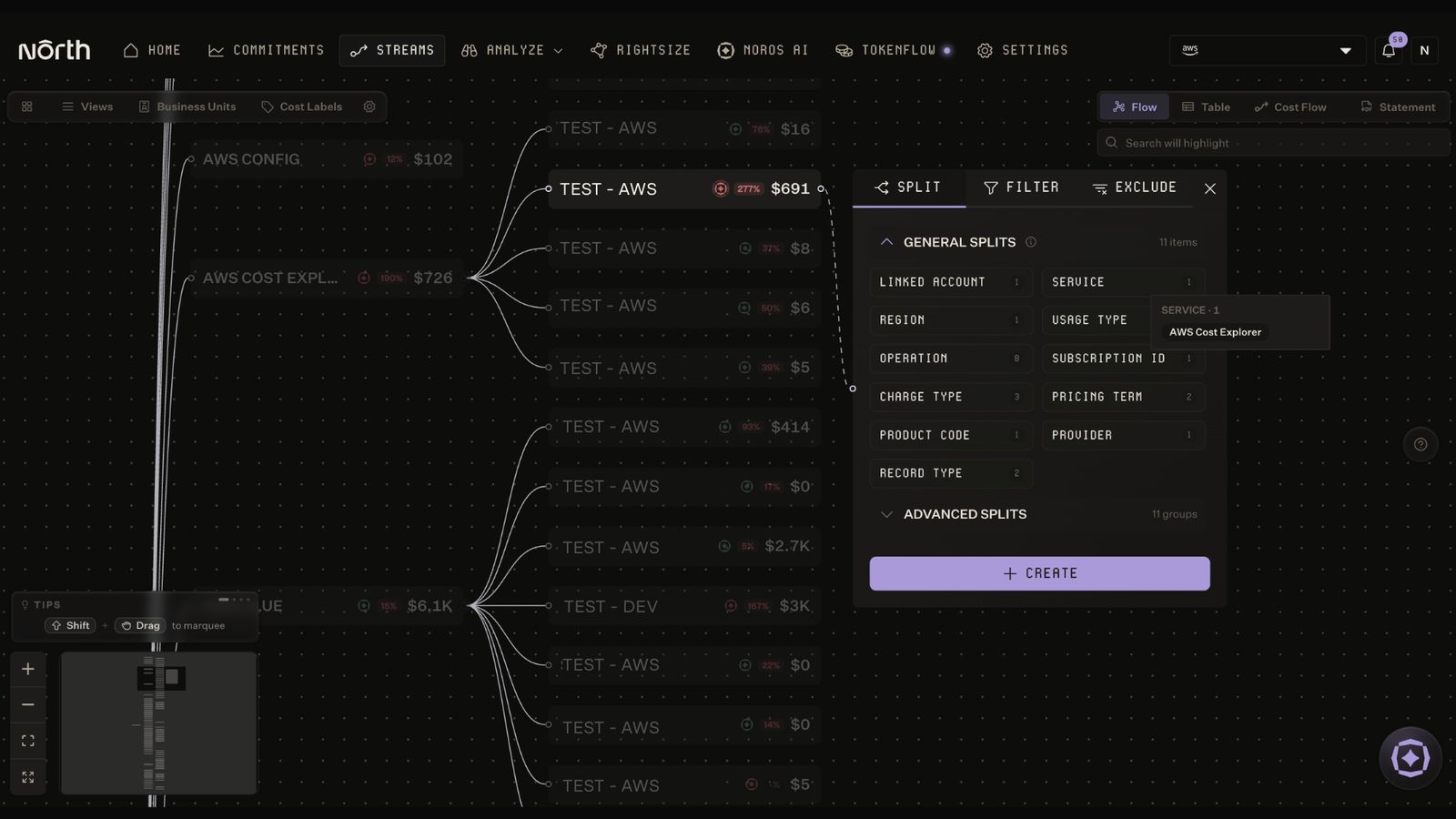
Coststreams lets teams split cost data by dimensions like account, region, or usage type, so shared spend can be broken down without relying on tags alone.
Pro tip: Coststreams makes it easy to tailor views by team, environment, project, service, or customer, so every stakeholder works from the same allocation model with the slice that matches their role.
5. Embed cost ownership into DevOps
FinOps works best when cost ownership sits close to infrastructure decisions.
Finance and FinOps teams can set budgets, policies, and reporting standards. DevOps teams can then manage the services, environments, and resources they influence directly.
This creates a shared operating model rather than shifting responsibility from one team to another.
What shared ownership looks like
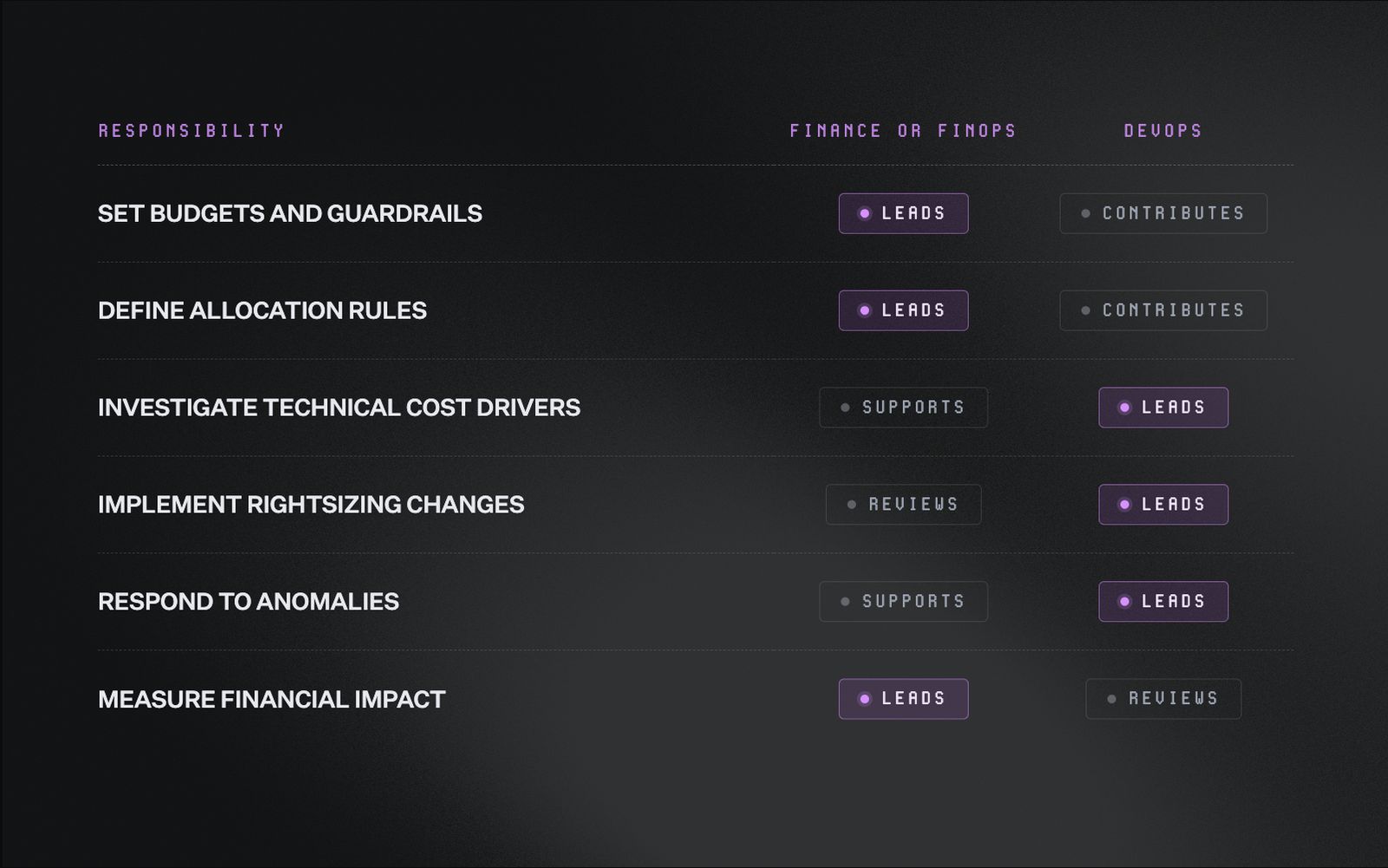
Ownership splits by responsibility rather than by team. Finance leads on budgets and impact, DevOps leads on technical investigation and fixes, and each side supports the other where it counts.
Showback and chargeback can make that ownership more concrete.
- Showback gives teams a clear view of what they spent, where, and why
- Chargeback assigns those costs to the responsible team, department, or cost center
Both depend on an allocation logic teams can trust. Shared costs should reflect real usage, while each team should see spend in the structure that matches its work.
Shared services like data platforms, observability, and networking are the hardest costs to split fairly. Usage-based splitting means each team pays for what it actually used.
That may mean organizing costs by:
- Team
- Project
- Environment
- Customer
- Department
- Business initiative
The same allocation logic should carry across dashboards, reports, and internal billing. That keeps finance and engineering aligned on the numbers behind each decision.
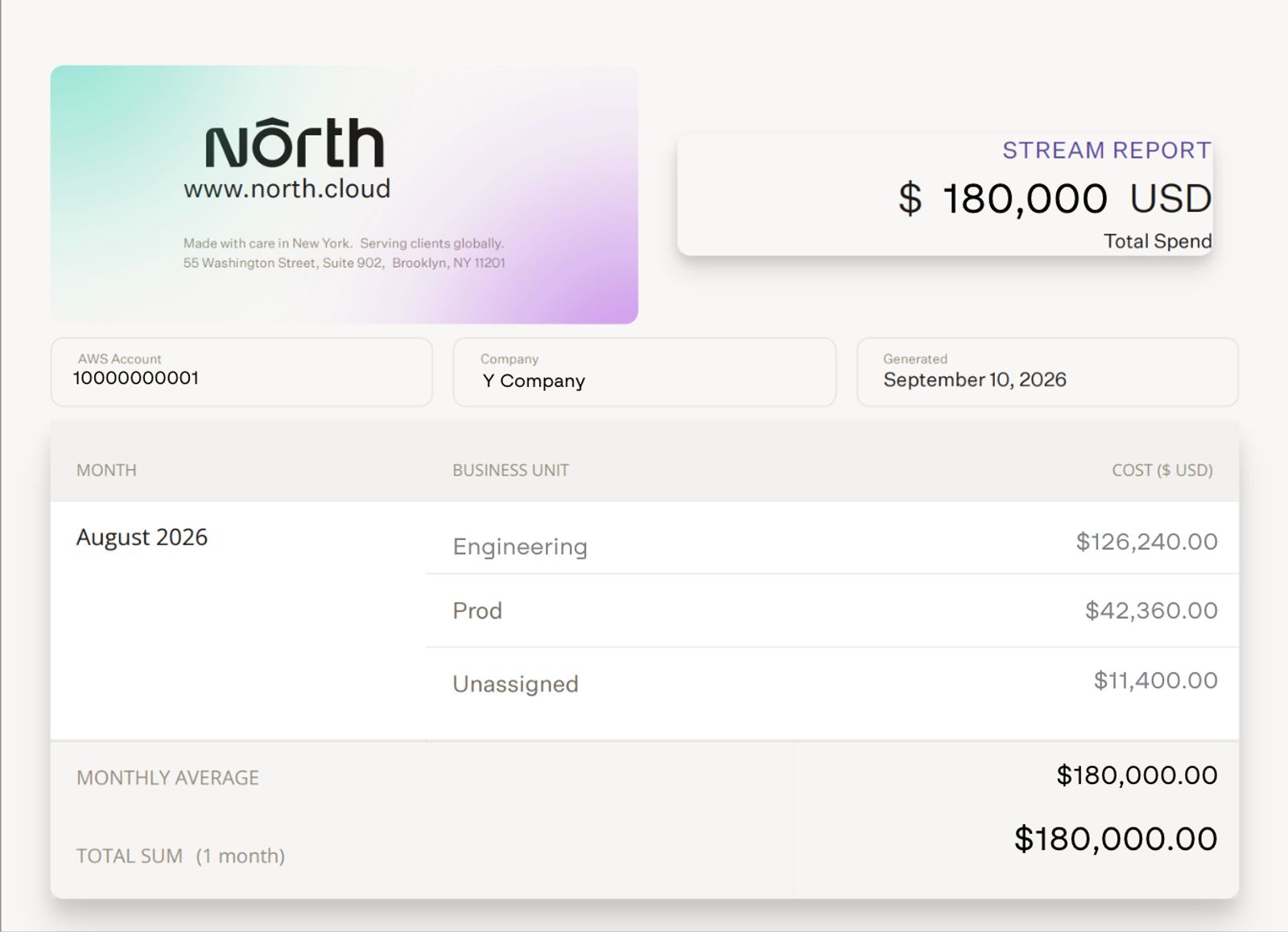
A North stream report breaks total spend down by business unit, turning one AWS invoice into a showback statement each team can act on.
Pro tip: Coststreams generates showback statements and finance-ready chargeback reports from the same allocation logic. Teams can track budgets, split shared costs by usage, and receive scheduled reports through email or Slack. Noros lets anyone ask follow-up questions in plain language, like why a team's spend jumped last week, without opening a dashboard.
Make FinOps part of daily DevOps operations with North
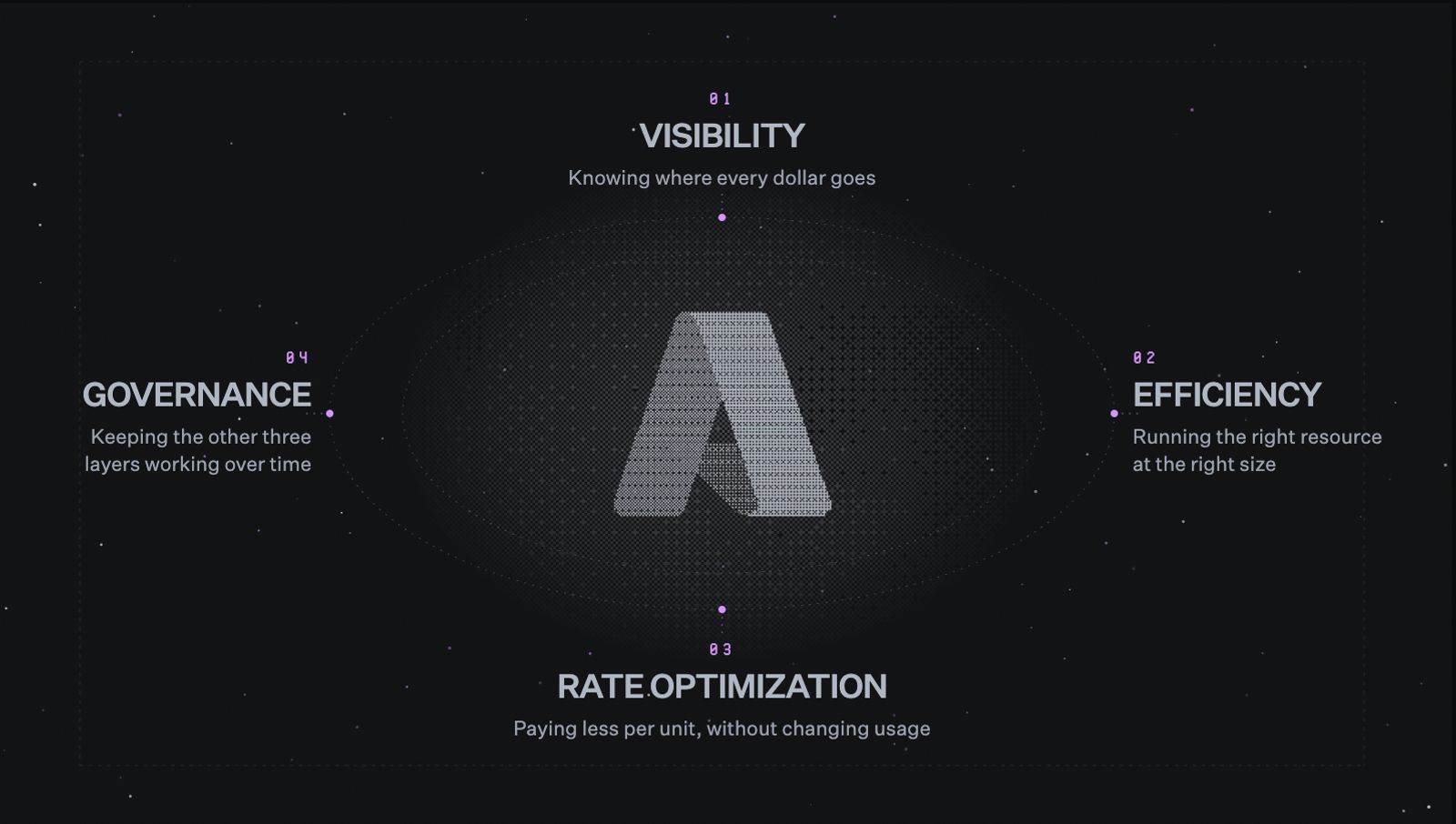
Cost management becomes more effective when context, automation, and ownership sit within everyday engineering workflows.
The strongest practices connect spend to business value, adapt commitments as usage changes, automate recurring work, and give each team the context to act.
North brings those workflows into one system across AWS, GCP, and Azure. Finance and DevOps can work from the same numbers while reducing manual reviews and responding earlier.
Explore North's free tier to see how you can manage cloud spend across AWS, GCP, and Azure with more context, flexibility, and control.
FAQs
Answers to common questions about the product or feature covered in this post.
What are the most important FinOps best practices for DevOps teams?
The most effective FinOps practices help DevOps teams understand and act on cloud costs earlier.
They include:
- Measuring spend against business value
- Matching commitments to stable usage
- Automating recurring FinOps work
- Tailoring cost views by team
- Assigning clear ownership for action
Together, these practices make cost management part of daily engineering operations.
What is the difference between FinOps and DevOps?
DevOps focuses on delivering and operating software reliably. FinOps focuses on maximizing the business value of cloud spend.
The two practices overlap because engineering decisions shape infrastructure costs. FinOps gives DevOps teams the financial context needed to balance cost, performance, and reliability.
How should DevOps teams measure FinOps performance?
Teams should measure both financial and operational outcomes.
Useful metrics include:
- Effective Savings Rate (ESR)
- Commitment utilization and coverage
- Cost per customer or transaction
- Budget variance
- Waste removed through rightsizing
- Time spent on recurring FinOps work
No single metric provides the full picture. Teams should combine rate efficiency, resource efficiency, and business value.
How does North help DevOps teams automate cloud cost management?
North helps DevOps teams automate cloud cost management by bringing analysis, allocation, anomaly detection, rightsizing, forecasting, reporting, and commitment management into one system.
Teams can reduce recurring manual work while retaining control over infrastructure decisions. This helps engineers identify cost changes earlier and act before they become budget surprises.
Noros, North's FinOps Agent, lets teams investigate spend in plain language, while scheduled reports keep finance and engineering aligned between reviews.
What cloud providers does North support?
North gives finance and DevOps teams one operating view across Amazon Web Services (AWS), Google Cloud Platform (GCP), and Microsoft Azure.
Teams can analyze spend, allocate costs, investigate anomalies, and manage optimization across all three providers without stitching together separate exports and dashboards.
North preserves provider-level detail while giving teams one set of numbers for cross-cloud reporting and decision-making.
How does North’s Coststreams help DevOps teams improve cost visibility across teams?
North's Coststreams improves cross-team visibility by organizing cloud spend around teams, projects, environments, services, customers, and cost centers.
DevOps teams can group and filter costs by team, project, environment, service, customer, or cost center. Shared costs can also be split based on usage, rather than divided evenly.
This gives each team a clearer view of the spend it influences. Finance, engineering, and leadership can work from the same allocation logic while using views tailored to their responsibilities.
Coststreams also supports budgets, showback, chargeback, and unit economics. Teams can track spend as it accrues and receive scheduled reports through email or Slack, with Noros available for follow-up questions in plain language.
How do Flexbot and Autobot automate cloud commitment management?
North's Flexbot and Autobot help DevOps teams maintain commitment savings as cloud usage changes.
Flexbot delivers commitment-level savings without a one or three year lock-in, so coverage can adjust as usage shifts. Autobot builds an adaptive commitment ladder through smaller monthly purchases. Machine learning-powered modeling looks at usage patterns, savings goals, and guardrails to decide how much coverage to add each month.
Both are designed to raise Effective Savings Rate, the savings teams actually realize, rather than just increasing coverage on paper.
How does Noros help DevOps teams manage cloud costs?
Noros, North's FinOps Agent, helps DevOps teams investigate and understand cloud spend through plain-language questions.
Teams can use Noros to:
- Explain why costs changed
- Investigate anomalies and identify affected services and workloads
- Ask questions about commitment health and coverage
- Generate summaries and charts in response to questions
- Get answers in plain language without exporting billing data or drilling through dashboards
Noros gives teams faster access to cost context without requiring manual billing exports or multiple dashboard reviews.