-
21 min read
AWS cost optimization tools: 8 options worth comparing in 2026

TL;DR
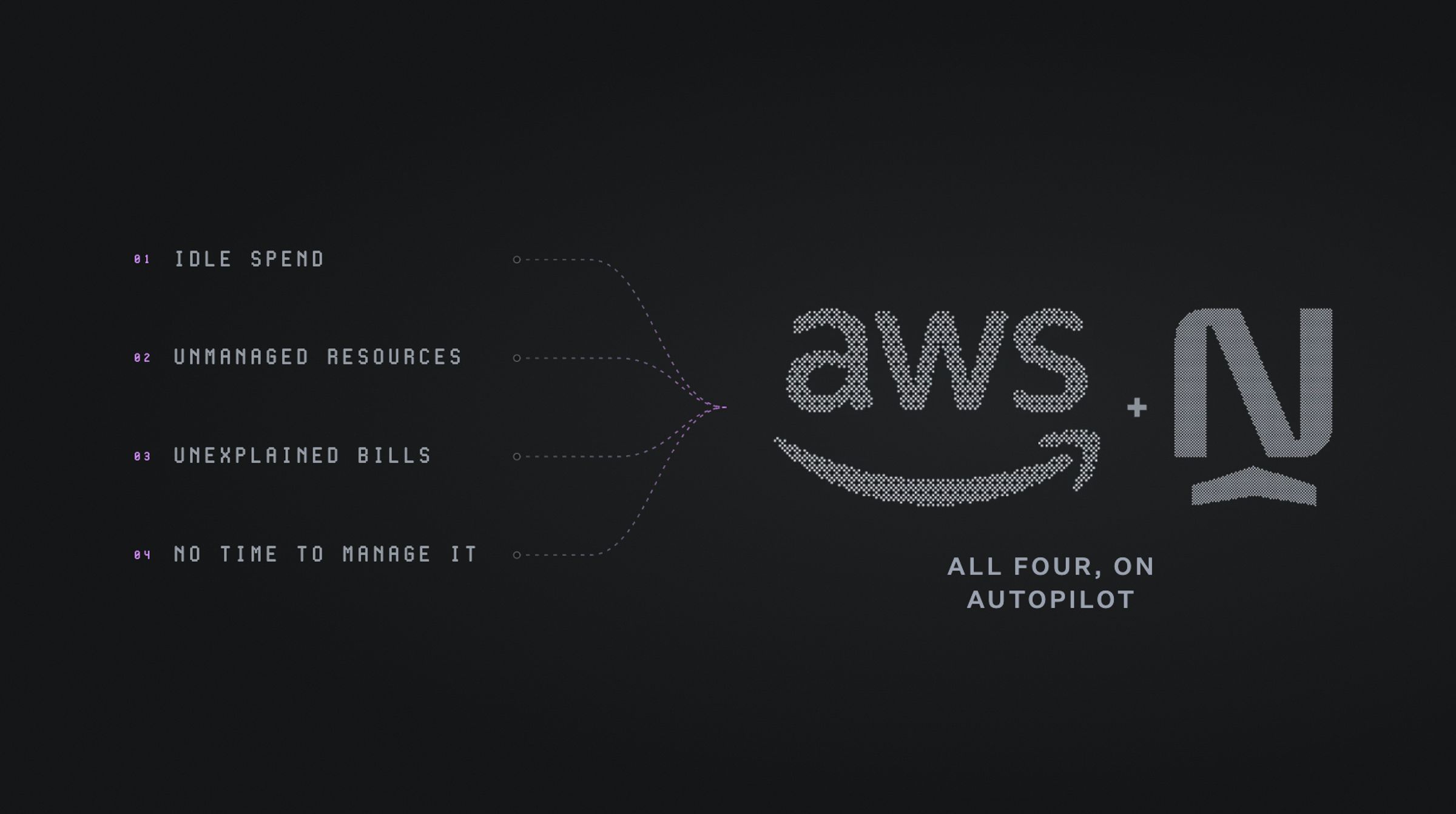
- Most AWS cost problems fall into one of four patterns: idle on-demand spend, resources nobody's turned off, a bill nobody can explain, or simply no time to manage any of it by hand.
- Reporting tools show where the money goes. Execution tools (commitment automation, rightsizing, allocation) act on it directly. That shift is the real dividing line in this category now.
- Native AWS tools like Cost Explorer and Compute Optimizer cover a simple, single-account setup well. Multi-account or fast-growing teams usually need more.
- This guide compares 8 tools on execution, pricing, and fit, including where each one falls short.
- North.cloud covers all four patterns in one platform: commitment automation, rightsizing, allocation, and continuous monitoring, with a free tier to test against a real AWS bill.
Amazon Web Services (AWS) cost optimization rarely earns a place on the roadmap until it has to. Most teams only have a chance to prioritize it once a huge number hits the bill, and nobody can explain it.
Yes, this reactive pattern is common, but it doesn't have to be permanent. Thankfully, a growing set of tools now handles that work without requiring a company to reorganize around it.
For years, most tools in this category were built to show where the money went. That reporting layer is still useful, but it stops short of the actual fix. A newer generation of tools goes further and acts on that spend directly, instead of just accounting for it.
Most teams already have a way to see where their AWS spend is going. What's often missing is a way to act on it without adding to their workload. This guide compares 8 tools on exactly that: the problem each one solves, how it solves it, and what it costs.
What cloud cost problem are you trying to solve?
Before getting into the list, it helps to know what's being solved for. Most problems in this category fall into one of four patterns, and each one points toward a different kind of tool.
1. Compute is running at on-demand rates despite steady, predictable usage
- How it shows up: AWS Cost Explorer shows most of the Elastic Compute Cloud (EC2) or Relational Database Service (RDS) bill sitting outside any Savings Plan (SP) or Reserved Instance (RI) coverage. The workloads behind it haven't changed much month to month, which usually means the coverage gap isn't a usage problem. It's a purchasing problem that needs revision.
- What fixes it: Continuous commitment management that adjusts coverage as usage shifts, instead of a one-time purchase that goes stale.
- Where to look in this guide: North.cloud, or ProsperOps.
2. Usage is unpredictable, not just steady or idle
- How it shows up: Spend swings with seasonal cycles, weekday versus weekend traffic, or time of day, so a fixed commitment or a static rightsizing recommendation is wrong half the time by design.
- What fixes it: Coverage and sizing that flex with the pattern itself, instead of a single average that smooths over the peaks and valleys.
- Where to look in this guide: North.cloud, ProsperOps, or AWS Compute Optimizer.
3. Resources are provisioned but nobody's turning them off
- How it shows up: Idle instances, unattached storage volumes, and development environments running nights and weekends. It was most likely provisioned for a reason at some point, but now nobody owns the decision to shut it down.
- What fixes it: Rightsizing and scheduling that runs continuously in the background, rather than a manual cleanup pass that only happens when someone remembers to look.
- Where to look in this guide: North.cloud, or AWS Compute Optimizer.
4. The bill can't be explained by team, product, or environment
- How it shows up: Finance asks where an increase came from, and answering takes a spreadsheet and a few hours nobody has budgeted for. This is usually a tagging problem more than a spending problem. The cost exists somewhere in the account, but nothing ties it back to who's responsible for it.
- What fixes it: Allocation that maps spend to a business owner without requiring a perfect tagging structure to already be in place first.
- Where to look in this guide: North.cloud, CloudZero, or Vantage.
5. There's no time to manage any of this by hand
- How it shows up: The team is scaling, cost review keeps getting pushed to the next sprint, and there's no dedicated FinOps headcount to own it. Awareness usually isn't the gap. But having to act on it is, since that competes with everything else the team already has to do.
- What fixes it: Tools built to run with less oversight, whether that's deeper automation that acts without a human approving every change, or a managed layer that takes the work off the team's plate entirely.
- Where to look in this guide: North.cloud, Noros.ai, or Harness.
What level of tooling fits your AWS cloud spend?
The problems above answer what's wrong. This part answers how much tooling that problem calls for, which usually comes down to spend and account complexity more than anything else.
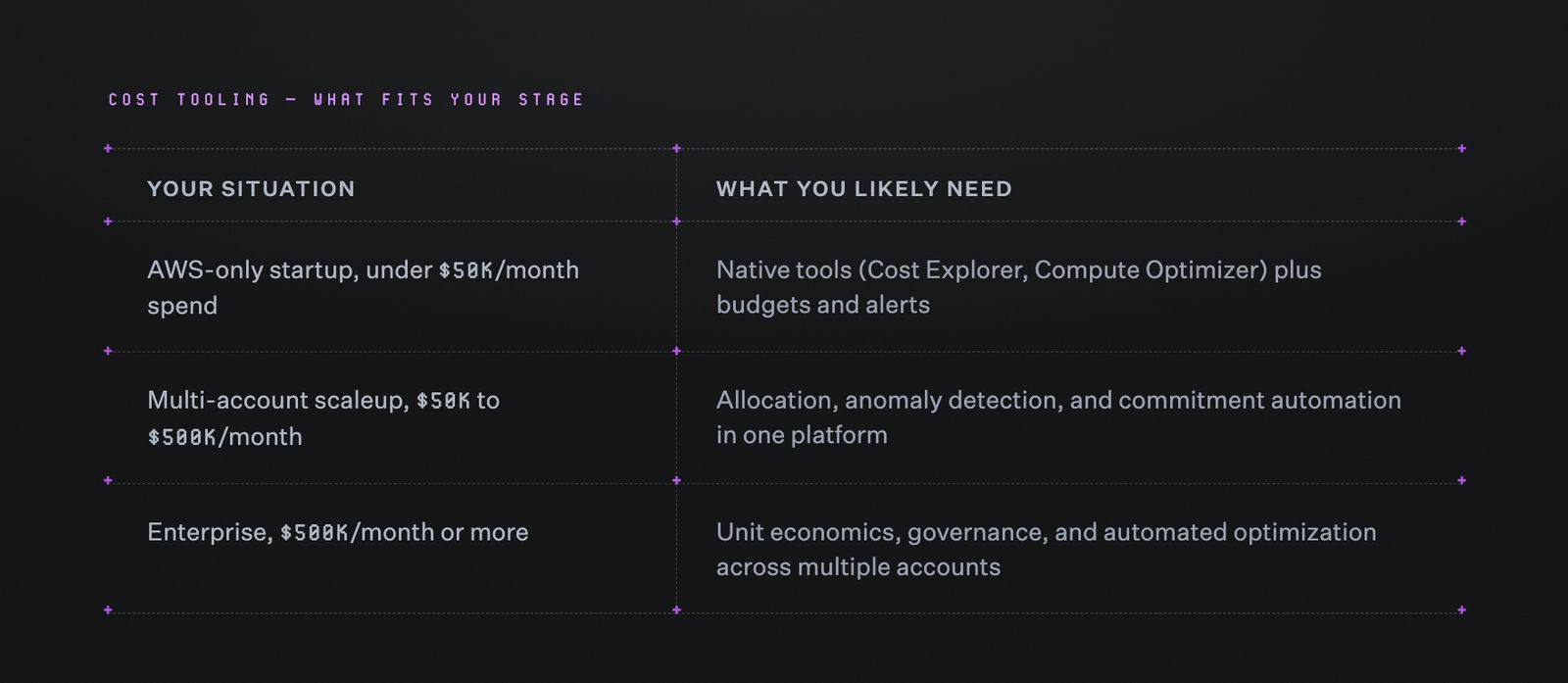
A quick reference for matching AWS spend level to the right tier of cost tooling.
Of course, these categories aren't fixed.
For example, a startup adding accounts and regions quickly can outgrow native tools before its bill reaches enterprise levels. Each new account needs its own commitment tracking, tagging, and anomaly checks. Ten small accounts create nearly as much coordination work as one large one, even while combined spend stays modest.
The table gives a starting point, but spend tier alone won't answer every case. These five questions get more specific before you dive into your tool search.
Five questions worth asking before choosing
1. Does the tool act on the data or just show it?
Dashboards are useful, but they don't reduce a bill on their own. Before committing to any tool, ask whether it executes rightsizing, purchases commitments, or only routes recommendations back to the team. A purely advisory tool still requires someone to act on every recommendation manually, and that work competes with everything else on an engineering team's plate.
2. Does the tool keep up as usage changes?
AWS spend shifts as workloads scale. A recommendation from three months ago is already stale. It’s important to look for continuous analysis, not a one-time audit. A static assessment run once at onboarding won't catch a new service added since, an instance family swapped during a migration, or a usage spike from a product launch. Each of those changes what the right recommendation actually is.
3. Does the tool give finance and engineering one system of record?
If engineers check one dashboard and finance checks another, reconciliation becomes its own job. A shared system of record removes that step. Otherwise, time spent reconciling two versions of the same spend is time not spent acting on it.
4. Does the tool fit existing workflows?
A tool that routes recommendations to Slack, Jira, or email gets seen and acted on faster than one that requires a separate check-in. This matters because a recommendation competing with everything else on a team's plate is easy to miss.
5. Is the tool's pricing transparent and easy to evaluate?
Quote-only pricing makes it hard to forecast the cost of running the tool itself. Look for published tiers with clear spend thresholds instead. A tool meant to control costs shouldn't itself be an unpredictable line item.
8 AWS cost optimization tools, evaluated on execution, pricing, and fit
AWS cost tools solve different parts of the problem. Some focus on native visibility, others specialize in rightsizing, allocation, or commitment automation. The 8 options below cover those major categories.
Each one was evaluated against the same five questions from the section above: execution versus recommendation, contract terms, pricing transparency, cross-cloud reach, and workflow fit.
1. North.cloud: AWS cost management and optimization
North is the financial operating system built for cloud, AI, and data spend. On AWS specifically, that means visibility, allocation, anomaly detection, and automated commitment management running as one connected platform instead of separate tools stitched together.
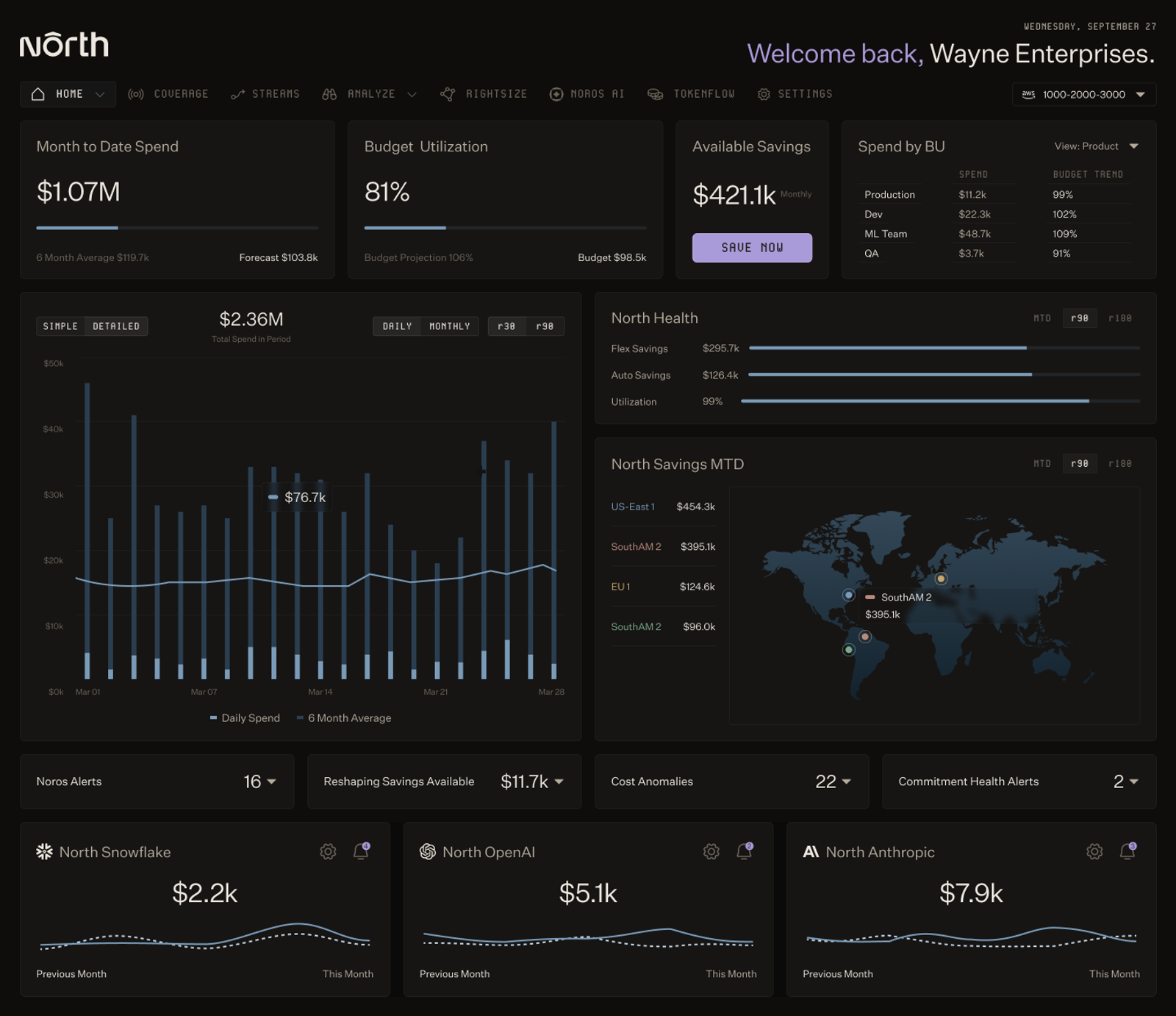
North's dashboard surfacing month-to-date spend, savings, and anomaly alerts across business units and regions in a single view.
Best for: Teams that want AWS visibility and automated execution in one platform, without a long-term contract to get there.
Key capabilities:
- Commitment automation across two ownership models, so AWS SPs and RIs stay optimized without a one-time purchase going stale
- Continuous EC2 and RDS rightsizing, with recommendations routed to Slack, Jira, or email instead of a separate dashboard
- Resource-level anomaly detection that flags spend spikes as they happen
- Cost allocation by team, product, or environment, without requiring a clean tagging structure first
- Plain-language answers to AWS spend questions through Noros FinOps agent, no analyst required
Pricing:
- Free tier: $0/month. A complete view of cloud costs, showing where spend goes, what's changing, and where to optimize. The free plan includes North's core visibility tools: Analyze, Coststreams, Anomalies, Rightsize, GreenOps, and Coverage.
- Starter: $199/month, for teams managing up to $75K/month in cloud spend. Adds Autobot (3.5% fee on commitment cost) and Flexbot (25% fee on savings).
- Premier: $1,399/month, for teams managing $75K/month or more in cloud spend. Lowers Autobot fees to 1.5% and Flexbot to 20%, with unlimited Coststreams views and business units.
- Premier Plus: Custom annual plan, suggested for teams managing $1M/month or more in cloud spend.
For more information, read North.cloud’s pricing page here.
Two ways to hold an AWS commitment, without the same risk
A SP or RI locks in a rate, but it also locks in a bet on what usage will look like a year or three years out. Get that forecast wrong, and a team ends up overcommitted (paying for capacity it doesn't use) or undercommitted (still paying on-demand rates on the difference).
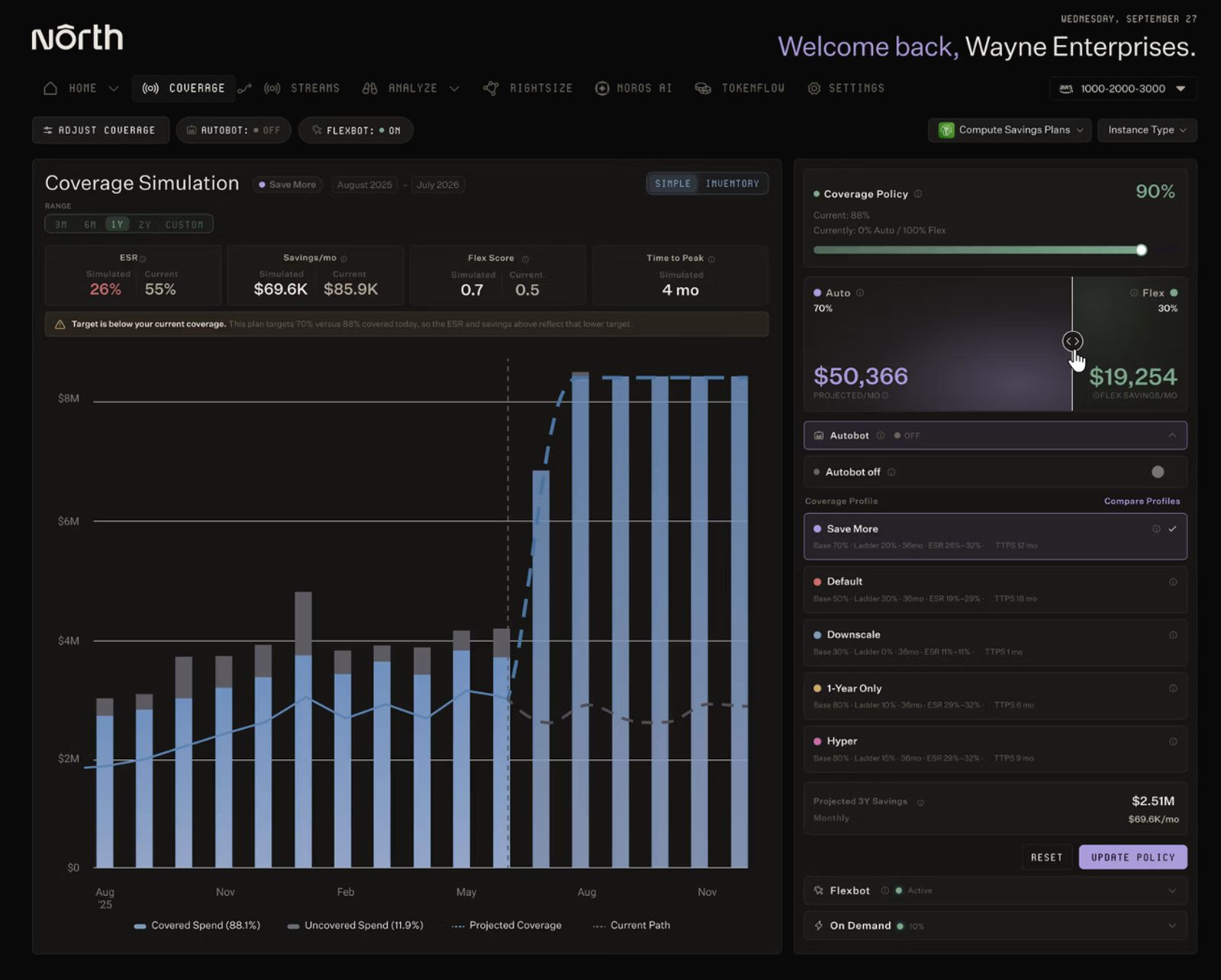
North's Coverage simulation tool modeling coverage, savings, and time to peak across different Autobot and Flexbot splits before committing to a policy.
North removes that risk with two different approaches:
- Autobot manages commitments inside a team's own AWS account. It uses machine learning to adjust the ladder as usage shifts, so the strategy keeps pace with actual usage instead of a forecast made once.
- Flexbot hands off the three-year term entirely. North holds the underlying commitment, and the team keeps month-to-month flexibility. Teams on this path average 55% in AWS compute savings, with EC2 alone averaging 51%, all without holding the long-term commitment themselves.
Allocation that doesn't wait for perfect tags
Shared infrastructure rarely maps cleanly to who's using it. A single EC2 fleet or shared RDS instance can serve multiple teams at once, and fixing tags after the fact is its own project.
A team doesn't have to fix tagging before getting a real answer to "who's driving this cost." North’s Coststreams allocates spend by team, product, or environment on top of the infrastructure as it already exists, so the allocation work can start now instead of after a cleanup project finishes.
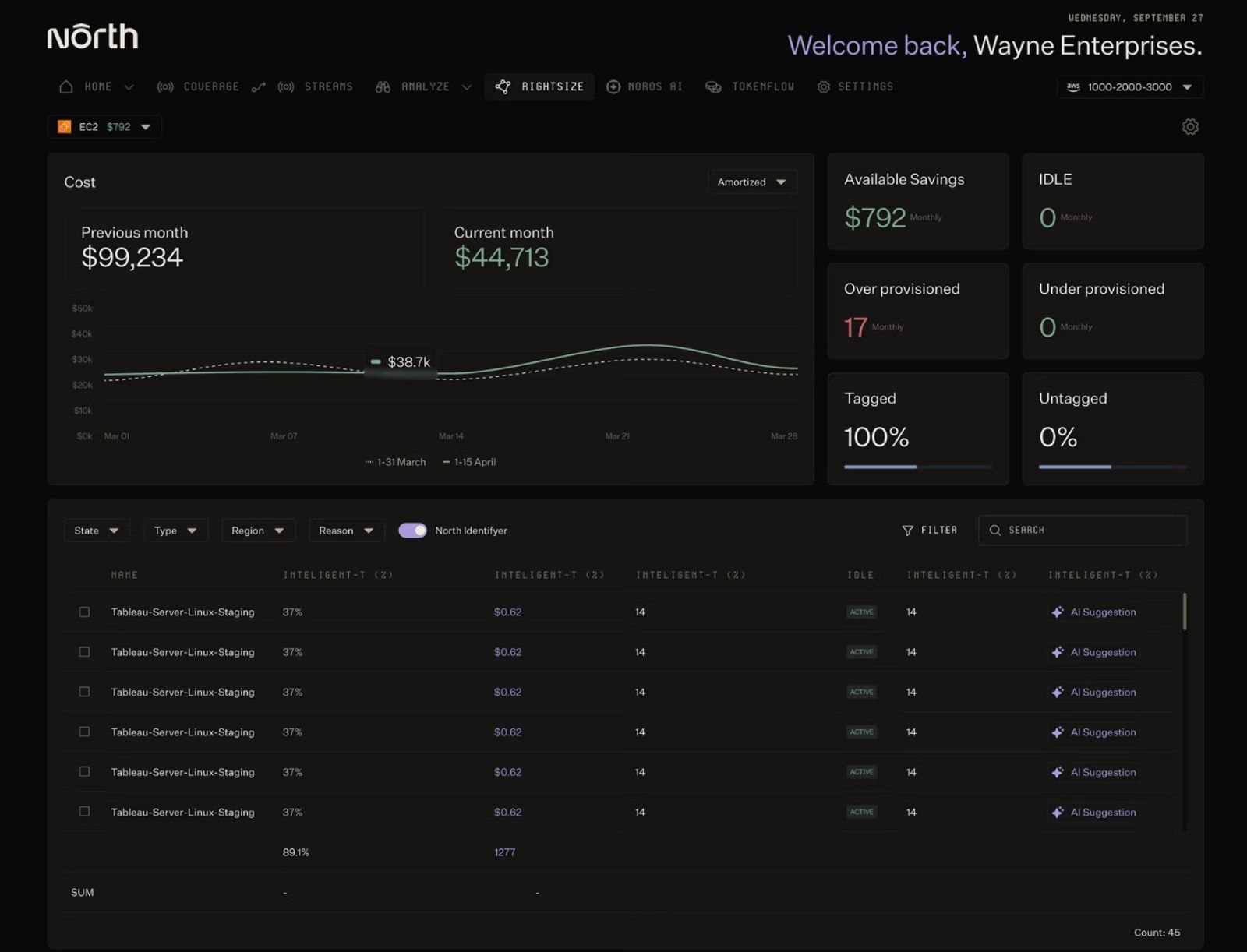
North's Rightsize view flagging over-provisioned resources with specific savings amounts and AI-powered suggestions for each one.
On top of that, the same infrastructure gets watched continuously. Overprovisioned instances and unexpected spend spikes get caught as they happen, not on a scheduled review.
Beyond AWS
Most teams' cloud footprint doesn't stop at AWS. North extends to:
- Google Cloud Platform (GCP) and Microsoft Azure, for one multi-cloud view instead of three separate ones
- AI and data spend from providers like OpenAI, Anthropic, and Snowflake
Across all three clouds, North is approaching $2 billion in managed spend, and customers have saved more than $400 million along the way.
Explore North's free tier to see AWS cost management and optimization in your own environment.
2. AWS Cost Explorer: Native visibility, built in
Cost Explorer is Amazon's own interface for AWS cost and usage data, and it's already available inside every AWS account at no extra cost.
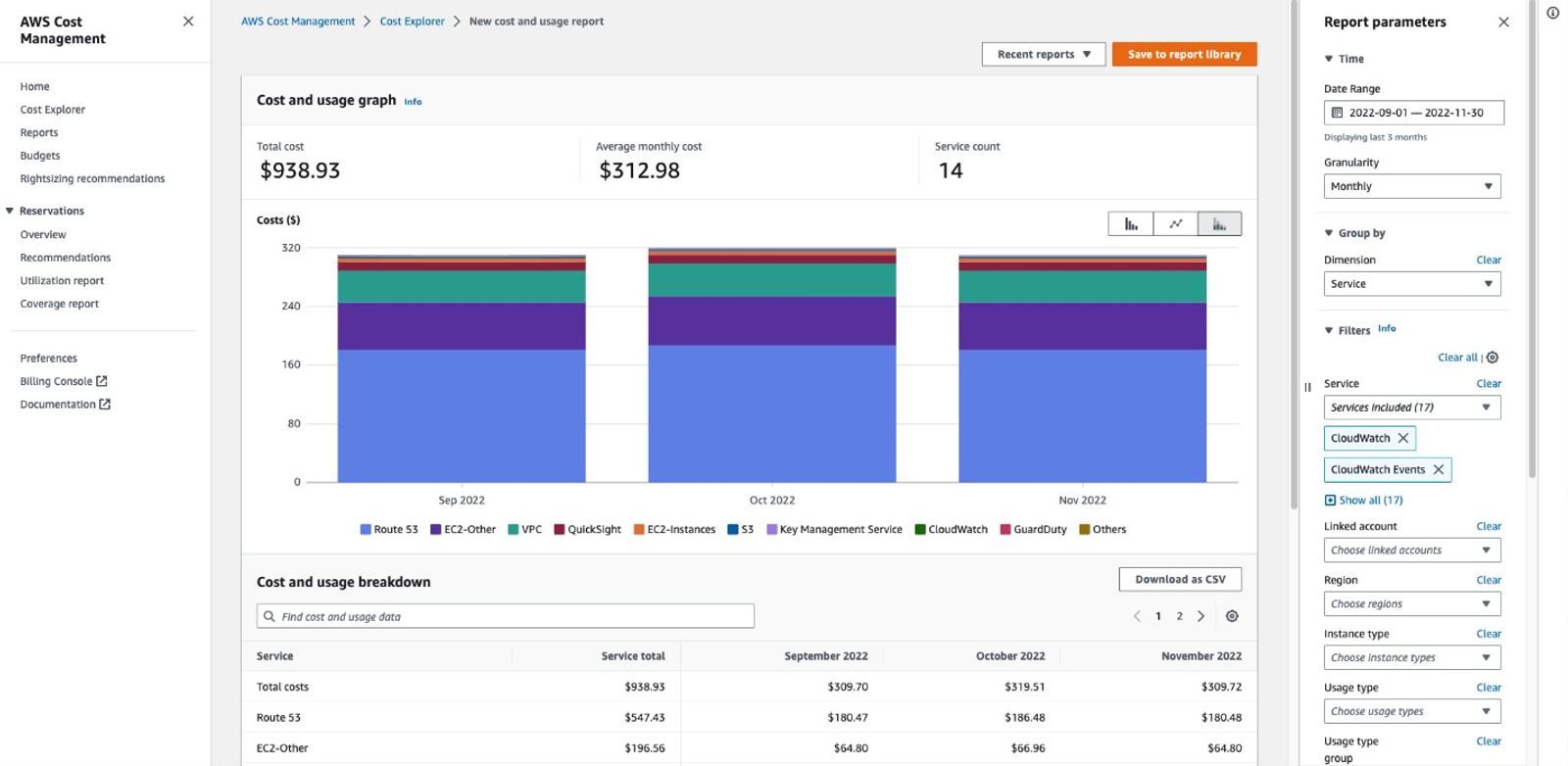
AWS Cost Explorer's report builder, grouping spend by service with monthly breakdowns and downloadable usage data. (Source: AWS Documentation)
Best for: Teams that need a free, native baseline for cost visibility and forecasting.
Key capabilities:
- Cost analysis by service, account, region, and tag
- Historical cost and usage reporting
- Forward-looking forecasts
- RI purchase recommendations
- Reservation utilization and coverage tracking
Pricing:
- Web interface: $0/month. Full access, with 13 months of history at daily granularity.
- API access: $0.01 per request using the primary billing view. Combining multiple billing views into a custom view adds $0.01 per source, so a view built from five sources costs $0.05 per request.
- Hourly granularity: $0.01 per 1,000 usage records/month, limited to a 14-day lookback.
Cost Explorer answers the "where is the money going" question well, and it does it for free. Teams get a full breakdown by service and account without connecting a third-party tool. For a team running one AWS account with a handful of services, this alone can be enough to catch obvious drift before it becomes a real problem.
What to consider: Cost Explorer only covers AWS, so it stops being enough once a team adds another cloud provider. It's also retrospective, showing what already happened rather than adjusting in real time. And it doesn't execute anything on its own. Every fix still needs someone to act on it manually.
3. AWS Compute Optimizer: Free, machine-learning-based rightsizing
Compute Optimizer analyzes historical utilization and recommends better-sized resources, using the provider’s own machine learning models.
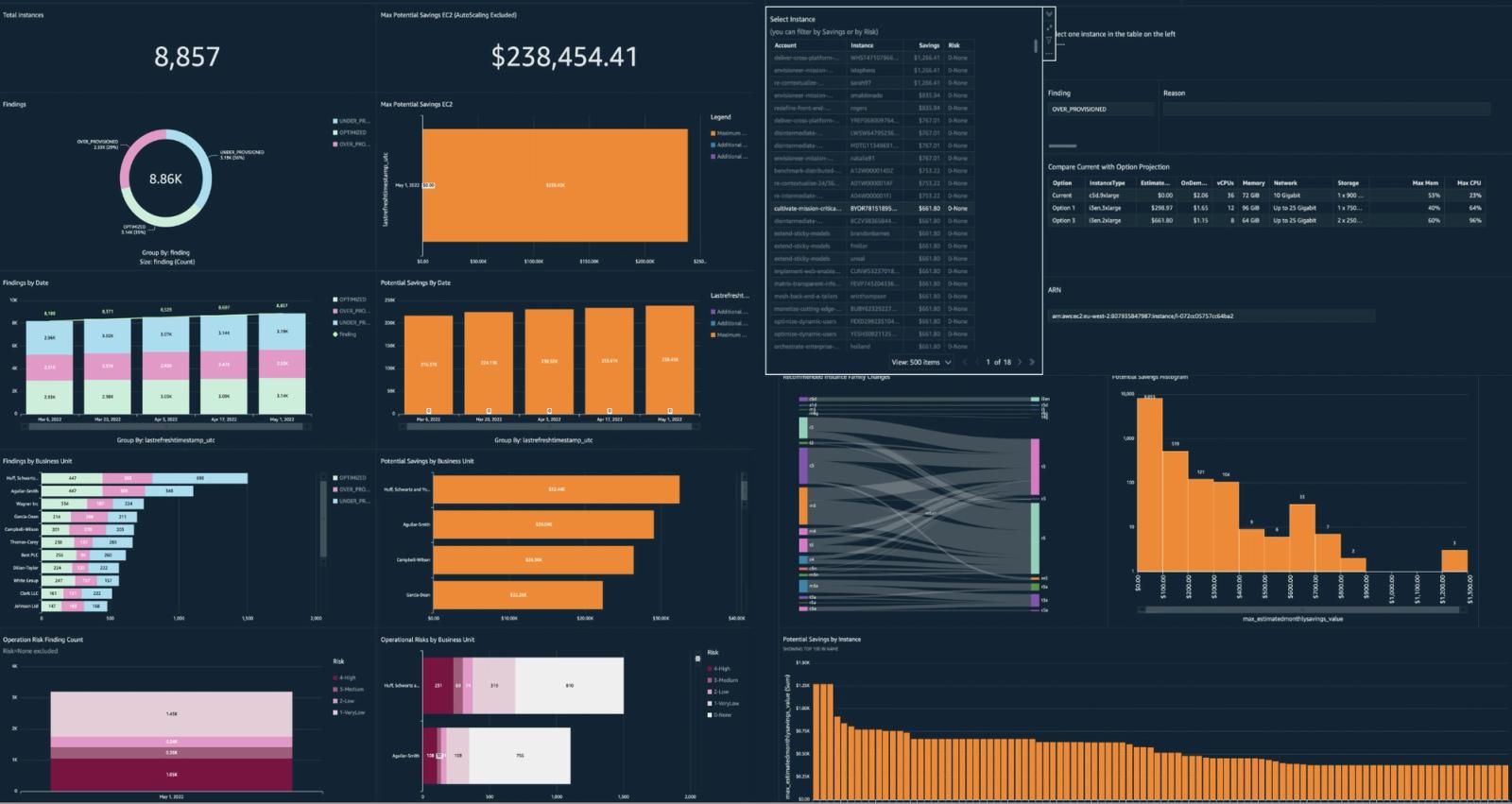
AWS Compute Optimizer's dashboard demo view, showing findings, potential savings, and instance-level rightsizing recommendations across an account. (Source: AWS Documentation)
Best for: Teams that want a free rightsizing baseline without a third-party tool.
Key capabilities:
- Machine-learning-based rightsizing recommendations across EC2, ECS on Fargate, EBS, Lambda, Aurora, RDS, NAT Gateway, ElastiCache, DynamoDB, DocumentDB, MemoryDB, WorkSpaces, and SageMaker Endpoint
- Free analysis window of 14 or 32 days
- Enhanced infrastructure metrics extend that window to roughly three months for EC2, EC2 Auto Scaling, and RDS specifically, at the added cost above
Pricing:
- Base service: $0/month. Compute Optimizer has no charge of its own. Teams only pay for the AWS resources it analyzes and standard CloudWatch monitoring fees, the same costs they'd already have.
- Enhanced infrastructure metrics: $0.0003360215 per resource/hour (about $0.25/month for a resource running continuously). Optional, and only available for EC2, EC2 Auto Scaling, and RDS. It extends the lookback window from 14 or 32 days to roughly three months, which helps catch seasonal usage patterns the shorter window misses.
Compute Optimizer looks at how a resource has been used and recommends a size that matches it, rather than the size someone guessed at when it was first provisioned. That's useful on its own, and the free tier now covers a wide range of AWS services beyond just compute.
What to consider: The free tier's lookback window tops out at 32 days, which can still miss quarterly or seasonal patterns unless enhanced infrastructure metrics are turned on for the services that support it. Like Cost Explorer, it only recommends changes. Someone still has to review and apply each one manually.
4. Noros.ai: AI FinOps agent for AWS cost questions
Noros answers AWS cost questions directly, in plain language, without a report or dashboard to build first.
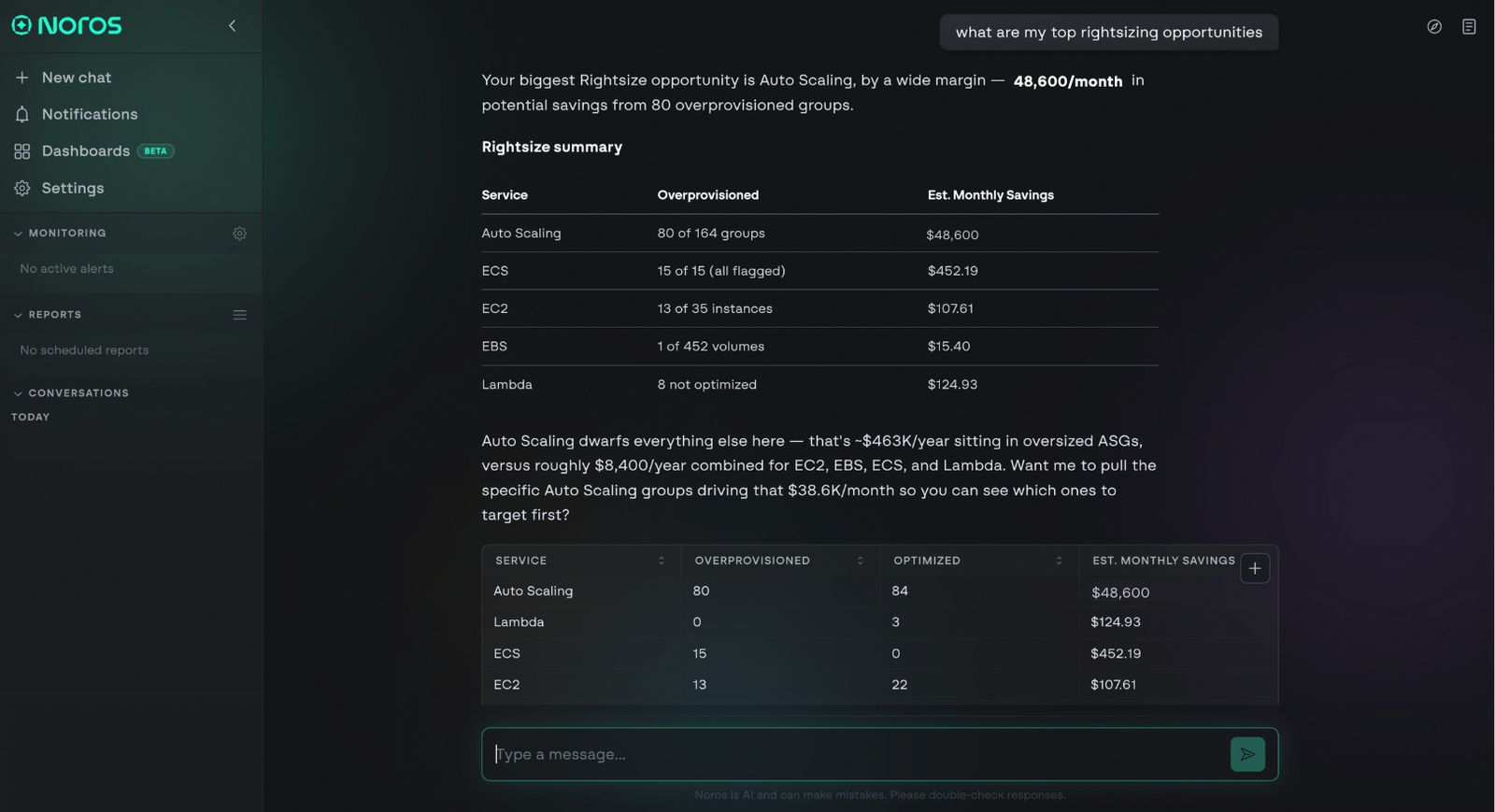
Noros answering a rightsizing question in plain language.
Best for: Teams that want fast answers to specific cost questions, without a dedicated analyst or a report-building process.
Key capabilities:
- Plain-language answers to any AWS cost question, grounded in real billing data instead of generic advice
- Automatic cost breakdowns by service, region, or account, plus anomaly detection at the resource level
- Savings opportunities like commitment coverage gaps, along with ongoing RI and SP health tracking
- Generative dashboards and charts, built automatically from a single question instead of a manual report
- Scheduled reports and alerts delivered to Slack or in-app, on whatever cadence a team sets
- Read-only account connection, so Noros can analyze AWS data without ever writing to the account
Pricing:
- Starter: $99/month per workspace. 100 queries per month, 1 user, 14-day free trial.
- Enterprise: $399/month per workspace. 1,000 queries per month, up to 5 users, advanced monitoring, scheduled insights, priority support.
A team without a dedicated FinOps analyst still runs into cost questions constantly, and Noros answers those directly instead of pointing to a dashboard someone has to interpret themselves.
It can do that because of what's underneath it. The model behind Noros is trained on tens of millions of real cloud optimization data points, and it works directly from the raw cost and usage data behind the bill, across hundreds of columns spanning services, resources, usage types, pricing models, and time. That depth is what lets it explain how a specific cost came about, not just report the number.
The same grounding carries across providers. Noros connects to GCP and Azure alongside AWS, so a team running either can ask the same kind of question without switching tools.
Once a question's been answered, it doesn't have to be asked again. It can become a saved report or a recurring Slack alert instead.
Start a free trial at noros.ai to see it against your own cloud data.
5. Harness Cloud and AI Cost Management: Engineering-led optimization
Harness combines cost visibility with cloud governance, autoscaling, and AI cost management, built into a broader software delivery platform rather than a standalone FinOps tool.
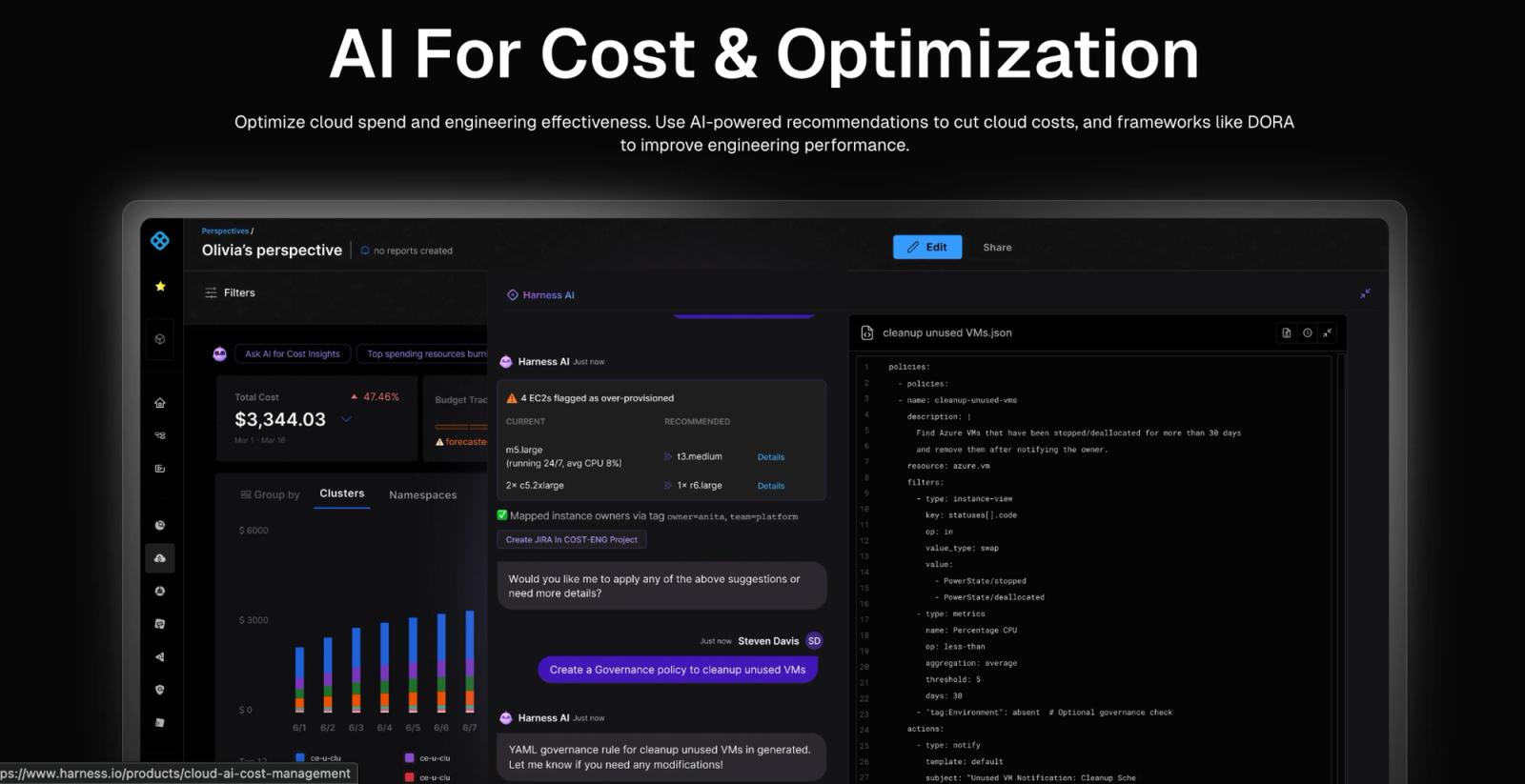
Harness AI flagging over-provisioned instances and generating a governance policy, shown on Harness's homepage. (Source: Harness)
Best for: Engineering and platform teams that want cost controls tied closely to infrastructure operations.
Key capabilities:
- Autoscaling and Spot instance orchestration
- Commitment planning and management
- Cost anomaly detection
- Policy-based governance
- Automated remediation for flagged issues
- Token and inference cost visibility for AI workloads
Pricing:
- Free: for individual developers and small teams, includes Harness Open Source and Litmus Chaos
- Essentials: for growing organizations with small to mid-size teams, includes packaged modules and standard support. Requires contacting sales.
- Enterprise: for large-scale organizations with complex needs, includes any module combination, advanced features, and a dedicated account manager. Requires contacting sales.
Harness sits closer to engineering operations than most tools on this list, since cost management is one piece of a broader delivery platform rather than the whole product. That makes automated remediation a real strength: a flagged issue can trigger a governance policy directly, without a separate handoff to a FinOps team.
What to consider: Essentials and Enterprise both require a sales conversation for pricing, even though the Free tier is self-serve. Harness is built primarily for engineering teams, so a team looking for cross-functional FinOps collaboration between finance and engineering may find it narrower than platforms built around that handoff specifically.
6. ProsperOps: Automated commitment and rate optimization
ProsperOps continuously manages SP and RI portfolios, adjusting coverage automatically as usage shifts rather than requiring a manual review cycle.
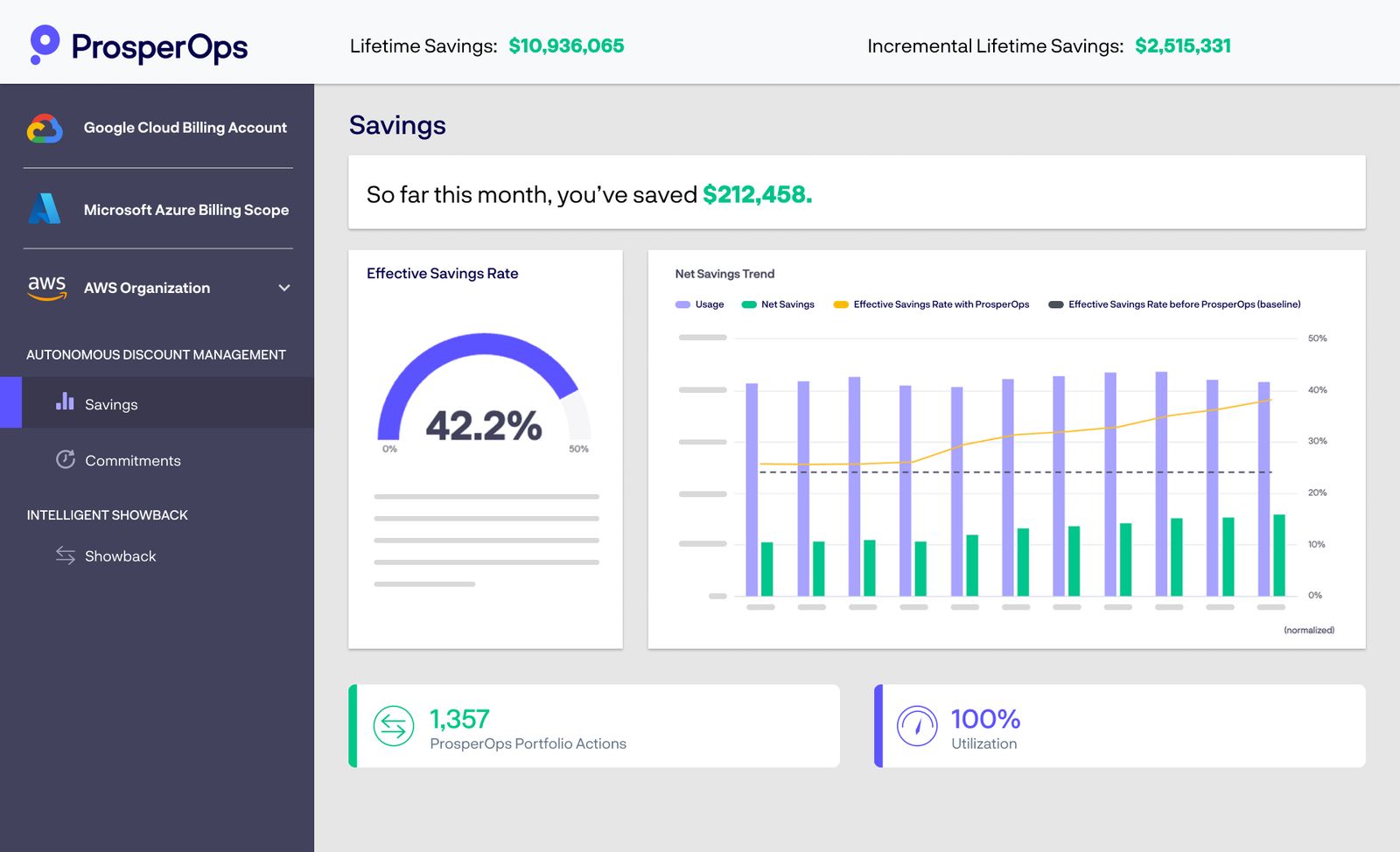
ProsperOps' savings dashboard, tracking effective savings rate and lifetime totals across connected cloud accounts. (Source: ProsperOps)
Best for: Teams that want commitment purchasing and rate optimization handled automatically, without owning the forecasting themselves.
Key capabilities:
- Automated commitment purchasing and ongoing portfolio adjustments
- Savings Plan and Reserved Instance optimization on AWS
- Resource-level optimization through ARM, layered on top of commitment management
- Unified savings measurement across the portfolio
Pricing:
- Free Savings Analysis: $0. Quantifies current and historical rate optimization outcomes, with results in as little as 24 hours and minimal AWS Identity and Access Management (IAM) permissions required.
- Autonomous Discount Management (ADM): a share of realized savings, calculated against the provider's own billing system rather than a percentage of total cloud spend.
- Autonomous Resource Management (ARM): a flat fee per managed resource, per month. Currently available for AWS Compute, with Azure and GCP support available by request.
What to consider: ProsperOps is built primarily around AWS, which is a strength for teams staying there, but a limitation for multi-cloud ones. ARM's Azure and GCP support isn't published yet, so multi-cloud environments get less depth outside AWS. ProsperOps was also recently acquired by Flexera in January 2026 and now operates as "ProsperOps, a Flexera company."
7. Vantage: Developer-friendly, self-serve cost visibility
Vantage offers cost reporting and optimization across cloud, Kubernetes, and software providers, built around a self-serve, developer-friendly interface.
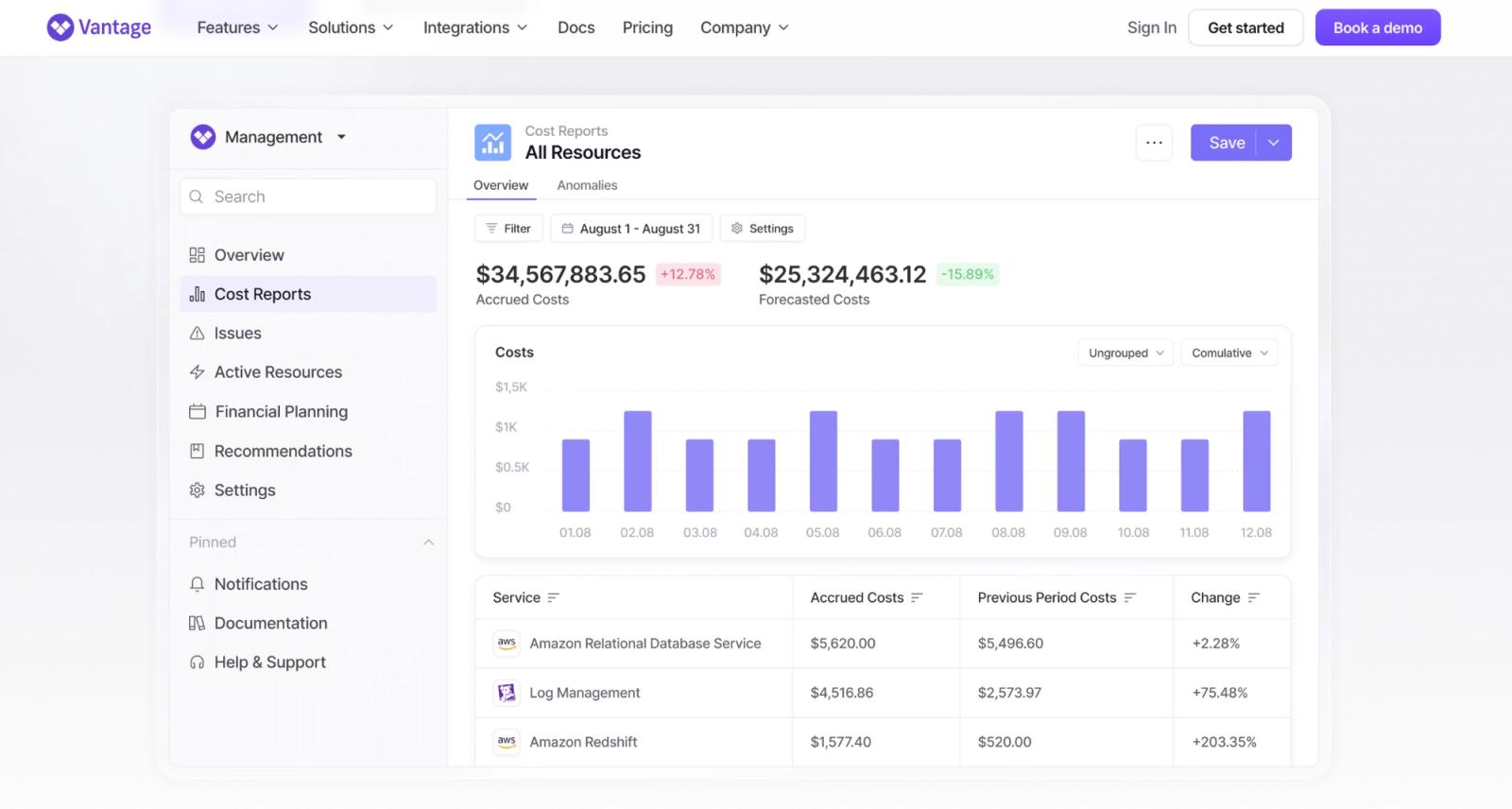
Vantage's Cost Reports dashboard, shown on Vantage's own website. (Source: Vantage)
Best for: Teams that want fast, self-serve cost visibility without a sales call to get started..
Key capabilities:
- Cost reports across multiple providers, including cloud, Kubernetes, and software spend
- Budgeting and forecasting
- Unit cost tracking through custom business metrics
- Optimization recommendations
- Autopilot for automated AWS Savings Plan purchasing
Pricing:
- Starter: free. $2,500 of tracked cloud spend, 30+ supported providers, email support, SAML single sign-on, 3 users.
- Pro: $30/month, with a 14-day free trial. $7,500 of tracked cloud spend, Autopilot for AWS Savings Plans, email support, virtual tagging, and max 5 users.
- Business: $200/month, with a 14-day free trial. $20,000 of tracked cloud spend, Autopilot for AWS Savings Plans, email support, virtual tagging, and max 10 users.
- Enterprise: custom. Unlimited tracked cloud spend, an automated FinOps agent, Autopilot for AWS Savings Plans, a dedicated account rep, virtual tagging, and unlimited users
What to consider: The self-serve tiers are capped by tracked spend, not just feature access, so a team growing past $20,000 in monthly spend needs Enterprise regardless of which features it uses. Automated optimization through Autopilot only covers AWS Savings Plans specifically, so rightsizing and broader commitment management still require manual work or another tool.
8. CloudZero: cost intelligence and unit economics
CloudZero maps cloud spend to business dimensions like customers, products, and features, rather than just services and accounts.
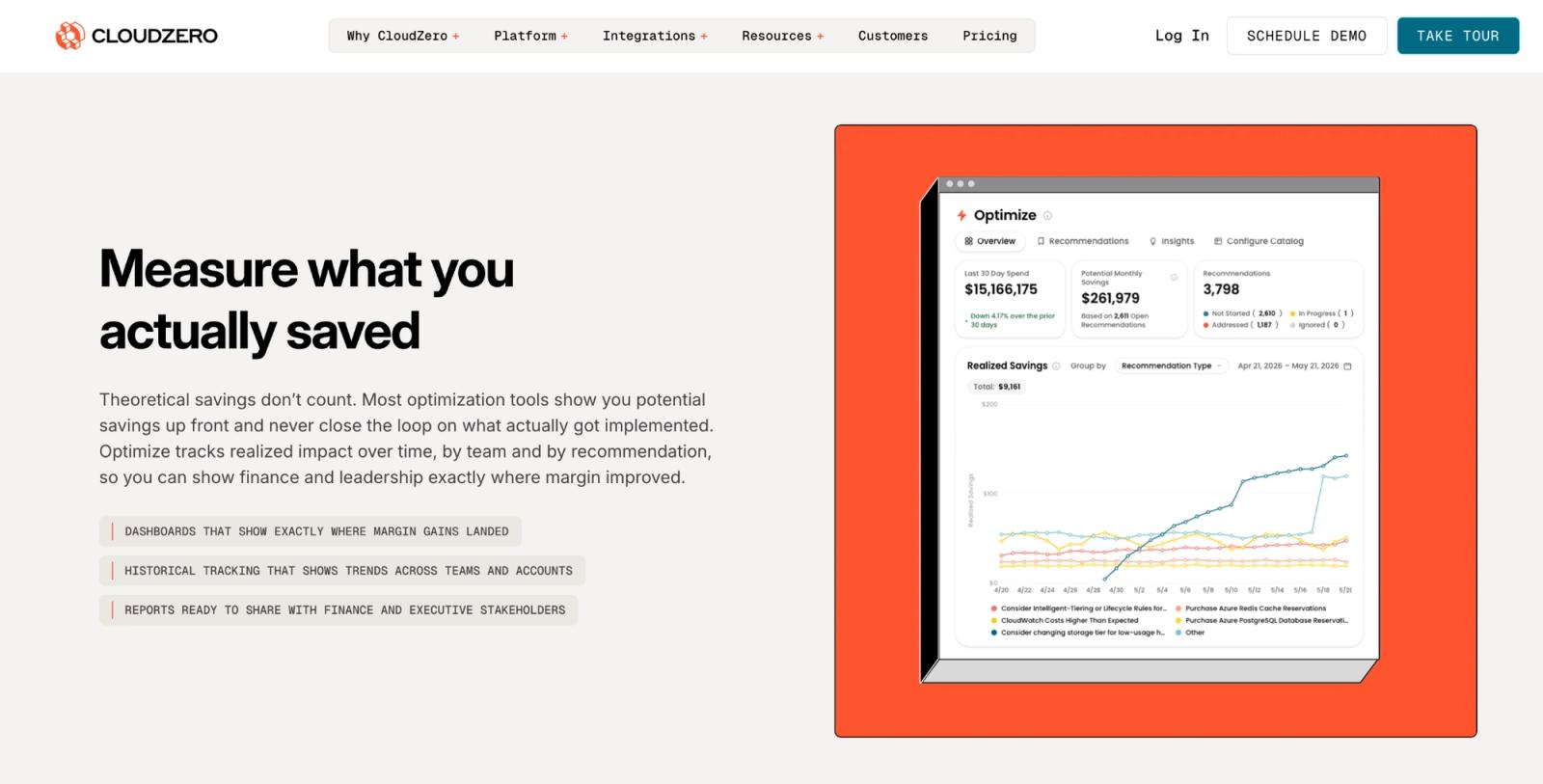
CloudZero's Optimize view, tracking realized savings against recommendations over time. (Source: CloudZero)
Best for: Teams that need to understand what's driving spend and tie it to unit economics like cost per customer or transaction.
Key capabilities:
- Multi-dimensional cost allocation without requiring a clean tagging structure
- Cost per customer, product, or transaction
- Budgeting and forecasting
- Anomaly detection
Pricing: Quote-based, with no per-seat fees. Rates aren't published, so getting a specific number requires talking to sales.
What to consider: CloudZero focuses on visibility and intelligence rather than automated execution, so its recommendations stop short of actually rightsizing a resource or purchasing a commitment. A team that wants the spend reduced automatically, not just explained, will likely need a second tool alongside it. Pricing also isn't published anywhere, so it’s important to investigate more before committing.
Choose one platform to understand and act on your AWS spend
Looking back at the four patterns from earlier, most teams don't run into just one. A team dealing with stale commitments is often also missing clean allocation, and usually doesn't have a dedicated FinOps hire to manage either problem by hand.
That's the case where a single platform earns its place. North covers all four patterns directly: commitment automation through Autobot and Flexbot, rightsizing through Rightsize, allocation through Coststreams, and the "no time to manage this by hand" problem through all three running continuously instead of on a schedule.
For a team dealing with only one narrow problem, like AWS Cost Explorer covering a stable, single-account setup, a native or single-purpose tool is still the better fit. But, for a team feeling more than one of these patterns at once, consolidating removes the coordination cost of running several tools that don't share data with each other.
Explore North's free tier to see which of these four patterns is driving your AWS bill.
FAQs
Answers to common questions about the product or feature covered in this post.
What is an AWS cost optimization tool?
An AWS cost optimization tool helps teams track, allocate, and reduce Amazon Web Services (AWS) spending.
Some tools only report where the money goes. Others also execute the fix directly, through rightsizing, commitment automation, or anomaly detection.
How do I know which of the four cloud cost problems I have?
Most AWS cost problems fall into one of four patterns: steady usage still running at on-demand rates, resources nobody's turned off, a bill nobody can explain by team or product, or simply not having time to manage any of it by hand.
Checking AWS Cost Explorer for SP and RI coverage is usually the fastest way to spot the first pattern. The others tend to show up as recurring friction, like finance asking questions engineering can't answer quickly.
Are native AWS tools like Cost Explorer and Compute Optimizer enough?
Native tools can be enough while a setup stays simple, one account, predictable usage, a small number of services.
Teams typically need more once:
- Spend approaches $50,000 a month or crosses multiple accounts
- Commitment decisions require regular manual analysis
- Recommendations pile up without anyone acting on them
The right time to add another tool depends on account complexity, not one fixed spend number.
How much can AWS cost optimization tools save?
Savings depend on how much of a workload sits on on-demand rates versus committed capacity, and how much is simply idle.
Teams overpaying on stale or missing commitments tend to see the largest gains from commitment automation. North's Flexbot, for example, averages 55% in AWS compute savings, 51% on EC2 specifically. Teams with tagging or allocation gaps tend to gain more from a platform built around allocation instead, like North's Coststreams, which maps spend to a team, product, or environment without requiring a clean tagging structure to already be in place.
What's the best AWS cost optimization tool?
There's no single best tool. The right one depends on how many of the four patterns above apply, and how much time a team has to manage the fix manually.
For a team dealing with more than one pattern at once, stale commitments alongside messy allocation, for instance, North.cloud is built to cover all of them in one platform. Noros is also available on its own, for teams that want plain-language answers before adding broader automation.
How much can North.cloud save on AWS costs?
North's commitment automation product, Flexbot, holds AWS SPs and RIs on a team's behalf, adjusting coverage continuously instead of locking in a single annual forecast. That removes the risk of overcommitting or undercommitting, which is what drives savings.
Flexbot averages 55% in AWS compute savings, 51% on EC2 specifically. Results depend on workload stability and how much commitment coverage a team already has in place.