-
14 min read
RDS Reserved Instances: How to reduce AWS database costs

TL;DR
- RDS reserved instances (RIs) are a billing commitment to a specific database configuration, in exchange for a discounted hourly rate of 29% to 69% versus on-demand pricing.
- The discount only covers compute. Storage, data transfer, backups, Extended Support, and T3/T4g CPU credits keep billing at full rates regardless of reservation status.
- Engine, instance family, and region lock in at purchase and can't be changed. Only size-flexible engines, like MySQL, PostgreSQL, and Aurora, allow scaling within the same family.
- Getting the most from RIs means rightsizing instances first, then choosing between a reserved instance and a Database Savings Plan based on workload stability.
- With North.cloud, Rightsize confirms instances are sized correctly, and Coverage, through Flexbot and Autobot, manages commitments continuously so reservations stay matched to actual usage.
The cloud bill was supposed to drop. Three months earlier, the team had purchased Reserved Instances (RIs), and the compute rate came down. But when finance flags the Amazon Relational Database Service (RDS) line item in the monthly review, the number looks almost the same as before.
When the team digs in, the compute savings are there. Alongside them, they find a different story:
- Charges for cross-availability zone data transfer
- Storage that has grown quietly for months
- Snapshots from a staging database that should have been decommissioned last quarter
The reservation worked exactly as advertised. It just covered one piece of a cost with several layers.
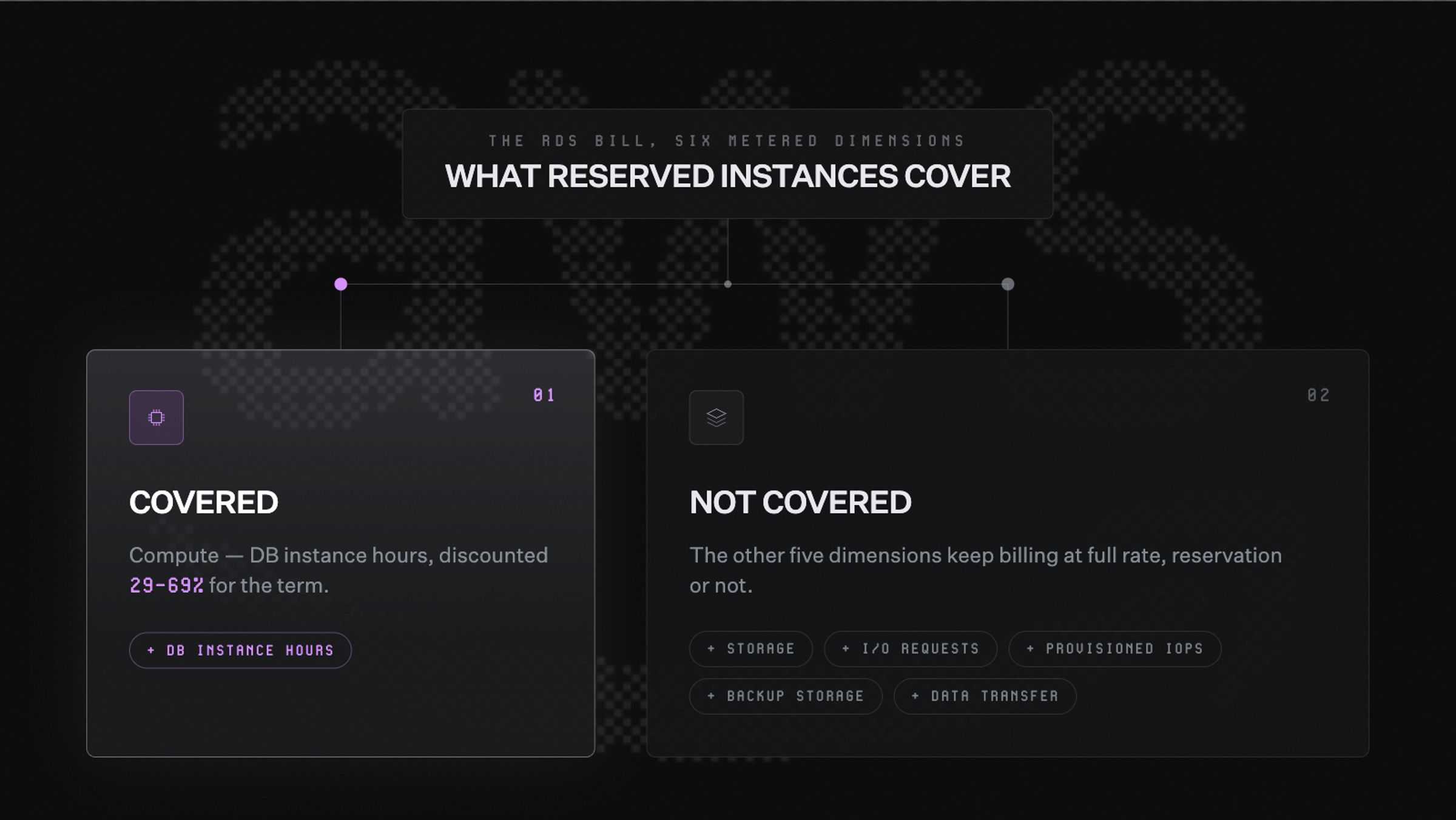
RDS RIs reduce database costs by committing to a specific instance configuration for one or three years. The discounted hourly rate saves between 29% and 69% versus on-demand pricing. But the discount only applies to compute, one of six independently metered billing dimensions.
This guide walks through what RDS RIs cover, where the lock-in risk lives, and how to approach the full picture.
What is Amazon RDS?
RDS is Amazon Web Services' (AWS) managed database service. It handles provisioning, patching, backups, and failover for relational databases, so engineering teams can stay focused on building.
RDS supports several engines, including MySQL, PostgreSQL, MariaDB, Oracle, SQL Server, Db2, and Amazon Aurora.
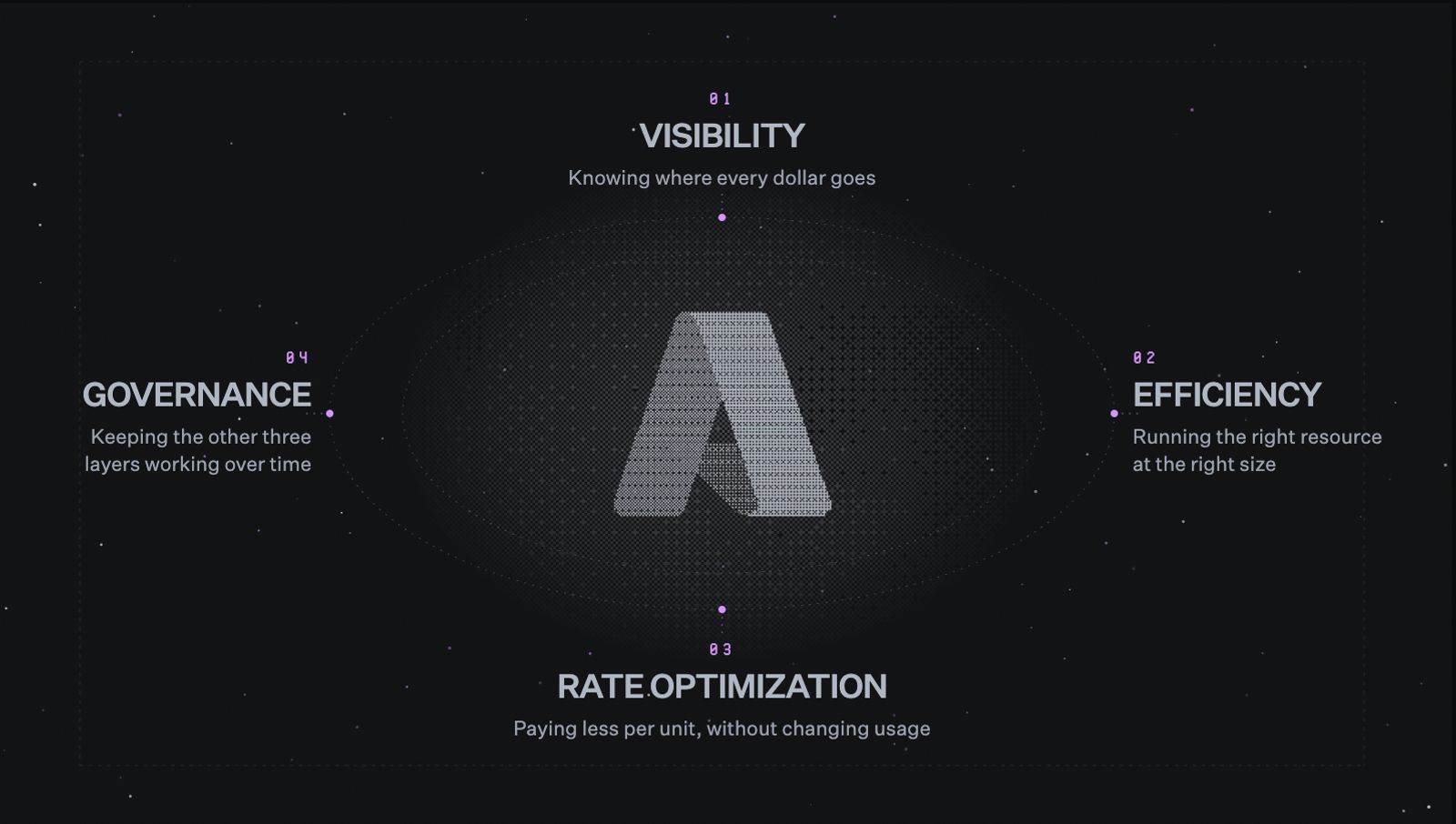
Before getting into RIs, it helps to understand what RDS billing covers. There are six independently metered dimensions, and reserved instances only apply to one of them.
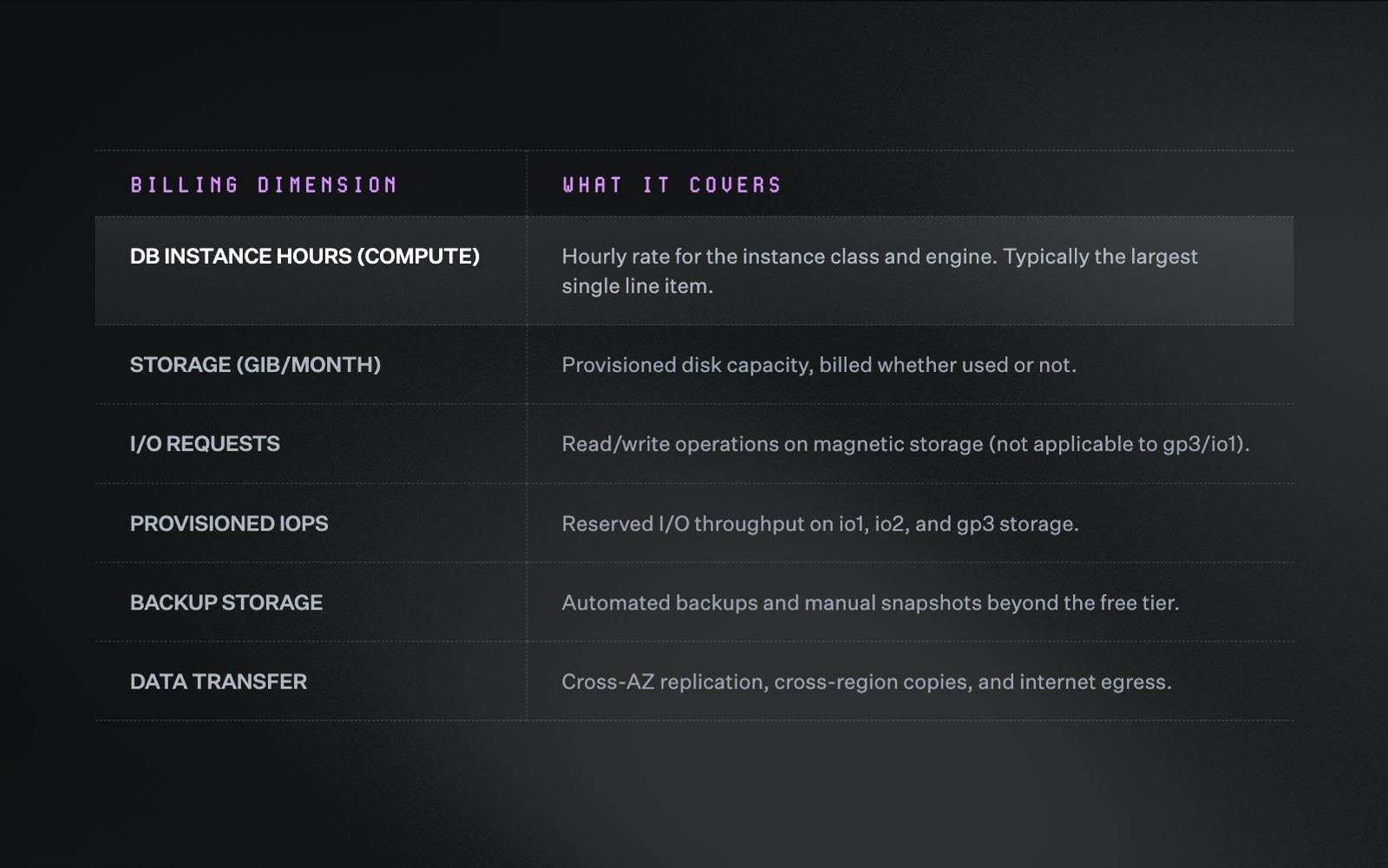
RDS bills across six dimensions. Reserved instances only discount one: DB instance hours.
Compute is typically the largest single line item, and that's where reserved instances come in. The other five dimensions continue billing at full rates regardless of reservation status. That's why a bill can stay high even after a purchase goes through. This guide will come back to each of them.
What are RDS reserved instances?
How RDS reserved instances work
An RDS reserved instance is a billing commitment to a specific database configuration. In exchange, AWS applies a discounted hourly rate to any matching running usage.
Purchasing one doesn't change how your databases are deployed or how they run. Your infrastructure stays exactly as it is.
Think of it like pre-paying for a parking spot in a specific garage. The daily rate drops, but the spot size and the garage are fixed for the full term.
Several attributes are locked at purchase and can't be changed afterward:
- Region (e.g., us-east-1)
- DB engine (e.g., PostgreSQL, MySQL, Aurora)
- Instance class type (e.g., db.r6g, db.m7g)
- Deployment type (Single-AZ vs. Multi-AZ)
- Term length (1 year or 3 years)
RDS RIs are non-cancellable, non-refundable, and non-transferable. The full term bills whether the instance runs or not. Getting the configuration right before committing matters more here than with most other AWS cost levers.
Payment options and savings ranges
There are three payment options for RDS RIs, and each balances upfront cost and savings depth differently:
- No Upfront (1-year term only): Zero capital outlay, lowest savings
- Partial Upfront (1-year or 3-year): Split between an upfront payment and an hourly rate
- All Upfront (1-year or 3-year): Full term paid upfront, highest savings
Savings ranges vary by term, payment option, and engine.
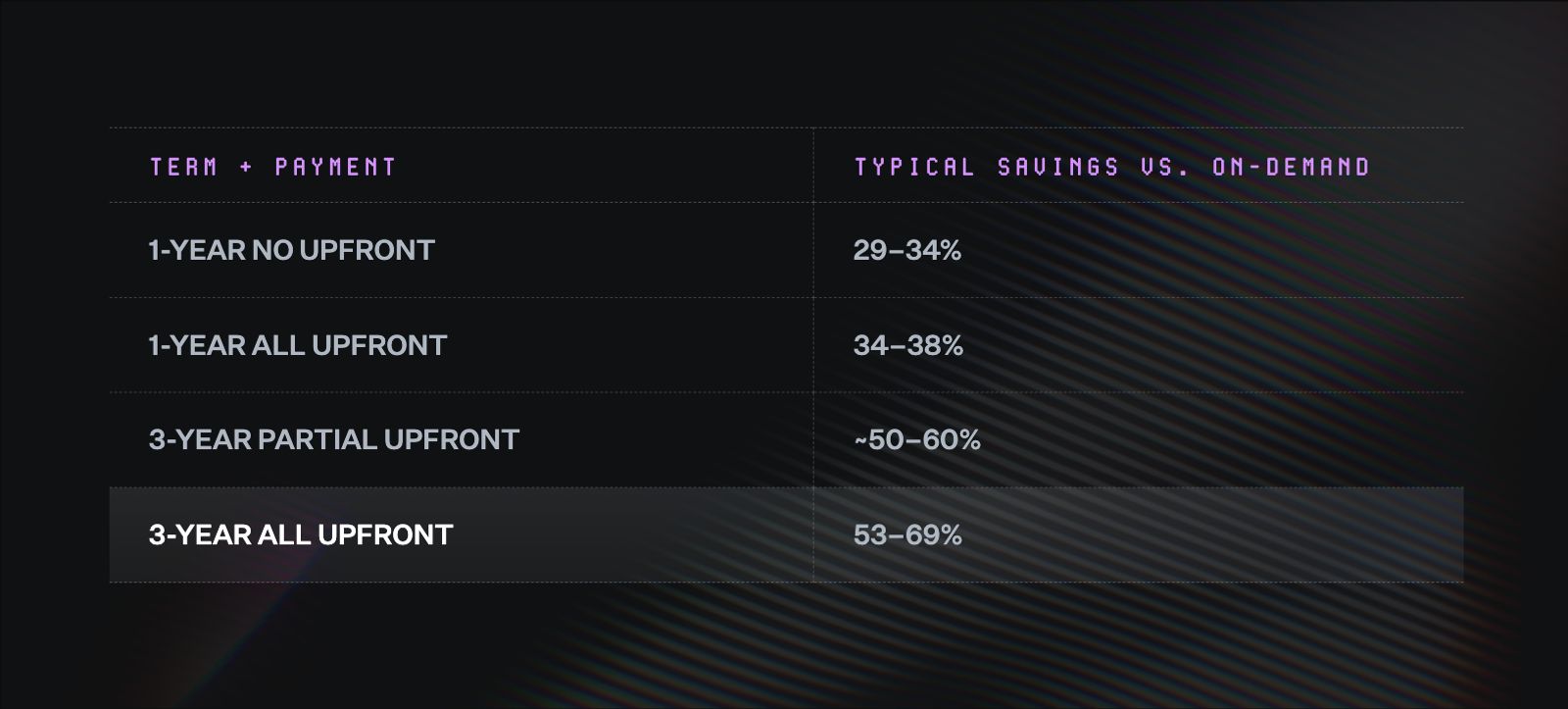
Longer terms and more upfront payment both deepen RDS reserved instance savings.
Savings depth also varies by engine. Aurora tends to deliver the highest discounts, while SQL Server and Oracle sit at the lower end.
For teams making their first reservation purchase, No Upfront is the lowest-risk entry point. There is no capital outlay, and the savings are meaningful even without a longer-term commitment.
Instance size flexibility and normalization
Not all RDS engines handle RI flexibility the same way. For some, a reservation for one instance size can apply to a different size within the same family. For others, the size has to match exactly.
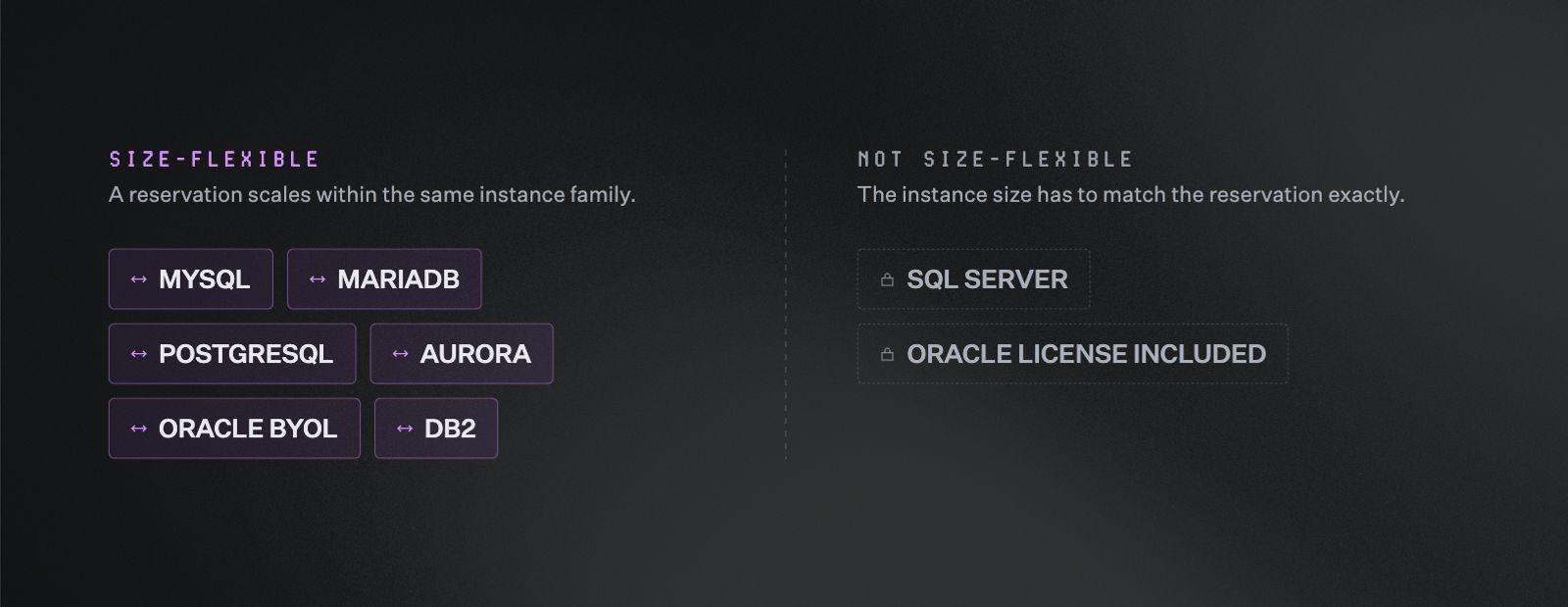
Most RDS engines let a reservation scale within its family. SQL Server and Oracle License Included don't.
How the unit system works
For size-flexible engines, AWS uses a point system to determine how a reservation applies. Every instance size gets a unit value, and larger sizes carry proportionally higher values.
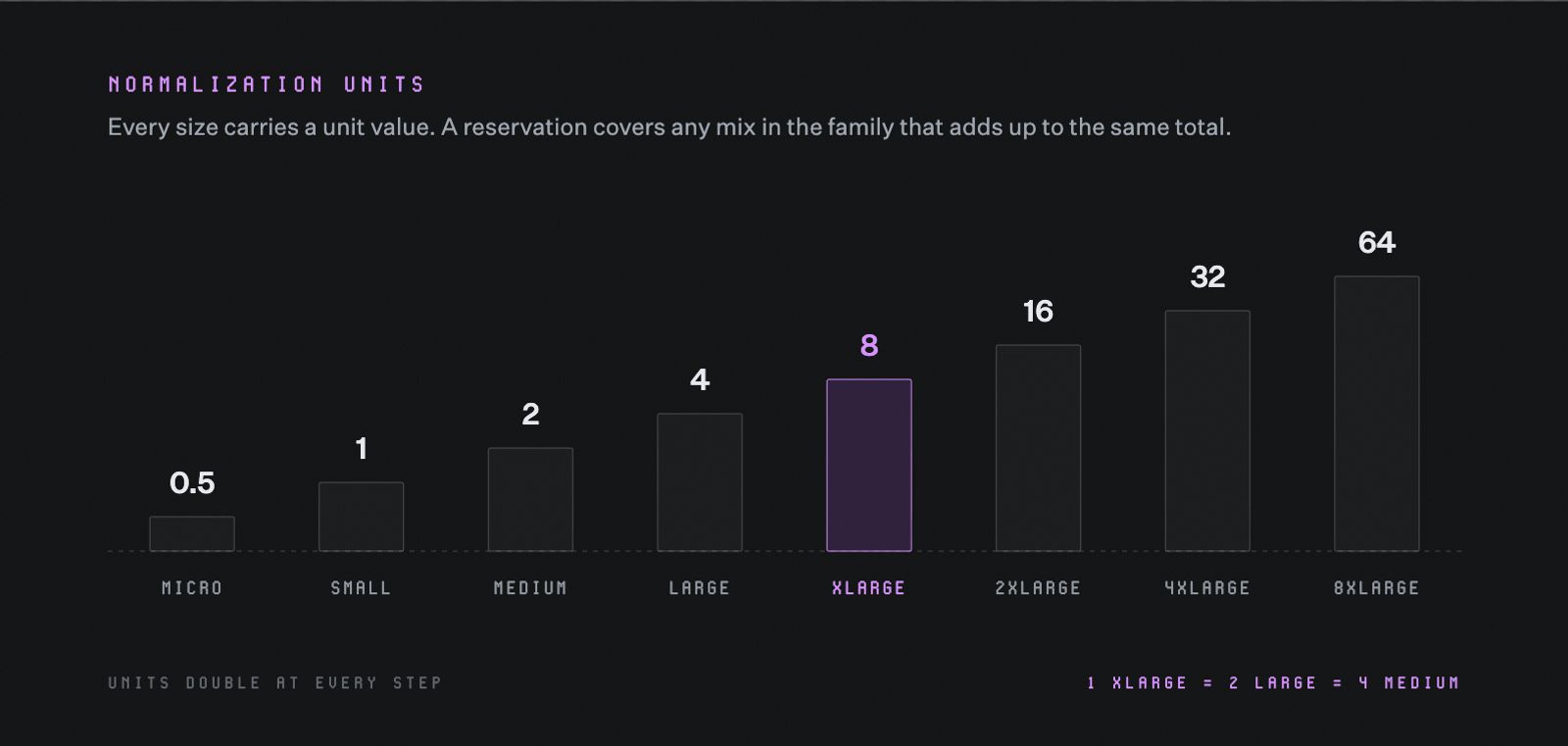
Unit values double at every size step, so one xlarge reservation covers two large or four medium instances.
When you purchase a reservation, you're purchasing a set number of units. AWS applies the discount to any running instances in the same family whose unit values add up to the same total.
A reservation worth 8 units can cover:
- One xlarge instance
- Two large instances
- Four medium instances
The discount applies as long as the units balance out.
What RDS reserved instances don't cover
A reservation reduces the compute portion of an RDS bill. The other five billing dimensions continue at full rates regardless of reservation status. That's why a bill can stay stubbornly high even after a reservation goes through.
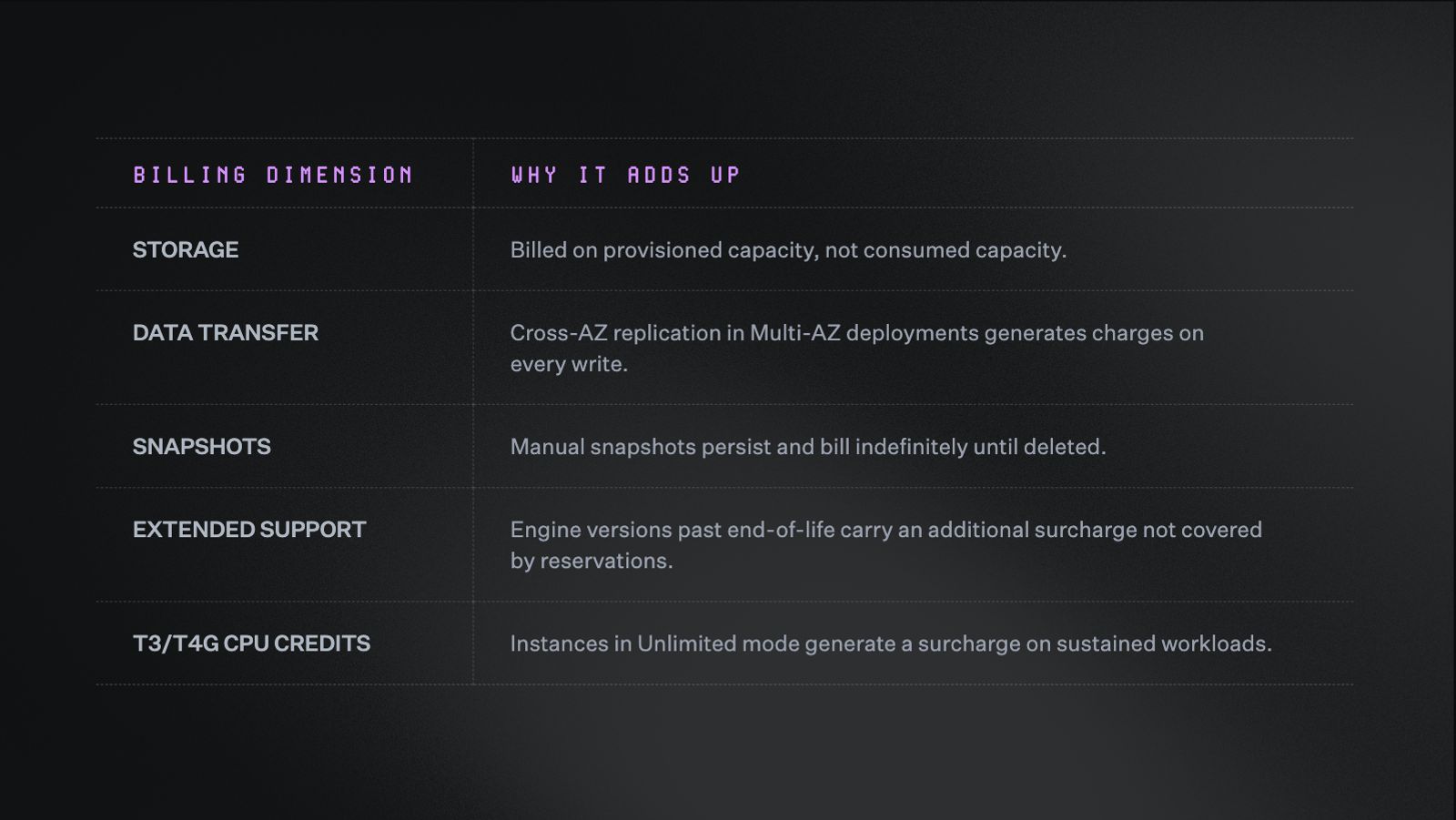
Five RDS cost drivers keep billing at full rate no matter what a reservation covers.
Storage
Storage bills on provisioned capacity, not consumed capacity. If a database is provisioned for 500 GB but only uses 200 GB, the bill reflects 500 GB.
Teams that provision generously as a precaution, and never revisit the decision, can end up paying for headroom they never use.
Data transfer
Every database transaction involves moving data, and AWS charges for that movement based on where it travels. Think of it like shipping costs: sending a package across town is cheaper than sending it across the country.
The same logic applies to data:
- Data that stays within the same Virtual Private Cloud (VPC) costs less
- Data that crosses availability zones (AZs) costs more
- Data that crosses regions costs the most
In Multi-AZ deployments, every write to the primary replicates to a standby in a separate AZ. That replication generates data transfer charges continuously by design. Keeping services within the same VPC and region, wherever possible, helps keep those costs in check.
Snapshots
Automated backups are included up to the size of your provisioned storage. Beyond that, additional backup storage bills per GiB per month.
Manual snapshots persist indefinitely and keep billing until deleted. Snapshots taken before major changes, and never cleaned up, can accumulate into a meaningful cost over time.
Extended Support
When a database engine version reaches end of community support, AWS keeps running it, but adds an Extended Support surcharge on top of the existing instance cost. Reserved instances don't cover that surcharge.
For teams with multi-year commitments, this is a meaningful risk. A reservation locked in on an aging engine version can end up costing more than on-demand pricing once Extended Support charges apply.
T3 and T4g instances
T3 and T4g RDS instances run in Unlimited mode by default. CPU usage above the baseline credit threshold generates an additional surcharge. Reserved instances don't cover this charge, and on sustained workloads it can exceed the base instance cost.
RDS reserved instances vs. Database Savings Plans
RIs aren't the only commitment option for RDS workloads. AWS introduced Database Savings Plans (SPs) as a more flexible alternative. The tradeoff is a shallower discount, but for some teams the flexibility is worth more than the savings gap.
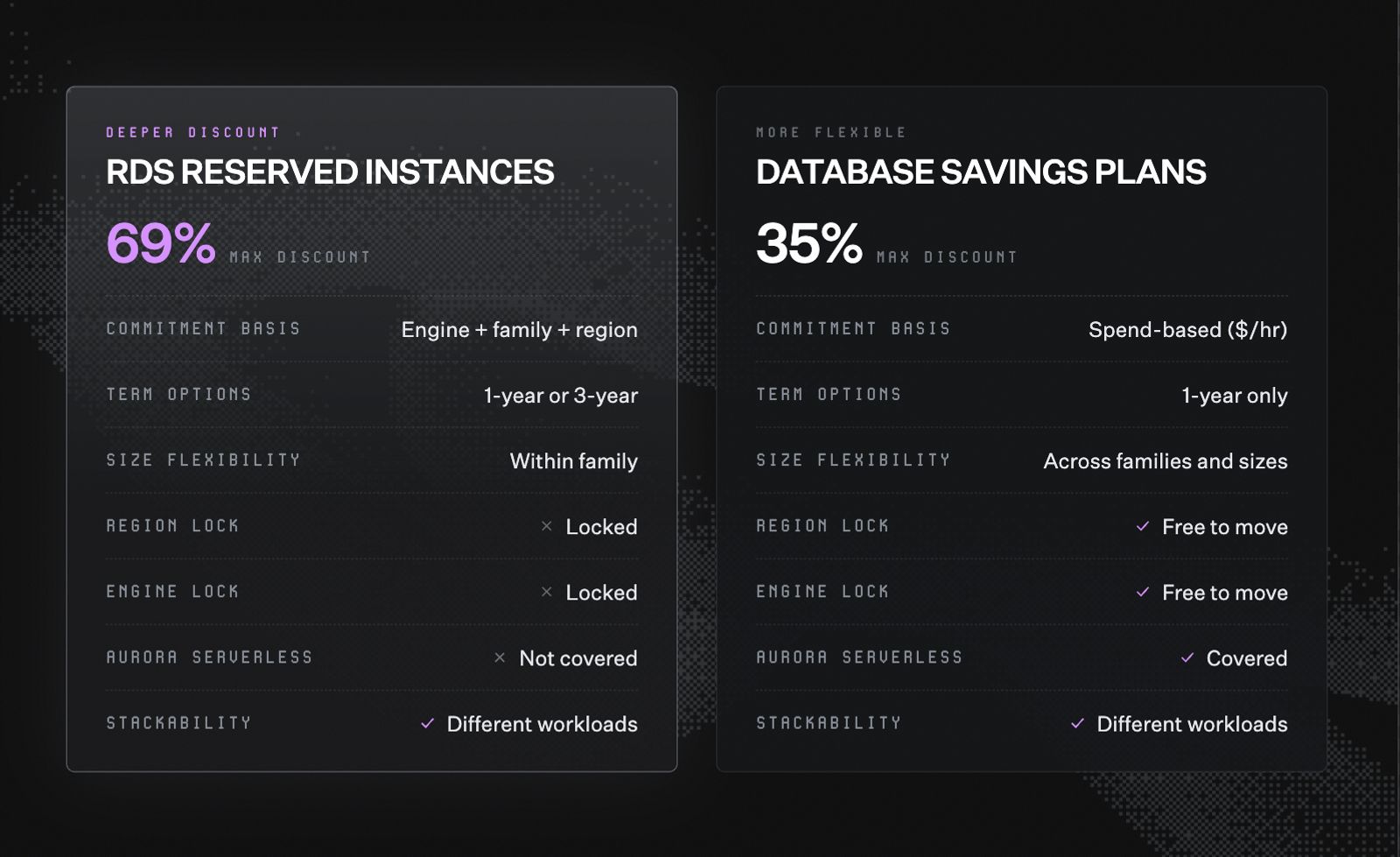
Reserved instances trade flexibility for a deeper discount. Database Savings Plans trade discount depth for flexibility.
RIs deliver deeper discounts because the commitment is more specific. When a team reserves a particular instance type in a particular region, the hardware can be planned for exactly. That procurement certainty is what allows for a larger discount than a spend-based commitment can deliver.
When RIs make more sense:
- The workload runs on a stable engine in a stable region
- The instance family is the right fit for the workload type
- The team has confidence in a 1 to 3 year horizon
This describes the majority of production relational databases.
When SPs make more sense:
- An engine migration is planned, such as moving from Oracle to Aurora PostgreSQL
- The team operates across multiple regions
- Significant changes to instance sizes are anticipated
- The workload runs on Aurora Serverless, which RIs don't cover
Both options can be used together across different workloads in the same account, but not for the same workload.
A team could use RIs for a stable database fleet and an SP for a workload mid-migration, getting the deeper discount where it's warranted and the flexibility where it's needed.
How to buy RDS reserved instances the right way
The standard advice for buying RIs is simple: look at your usage, pick the right term, and purchase. In practice, the teams that see the most savings follow a more deliberate sequence.
Step 1: Get visibility into your RDS footprint
Before committing, it helps to have a clear picture of what is actually running. That means identifying:
- Which engines are in use
- Which instance families are deployed
- Which regions are active
- Which deployment types are configured (Single-AZ vs. Multi-AZ)
The harder part is attribution. A database without a clear owner can't be rightsized or committed to intelligently. Until every database has an owner and a purpose, reservation decisions rest on incomplete information.
A few patterns tend to surface once teams look closely:
- Legacy databases from decommissioned products still running and billing
- Development or staging environments that were never cleaned up
- Instances configured with Multi-AZ when they don't need it
AWS Cost Explorer's RI recommendations are a useful starting point, but they reflect usage patterns only. They don't account for planned migrations, upcoming rightsizing, or databases that should be decommissioned. Treat them as signals, not purchase orders.
The attribution gap is where most teams get stuck. Without knowing which team owns which database, commitment decisions are guesswork. Nobody wants to reserve capacity for a database that turns out to belong to a product that's being sunset next quarter.
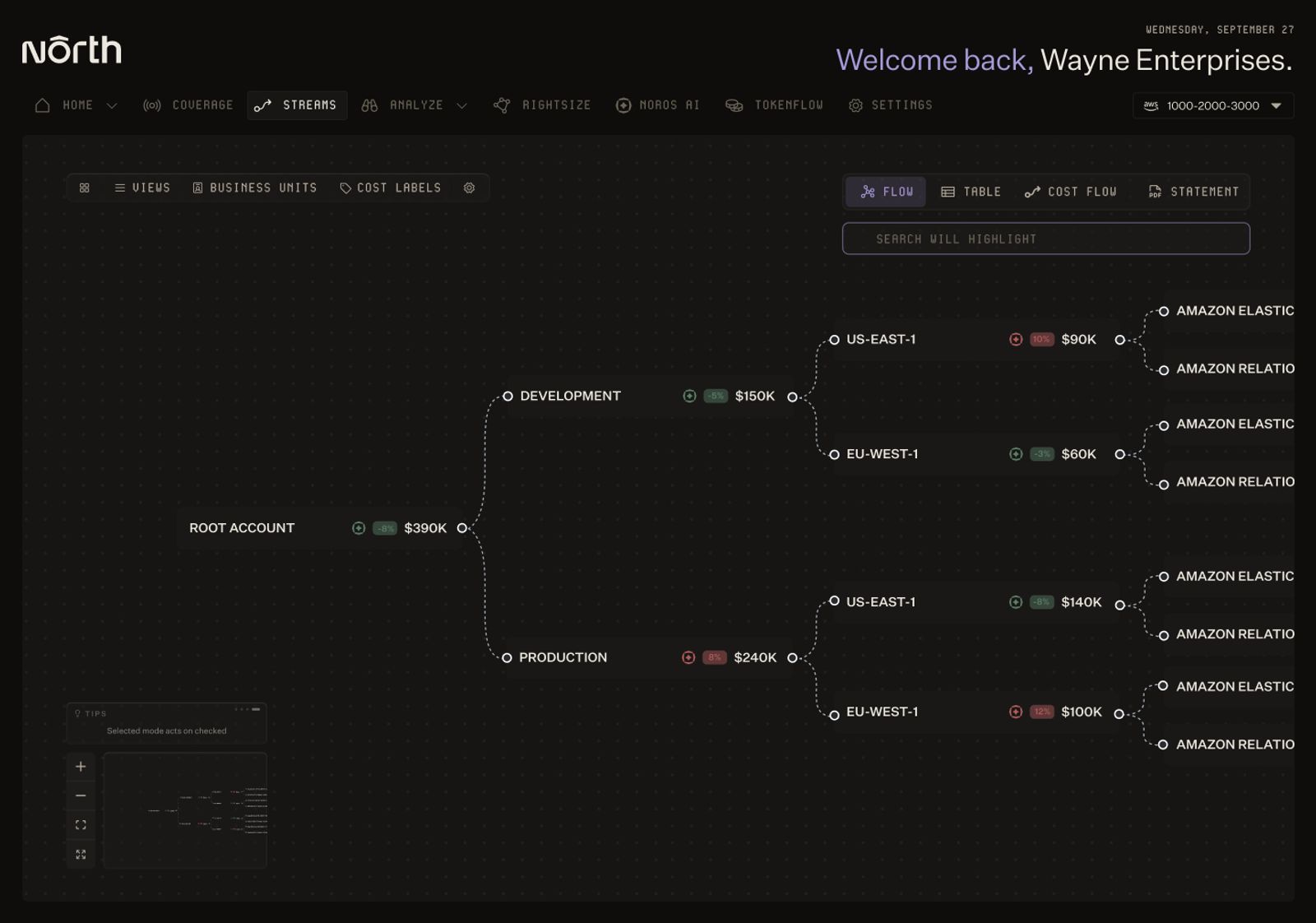
North's Streams view breaks spend down from account level to individual AWS service, region by region.
This is usually a tagging and allocation problem before it's a reservation problem. Teams need spend broken down by owner, environment, and business unit, so a database can be tied to a real cost center before anyone commits to it for a year or three. With North's Coststreams, that breakdown happens automatically, so the ownership conversation can happen before a purchase, not after finance flags the bill.
Step 2: Rightsize before you commit
Overprovisioned instances are common in RDS. Many databases run on more capacity than their workloads ever require.
That's rarely intentional. Sizing is often a guess made early on, and few teams go back to check it later. It’s a guess that costs more in RDS than it would elsewhere. EC2 lets you convert an oversized commitment mid-term. RDS doesn't.
Committing to an oversized instance locks in excess capacity for one to three years. For SQL Server, where size flexibility doesn't exist, an oversized purchase is a complete loss for the full term.
So the sequence matters: rightsize first, then commit. Before locking in a reservation, it's worth checking whether each instance is actually using the compute it's provisioned for.
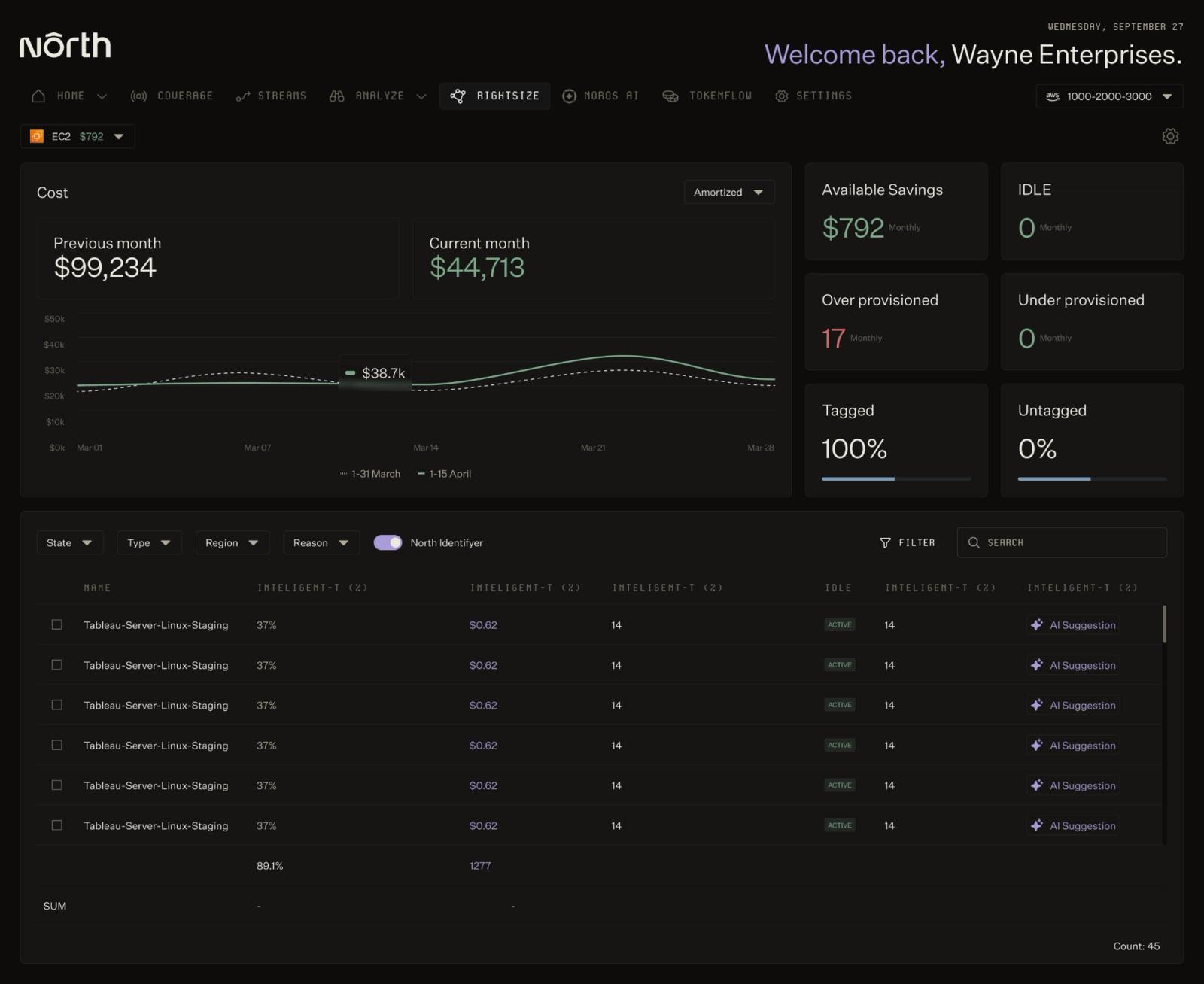
North's Rightsize flags over-provisioned instances and suggests a better fit before any commitment is made.
With North's Rightsize, that check happens automatically. It flags instances that are consistently underutilized and suggests a better fit before any commitment is made. The reservation starts at the right size from day one, instead of locking in a guess for the next three years.
Step 3: Choose your commitment instrument
With visibility established and instances rightsized, the commitment decision becomes more straightforward.
For teams new to RDS reservations, a 1-Year No Upfront commitment is the lowest-risk entry point. There's no capital outlay, and after a year the team has real usage data to inform a longer commitment.
Before any multi-year reservation, check whether the engine version is approaching end of standard support. MySQL 8.0 and PostgreSQL 14 are both nearing that threshold. A 3-year reservation on either could overlap with Extended Support charges. If an upgrade isn't already planned, factor that in before purchasing.
Step 4: Manage commitments continuously, not annually
Database workloads drift. Teams resize instances, migrate engines, decommission products, and spin up new services throughout the year.
A reservation that matched the workload in January may no longer fit by July.
Two metrics signal whether reservations are working:
- RI coverage: the proportion of running workload covered by a reservation. Low coverage means on-demand rates are being paid for instances that could be reserved.
- RI utilization: the proportion of a reservation consumed by active workloads. Low utilization means reservations aren't matched to running instances.
Both should stay above 80% as a general benchmark. When either drops, it signals drift that needs attention.
The problem is that drift happens continuously, and annual review cycles rarely catch it in time. That's the gap North built two commitment models to close:
- Flexbot manages RDS reservations on your behalf, using the same upfront payment and discounted rate as a standard reserved instance. The difference is what happens after. Once savings start accumulating in your account, you can recoup the remaining commitment at any time. That means you can commit to an RI without the risk of getting stuck if you need to upgrade instances, migrate databases, or switch providers.
- Autobot manages commitments on your own AWS accounts. It's machine learning powered, laddering coverage in monthly increments and adjusting continuously as usage shifts. When usage trends down, Autobot lets coverage expire. When usage grows, it ladders in more.
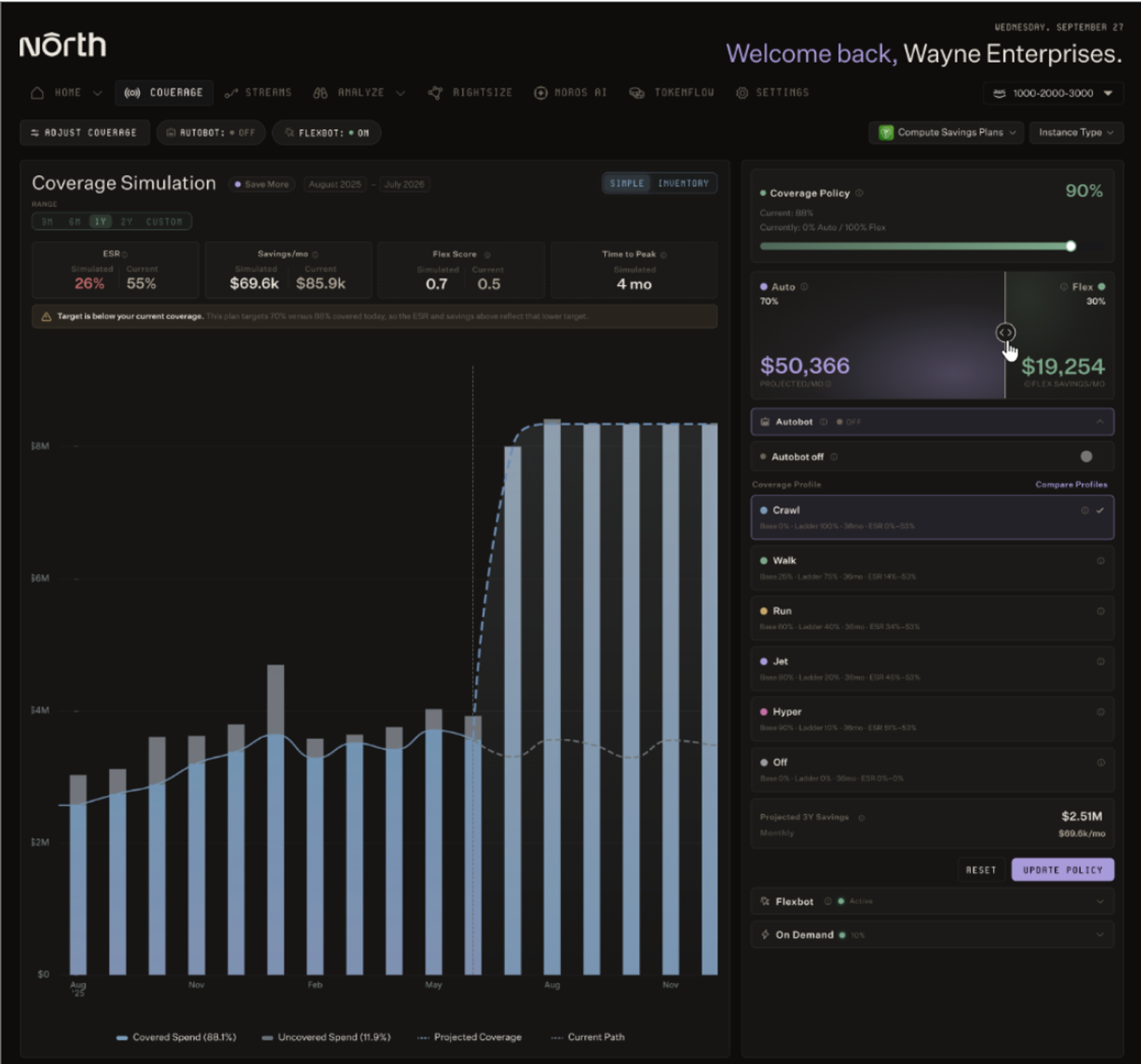
North's Coverage dashboard lets teams simulate and adjust how Autobot and Flexbot split commitment coverage over time.
The two can work together. A team might run Flexbot for a stable core fleet where North's risk absorption makes sense, and Autobot for accounts where they want the savings without handing over account ownership. Either way, commitments stay under continuous watch, adjusting to what's running instead of resetting once a year.
RDS reserved instances, managed continuously with North
Buying a reserved instance is straightforward. The harder part is making sure the reservation still fits three months later.
Workloads shift, teams restructure, and engine versions creep toward end-of-life.
The teams that consistently reduce RDS costs aren't the ones who make the best one-time purchase decision. They're the ones who treat commitments as something to manage continuously: the right visibility into what's running, the right sizing before anything is locked in, and a commitment layer that adjusts as workloads change.
Book a demo to see how North manages RDS commitments from day one.
FAQs
Answers to common questions about the product or feature covered in this post.
What are RDS reserved instances?
An RDS reserved instance (RI) is a commitment to a specific Amazon Relational Database Service (RDS) configuration in exchange for a discounted hourly rate. Purchasing one doesn't change how databases are deployed or how they run.
AWS matches the reservation to any running usage that fits the committed configuration and bills it at the reserved rate. RIs are non-cancellable, non-refundable, and non-transferable for the full term.
What is the difference between RDS reserved instances and on-demand pricing?
On-demand pricing charges per instance-hour with no commitment.
Reserved instances (RIs) require a 1-year or 3-year commitment in exchange for a discounted rate. Savings range from 29% to 69% depending on the payment option, term length, and engine.
The tradeoff is flexibility for price. On-demand allows changes at any time. RIs lock in a specific engine, instance family, and region for the duration of the term.
Can you modify RDS reserved instances?
The engine, instance family, and region can't be changed after purchase. For size-flexible engines, including MySQL, MariaDB, PostgreSQL, and Aurora, it's possible to scale within the same instance family using the normalization unit system. Unlike Amazon Elastic Compute Cloud (EC2) reserved instances, there's no convertible option for RDS RIs.
What costs are not covered by RDS reserved instances?
RIs only discount the compute layer. The following dimensions continue billing at full rates regardless of reservation status:
- Storage billed on provisioned capacity rather than consumed capacity
- Provisioned IOPS
- Data transfer including cross-availability zone (AZ) replication in Multi-AZ deployments
- Backup storage since manual snapshots persist and bill indefinitely until deleted
- Extended Support surcharges for engine versions past community end-of-life
- T3 and T4g CPU credit surcharges for instances running in Unlimited mode
When should you buy RDS reserved instances?
RIs make the most sense when workloads are stable and engine versions aren't approaching end-of-life. Instances should also be rightsized before any commitment is made.
If any of those conditions is uncertain, a 1-Year No Upfront reservation is the lowest-risk way to test fit before committing to a longer term or larger upfront payment.
North's Rightsize and Coverage tools help confirm those conditions before you buy, rather than after. Rightsize flags whether an instance is sized correctly, and Coverage’s Autobot measures how stable a workload's usage has actually been.
How does North handle RDS reserved instances?
North's Coverage manages RDS commitments through two models:
- Flexbot manages reservations on your own AWS accounts, using the same upfront payment and discounted rate as a standard reserved instance. The difference is what happens after: once savings start accumulating, you can recoup the remaining commitment at any time. That means you get RI pricing without the risk of being stuck if you need to upgrade instances, migrate databases, or switch providers. On RDS, Flexbot's average effective savings run around 55%.
- Autobot runs on your own AWS accounts. It's machine learning powered, laddering coverage in monthly increments and adjusting continuously as usage shifts, so commitments stay matched to what's actually running instead of resetting once a year.
Does North handle rightsizing before making commitment decisions?
North's Rightsize identifies over-provisioned RDS instances as part of the process. Rightsizing and commitment management work together rather than in sequence.
Recommendations require a human review before anything ships, so reservations get purchased for the correct instance size from the start, rather than locking in capacity the workload doesn't need.